
Super Productivity
Free, open-source to-do app with time tracking and a Pomodoro timer
What is Super Productivity?
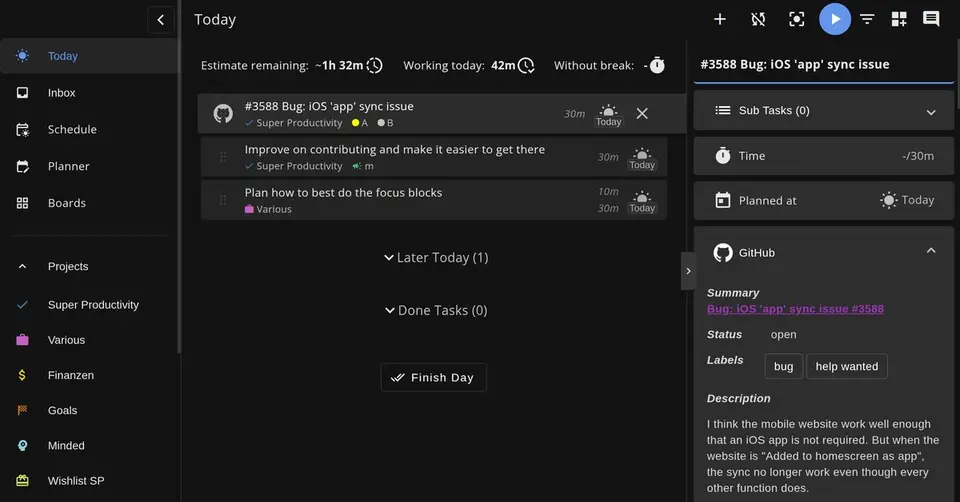
Super Productivity is a free, open-source task manager that combines a to-do list with time tracking, timeboxing and focus sessions. Tasks are organized with subtasks, projects and tags, can be laid out on Kanban or Eisenhower boards, and can be imported from Jira, GitHub and GitLab. Data stays on the device by default with no account, and syncing between devices is optional through Dropbox, WebDAV or the project's own SuperSync service.
Super Productivity is free to use. See every plan
Good for
- Developers who plan their day from Jira, GitHub or GitLab issues
- Freelancers who need time sheets from the tasks they tracked
- People who want a free app that keeps data on their own device
Worth knowing
- The web app is more limited than the desktop app: calendar integration and WebDAV sync are likely to fail in a browser because of CORS.
- SuperSync is labeled beta, and the project's wiki suggests Nextcloud, WebDAV or Dropbox for production use until it is stable.
- Fetching issues and sending work logs needs a network connection, and a failed issue update is not retried automatically.
- The project is maintained by volunteers and funded by donations; help comes from the community on GitHub and Reddit.
Key features
- Tasks, projects and boards
- Tasks take subtasks, notes, tags, projects and repeat rules, and can be viewed as lists, on a Kanban board, in an Eisenhower Matrix or on boards you build yourself.
- Time tracking and time sheets
- Starting a task tracks time against it. Tracked time can be turned into time sheets and work summaries for export to a company's time-tracking system.
- Focus mode and break reminders
- Focus mode offers Pomodoro, Flowtime and countdown sessions, and a break reminder tells you when it is time to step away.
- Planner and schedule
- The planner lays the day out on a schedule timeline next to calendar events, which come in through Google Calendar or any CalDAV calendar.
- Issue tracker imports
- Issues assigned to you can be imported from Jira, GitHub, GitLab, Gitea and other trackers, with time tracked per issue and work logs sent back.
- Local data and optional sync
- Data is stored on the device and no account is needed. Devices can sync through Dropbox, WebDAV or SuperSync, the project's end-to-end encrypted service that can be self-hosted.
Super Productivity pricing
- Starts at
- Free
- Free plan
- Every feature on every platform is free under the MIT license, with no account, premium tier or trial. Development is supported by optional donations through GitHub Sponsors.
- Free trial
- None listed
| Plan | Price | What you get |
|---|---|---|
| Free | $0 | All features on Windows, macOS, Linux, Android, iOS and the web, released as open source under the MIT license. |
Read from super-productivity.com on Oct 5, 2026. Prices change, so confirm with Super Productivity before you buy.
Works with
Super Productivity alternatives
- Super Productivity vs TickTick
Free plan · from $49.99/yr
- Super Productivity vs Amazing Marvin
Free trial · from $8/mo
- Super Productivity vs Vikunja
Free plan · from €4/mo
- Super Productivity vs Todoist
Free plan · from $5/mo
- Super Productivity vs Tasks.org
Free plan · from $0.99/yr





Common questions
Is Super Productivity free?
Yes. Super Productivity is free to use. Every feature on every platform is free under the MIT license, with no account, premium tier or trial. Development is supported by optional donations through GitHub Sponsors.
How much does Super Productivity cost?
Super Productivity lists one plan. Free: $0. Prices were read from super-productivity.com on Oct 5, 2026.
What platforms does Super Productivity work on?
Super Productivity is available on Web, macOS, Windows, Linux, iOS and Android.
Is Super Productivity open source?
Yes. Super Productivity is open source, according to its own site.
Does Super Productivity work offline?
Yes, according to its own site. What works without a connection differs by plan and platform, so check the vendor's page for the detail.
What does Super Productivity integrate with?
Super Productivity's listing names Jira, GitHub, GitLab, Gitea, Trello, Google Calendar, CalDAV and Dropbox. A listing names up to eight integrations, so it may connect to more.
Who makes Super Productivity?
Super Productivity is made by Johannes Millan. It dates from 2016.
What are the alternatives to Super Productivity?
The closest alternatives to Super Productivity in our directory are TickTick, Amazing Marvin, Vikunja, Todoist and Tasks.org. Each one has a side-by-side comparison with Super Productivity.
Sources for this page
The prices, plans, platforms and features above were read from these pages on Oct 5, 2026.
- super-productivity.com/pricing/
- super-productivity.com/
- super-productivity.com/download/
- super-productivity.com/integrations/
- super-productivity.com/about/
- super-productivity.com/imprint/
- github.com/super-productivity/super-productivity/blob/master/README.md
- github.com/super-productivity/super-productivity/wiki/3.05-Web-App-vs-Desktop
- github.com/super-productivity/super-productivity/wiki/3.08-Sync-Integration-Comparison
- apps.apple.com/us/app/super-productivity/id1482572463