
Godspeed review (2026): is it worth $48 a year?
Keyboard-driven to-do manager for Mac, iOS and the web
Black Friday: is there a Godspeed sale?
Godspeed report card
Fair · out of 4.0 · graded Nov 19, 2026
Best for running your to-do list from the keyboard
The iPhone app is the weak point: reviewers on Setapp and the App Store report crashes, a failed sign-in and lists reordering themselves, the latest in September 2026. There is no free plan, only a two-week trial, then $48 a year or $6 a month, and Windows and Android get only the web app. The Mac app draws far fewer complaints.
Who Godspeed is for
- Fits if you want to add, move and finish tasks without touching the mouse
- Works for people who write their own commands, since macros can run JavaScript
Who Godspeed is not for
- Not for you if you want a free plan, as there's only the two-week trial
- Skip it if you're on Windows or Android and want a native app, because those get the web app, where the browser takes some hotkeys
- Pricey if you pay monthly, at $6 against $4 a month on the yearly plan
- Watch out: shared lists aren't end-to-end encrypted, and the Google Calendar link is still a private beta
- Watch out: the App Store lists a $149 purchase with no basis shown, which the pricing page doesn't mention
Why Godspeed gets a 2.2
Five grades, each with its reason. The GPA is their average: an A is 4 points, an F is none.
- CValue for money$48 a year works out at $4 a month, which is the middle of this category, and $6 if you pay monthly. One subscription does cover Mac, iOS and web on as many devices as you like. The App Store also lists a $149 purchase with no basis shown.
- CFree plan and trialNo free plan. Two weeks with every feature and no card asked for, then it's yearly or monthly. Students and nonprofits can write in for a discount, though the amount isn't published.
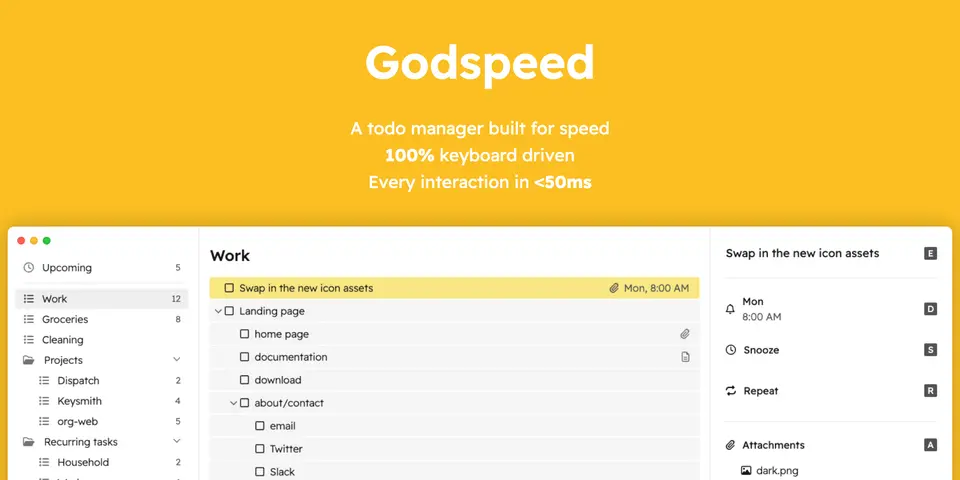
- BFeaturesIt covers the job: hotkeys for everything, a Command Palette, tasks nested as deep as you like, plain-language dates and repeats, lists built from boolean filters, macros that run JavaScript, a list email address each. Google Calendar is still a private beta.
- DEase of useWas C. Down to D because of one problem people report: the iPhone app crashes, will not sign in, and misbehaves.
- BPlatforms and integrationsMac, iPhone, iPad and a web app, plus an API, URL handlers, Apple Shortcuts and Siri. No native Windows or Android app, so those get the web version, where the browser swallows some hotkeys.
What these grades rest on. Graded from this listing, whose facts were read from Godspeed's own pages on 6 October 2026. Problems people report, and lawsuits, fines and breaches, were read from reviews, news, app-store reviews and court and regulator records on 19 November 2026. How we review and grade.
Make Godspeed? Put this grade on your site

Paste this where you want the badge. It links here and follows the grade if it changes. About badges
<a href="https://toolgpa.com/tools/godspeed#review"><img src="https://toolgpa.com/badge/godspeed.svg" alt="Godspeed: 2.2 GPA on ToolGPA" width="196" height="56"></a>The worst thing about Godspeed
The iPhone app is unstable and has crashed or locked users out
Several reviewers say the iPhone app crashes, will not sign in, or stopped running on their phone, with the latest report in September 2026. If you pay for Godspeed mainly to capture tasks on the go, the phone half may let you down while you are billed for both.
Took a letter off its grade for Ease of use
Reported bysetapp.com (Sep 14, 2026)setapp.com (Jan 8, 2026)apps.apple.com (Feb 26, 2025)
Found on Nov 19, 2026 by searching reviews, news, app-store reviews, and court and regulator records. A problem is listed only when at least three places report it and it is still true, and each one took a letter off the grade it belongs to. Cases are described as they stand today: an ongoing case is a claim, not a finding.
Where Godspeed stands among to-do list apps
Godspeed's GPA of 2.2 is higher than 18 of the 133 other to-do list apps we grade, and level with 32.
It stands best on features (B, above 104 of 133) and worst on ease of use (D, above 4).
Its paid plans start at $4 a month when paid by the year, against a middle price of $3 for the category: 45 of the 72 others that charge start lower.
On features, ease of use and platforms it scores 2.3 out of 4. 15 tools score higher and cost less.
Each grade against the category
Every bar is all 134 to-do list apps we grade, cut by the letter each got. Godspeed’s own letter is outlined.
- CValue for moneyAbove 20 of 133, level with 35
- CFree plan and trialAbove 9 of 133, level with 64
- BFeaturesAbove 104 of 133, level with 27
- DEase of useAbove 4 of 133, level with 21
- BPlatforms and integrationsAbove 85 of 133, level with 34
Price against what you get
Each dot is one of 107 to-do list apps. Further left costs less, and higher up scores better on features, ease of use and platforms. Point at a dot to see which tool it is.
Features, ease of use and platforms, averaged
What paid plans start at, a month (each step along is roughly double) →
- The best score at each price
- Has a free plan
- No free plan
Keep Godspeed, or make your own?
You could make this
A to-do list at its plainest is tasks with dates, repeats and a box to tick.
What Godspeed does at its core is tasks and natural-language input, and that is the kind of thing an AI app builder makes well. You would give up 5 things, listed below, and little else. It costs $48 a year. An AI app builder starts at about $20 a month on our listings, and you only need it while you build.
What you could make
- Tasks and natural-language input: an app builder makes these well.
What you could not
- Apps for macOS and iOS that stay in step with each other.
- Several people working in it at the same moment.
- It plugs into other products, Google Calendar, Apple Shortcuts and Siri among them, and has an API.
- End-to-end encryption done properly.
- The depth: we grade its features B, which means it covers the whole job.
What this rests on. Godspeed’s listing: what it does, where it runs, what it plugs into and what it costs. It is a judgement about the kind of software this is. We have not built a replacement for it, and making your own means looking after it too. How we decide, and every tool’s verdict.
What is Godspeed?
Godspeed is a to-do manager for Mac, iPhone, iPad and the web that is designed to be run entirely from the keyboard, with a command palette, customizable hotkeys and user-defined macros. Tasks nest to any depth and take due dates and repeat rules typed in plain language. It works offline, syncs through the vendor's cloud with optional end-to-end encryption, and is sold as one subscription that covers every device after a two-week trial.
Worth knowing
- There is no free plan: after the 2-week trial the pricing page offers only yearly or monthly subscriptions.
- Native apps exist only for macOS 12 or newer, iPhone and iPad. Other systems use the web app, where some hotkeys are taken by the browser.
- Data in shared lists is not end-to-end encrypted, so that every collaborator can read it.
- The Google Calendar integration is described on the vendor's site as a private beta.
Key features
- Keyboard-driven interface
- Every action has a hotkey or sits in the Command Palette. Hotkeys can be reassigned or set as multi-key chords, and Hardcore Mode switches the mouse off altogether.
- Natural-language dates and repeats
- Due dates and repeat rules are typed in plain language. A task can repeat from its previous due date or from the day it was completed, and can be snoozed.
- Labels, smart lists and search operators
- Labels can be grouped and made mutually exclusive. Smart lists are saved searches built from boolean operators over lists, labels, dates and other task properties.
- Macros
- Macros are custom commands made by stringing together existing commands and other macros, with variables that can be updated using JavaScript.
- Shared lists and public links
- Lists can be shared with other Godspeed users, who see each other's live selection while working in the same list, or published as a publicly viewable link.
- Capture by email, URL handlers and API
- Each list has its own email address for creating tasks, a global hotkey opens Quick Entry on the Mac, and URL handlers and an API let other apps and scripts add tasks.
Godspeed pricing
As of Oct 6, 2026, Godspeed is a paid product with a free trial, starting at $48 per year ($4 / month), or $6 billed monthly.
- Starts at
- $48 per year ($4 / month), or $6 billed monthly
- Free plan
- None
- Free trial
- 2-week free trial with every feature and no credit card required
| Plan | Price | What you get |
|---|---|---|
| Pay yearly | $48per year ($4 / month) | Full access after the 2-week trial. One purchase covers the Mac, iOS and web apps on any number of devices. |
| Pay monthly | $6per month | The same full access on every device, billed month to month. |
| Full access | $149.00in-app purchase; basis not shown on the App Store listing | Listed among the iOS app's in-app purchases without a billing period. The vendor's pricing page describes only the two subscriptions. |
Read from godspeedapp.com on Oct 6, 2026. Prices change, so confirm with Godspeed before you buy.
Ways to pay less
- Annual discountYearly billing works out to $4 a month
The pricing page lists $48 billed yearly ($4 a month) against $6 billed monthly, which is $24 less over a year, a saving of about 33%.
Stated on godspeedapp.com - EducationStudent discount on request
The pricing FAQ says students can contact Godspeed for a discount. The amount is not published.
Stated on godspeedapp.com - NonprofitNonprofit discount on request
The same FAQ answer extends a discount to nonprofits and others who get in touch. The amount is not published.
Stated on godspeedapp.com
Works with
Godspeed alternatives
- Godspeed vs Things 3
Free trial · from $9.99 one-time
- Godspeed vs OmniFocus
Free trial · from $74.99 one-time
- Godspeed vs Todoist
Free plan · from $5/mo
- Godspeed vs Checkvist
Free plan · from $3.9/mo
- Godspeed vs TaskPaper
Free trial · from $24.99 one-time




Common questions
Does Godspeed have an Android app?
No Android app was listed when its pages were read on Oct 6, 2026. Godspeed is listed for macOS, iOS and Web.
Does Godspeed have a Windows app?
No Windows app was listed when its pages were read on Oct 6, 2026. Godspeed is listed for macOS, iOS and Web.
Is Godspeed open source?
Godspeed is not described as open source on its own site, as read on Oct 6, 2026.
Is Godspeed end-to-end encrypted?
Godspeed describes itself as end-to-end encrypted on its own site. Nobody here has audited that.
Does Godspeed work offline?
Yes, according to its own site. What works without a connection differs by plan and platform, so check the vendor's page for the detail.
Does Godspeed have an API?
Yes. Godspeed offers a public API, according to its own site.
Sources for this page
The prices, plans, platforms and features above were read from these pages on Oct 6, 2026.
- godspeedapp.com/pricing
- godspeedapp.com/
- godspeedapp.com/ios
- godspeedapp.com/guides/web-app
- godspeedapp.com/guides/encryption
- godspeedapp.com/guides/api
- godspeedapp.com/guides/macros
- godspeedapp.com/calendar-integration-private-beta
- godspeedapp.com/privacy
- godspeedapp.com/eula
- apps.apple.com/us/app/godspeed-to-do-list/id6451131801