
Listberry
Paper-style daily planner with a to-do list for every day
What is Listberry?
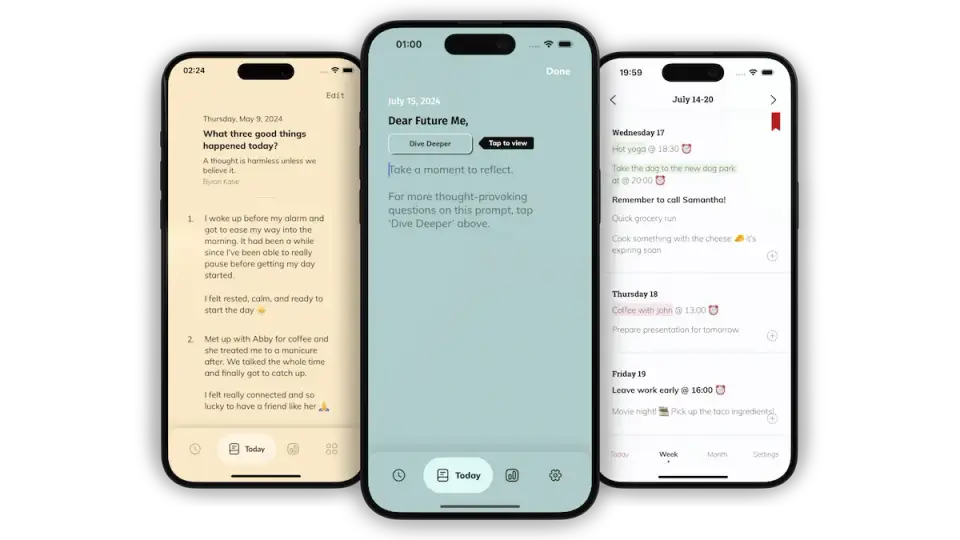
Listberry is a phone planner from Oatmeal Apps that gives each day on its calendar its own to-do list. Tasks are crossed out in the manner of a paper planner and stay visible afterward, and they can carry alerts, repeats, bold text and highlighter colors. No account is needed and entries are stored on the device. The standard version is free, and a Premium subscription lifts its limits on daily tasks and PDF exports.
Listberry has a free plan. Paid plans start at $0.99 per month. See every plan
Good for
- People moving from a paper planner to a phone
- Day-by-day to-do lists kept beside appointments
- Users who want no account and entries kept on the device
Worth knowing
- The free version stops at 12 tasks per day and 3 PDF exports.
- Manual reordering, night mode, weekly and monthly goals and automatic carry-over of unfinished tasks are Premium features.
- Entries stay on the device with no account, and the vendor says no data is kept in the cloud, so lists do not sync between devices.
- The App Store version is for iPhone only, and the vendor's page links to the App Store and Google Play but to no web or desktop app.
Key features
- A to-do list for each day
- Tasks are written against a date on the calendar, with room to plan the days, weeks and months ahead. A setting opens the app in Month view by default.
- Crossing tasks off
- A finished task is crossed out by hand, as on paper, and remains on the day's list so it can still be read later.
- Alerts, events and repeating tasks
- Tasks can carry reminders and repeat on a schedule, and the listing says chores are told apart from events and appointments.
- Bold, highlights and color grouping
- Important tasks can be set in bold or marked with a highlighter color. Premium can group tasks by color in place of manual ordering.
- Automatic carry-over
- A Premium setting moves tasks that were not crossed off to the next day's list automatically.
- PDF export
- All entries can be exported as a PDF for safekeeping or printing. The free version allows 3 exports and Premium removes the limit.
Listberry pricing
- Starts at
- $0.99 per month
- Free plan
- All core features with up to 12 tasks per day and 3 PDF exports, plus progress tracking, highlighting and bold text, and no ads.
- Free trial
- None listed
| Plan | Price | What you get |
|---|---|---|
| Free | $0 | Core features, up to 12 tasks per day, 3 PDF exports, progress tracking, and highlighted and bold tasks. No ads or tracking. |
| Listberry Monthly | $0.99per month (in-app purchase named Listberry Monthly) | Premium: unlimited daily tasks and PDF exports, weekly and monthly goals, night mode, color grouping, manual reordering and automatic carry-over. |
| Listberry Yearly | $11.99per year (in-app purchase named Listberry Yearly) | The same Premium features billed once a year. As listed, it costs slightly more than twelve monthly payments. |
Read from apps.apple.com on Oct 9, 2026. Prices change, so confirm with Listberry before you buy.
How people rate the Listberry app
4.8
out of 5 for the iPhone and iPad app
- 5 stars85%
- 4 stars11%
- 3 stars1%
- 2 stars1%
- 1 star2%
302 ratings on the App Store in the United States, read Oct 9, 2026. It rates the app, not everything the product does. See the listing
Listberry alternatives
- Listberry vs TeuxDeux
Free plan · from $3/mo
- Listberry vs todo mate
Free plan · from $1.99/mo
- Listberry vs MinimaList
Free plan · from $2.99/mo
- Listberry vs Do!
Free plan · from $20.00 one-time
- Listberry vs Tasks: To Do List & Reminders
Free plan · from $1.99/mo





Common questions
Is Listberry free?
Listberry has a free plan. All core features with up to 12 tasks per day and 3 PDF exports, plus progress tracking, highlighting and bold text, and no ads. Paid plans start at $0.99 per month.
How much does Listberry cost?
Listberry lists 3 plans. Free: $0. Listberry Monthly: $0.99 per month (in-app purchase named Listberry Monthly). Listberry Yearly: $11.99 per year (in-app purchase named Listberry Yearly). Prices were read from apps.apple.com on Oct 9, 2026.
What platforms does Listberry work on?
Listberry is available on iOS and Android.
How is Listberry rated?
Listberry's iPhone and iPad app averages 4.8 out of 5 from 302 ratings on the App Store in the United States, as read on Oct 9, 2026. That is the store's rating of the app, not a score from us.
Does Listberry have a Windows app?
No Windows app was listed when its pages were read on Oct 9, 2026. Listberry is listed for iOS and Android.
Does Listberry have a macOS app?
No macOS app was listed when its pages were read on Oct 9, 2026. Listberry is listed for iOS and Android.
Is Listberry open source?
Listberry is not described as open source on its own site, as read on Oct 9, 2026.
Who makes Listberry?
Listberry is made by Oatmeal Apps.
What are the alternatives to Listberry?
The closest alternatives to Listberry in our directory are TeuxDeux, todo mate, MinimaList, Do! and Tasks: To Do List & Reminders. Each one has a side-by-side comparison with Listberry.
Sources for this page
The prices, plans, platforms and features above were read from these pages on Oct 9, 2026. What people say is linked where it appears.