Google Tasks review (2026): is the free plan enough?
Google's to-do list, built into Gmail, Calendar, Chat and Docs
Black Friday: is there a Google Tasks sale?
Our verdict
First of our top three to-do list apps
For: Most people, at no cost
Google Tasks is free with a Google Account on the web, iPhone and Android, and sits inside Gmail, Calendar, Chat and Docs. Lists, subtasks, stars, repeating tasks and reminders come with no cap, and its iPhone and iPad app averages 4.8 from about 107,000 ratings. The worst thing: reminders can arrive a day late or never ring, as an iPhone user's doctor's appointment alert did in January 2026, so do not count on it alone for medicine or bills. There is no desktop app, no reminder by place, no way to share a list with anyone, no search in the phone apps, and a task with subtasks cannot repeat.
See all three and how we rankGoogle Tasks report card
Very good · out of 4.0 · graded Nov 18, 2026
Best for a basic to-do list inside Gmail and Calendar
Reminders in Google Tasks can arrive late or not at all: an iPhone user's doctor's appointment alert came the day after, and repeating alerts stop unless the app is opened. It is a free list inside Gmail and Calendar, but it has no reminders by place, no way to share a list with anyone, and no search in the phone apps.
Who Google Tasks is for
- Fits if you already work in Gmail and Google Calendar and want tasks in the same window
- Works for a basic personal to-do list at no cost
Who Google Tasks is not for
- Too light for shared projects, since shared tasks can't have subtasks and can't repeat
- Too light for sorting a long list, with no tags, no priorities past a star and no saved views
- Skip it if you want a desktop app, as it's the browser, Android and iOS only
- Pricey if you want to assign tasks from a Google Doc, a premium feature on some Workspace plans, which start at $7 a user
- Watch out: on a work or school account, an administrator controls whether Tasks is there at all
Why Google Tasks gets a 3.0
Five grades, each with its reason. The GPA is their average: an A is 4 points, an F is none.
- AValue for moneyTasks is free on the web and in both phone apps, against a category whose middle plan is $3.99 a month. The only paid route is Google Workspace from $7 a user, and that buys Gmail and Docs for a business, not a better to-do list.
- AFree plan and trialA Google Account gets lists, subtasks, stars, repeating tasks, reminders and the Calendar link for nothing, with no cap you'd ever reach. Only assigning from a Google Doc needs a Workspace plan.
- DFeaturesWas C. Down to D because of four problems people report: no reminders by place, so Keep's location alerts stopped; repeating tasks can't have subtasks and some drop out of view; no way to share a list with a partner or family; no search, and no one list of what's due today.
- BEase of useWas A. Down to B because of two problems people report: reminders arrive late or never ring; keep reminders landed as messy copies that don't stay in step.
- BPlatforms and integrationsWeb, Android and iOS, wired into Gmail, Calendar, Chat, Docs, Drive and Keep, with a REST API and Apps Script. No desktop app at all, which is what keeps it off an A.
What these grades rest on. Graded from this listing, whose facts were read from Google's own pages on 9 October 2026, and its App Store rating. Problems people report, and lawsuits, fines and breaches, were read from reviews, news, app-store reviews and court and regulator records on 18 November 2026. How we review and grade.
Make Google Tasks? Put this grade on your site
Paste this where you want the badge. It links here and follows the grade if it changes. About badges
<a href="https://toolgpa.com/tools/google-tasks#review"><img src="https://toolgpa.com/badge/google-tasks.svg" alt="Google Tasks: 3.0 GPA on ToolGPA" width="196" height="56"></a>The worst thing about Google Tasks
Reminders that arrive a day late or never ring
People who count on Tasks to remind them report alerts that never come or come after the event: a doctor's appointment reminder that arrived the next day in January 2026, repeating reminders that stop unless the app is opened. Since Keep reminders moved here, alerts come only from the Tasks or Calendar app. A missed alert can cost you the appointment, a dose of medicine or a bill.
Took a letter off its grade for Ease of use
Reported byitunes.apple.com (Jan 14, 2026)itunes.apple.com (Apr 30, 2026)itunes.apple.com (Jul 25, 2026)itunes.apple.com (Nov 17, 2025)itunes.apple.com (Nov 4, 2025)itunes.apple.com (Oct 28, 2026)news.ycombinator.com (May 7, 2023)techradar.com (Oct 15, 2025)androidcentral.com (Dec 2, 2025)
What else goes wrong
- 2
No reminders by place, so Keep's location alerts stopped
Tasks cannot remind you when you get somewhere. When Google moved Keep reminders into Tasks, from October 2025 and for every account by January 2026, all place reminders stopped: the address is copied into the task's notes but never fires. Assistant's place reminders had gone before that. People who used them to pull up a shopping list at the store say nothing in Google's own apps replaces them.
Took a letter off its grade for Features
Reported byandroidauthority.com (Sep 21, 2026)computerworld.com (Sep 10, 2025)techradar.com (Oct 15, 2025)androidcentral.com (Dec 2, 2025)9to5google.com (Jan 15, 2026)howtogeek.com (Jan 19, 2026)forum.gettingthingsdone.com (Jan 19, 2026)itunes.apple.com (Aug 30, 2026)
- 3
Repeating tasks can't have subtasks and some drop out of view
A task with subtasks can't repeat and a repeating task can't be moved to another list, so a weekly checklist has to be rebuilt by hand. Users also report repeating tasks that vanish from the app until they fall due, stopped showing on Google Calendar across two updates in September 2026, or never appeared in the app when made in Calendar (April and June 2026).
Took a letter off its grade for Features
Reported byforum.gettingthingsdone.com (Jan 19, 2026)itunes.apple.com (Sep 16, 2026)itunes.apple.com (Jun 17, 2026)itunes.apple.com (Apr 21, 2026)itunes.apple.com (Mar 9, 2026)itunes.apple.com (Dec 13, 2024)
- 4
No way to share a list with a partner or family
A personal list cannot be shared with anyone. Google only lets you assign single tasks inside a Google Chat space or, on eligible Workspace plans, a Google Doc, and those shared tasks can't repeat or have subtasks. People wanting one grocery or chore list for a household keep asking for it in reviews from 2024 to November 2026, and one says they moved to Microsoft To Do over it.
Took a letter off its grade for Features
Reported byandroidauthority.com (Sep 21, 2026)itunes.apple.com (Nov 3, 2026)itunes.apple.com (Jun 7, 2026)itunes.apple.com (Jul 26, 2026)itunes.apple.com (Feb 11, 2025)itunes.apple.com (Oct 30, 2024)justuseapp.com
- 5
Keep reminders landed as messy copies that don't stay in step
The move of Keep reminders into Tasks dropped them into your first list, often with the whole note as one unformatted title, long titles cut short and older ones parked in a separate list of old Keep reminders. Users say they had to fix each one by hand. A reminder's title can now be changed only in Tasks or Calendar, and through April 2026 users reported that edits made in Keep never reach the task.
Took a letter off its grade for Ease of use
Reported byforum.gettingthingsdone.com (Jan 19, 2026)9to5google.com (Jan 15, 2026)androidcentral.com (Dec 2, 2025)itunes.apple.com (Nov 21, 2025)itunes.apple.com (Apr 30, 2026)techradar.com (Oct 15, 2025)
- 6
No search, and no one list of what's due today
The phone apps have no search, so finding a task in a long list means scrolling, and reviewers were still asking for it in late October 2026. There is no view that gathers today's or overdue tasks from all your lists either; you check each list on its own. Android Authority's reviewer named the missing Today view in September 2026. On a computer, Calendar shows lists side by side but has no filter for today.
Took a letter off its grade for Features
Reported byandroidauthority.com (Sep 21, 2026)itunes.apple.com (Oct 26, 2026)itunes.apple.com (Oct 20, 2026)itunes.apple.com (May 26, 2026)itunes.apple.com (Nov 29, 2025)itunes.apple.com (Nov 18, 2025)justuseapp.com
Found on Nov 18, 2026 by searching reviews, news, app-store reviews, and court and regulator records. A problem is listed only when at least three places report it and it is still true, and each one took a letter off the grade it belongs to. Cases are described as they stand today: an ongoing case is a claim, not a finding.
Where Google Tasks stands among to-do list apps
Google Tasks's GPA of 3.0 is higher than 123 of the 133 other to-do list apps we grade, and level with 9.
It stands best on free plan and trial (A, above 95 of 133) and worst on features (D, above 2).
Its paid plans start at $7 a month for each person, against a middle price of $3 for the category: 60 of the 72 others that charge start lower.
On features, ease of use and platforms it scores 2.3 out of 4. 23 tools score higher and cost less.
Each grade against the category
Every bar is all 134 to-do list apps we grade, cut by the letter each got. Google Tasks’s own letter is outlined.
- AValue for moneyAbove 76 of 133, level with 57
- AFree plan and trialAbove 95 of 133, level with 38
- DFeaturesAbove 2 of 133, level with 24
- BEase of useAbove 76 of 133, level with 48
- BPlatforms and integrationsAbove 85 of 133, level with 34
Price against what you get
Each dot is one of 107 to-do list apps. Further left costs less, and higher up scores better on features, ease of use and platforms. Point at a dot to see which tool it is.
Features, ease of use and platforms, averaged
What paid plans start at, a month (each step along is roughly double) →
- The best score at each price
- Has a free plan
- No free plan
Keep Google Tasks, or make your own?
You could make this
A to-do list at its plainest is tasks with dates, repeats and a box to tick.
What Google Tasks does at its core is tasks, calendar and time blocking, and that is the kind of thing an AI app builder makes well. You would give up 4 things, listed below, and little else. It costs $84 a year. An AI app builder starts at about $20 a month on our listings, and you only need it while you build.
What you could make
- Tasks, calendar and time blocking: an app builder makes these well.
What you could not
- A real app for iOS and Android. Something home-made would be a web page.
- It is priced for each person, which means accounts and billing for a team.
- It plugs into other products, Gmail, Google Calendar and Google Chat among them, and has an API.
- AI features, unless you pay a model provider for each request yourself.
What this rests on. Google Tasks’s listing: what it does, where it runs, what it plugs into and what it costs. It is a judgement about the kind of software this is. We have not built a replacement for it, and making your own means looking after it too. How we decide, and every tool’s verdict.
What is Google Tasks?
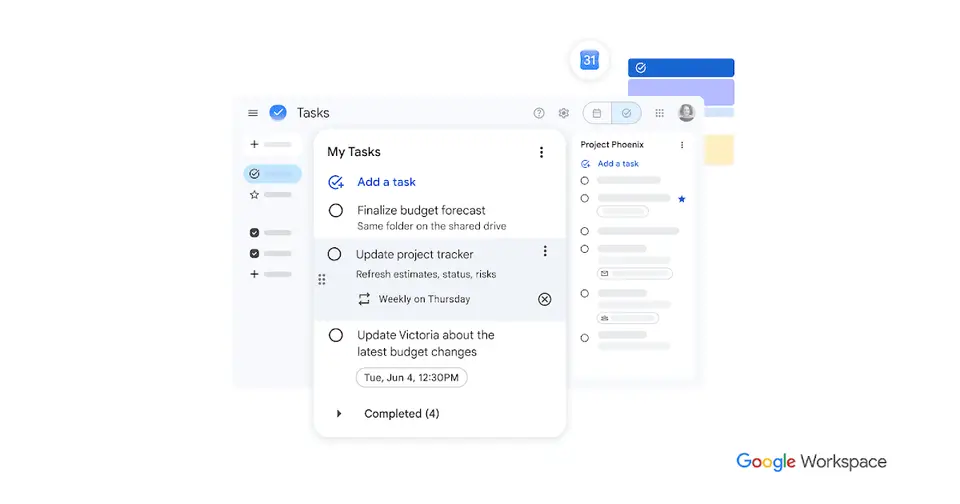
Google Tasks is Google's to-do list for the web, Android and iOS. Tasks are kept in lists with subtasks, stars, dates and repeat rules, and any task with a date shows up on Google Calendar. It opens in the side panel of Gmail, Calendar, Chat and Drive, and the mobile apps are free. Assigning tasks from a Google Doc is marked as a premium feature for some Google Workspace Business and Enterprise plans.
Worth knowing
- Assigning tasks from Google Docs is marked as a premium feature for some Workspace Business and Enterprise plans.
- Shared tasks cannot have subtasks and cannot repeat.
- No desktop app is listed: Google offers Tasks in the browser and as Android and iOS apps.
- On work or school accounts, an administrator controls whether Tasks is available.
Key features
- Tasks on Google Calendar
- A task with a date and time appears on Google Calendar and triggers a reminder. A duration can be added and the time marked as busy.
- Tasks from Gmail
- An email can be turned into a task without leaving Gmail, and the task links back to the original message.
- Lists, subtasks and stars
- Separate lists hold different projects or topics. Larger tasks break down into subtasks, tasks reorder by drag and drop, and stars mark the important ones.
- Repeating tasks and nudges
- Tasks can repeat daily, weekly, monthly or annually. Nudges keep surfacing a reminder until the task is completed.
- Shared tasks in Chat and Docs
- Tasks can be assigned to teammates in a Google Chat space. Assigning from a Google Doc needs a work or school account on an eligible Workspace plan.
- Gemini and the Tasks API
- The Gemini app can add, edit and show tasks on request. Developers can read and update tasks through a REST API or automate them with Apps Script.
Google Tasks pricing
As of Oct 9, 2026, Google Tasks has a free plan, and paid plans start at $7 per user / month with a 1-year commitment (Workspace Business Starter).
- Starts at
- $7 per user / month with a 1-year commitment (Workspace Business Starter)
- Free plan
- The Android and iOS apps are free and Tasks runs in a browser with a Google Account: lists, subtasks, stars, repeating tasks and reminders. Assigning tasks from Google Docs needs an eligible Workspace plan.
- Free trial
- 14-day Google Workspace trial for new customers, limited to 10 users; billing details required
| Plan | Price | What you get |
|---|---|---|
| Personal Google Account | $0 | Tasks on the web and in the free Android and iOS apps, with lists, subtasks, repeating tasks and Calendar reminders. |
| Business Starter | $7per user / month, 1-year commitment ($8.40 flexible) | Google Workspace for up to 300 users with 30 GB pooled storage per user. Tasks comes bundled with Gmail, Calendar, Chat and Docs. |
| Business Standard | $14per user / month, 1-year commitment ($16.80 flexible) | Google Workspace with 2 TB pooled storage per user and shared drives. |
| Business Plus | $22per user / month, 1-year commitment ($26.40 flexible) | Google Workspace with 5 TB pooled storage per user. |
| Enterprise | Custom | For companies with more than 300 users; priced through Google sales and resellers. |
Read from knowledge.workspace.google.com on Oct 9, 2026. Prices change, so confirm with Google Tasks before you buy.
Ways to pay less
- Annual discountLower Workspace rate with a 1-year commitment
Business Starter costs $7 per user per month on the Annual/Fixed-Term Plan versus $8.40 on the Flexible Plan. Standard drops from $16.80 to $14 and Plus from $26.40 to $22.
Stated on knowledge.workspace.google.com - NonprofitGoogle Workspace for Nonprofits at $0
Eligible nonprofits get Google Workspace for Nonprofits at $0 per user, or Business Standard at $3.50 and Business Plus at $6.16 per user per month on a 1-year commitment.
Stated on google.com - EducationWorkspace Education Fundamentals at no charge
Google Workspace for Education Fundamentals is available at no charge to qualifying institutions.
Stated on edu.google.com - By countryLower Workspace price shown to buyers in India
On October 9, 2026 Google's pricing page showed a reader in India Workspace Starter at ₹270 per user / month on a 1-year commitment. Its US page lists Starter at $7, and its help center gives a standard rate of Rs540.
Stated on workspace.google.com
Google Tasks refunds and cancellation
Good · checked Oct 18, 2026
On a personal Google Account, Tasks costs nothing, so there is nothing to claim back. The paid route is a Google Workspace edition, and that is where the grade comes from. Monthly is the fair half: cancel in the Admin console whenever you like, pay for the days you used, and leftover credit comes back to your card. The annual commitment is the other half, where leaving early still costs you the rest of the term. A split like that, with no barrier on the monthly plan, is a B.
- Refund window
- No set window
- How you cancel
- Yourself, in settings
- Getting your money back
Google's comparison of its two Workspace payment plans says that on the Annual/Fixed-Term Plan, cancelling before the renewal date means you are charged for the remaining balance of the contract and no refunds are issued. The Flexible Plan can be cancelled at any time without penalty, but nothing is refunded there either. The only refund Google describes is of credit left on the billing account after cancelling.
Stated on knowledge.workspace.google.com- How to cancel Google Tasks
A Workspace subscription is cancelled by an administrator in the Admin console's billing section, which needs the Billing management privilege. Subscriptions bought through a reseller, through Google Play or through the Settings app on iOS are cancelled there instead. Google Tasks on a personal Google Account has no subscription to end.
- In the Google Admin console, open Billing, then Subscriptions
- Click the subscription, then More, then Cancel Subscription
- Select a reason for cancelling and click Continue, then Continue to cancel
- Review the alternatives Google offers and click Continue to cancel
- Tick the box to confirm you have read the information
- Enter your email address and click Cancel My Subscription
- What you keep afterwards
Google warns that after cancelling, users' Google Workspace data is deleted and cannot be restored, and tells you to download anything you want to keep with its Data Export tool first. You lose access to core services such as Gmail, Calendar and Meet, while additional Google services stay. Cancelling does not by itself remove user accounts or groups, and you can resubscribe within 51 days.
Stated on knowledge.workspace.google.com- Renewals
Google's payment-plan comparison says the Flexible Plan bills monthly for the accounts you have with no commitment, while the Annual/Fixed-Term Plan commits you to a year or more and runs to its renewal date, with licences reducible only at renewal. Cancelling the annual plan before that date still costs the remaining balance. The pages read mention no reminder before a renewal.
Stated on knowledge.workspace.google.com
In your favour
- Tasks on a personal Google Account is free, so there is nothing to cancel and nothing to reclaim.
- The monthly Flexible Plan can be cancelled at any time without a penalty.
- An admin cancels in the Admin console; there is nobody to phone and no notice period.
- Credit left on the billing account after cancelling can be refunded if you ask support for it.
Watch out for
- Cancel an Annual/Fixed-Term contract early and you still pay the remaining balance, with no refund.
- Google says no refunds are issued, full stop, outside leftover billing credit.
- Workspace data is deleted after cancellation and cannot be restored, so export it first.
- On the annual plan you cannot reduce the number of licences until the contract comes up for renewal.
Google Tasks customer support
Excellent · checked Oct 18, 2026
Every paid Workspace edition includes Standard Support, and that means a live chat with a Google representative from the Admin console, or an email, with a stated initial response of one business day or less. Behind it sit a help centre for Tasks itself, an admin help centre and public communities. Two things to know: only an administrator can open a case, and on a free personal account you get the articles and the forum, nothing more.
Ways to get help
Live chat
A live chat opened from Get help in the Google Admin console. Google says you describe the issue, ask to be connected, pick a language and are then queued until a Google support representative is available. It needs the Support administrator privilege.
Stated on knowledge.workspace.google.comEmail
An email to Google support raised through the same Get help flow in the Admin console, as an alternative to the live chat. It is open to administrators with the Support administrator privilege.
Stated on knowledge.workspace.google.comAccount manager
A Technical Account Manager comes with Premium Support, which Google sells as a paid upgrade on its Enterprise edition. A Technical Account Advisor service is offered to Enhanced Support customers and included with Enterprise.
Stated on workspace.google.comHelp centre
The Google Tasks Help Center, open to anyone without signing in, with topics on getting started, adding and organising tasks and notification settings, alongside a separate administrator help centre for Workspace.
Stated on support.google.comCommunity or forum
The Google Workspace Help Community, a public forum where product experts and other administrators answer troubleshooting questions. Google also runs a separate community for admins with product news and road maps.
Stated on support.google.com
Not listed on Google Tasks’s pages: phone.
- When people answer
Google does not publish hours for Standard Support. It sells round-the-clock cover as an upgrade: Enhanced Support covers P1 and P2 cases 24/7, and Premium Support covers P1, P2 and P3 cases 24/7.
Stated on workspace.google.com- How fast it says it replies
Google's support policies say issues are investigated by priority and time of submission and that you can expect an initial response within one business day or less. Enhanced Support states a one-hour response for P1 cases and Premium Support fifteen minutes. These policies apply to administrators only.
Stated on knowledge.workspace.google.com- What depends on your plan
Standard Support comes with the paid Workspace editions. Enhanced Support is a paid upgrade on Business Standard and Business Plus and is included in Enterprise; Premium Support is a paid upgrade on Enterprise. Each adds faster response targets, round-the-clock cover for more case types and, on Premium, a Technical Account Manager.
Stated on workspace.google.com
In your favour
- Live chat with a Google representative is part of Standard Support, so it comes with every paid edition.
- Google states an initial response of one business day or less, and publishes how it ranks cases by priority.
- The Tasks help centre and the Workspace communities are open to anyone, free accounts included.
- Faster cover can be bought rather than only coming with the most expensive edition.
Watch out for
- Only an administrator with the Support administrator privilege can open a case, so everyone else goes through one.
- On a free personal Google Account there is no chat and no ticket: the help centre and the forum are it.
- Google publishes no hours at all for Standard Support, only for the paid upgrades.
- The one-hour and fifteen-minute targets belong to Enhanced and Premium Support, which cost extra.
What these two grades rest on. Read on 18 October 2026: Google's comparison of the Flexible and Annual/Fixed-Term Workspace payment plans, its page on cancelling a Workspace subscription, its page on contacting Workspace support with its support policies, the Workspace Customer Care page, the Google Tasks Help Center and the Workspace help community. Tasks has no billing of its own. Nobody here cancelled a plan or contacted its support. They are graded apart from the five that make the GPA. How we grade refunds and support.
How people rate the Google Tasks app
4.8
out of 5 for the iPhone and iPad app
- 5 stars87%
- 4 stars8%
- 3 stars3%
- 2 stars<1%
- 1 star1%
106,982 ratings on the App Store in the United States, read Oct 5, 2026. It rates the app, not everything the product does. See the listing
Works with
Jobs at Google
Any open roles at Google are on its own careers page. We can’t read a count from there, so have a look.
Applications go to Google, not to us.
Google Tasks alternatives
- Google Tasks vs Todoist
Free plan · from $5/mo
- Google Tasks vs TickTick
Free plan · from $49.99/yr
- Google Tasks vs Any.do
Free plan · from $4.99/mo



Common questions
Does Google Tasks have a Windows app?
No Windows app was listed when its pages were read on Oct 9, 2026. Google Tasks is listed for Web, iOS and Android.
Does Google Tasks have a macOS app?
No macOS app was listed when its pages were read on Oct 9, 2026. Google Tasks is listed for Web, iOS and Android.
Is Google Tasks open source?
Google Tasks is not described as open source on its own site, as read on Oct 9, 2026.
Does Google Tasks have an API?
Yes. Google Tasks offers a public API, according to its own site.
Sources for this page
The prices, plans, platforms and features above were read from these pages on Oct 9, 2026. What people say is linked where it appears.
- workspace.google.com/products/tasks/
- knowledge.workspace.google.com/admin/billing/compare-flexible-and-annual-fixed-term-payment-plans
- knowledge.workspace.google.com/admin/getting-started/editions/business-editions
- workspace.google.com/pricing
- workspace.google.com/faq/
- apps.apple.com/us/app/google-tasks-get-things-done/id1353634006
- play.google.com/store/apps/details?id=com.google.android.apps.tasks&hl=en_US&gl=US
- support.google.com/tasks/answer/7675772?hl=en
- support.google.com/tasks/answer/12048749?hl=en
- support.google.com/tasks/answer/11549608?hl=en
- developers.google.com/workspace/tasks
- google.com/nonprofits/offerings/workspace/
- edu.google.com/workspace-for-education/editions/compare-editions/