Snaptick
Free, open-source Android daily planner with a pomodoro timer
What is Snaptick?
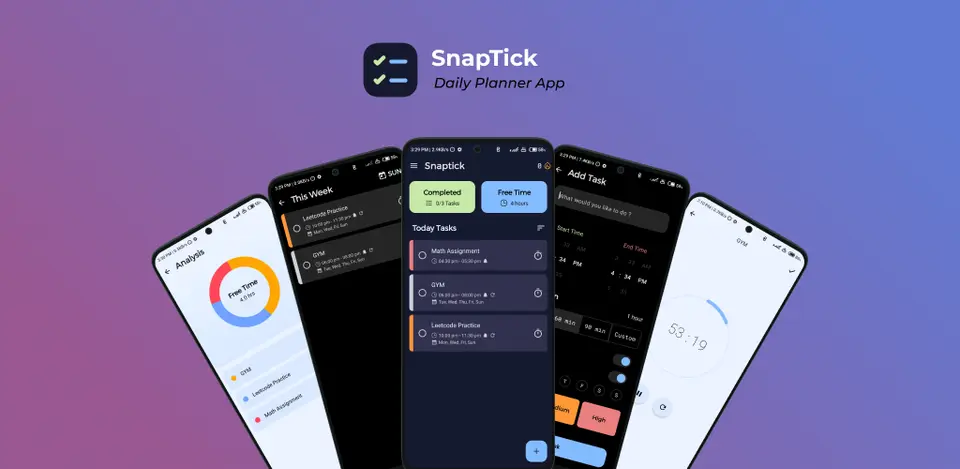
Snaptick is a free, open-source daily task planner for Android. Tasks are set with start and end times or as all-day items, can repeat and carry reminders, and show up in a calendar view, alongside a built-in pomodoro timer and a free-time screen. The app has no ads and needs no registration, and it is installed from GitHub Releases or the IzzyOnDroid repository.
Snaptick is free to use. See every plan
Good for
- Android users who want a free daily planner without ads
- Planning a day as timed tasks and working through them with a pomodoro timer
- People who prefer open-source apps installed from outside Google Play
Worth knowing
- Android only, version 8.0 or later; there is no iOS, desktop or web version.
- The README offers downloads from GitHub Releases and IzzyOnDroid only; the changelog records the Google Play link being removed in version 3.1.
- The README and release notes describe no account or cloud sync between devices; task data is moved with the backup and restore feature.
- The in-app update checker contacts GitHub, which the IzzyOnDroid listing flags as a dependency on a non-free network service.
Key features
- Timed and all-day tasks
- Tasks are created with a start and end time or as all-day items, given a priority, and sorted by options such as priority. Tasks that run past midnight are supported.
- Pomodoro timer
- A pomodoro timer runs for one task at a time as a foreground service, so it keeps counting after the app is closed and stops when its task is completed or deleted.
- Reminders and repeating tasks
- Each task can carry up to 4 reminders with custom offsets, and repeating tasks send a notification on the days they recur. A reminder notification can start a pomodoro.
- Calendar view, sync and ICS import
- A calendar view shows tasks by date and lets you create and edit them there. Tasks can be mirrored to a calendar on the device, and events can be imported from an .ics file.
- Free-time analysis
- A free-time screen works out the time left in the day around the tasks you have scheduled and a sleep time that you set.
- Widget, backup and themes
- A home-screen widget lists today's incomplete tasks and completes one with a tap. Task data can be backed up and restored offline, and themes cover light, dark, AMOLED and dynamic colors.
Snaptick pricing
- Starts at
- Free
- Free plan
- The whole app is free, ad-free and open source under the GPL-3.0 license, with no paid version. The developer takes donations through Ko-fi, Buy Me a Coffee, PayPal and a crypto donation link.
- Free trial
- None listed
| Plan | Price | What you get |
|---|---|---|
| Free | $0 | The complete Android app, installed as an APK from GitHub Releases or through the IzzyOnDroid repository, or built from source. |
Read from github.com on Oct 9, 2026. Prices change, so confirm with Snaptick before you buy.
Snaptick alternatives
- Snaptick vs Tasks.org
Free plan · from $0.99/yr
- Snaptick vs jtx Board
Free plan · from $0.99
- Snaptick vs TickTick
Free plan · from $49.99/yr




Common questions
Is Snaptick free?
Yes. Snaptick is free to use. The whole app is free, ad-free and open source under the GPL-3.0 license, with no paid version. The developer takes donations through Ko-fi, Buy Me a Coffee, PayPal and a crypto donation link.
How much does Snaptick cost?
Snaptick lists one plan. Free: $0. Prices were read from github.com on Oct 9, 2026.
What platforms does Snaptick work on?
Snaptick is available on Android.
Does Snaptick have an iPhone app?
No iPhone app was listed when its pages were read on Oct 9, 2026. Snaptick is listed for Android.
Does Snaptick have a Windows app?
No Windows app was listed when its pages were read on Oct 9, 2026. Snaptick is listed for Android.
Is Snaptick open source?
Yes. Snaptick is open source, according to its own site.
Who makes Snaptick?
Snaptick is made by ECHOO (Vishal Singh). It dates from 2024.
What are the alternatives to Snaptick?
The closest alternatives to Snaptick in our directory are Tasks.org, Super Productivity, jtx Board and TickTick. Each one has a side-by-side comparison with Snaptick.
Sources for this page
The prices, plans, platforms and features above were read from these pages on Oct 9, 2026.
- github.com/vishal2376/snaptick
- raw.githubusercontent.com/vishal2376/snaptick/master/README.md
- raw.githubusercontent.com/vishal2376/snaptick/master/CHANGELOG.md
- raw.githubusercontent.com/vishal2376/snaptick/master/PRIVACY_POLICY.md
- raw.githubusercontent.com/vishal2376/snaptick/master/fastlane/metadata/android/en-US/full_description.txt
- api.github.com/repos/vishal2376/snaptick/releases
- api.github.com/repos/vishal2376/snaptick
- api.github.com/users/vishal2376
- apt.izzysoft.de/fdroid/index/apk/com.vishal2376.snaptick