The Akiflow Insider’s Guide
Everything we know about Akiflow in one document: what it costs, its grades, getting a refund, getting help and what else to look at. Read it here, or keep a copy.
Akiflow
The Insider’s Guide
Time-blocking planner that pulls tasks from other apps into one inbox
Every plan, grade, refund rule and rival among daily planner apps, read from Akiflow’s own pages.
Made by Akiflow Inc. · checked Oct 9, 2026 · toolgpa.com
Contents
- 01WelcomeWhat it is, who it suits, its grades and the ten things to know first
- 02Insider tipsWhat most people miss: ways to pay less, settings worth changing and the catches
- 03What it costsEvery plan, the free plan, ways to pay less and how prices have moved
- 04What it doesIts main features, where it runs, what it works with and who makes it
- 05Where it standsIts grades against its category, and whether to keep it or make your own
- 06After you payGetting your money back, getting out, and getting help
- 07The alternativesThe tools it is most often weighed against, side by side
- 08Quick answersThe questions people ask about it, each answered in a line or two
- 09About ToolGPAWho made this guide, what else is on the site, and how to cite it
ToolGPA put this guide together from Akiflow’s own pages, its app-store listings and our grades. Every fact in it is on Akiflow’s page too, where it is kept up to date. Checked Oct 9, 2026.
Part 01 · Overview
Welcome
What it is, who it suits, its grades and the ten things to know first
2.2
GPA, above 8 of the 69 other daily planner apps we grade
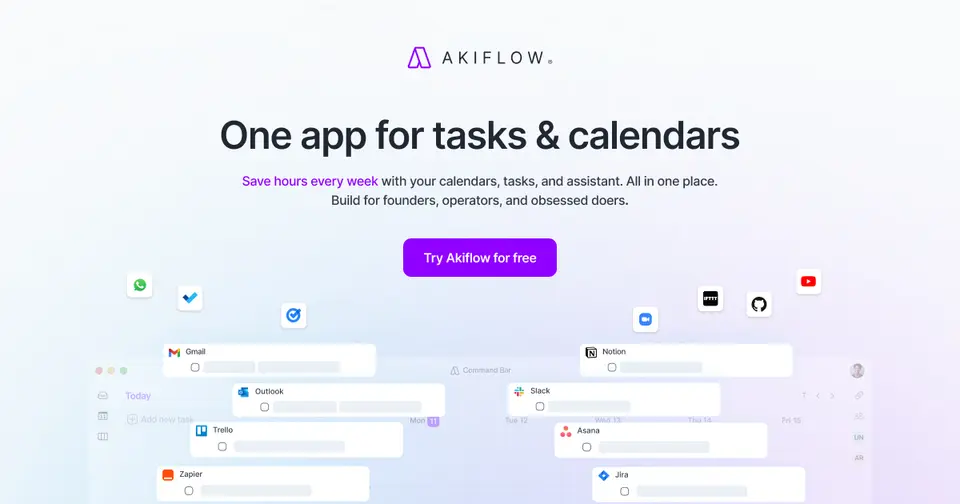
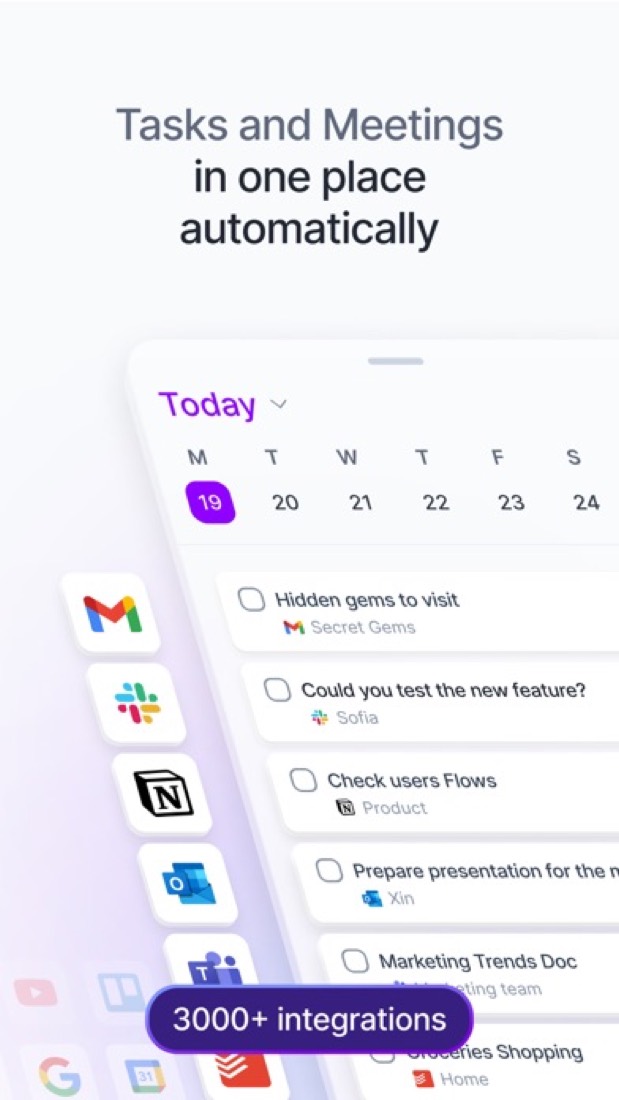
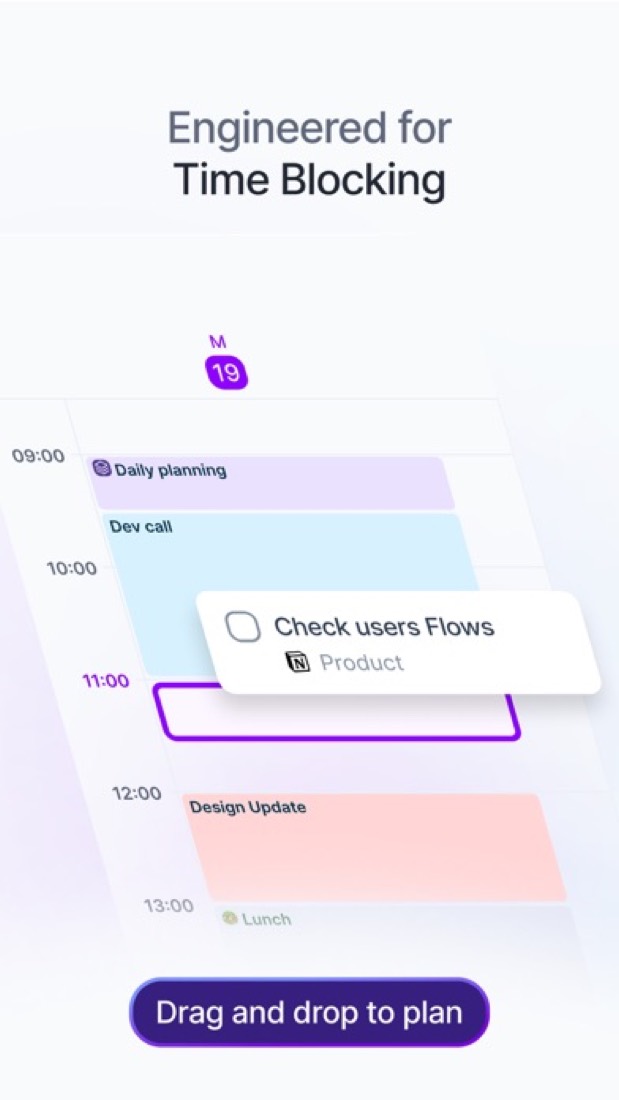
Akiflow is a daily planner that puts a task inbox next to your Google and Outlook calendars. Tasks arrive from connected tools such as Gmail, Slack, Notion and Asana, and are placed on the calendar as time blocks. A built-in AI assistant called Aki plans and reschedules work from typed or spoken requests, and an MCP connector opens tasks and calendar to Claude and ChatGPT. Release 2.83, dated October 8, 2026, adds iCloud Calendar sync, Travel Time blocks and an Apple Watch app.
To get you started, here are 10 things to know about Akiflow, taken from its own pages and our grades.
Too few phone ratings to lean on, and you start by connecting Gmail, Slack, Notion and your calendars before a day gets planned.
- 1
Best for time blocking tasks from lots of apps
If you want to try a planner for free, look elsewhere.
- 2
Paid plans start at $19 a month
As its pricing page puts it: $19 per month, billed yearly ($228).
- 3
You can try it first
7-day full-access trial. A card is required and the chosen plan starts afterwards unless cancelled.
- 4
It runs on 5 platforms
Web, macOS, Windows, iOS and Android.
- 5
Universal inbox
Tasks from connected tools such as Gmail, Slack, Notion, Asana, Jira and Todoist land in one inbox. Zapier and IFTTT cover tools without a native integration.
- 6
Time blocking on the calendar
Place tasks on a calendar that syncs with Google Calendar and Outlook Calendar. Release 2.83 adds two-way iCloud Calendar sync, due for everyone on Oct 14, 2026, and Travel Time blocks before events.
- 7
Aki AI assistant
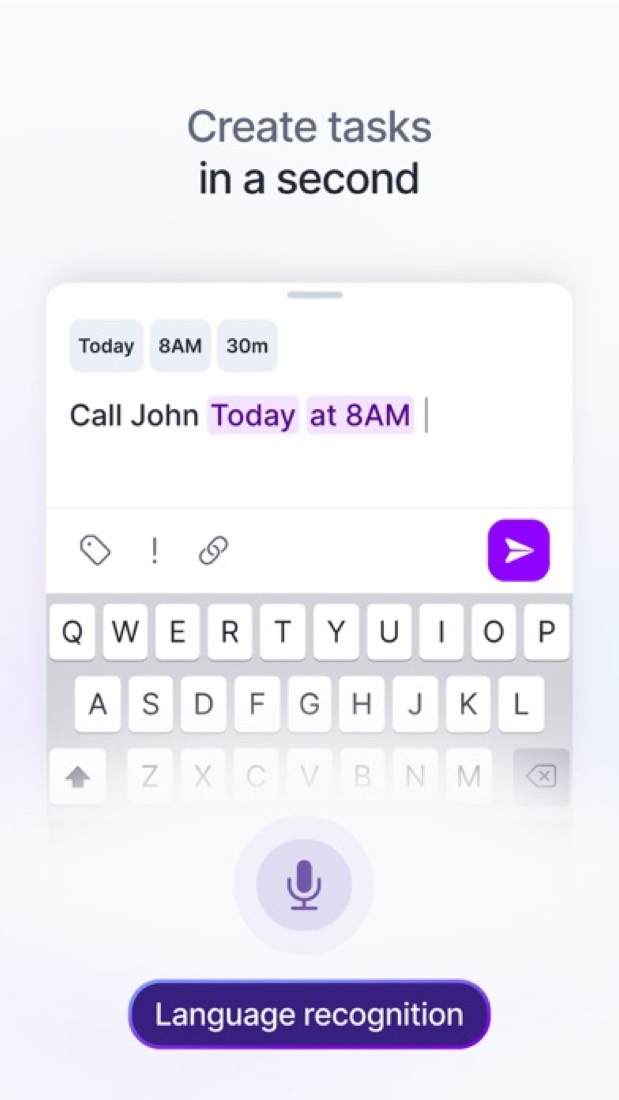
Ask Aki by chat or voice to plan, prioritize or move work, for example clearing an afternoon and pushing tasks to the next day. Included in Pro and labelled Beta on the features page.
- 8
Refunds: no set window
Akiflow's terms say purchases are non-refundable, and that includes the unused part of a yearly or five-year plan. So the 7-day trial is your window to decide, and it needs a card.
- 9
A 2.2 GPA, above 8 of 69
That is against the other daily planner apps we grade, on value, the free plan, features, ease of use and platforms.
- 10
Keep it
The plain part of Akiflow you could make: tasks, calendar and time blocking. What surrounds it you could not. The 6 things listed below take a company, not a weekend.
Akiflow at a glance
- Pricing
- Free trial, from $19 per month, billed yearly ($228)
- Free plan
- No
- Free trial
- 7-day full-access trial. A card is required and the chosen plan starts afterwards unless cancelled.
- Runs on
- Web, macOS, Windows, iOS, Android
- Made by
- Akiflow Inc.
- Category
- Daily Planner Apps
- Our grade
- 2.2 GPA, fair
The report card
Best for time blocking tasks from lots of apps
Akiflow is a daily planner that pulls tasks from email, Slack and other tools into one inbox, and you drag each one onto your calendar as a time block. There's no free plan, the trial is 7 days and needs a card, and it's $19 a month paid as $228 up front or $34 monthly, with meeting recording $19 more. If you want to try a planner for free, look elsewhere.
| Subject | Grade | Comment |
|---|---|---|
| Value for money | D | $19 a month if you pay $228 up front, or $34 month to month, when the middle for a planner here is $5.99 and the dearest tenth starts at $17.29. So it sits in that dearest tenth even on the yearly deal. Meeting recording is another $19 on top. |
| Free plan and trial | D | No free plan. You get 7 days with everything unlocked, but a card goes in first and the plan starts by itself unless you cancel. Sunsama and Morgen both give 14 days with no card. |
| Features | B | One inbox for tasks from Gmail, Slack, Notion, Asana, Jira and more, time blocking on your real calendar, booking links, a command bar and an AI assistant. That covers planning, though the AI is still marked beta and meeting recording is a separate $19 add-on. |
| Ease of use | C | Too few phone ratings to lean on, and you start by connecting Gmail, Slack, Notion and your calendars before a day gets planned. A free 1:1 setup call is included, but one reviewer's advice was to watch the tutorials first and a couple mention bugs. |
| Platforms and integrations | A | Web, Mac, Windows, iPhone, Android and now an Apple Watch app, in sync with Google, Outlook and, from October, iCloud calendars. Native integrations for eight tools plus Zapier, IFTTT and an MCP connector for Claude and ChatGPT. No Linux desktop app. |
An A is worth 4 points, a B 3, a C 2, a D 1 and an F nothing. The GPA is the average of the five.
Who Akiflow is for
- Fits if your tasks are spread across Gmail, Slack, Notion and Asana and you want one list
- Works for days full of meetings, where tasks have to be blocked into the gaps
Who it is not for
- Skip it if you want a free planner, because there's no free plan here
- Pricey if you pay monthly, at $34 a month against $19 a month billed as $228 a year
- Tight if you want a proper try first, as the trial is 7 days, needs a card and starts the plan by itself
- Not for you if you want meetings recorded and summed up without paying $19 a month more
- Watch out: no Linux app, team prices go through sales, the AI is still beta and iCloud sync is only now rolling out
Good to know
Good for
- People whose tasks are spread across email, chat and project tools
- Planning each day by time blocking tasks around meetings
- Keyboard-driven users who want a command bar and shortcuts
Worth knowing
- There is no free plan, and the 7-day trial requires a card.
- Monthly billing costs $34 per month, against $19 per month on the yearly plan.
- The AI Meeting Assistant (recording, transcripts, summaries) is a separate $19-per-month add-on.
- Desktop downloads are listed for macOS and Windows only, the Apple Watch app needs the Akiflow iPhone app, and team pricing is arranged with sales.
Part 02 · Tips
Insider tips
What most people miss: ways to pay less, settings worth changing and the catches
6
Things most people miss, each from its own help pages
The things about Akiflow that are easy to miss until they cost you: ways to pay less, settings worth changing and the catches at renewal or when you leave. Each one is from Akiflow’s own pages, linked beside it.
Read on Oct 17, 2026. Read from Akiflow's help centre (referrals, the command bar, keyboard shortcuts, Gmail, Slack, settings and security) on 17 October 2026. Not tried out: these tips are what its own pages say.
- 1
Pay less
Refer someone and you both get $25 off
Akiflow's referrals page says you and the person you refer each get $25 in credit once they pay their first invoice after the trial. It comes off your next invoice automatically, up to $300 in all. Your link is at web.akiflow.com/user/referrals. Team plan members can't use it.
product.akiflow.com - 2
Setting
Your meeting invites carry your referral link unless you turn it off
Events you create with guests get a "Scheduled with Akiflow" signature with your referral link in it. If you'd rather clients and your boss didn't see that on every invite, switch the signature off in Settings, General.
product.akiflow.com - 3
Shortcut
Type # for project, = for duration and ! for priority as you add a task
In the command bar, # sets the project, * adds a tag, = how long it takes, < a deadline, ! the priority and > a time slot, alongside dates like "tomorrow". Press Esc if it reads a word as a date by mistake. With the desktop app, Cmd+E (Ctrl+E) opens it from any app.
product.akiflow.com - 4
Setting
Choose what ticking off a Gmail task does to the email
In Settings, Integrations, your Gmail account, set On mark as done to unstar the email, open Gmail, do nothing or ask each time. You can import by an Akiflow label instead of stars, too. Stars from before you connected aren't imported, and a starred thread brings in only its latest email.
product.akiflow.com - 5
Easy to miss
Save a Slack message for later and it lands in your task inbox
With Slack connected, messages you save to Later come into Akiflow as tasks, or use a message's three-dot menu and Create a task. Only messages saved after connecting count. Finishing the task doesn't clear it from Later, but unsaving it marks the task done. Press O to open the original.
product.akiflow.com - 6
Privacy
Need SOC 2 for work? Akiflow says it doesn't have it yet
Its security page says it stores data from connected tools, such as calendar events, the subjects of emails you star and the text of Slack messages you save, encrypted in transit and with 256-bit AES at rest. It doesn't currently hold SOC 2 or ISO 27001. Support can send a data processing agreement.
product.akiflow.com
Part 03 · Pricing
What it costs
Every plan, the free plan, ways to pay less and how prices have moved
$19
A month to start
Akiflow is a paid product with a free trial, starting at $19 per month, billed yearly ($228).
So it sits in that dearest tenth even on the yearly deal.
Pro
$19
per month, billed yearly ($228)
The single plan: tasks, calendar planning, integrations, the Aki AI assistant and the MCP connector. $34 per month when billed monthly.
Trying it first
7-day full-access trial. A card is required and the chosen plan starts afterwards unless cancelled.
Read from akiflow.com on Oct 9, 2026.
Ways to pay less
Annual discount
Save 44% with yearly billing
Pro costs $19 per month when billed yearly ($228) instead of $34 per month on monthly billing. Akiflow lists this as a 44% saving.
Stated on akiflow.comEducation
40% off Pro Yearly for students and researchers
Eligible university students and researchers get 40% off Pro Yearly for life after verifying an academic email with Akiflow support.
Stated on akiflow.comOther savings
Believer multi-year plans
Longer Pro commitments cost less per month: $357.60 for two years (equal to $14.90 per month) or $699 for five years.
Stated on akiflow.comBy country
Purchasing-power pricing in selected countries
The pricing FAQ says Akiflow may apply local purchasing-power pricing in selected countries, and that the checkout price shown for your location is the one that applies. It names no countries or amounts.
Stated on akiflow.com
How its prices have moved
- Jan 11, 2024Pro: $24.99 per month billed monthly, or $14.99 per month billed yearly ($179.88) → $34 per month billed monthly, or $19 per month billed yearlyThe archived copy of 11 January 2024 shows $34 monthly and $19 a month billed yearly; the copy before it, of 2 December 2023, shows $24.99 and $14.99. The cards of the time are named only Monthly and Yearly; this is the one paid plan, now called Pro.
- Mar 26, 2023Premium: $15 per month billed monthly, or $12.50 per month on the yearly plan → $24.99 per month billed monthly, or $14.99 per month on the yearly planThe archived copy of 26 March 2023 shows $24.99 monthly and $14.99 a month on the yearly plan; the copy before it, of 6 February 2023, shows $15 and $12.50. The price changed between the two.
What the app costs elsewhere
Each country’s App Store price for “Weekly Premium”, against $4.99 in the United States, in dollars at the day’s rate. The four cheapest and the four dearest of 11.
| Country | Price there | In dollars | Against the US |
|---|---|---|---|
| Turkey | ₺229,99 | $4.68 | 6% less |
| Philippines | ₱ 299.00 | $4.76 | about the same |
| Canada | $6.99 | $4.91 | about the same |
| Brazil | R$ 24,90 | $4.98 | about the same |
| Australia | $7.99 | $5.58 | 12% more |
| South Africa | R99.99 | $6.05 | 21% more |
| United Kingdom | £4.99 | $6.60 | 32% more |
| Germany | 5,99 € | $6.71 | 35% more |
Part 04 · Features
What it does
Its main features, where it runs, what it works with and who makes it
5
Places it runs: Web, macOS, Windows, iOS and Android
Time-blocking planner that pulls tasks from other apps into one inbox. Here is what it does, as its own site describes it, and what it covers: works offline, AI features, keyboard-first, tasks, time blocking, calendar, booking links.
Web, Mac, Windows, iPhone, Android and now an Apple Watch app, in sync with Google, Outlook and, from October, iCloud calendars.
- Universal inbox
- Tasks from connected tools such as Gmail, Slack, Notion, Asana, Jira and Todoist land in one inbox. Zapier and IFTTT cover tools without a native integration.
- Time blocking on the calendar
- Place tasks on a calendar that syncs with Google Calendar and Outlook Calendar. Release 2.83 adds two-way iCloud Calendar sync, due for everyone on Oct 14, 2026, and Travel Time blocks before events.
- Aki AI assistant
- Ask Aki by chat or voice to plan, prioritize or move work, for example clearing an afternoon and pushing tasks to the next day. Included in Pro and labelled Beta on the features page.
- Availability sharing and booking
- Share open slots or a meeting link so other people can book one-off or recurring meetings with you.
- Command bar and shortcuts
- Create, edit and navigate tasks from the keyboard. The command bar also turns copied text from a web page into a task.
- MCP connector
- Connects Claude, ChatGPT or another MCP client to your Akiflow tasks, calendar and meetings.
Where it runs
- Web
- macOS
- Windows
- iOS
- Android
What it works with
- Google Calendar
- Outlook Calendar
- Gmail
- Slack
- Notion
- Asana
- Todoist
- Zapier
Who makes Akiflow
Akiflow is made by Akiflow, which its terms describe as a US company, run by a fully remote team. It earns money from paid subscriptions to its time-blocking app for tasks and calendars, and its own pages name Y Combinator and Benson Oak Ventures among its backers.
- Based
- Fully remote, with no officeakiflow.com
- Ownership
- Privately held. Privately held. Its About page names Benson Oak Ventures, Y Combinator and a list of angel investors as its backers, and its terms of service describe Akiflow as a US company.akiflow.com
- Funding
- Akiflow names its backers but does not publish amounts or dates. Its About page lists Benson Oak Ventures and Y Combinator alongside angel investors including Yaron Samid, Matilde Giglio, Adam Schwartzt, Matthew Trifiro, Dror Ceder, Eilon Reshef, Ayal Itzkovitz, Matteo Frattini and Enrico Pandian. Y Combinator's own page puts Akiflow in its Summer 2020 batch.akiflow.comycombinator.com
- Founders and leaders
- Nunzio Martinello, CEOakiflow.com
- Sebastiano Favaro, CTOakiflow.com
- Affiliate program
- Affiliate tier of its ambassador program: up to $50 for each referred user, with a dashboard showing clicks, trials and commissions, and partner-only resources and coupons. Sign-up runs through its Tapfiliate partner page.akiflow.com
- Reseller program
- Reseller tier of its ambassador program, for distributors, agencies and consultants: deals set by category, a dedicated account manager and partner-only resources and coupons. The rates are not published.akiflow.com
- Lately
Read on Oct 18, 2026 from the company’s own pages and from news reports. What is not stated there is left out.
Part 05 · Standing
Where it stands
Its grades against its category, and whether to keep it or make your own
8/69
Other daily planner apps it is graded above
Akiflow's GPA of 2.2 is higher than 8 of the 69 other daily planner apps we grade, and level with 8.
It stands best on platforms and integrations (A, above 55 of 69) and worst on value for money (D, above 0).
Its paid plans start at $19 a month, against a middle price of $4.17 for the category: 49 of the 52 others that charge start lower.
On features, ease of use and platforms it scores 3.0 out of 4. 7 tools score higher and cost less.
Each grade against the category
Every bar is all 70 daily planner apps we grade, cut by the letter each got. Akiflow’s own letter is outlined.
- DValue for moneyAbove 0 of 69
- DFree plan and trialAbove 1 of 69
- BFeaturesAbove 32 of 69
- CEase of useAbove 0 of 69
- APlatforms and integrationsAbove 55 of 69
Price against what you get
Each dot is one of 57 daily planner apps. Further left costs less; higher up scores better on features, ease of use and platforms. Akiflow is the marked dot.
What paid plans start at, a month (each step along is roughly double) →
Keep it, or make your own?
Whether this is something you could build for yourself with an AI app builder, and what you would give up.
Keep it
The plain part of Akiflow you could make: tasks, calendar and time blocking. What surrounds it you could not. The 6 things listed below take a company, not a weekend.
That makes this kind of software worth paying for, not this one in particular: 53 of the 69 other daily planner apps grade higher. It costs $228 a year.
What you could make
- Tasks, calendar and time blocking: an app builder makes these well.
What you could not
- Booking pages that read and write other people's calendars and send the emails.
- Apps for macOS, Windows, iOS and Android that stay in step with each other.
- It plugs into other products, Google Calendar, Outlook Calendar and Gmail among them.
- AI features, unless you pay a model provider for each request yourself.
- Hooks into the device itself: an Apple Watch app.
- The depth: we grade its features B, which means it covers the whole job.
What this rests on. Akiflow’s listing: what it does, where it runs, what it plugs into and what it costs. It is a judgement about the kind of software this is. We have not built a replacement for it, and making your own means looking after it too. How we decide, and every tool’s verdict.
Part 06 · Refunds
After you pay
Getting your money back, getting out, and getting help
What happens once you have paid: whether you can get your money back, how to leave, and how to reach a person when something goes wrong. Each is graded from Akiflow’s own terms and help pages.
Refunds and cancelling
Ordinary · checked Oct 12, 2026
Akiflow's terms say purchases are non-refundable, and that includes the unused part of a yearly or five-year plan. So the 7-day trial is your window to decide, and it needs a card. Cancelling is a button in the billing settings and you keep access to the end of the period, which is the ordinary deal and a C. What we don't like: you can't export your own tasks without asking support.
- Refund window
- No set window
- How you cancel
- Yourself, in settings
- Getting your money back
The terms say purchases are non-refundable and that cancelling brings no refund for unused time or pre-payments. Consumer rights under national law still apply: the terms cite a 14-day withdrawal period in the EU and a 14-day cooling-off period in the UK, with a full refund. Elsewhere they say that right holds only if you have not started using the service. Refunds are paid in the currency of the original charge.
Stated on akiflow.com- How to cancel Akiflow
The account help article says a subscription is cancelled under Settings, then Account, then Manage Account, then Billing, with a Cancel subscription button below the plan information. The whole process has to be completed or the subscription stays active, and an email confirms the cancellation. Subscriptions cannot be paused.
- Go to Settings, then Account, then Manage Account, then Billing
- Click the Cancel subscription button below the plan information
- Complete the entire cancellation process: if you exit before finishing, the subscription stays active
- Click Manage on your current plan to confirm it worked, and look for the confirmation email
- What you keep afterwards
You keep full access until the end of the billing period you paid for, monthly or yearly, and can reactivate before it expires. Not paying does not delete anything: the account and data stay intact unless you delete the account, which removes the data for good, most of it immediately. There is no self-service export of tasks created in Akiflow: you have to ask support, and not every type of data is guaranteed.
Stated on product.akiflow.com- Renewals
The terms say monthly plans are billed in advance each month, yearly plans once a year and the five-year Believer plan once every five years. The pricing page says a card is required for the 7-day trial and the chosen plan starts afterwards unless it is cancelled. Neither mentions a reminder before a charge. Purchases are non-refundable, with no exception stated for a renewal.
Stated on akiflow.com
In your favour
- Cancelling is a button in the billing settings, and you get an email to confirm it.
- You keep full access to the end of the period you paid for, and can reactivate before it runs out.
- Stopping payment doesn't delete your account or your data.
- EU and UK consumers have a 14-day right to withdraw written into the terms.
Watch out for
- Purchases are non-refundable, with nothing back for unused time, even on the yearly and five-year plans.
- The trial needs a card and rolls into the plan you picked after 7 days. No reminder before a charge is promised.
- You can't export tasks you created in Akiflow yourself. You have to ask support, and it isn't guaranteed.
- Quit the cancellation flow halfway and the subscription stays active, so finish it and check for the email.
Customer support
Good · checked Oct 12, 2026
You can chat with the team from inside the app or email them, and Akiflow puts numbers on it: Monday to Friday, with replies usually in under 4 hours. That's more than a bare email address, so it's a B. It isn't an A because nothing says the chat is answered live, and weekend messages wait until Monday. App Store reviewers speak well of the support too, which fits but doesn't move the grade.
Ways to get help
Live chat
On desktop and web, the avatar menu has a Contact support option that opens a chat with the team inside Akiflow. The article does not say the chat is answered live.
Stated on product.akiflow.comEmail
A support email address, given in the support article as the alternative to the in-app chat.
Stated on product.akiflow.comContact form or ticket
A contact form on the contacts page, offered to people who cannot use their email app.
Stated on akiflow.comHelp centre
A searchable help centre with articles on getting started, the calendar, integrations, task management, time blocking and the account.
Stated on product.akiflow.comCommunity or forum
A Slack community, linked under Community in the website's footer.
Stated on akiflow.com
Not listed on Akiflow’s pages: phone.
- When people answer
The support article says the team is available Monday to Friday, and that messages sent over the weekend are answered first thing on Monday. It gives no times of day and no time zone.
Stated on product.akiflow.com- How fast it says it replies
The contacts page says product support replies usually come in under 4 hours. The support article adds that bug reports are aimed to be resolved within 2 to 4 weeks, sometimes longer, with no guarantee.
Stated on akiflow.com- What depends on your plan
Akiflow sells a single plan, Pro, so its pages describe one level of support for everyone who pays. The pricing page says Pro includes a free one-to-one onboarding call.
Stated on akiflow.com
In your favour
- You can reach the team from inside the app, without hunting for an address.
- Akiflow says replies usually come in under 4 hours.
- Pro includes a free one-to-one onboarding call.
Watch out for
- Nobody's there at the weekend: messages wait until Monday.
- Under 4 hours is what usually happens, not a guarantee.
- Bug fixes run on a slower clock: the aim is 2 to 4 weeks, sometimes longer.
- No phone line is offered on the pages we read.
What its users report
- Several App Store reviewers say customer service replied quickly and was helpful when they got in touch. apps.apple.com
What these two grades rest on. Read on 12 October 2026: Akiflow's terms of service, its pricing page and FAQ, its contacts page, and its help centre's articles on the account and on support, plus the eight reviews its App Store listing shows for what users report. Nobody here cancelled a plan or contacted its support. They are graded apart from the five that make the GPA. How we grade refunds and support.
Part 07 · Alternatives
The alternatives
The tools it is most often weighed against, side by side





Sunsama, Motion, Morgen, Routine and Ellie
The 5 tools Akiflow is most often weighed against, with where each one differs from it.
- 2.6GPA
Sunsama
Free trial · from $17/mo
Daily planner with guided planning routines and calendar timeboxing.
- Only Sunsama lists a Linux app.
- Akiflow also covers booking links.
- Sunsama also covers auto-scheduling, Pomodoro timer and goals.
- 2.4GPA
Motion
Free trial · from $19/mo
AI work planner that auto-schedules tasks on your calendar.
- Akiflow also covers time blocking.
- Motion also covers meeting notes and auto-scheduling.
- 2.4GPA
Morgen
Free trial · from $15/mo
Calendar and daily planner with AI-suggested time blocking.
- Only Morgen lists a Linux app.
- Morgen also covers auto-scheduling.
- 2.8GPA
Routine
Free plan · from $5/mo
Planner combining tasks, calendar and notes, with an AI assistant.
- Routine has a free plan. Akiflow does not, though it has a free trial.
- Only Routine lists a Linux app.
- Akiflow also covers booking links.
- 2.4GPA
Ellie
Free plan · from $9.99/mo
Daily planner with a brain dump list and calendar timeboxing.
- Ellie has a free plan. Akiflow does not, though it has a free trial.
- Only Akiflow lists an Android app.
- Ellie can be bought with a one-time purchase.
Part 08 · Questions
Quick answers
The questions people ask about it, each answered in a line or two
18
Questions, each answered in a line or two
The short version of everything above, for when you only need the answer. Each one is told in full in its part of the guide.
Is Akiflow free?
No, Akiflow is a paid product, but you can try it first. 7-day full-access trial.
How much does Akiflow cost?
Akiflow lists one plan. Pro: $19 per month, billed yearly ($228).
What platforms does Akiflow work on?
Akiflow is available on Web, macOS, Windows, iOS and Android.
Does Akiflow offer any discounts?
Akiflow publicly lists the following: Save 44% with yearly billing; 40% off Pro Yearly for students and researchers; Believer multi-year plans; Purchasing-power pricing in selected countries.
Does Akiflow have a Linux app?
No Linux app was listed when its pages were read on Oct 9, 2026. Akiflow is listed for Web, macOS, Windows, iOS and Android.
Is Akiflow open source?
Akiflow is not described as open source on its own site, as read on Oct 9, 2026.
Does Akiflow work offline?
Yes, according to its own site. What works without a connection differs by plan and platform, so check the vendor's page for the detail.
What does Akiflow integrate with?
Akiflow's listing names Google Calendar, Outlook Calendar, Gmail, Slack, Notion, Asana, Todoist and Zapier.
Does Akiflow have a student discount?
40% off Pro Yearly for students and researchers. Eligible university students and researchers get 40% off Pro Yearly for life after verifying an academic email with Akiflow support.
Who makes Akiflow?
Akiflow is made by a company of the same name. Privately held.
What are the alternatives to Akiflow?
The closest alternatives to Akiflow in our directory are Sunsama, Motion, Morgen, Routine and Ellie.
Does Akiflow give refunds?
The terms say purchases are non-refundable and that cancelling brings no refund for unused time or pre-payments.
How do I cancel Akiflow?
The account help article says a subscription is cancelled under Settings, then Account, then Manage Account, then Billing, with a Cancel subscription button below the plan information.
What happens to my data if I cancel Akiflow?
You keep full access until the end of the billing period you paid for, monthly or yearly, and can reactivate before it expires.
How do I contact Akiflow support?
Akiflow's pages list these ways to get help: live chat, email, contact form or ticket, help centre and community or forum.
How does Akiflow compare with other daily planner apps?
Akiflow's GPA of 2.2 is higher than 8 of the 69 other daily planner apps we grade, and level with 8.
Is Akiflow good value for money?
ToolGPA grades Akiflow D for value for money. Its paid plans start at $19 a month, against a middle price of $4.17 for the category: 49 of the 52 others that charge start lower.
Could I make my own version of Akiflow?
The plain part of Akiflow you could make: tasks, calendar and time blocking.
Where this guide comes from
The prices, plans, platforms and features were read from Akiflow’s own pages on Oct 9, 2026, and the grades were given on Oct 10, 2026. Based on Akiflow's pricing, features, download, integrations, MCP and changelog pages as of 9 October 2026 and its App Store listing and reviews. Also tested with a demo account on 2026-09-09.
Every tool we list gets five grades, A to F, each with its reason, and a GPA that averages them. How each is decided is at toolgpa.com/grades. This guide is ToolGPA’s own work; it is not made, paid for or approved by Akiflow Inc. Prices change, so check akiflow.com before you buy.
Part 09 · About
About ToolGPA
Who made this guide, what else is on the site, and how to cite it
3,189
Tools graded, in 94 categories
ToolGPA grades software the way a school report grades a pupil: five subjects, a letter for each with the reason written beside it, and a GPA that averages them. Prices, plans and platforms are read from each maker’s own pages and dated, so you always know how fresh a figure is.
Every grade, review and ranking on ToolGPA is our own judgement. No company can pay for a grade or change one. Every tool on the site has a guide like this one, free to download and pass on. It all lives at toolgpa.com.
3,189
tools graded
94
categories
426
price changes on record
579
apps priced in 12 countries
What else is on toolgpa.com
- Akiflow, kept up to dateEverything in this guide, with prices and grades as they are todaytoolgpa.com/tools/akiflow
- How grades are givenThe rules behind every letter and every GPAtoolgpa.com/grades
- Value chartsWhat each tool costs against what it scores, for every categorytoolgpa.com/charts
- CompareAny two tools side by side, plan by plantoolgpa.com/compare
- Price changesEvery price rise and cut on record, each with its sourcetoolgpa.com/price-changes
- Prices by countryWhat apps cost on the App Store in 12 countriestoolgpa.com/prices-by-country
- Pay lessEvery public discount: yearly billing, students, nonprofitstoolgpa.com/save
- Keep or makeWhich tools are worth paying for, and which you could build yourselftoolgpa.com/keep-or-make
Scan for the live page
Prices and grades as they are today
Quoting this guide?
Please name ToolGPA and link to the live page, so readers can check the figures for themselves:
ToolGPA, "Akiflow: The Insider's Guide", checked Oct 9, 2026. https://toolgpa.com/tools/akiflow
Know someone choosing between daily planner apps?
Send them this guide: toolgpa.com/tools/akiflow/guide
ToolGPA elsewhere: youtube.com/@toolgpa
See our other guides
The best-graded daily planner apps after Akiflow, each with an Insider's Guide of its own.
- Daily Planner Apps Insider's GuideEvery one of the 70 daily planner apps we grade, compared
- Hero Assistant Insider's GuideDaily assistant app combining calendar, to-dos, habits and notes3.4 GPA
- LiveIt Insider's GuidePersonal organizer joining planner, journal, notes and habits3.4 GPA
- Open Sunsama Insider's GuideSelf-hostable daily planner with time blocking and an MCP server3.2 GPA


Choosing software? Every tool graded, every price dated.
Compare tools at toolgpa.com ›Everything in this guide is ToolGPA’s own summary of what Akiflow’s pages, its app-store listings and public reviews said on the dates shown. Grades are our judgement under the rules at toolgpa.com/grades. Every grade, review and ranking on ToolGPA is our own judgement. No company can pay for a grade or change one. Akiflow is a trademark of its owner, and this guide is not made, paid for or approved by Akiflow Inc. Prices and plans change: check akiflow.com before you buy.