
Noteshelf
Handwritten note-taking and PDF annotation for stylus devices
What is Noteshelf?
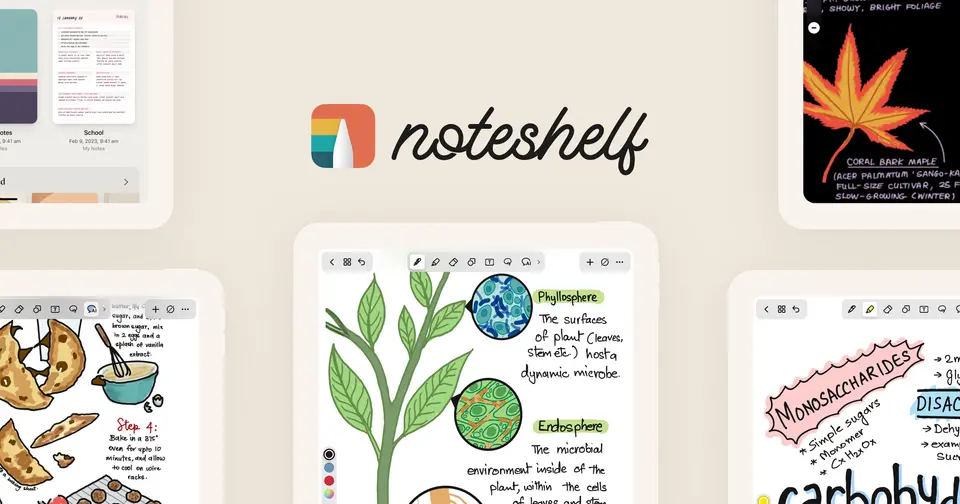
Noteshelf is a handwriting-first note-taking app for iPad, iPhone, Mac, Android and Windows devices. It combines pens and highlighters modeled on real ones with PDF annotation, audio recording, typed text and more than 200 templates, and an AI assistant can summarize pages or generate notes. It is free to use with limits, and the Premium upgrade is sold differently on each platform.
Noteshelf has a free plan. Paid plans start at $7.99 one-time on Windows; Premium is $9.99 one-time on Android. See every plan
Good for
- Students and teachers taking handwritten notes with a stylus
- Marking up PDFs, slides and scanned documents
- Planners and journals built from ready-made templates
Worth knowing
- The Free tier is limited to 3 notebooks, and handwriting recognition and search require Premium.
- Pricing differs by platform: $7.99 on the Microsoft Store, a $9.99 one-time upgrade on Android, and subscriptions or a lifetime purchase on the App Store.
- The App Store shows several yearly Premium prices between $19.99 and $49.99, so the price offered inside the app may vary.
- Sync uses iCloud on Apple devices and Google Drive on Android; the listings do not describe syncing between the two.
Key features
- Handwritten notes
- Write with pens and highlighters modeled on real ones, turn rough strokes into clean shapes, and use a zoom box for precise writing.
- Handwriting recognition
- Converts handwriting to text and searches handwritten notes in 65 languages. Recognition and search are part of Premium.
- PDF and document annotation
- Import PDFs, documents, slides and images, then highlight, underline and write on them. A built-in scanner digitizes paper documents.
- Audio recording
- Record lectures or meetings while taking notes and replay them later. The Apple version can also record from an Apple Watch.
- Noteshelf AI
- Generates handwritten notes on a topic, summarizes pages, translates text and explains terms, drawing on a monthly allowance of AI credits.
- Sync and backup
- iCloud sync across iPhone, iPad and Mac, Google Drive sync between Android devices, and automatic backup to Google Drive, OneDrive, Dropbox or WebDAV.
Noteshelf pricing
- Starts at
- $7.99 one-time on Windows; Premium is $9.99 one-time on Android
- Free plan
- Free: 3 notebooks with unlimited pages, hundreds of templates and Noteshelf AI with 30 monthly credits, as listed for Noteshelf 3 on Android.
- Free trial
- None listed
| Plan | Price | What you get |
|---|---|---|
| Free | $0 | 3 notebooks with unlimited pages, hundreds of templates and Noteshelf AI for text with 30 monthly credits. |
| Noteshelf for Windows | $7.99one-time purchase on the Microsoft Store | The Windows app for stylus devices, with handwritten and typed notes, audio recording, PDF annotation and handwriting search. |
| Premium (Android) | $9.99one-time purchase; local pricing may apply | Unlimited notebooks, configurable digital diaries, handwriting recognition and search, and 100 monthly AI credits. |
| Premium (iPhone, iPad and Mac) | $7.99 to $49.99in-app purchase: weekly, monthly, yearly or lifetime | The US App Store lists Weekly at $7.99, Monthly at $9.99, Yearly at prices from $19.99 to $49.99, and a Lifetime purchase at $14.99. |
Read from noteshelf.net on Oct 5, 2026. Prices change, so confirm with Noteshelf before you buy.
Ways to pay less
- Lifetime licenseOne-time Premium purchase
Premium is a one-time $9.99 fee on Android, and the US App Store lists a Lifetime Premium in-app purchase at $14.99 next to its subscriptions.
Stated on noteshelf.net - EducationReduced prices for schools and businesses
Noteshelf 3 is offered to schools and businesses at reduced prices through Apple School Manager and Apple Business Manager.
Stated on noteshelf.net - Other savings30% off Premium for Samsung Galaxy users
The Android page advertises 30% off the Premium upgrade as an offer exclusive to Samsung Galaxy users.
Stated on noteshelf.net
How people rate the Noteshelf app
4.6
out of 5 for the iPhone and iPad app
- 5 stars81%
- 4 stars8%
- 3 stars3%
- 2 stars2%
- 1 star6%
6,841 ratings on the App Store in the United States, read Oct 5, 2026. It rates the app, not everything the product does. See the listing
Works with
- iCloud
- Google Drive
- OneDrive
- Dropbox
- Evernote
- Unsplash
- Pixabay
Noteshelf alternatives
- Noteshelf vs Goodnotes
Free plan · from $11.99/yr
- Noteshelf vs Notability
Free plan · from $14.99/yr
- Noteshelf vs CollaNote
Free plan · from $13.90 one-time
- Noteshelf vs Microsoft OneNote
Free plan · from $9.99/mo



Common questions
Is Noteshelf free?
Noteshelf has a free plan. Free: 3 notebooks with unlimited pages, hundreds of templates and Noteshelf AI with 30 monthly credits, as listed for Noteshelf 3 on Android. Paid plans start at $7.99 one-time on Windows; Premium is $9.99 one-time on Android.
How much does Noteshelf cost?
Noteshelf lists 4 plans. Free: $0. Noteshelf for Windows: $7.99 one-time purchase on the Microsoft Store. Premium (Android): $9.99 one-time purchase; local pricing may apply. Premium (iPhone, iPad and Mac): $7.99 to $49.99 in-app purchase: weekly, monthly, yearly or lifetime. Prices were read from noteshelf.net on Oct 5, 2026.
What platforms does Noteshelf work on?
Noteshelf is available on iOS, macOS, Android and Windows.
Does Noteshelf offer any discounts?
Noteshelf publicly lists the following: One-time Premium purchase; Reduced prices for schools and businesses; 30% off Premium for Samsung Galaxy users.
How is Noteshelf rated?
Noteshelf's iPhone and iPad app averages 4.6 out of 5 from 6,841 ratings on the App Store in the United States, as read on Oct 5, 2026. That is the store's rating of the app, not a score from us.
Does Noteshelf have a Linux app?
No Linux app was listed when its pages were read on Oct 5, 2026. Noteshelf is listed for iOS, macOS, Android and Windows.
Is Noteshelf open source?
Noteshelf is not described as open source on its own site, as read on Oct 5, 2026.
What does Noteshelf integrate with?
Noteshelf's listing names iCloud, Google Drive, OneDrive, Dropbox, Evernote, Unsplash and Pixabay. A listing names up to eight integrations, so it may connect to more.
Does Noteshelf have a student discount?
Reduced prices for schools and businesses. Noteshelf 3 is offered to schools and businesses at reduced prices through Apple School Manager and Apple Business Manager.
Who makes Noteshelf?
Noteshelf is made by Fluid Touch Pte. Ltd.
What are the alternatives to Noteshelf?
The closest alternatives to Noteshelf in our directory are Goodnotes, Notability, Samsung Notes, CollaNote and Microsoft OneNote. Each one has a side-by-side comparison with Noteshelf.
Sources for this page
The prices, plans, platforms and features above were read from these pages on Oct 5, 2026. What people say is linked where it appears.