
Tiimo review (2026): is the free plan enough?
Visual daily planner with an AI co-planner and focus timer
Black Friday: is there a Tiimo sale?
Tiimo report card
Fair · out of 4.0 · graded Oct 10, 2026
Best for visual planning for ADHD and autistic brains
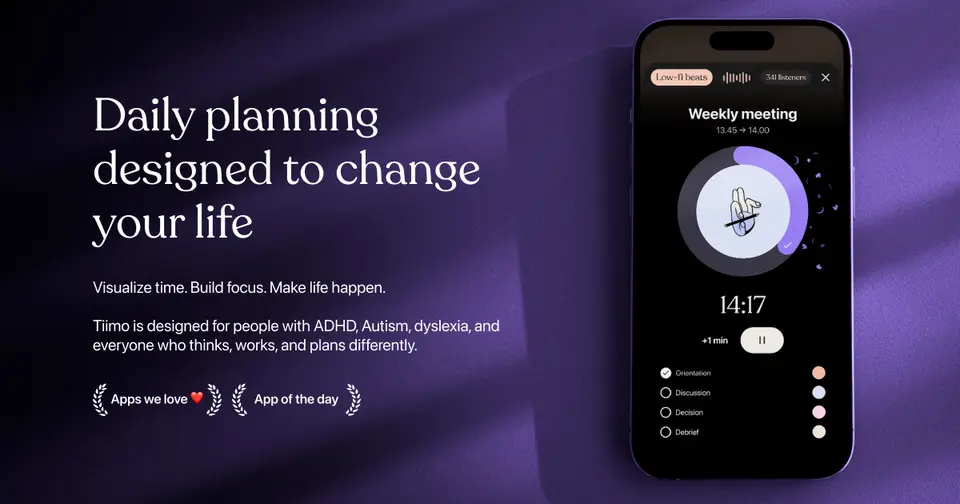
Tiimo is a visual planner built with ADHD and autism in mind: a color-coded timeline, a countdown timer for the task in front of you, and an AI Co-planner that turns a brain-dump into timed steps. But the free version is phones only, the web planner and calendar import need Pro, Tiimo publishes no price list, and the Co-planner isn't on Android.
Who Tiimo is for
- Fits if you have ADHD or autism and a plain list doesn't hold your attention
- Works for families, since Pro holds up to five profiles on one subscription
Who Tiimo is not for
- Tight if you're staying free, as it's phone apps only with limited AI chats and no calendar import
- Skip it if you're on Android and want the AI Co-planner, which is on iOS and the web only
- Not for you if you want the price before you sign up, because it's only shown at checkout
- Watch out: the 7-day trial comes only with the yearly plan, and monthly is charged right away
- Skip it if you use Windows or an Intel Mac, as the Mac app needs macOS 15 and an M1 chip or later
Why Tiimo gets a 2.4
Five grades, each with its reason. The GPA is their average: an A is 4 points, an F is none.
- CValue for moneyTiimo publishes no price list at all. The US App Store shows Pro purchases from $7.00 to $54.00 without saying which are months and which are years, so there's no figure to set against the $6 a month a typical planner asks.
- CFree plan and trialFree is phone apps only: basic planner, to-do list, focus timer, 1 profile and a limited number of AI chats. The web planner and calendar import both need Pro, and the 7-day trial comes only with the yearly subscription.
- CFeaturesA drag-and-drop colour timeline, a to-do tab, a visual countdown, mood check-ins, and calendars pulled in from Apple, Google and Outlook. But the listing's own notes show the holes: the AI Co-planner, which is half the pitch, isn't on Android, and calendar import is a Pro feature.
- BEase of use4.59 from about 20,600 App Store ratings, which clears our B line and just misses the A. You can type or even say what's on your mind and the Co-planner turns it into steps with times on them.
- BPlatforms and integrationsiPhone, Android, a Mac app and a web planner, with Apple, Google and Outlook calendars coming in. But there's no Windows app, the Mac one wants macOS 15 and an M1 chip or later, and the web planner needs Pro.
What these grades rest on. Graded from this listing, whose facts were read from Tiimo's own pages on 5 October 2026, and its App Store rating. Also tested with a demo account on 2026-06-08. How we review and grade.
Make Tiimo? Put this grade on your site

Paste this where you want the badge. It links here and follows the grade if it changes. About badges
<a href="https://toolgpa.com/tools/tiimo#review"><img src="https://toolgpa.com/badge/tiimo.svg" alt="Tiimo: 2.4 GPA on ToolGPA" width="196" height="56"></a>Where Tiimo stands among daily planner apps
Tiimo's GPA of 2.4 is higher than 18 of the 75 other daily planner apps we grade, and level with 18.
It stands best on ease of use (B, above 42 of 75) and worst on features (C, above 0).
Each grade against the category
Every bar is all 76 daily planner apps we grade, cut by the letter each got. Tiimo’s own letter is outlined.
- CValue for moneyAbove 10 of 75, level with 30
- CFree plan and trialAbove 6 of 75, level with 49
- CFeaturesAbove 0 of 75, level with 37
- BEase of useAbove 42 of 75, level with 27
- BPlatforms and integrationsAbove 27 of 75, level with 33
Keep Tiimo, or make your own?
You could make this
A daily planner at its plainest is today's tasks laid along a timeline.
What Tiimo does at its core is tasks, calendar, time blocking and mood tracking, and that is the kind of thing an AI app builder makes well. You would give up 3 things, listed below, and little else.
What you could make
- Tasks, calendar, time blocking and mood tracking: an app builder makes these well.
What you could not
- Apps for macOS, iOS and Android that stay in step with each other.
- AI features, unless you pay a model provider for each request yourself.
- Hooks into the device itself: an Apple Watch app, widgets and Live Activities.
What this rests on. Tiimo’s listing: what it does, where it runs, what it plugs into and what it costs. It is a judgement about the kind of software this is. We have not built a replacement for it, and making your own means looking after it too. How we decide, and every tool’s verdict.
What is Tiimo?
Tiimo is a visual daily planner built with ADHD and autism in mind. It lays tasks and routines out on a color-coded timeline and pairs them with a to-do list, a countdown focus timer and mood check-ins. The free version runs on the iOS and Android apps only; Tiimo Pro adds the web planner and unlimited use of the AI Co-planner.
Worth knowing
- Tiimo publishes no price list. Prices vary by location and are shown at checkout in the App Store, Google Play or the web planner.
- The free version works on the iOS and Android apps only. The web planner needs an active trial or Tiimo Pro subscription.
- The AI Co-planner is available on iOS and the web app only, not on Android.
- There is no Windows app. The Mac version is the App Store app, which requires macOS 15 and an Apple M1 chip or later.
Key features
- Visual timeline
- The day appears as a color-coded timeline with drag-and-drop tasks and custom colors and icons. The web planner adds daily, weekly and monthly views.
- AI Co-planner
- Type or speak what is on your mind and the Co-planner turns it into tasks, breaks them into steps and estimates how long each takes. Free accounts get limited AI chats.
- To-do list
- A to-do tab collects tasks that are not yet scheduled. They can be prioritized by hand or by AI suggestion, then dragged into the day.
- Focus timer
- A visual countdown for the current task. Timers and upcoming tasks also show in widgets, Live Activities and on Apple Watch.
- Calendar import
- Brings Apple, Google and Outlook calendars into the schedule, and the App Store listing also mentions Apple Reminders. Tiimo lists calendar integration as a Pro feature.
- Mood tracking and profiles
- Mood check-ins and daily reflections sit alongside the plan. Pro accounts can hold up to five profiles, for example one per family member.
Tiimo pricing
As of Oct 5, 2026, Tiimo has a free plan, and paid plans start at $7.00 to $54.00 (US App Store in-app purchases; billing period not shown).
- Starts at
- $7.00 to $54.00 (US App Store in-app purchases; billing period not shown)
- Free plan
- Free version on the iOS and Android apps: basic planner, to-do list, focus timer, limited AI chats and 1 profile. The web planner is not included.
- Free trial
- 7-day free trial of Tiimo Pro, offered on the yearly subscription only. Monthly subscriptions are charged right away.
| Plan | Price | What you get |
|---|---|---|
| Free | $0 | Basic planner, limited AI chats and 1 profile, on the iOS and Android apps only. |
| Tiimo Pro | $7.00 to $54.00billing period not shown on the US App Store listing | All features on every platform, paid monthly or yearly. The US App Store lists purchases of $7.00, $11.99, $12.00, $14.00, $36.00, $42.00, $48.00 and $54.00. |
Read from apps.apple.com on Oct 5, 2026. Prices change, so confirm with Tiimo before you buy.
Ways to pay less
- Annual discountLower price on the yearly subscription
Tiimo's FAQ says a full-year Tiimo Pro subscription is discounted compared with paying monthly. It does not state the size of the saving.
Stated on tiimoapp.com - Other savingsApple Family Sharing
A subscription bought on the App Store can be shared through Apple Family Sharing, with a separate account for each person. Google Play and web purchases are excluded.
Stated on tiimoapp.com - Other savingsFree yearly subscription for coaches
Coaches who email Tiimo from a work address with a link to their practice are given a free yearly subscription.
Stated on tiimoapp.com
Tiimo refunds and cancellation
Ordinary · checked Oct 18, 2026
Tiimo's answer on refunds is that it depends who took your money. Buy in the App Store and only Apple can decide; buy on the web or on Google Play and you write to Tiimo. Either way the terms say charges are generally nonrefundable and that nothing comes back for the part of the period you have not used. Cancelling is straightforward and you keep the free app on your phone. Ordinary, so a C.
- Refund window
- No set window
- How you cancel
- Yourself, in settings
- Getting your money back
The FAQ says all payments and refunds are handled by the platform you subscribed through. For an App Store subscription you use Apple's refund page, and Tiimo says it is not authorised to process those requests. For a web or Google Play subscription you write to Tiimo by chat or email. It adds that charges for app purchases are generally nonrefundable and that it does not refund partially used periods.
Stated on tiimoapp.com- How to cancel Tiimo
You cancel through the platform you first subscribed on, and the FAQ says deleting the app does not cancel anything. For a subscription bought on the web planner you log in, open Settings, then Account, then Manage subscriptions, which opens a customer portal where you cancel. App Store and Google Play subscriptions are cancelled in those stores, and Tiimo says one cannot be managed from the other.
- Log in to the Tiimo web planner
- Go to Settings, then Account, then Manage subscriptions
- Your customer portal opens in a new tab
- Cancel your subscription there
- What you keep afterwards
The terms say Tiimo does not refund any remaining subscription period after cancellation. No page read says in so many words what happens on the day it lapses, but the FAQ says the free version exists only in the iOS and Android apps and that the web planner is a premium feature needing an active trial or subscription. The privacy policy says you can ask Tiimo to delete your data.
Stated on tiimoapp.com- Renewals
The terms say a subscription renews automatically unless you cancel through the platform you signed up on, and that payment is taken at the start of each billing cycle. The FAQ adds that the 7-day free trial comes only with a yearly subscription, that a monthly one is charged straight away, and that the trial rolls into a paid subscription unless you cancel at least 24 hours before it ends.
Stated on tiimoapp.com
In your favour
- You cancel it yourself, in the store or in the web planner's own portal.
- A free version of the app stays on iOS and Android when the subscription stops.
- Tiimo says plainly which purchases it can refund and which only Apple can.
- A 7-day trial comes with the yearly plan before anything is charged.
Watch out for
- Charges are generally nonrefundable and nothing comes back for unused time.
- Bought it in the App Store? Tiimo says it is not authorised to refund you.
- Cancel the trial at least 24 hours before it ends or the year is charged.
- The web planner needs an active subscription, so that goes when you stop paying.
Tiimo customer support
Good · checked Oct 18, 2026
For a small app this is better than you would expect: a chat widget on the site that Tiimo says reaches its team, an address to write to, and an FAQ that covers subscriptions, refunds and cancelling honestly. It is not an A because no page says when anyone is at the other end or how long a reply takes, and there is no phone line.
Ways to get help
Live chat
The terms and the FAQ both point to a chat at the bottom of the page, and the refund answer says to reach the team directly through it. No page read gives its hours or says whether a bot answers first.
Stated on tiimoapp.comEmail
A support address is given in the terms and throughout the FAQ, including a separate subject line for bug reports. It is the route Tiimo names for refunds on web and Google Play purchases.
Stated on tiimoapp.comHelp centre
The FAQ is the written help: sections on using Tiimo, subscription and payment, and troubleshooting, with step-by-step answers for iOS, Android and the web planner, plus feature guides in the resource hub.
Stated on tiimoapp.com
Not listed on Tiimo’s pages: phone.
- When people answer
Its pages do not say.
- How fast it says it replies
Its pages do not say.
- What depends on your plan
Its pages do not say.
In your favour
- A chat to the team sits on every page, and nothing says you have to be paying to use it.
- The FAQ answers the uncomfortable questions about refunds and cancelling head on.
- Instructions are given separately for iOS, Android and the web planner.
Watch out for
- No hours and no reply time are stated anywhere we could read.
- No phone line, and no help centre beyond the single FAQ page.
- Nothing on the pages read says whether paying gets you a faster answer.
What these two grades rest on. Read on 18 October 2026: Tiimo's terms of use with its subscription, renewal and cancellation sections, its FAQ including the subscription and payment answers on switching plans, cancelling and refunds, its privacy policy and its resource hub. Nobody here cancelled a plan or contacted its support. They are graded apart from the five that make the GPA. How we grade refunds and support.
How people rate the Tiimo app
4.6
out of 5 for the iPhone and iPad app
- 5 stars81%
- 4 stars9%
- 3 stars4%
- 2 stars2%
- 1 star5%
20,558 ratings on the App Store in the United States, read Oct 5, 2026. It rates the app, not everything the product does. See the listing
Works with
Tiimo alternatives
- Tiimo vs Structured
Free plan · from $2.99/mo
- Tiimo vs TimeBloc
Free plan · from $19.99
- Tiimo vs TimeTune
Free plan · from $2.99
- Tiimo vs Sectograph
Free plan · from $3.99 one-time




Common questions
Does Tiimo have a Windows app?
No Windows app was listed when its pages were read on Oct 5, 2026. Tiimo is listed for Web, macOS, iOS and Android.
Does Tiimo have a Linux app?
No Linux app was listed when its pages were read on Oct 5, 2026. Tiimo is listed for Web, macOS, iOS and Android.
Is Tiimo open source?
Tiimo is not described as open source on its own site, as read on Oct 5, 2026.
Sources for this page
The prices, plans, platforms and features above were read from these pages on Oct 5, 2026. What people say is linked where it appears.