The Todoist Insider’s Guide
Everything we know about Todoist in one document: what it costs, its grades, getting a refund, getting help and what else to look at. Read it here, or keep a copy.
Todoist
The Insider’s Guide
Cross-platform to-do list with natural-language task entry

Every plan, grade, refund rule and rival among to-do list apps, read from Todoist’s own pages.
Made by Todoist Inc. · checked Oct 4, 2026 · toolgpa.com
Contents
- 01WelcomeWhat it is, who it suits, its grades and the ten things to know first
- 02Insider tipsWhat most people miss: ways to pay less, settings worth changing and the catches
- 03What it costsEvery plan, the free plan, ways to pay less and how prices have moved
- 04What it doesIts main features, where it runs, what it works with and who makes it
- 05Where it standsIts grades against its category, and whether to keep it or make your own
- 06After you payGetting your money back, getting out, and getting help
- 07The alternativesThe tools it is most often weighed against, side by side
- 08Quick answersThe questions people ask about it, each answered in a line or two
- 09About ToolGPAWho made this guide, what else is on the site, and how to cite it
ToolGPA put this guide together from Todoist’s own pages, its app-store listings and our grades. Every fact in it is on Todoist’s page too, where it is kept up to date. Checked Oct 4, 2026.
Part 01 · Overview
Welcome
What it is, who it suits, its grades and the ten things to know first
2.8
GPA, above 92 of the 123 other to-do list apps we grade
Todoist is a task manager for individuals and small teams. Tasks are added in plain language and organized into projects that can be viewed as a list, a board or a calendar. The Business plan adds a shared team workspace that sits alongside each member's personal tasks.
To get you started, here are 10 things to know about Todoist, taken from its own pages and our grades.
- 1
Best for to-do lists on every device
If you need any of those, look elsewhere.
- 2
Paid plans start at $5 a month for each person
As its pricing page puts it: $5 per user / month, billed yearly.
- 3
There is a free plan
Beginner plan: 5 personal projects, task reminders, list and board layouts, 3 filter views and 1 week of activity history.
- 4
It runs on 6 platforms
Web, macOS, Windows, Linux, iOS and Android, with a browser extension too.
- 5
Quick Add
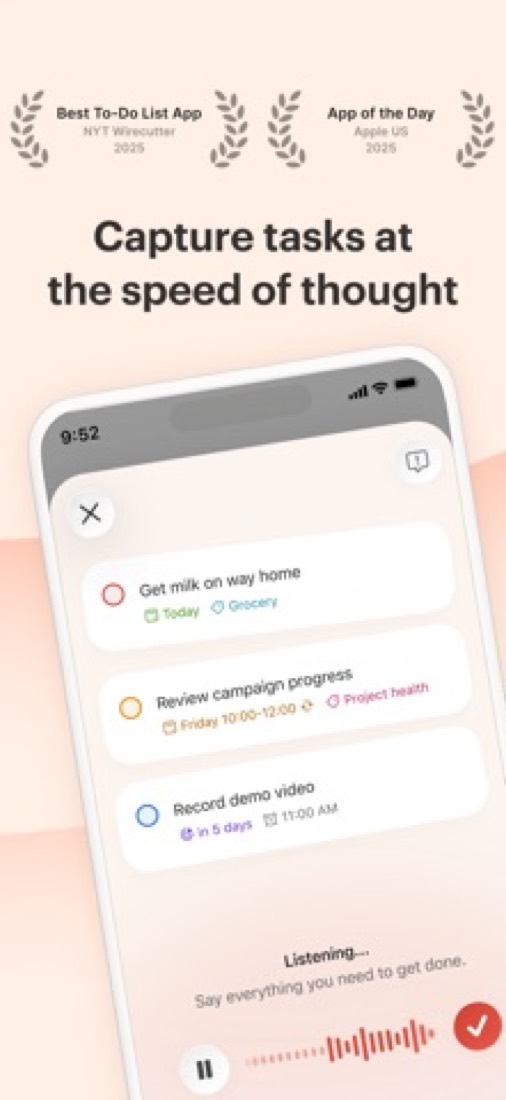
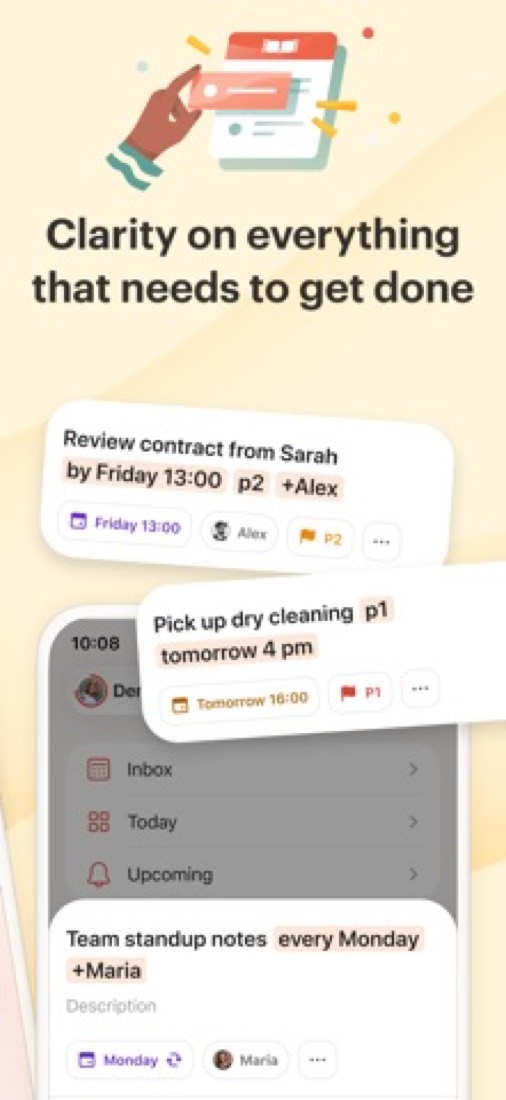
Capture tasks in natural language as they come to you, including recurring due dates and reminders.
- 6
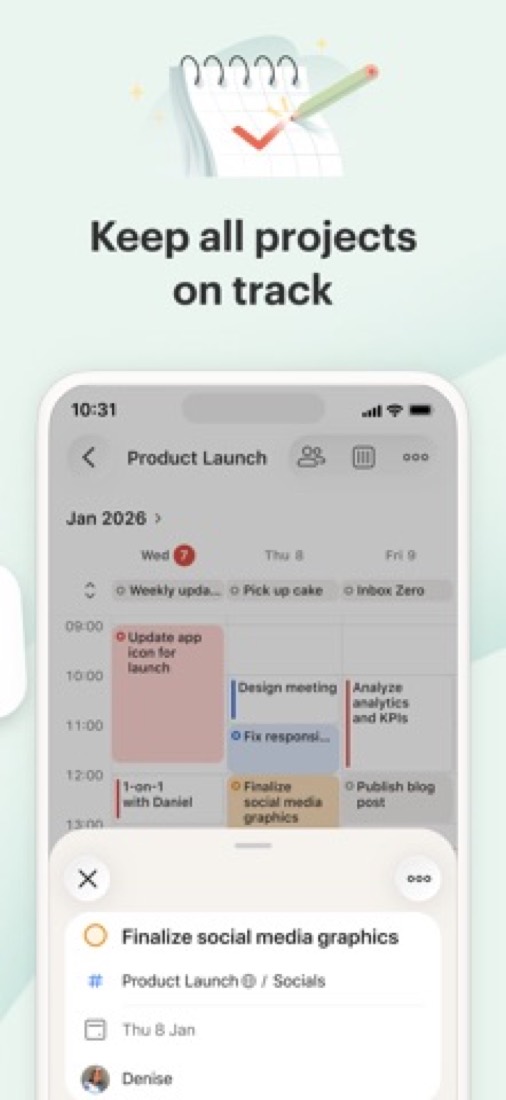
List, board and calendar layouts
Switch any project between a list, a kanban board and a calendar. The calendar layout needs a paid plan.
- 7
Filters, labels and priorities
Saved filter views pull tasks from across projects: 3 on the free plan, 150 on Pro and Business.
- 8
Refunds: 30 days
Pay for a year and you get 30 days to change your mind. On Pro you refund yourself from the settings, with nobody to ask, and the 30 days start again at each yearly renewal.
- 9
A 2.8 GPA, above 92 of 123
That is against the other to-do list apps we grade, on value, the free plan, features, ease of use and platforms.
- 10
Keep it
The plain part of Todoist you could make: tasks, natural-language input, kanban boards, calendar and templates. What surrounds it you could not. The 5 things listed below take a company, not a weekend.
Todoist at a glance
- Pricing
- Free plan, from $5 per user / month, billed yearly
- Free plan
- Yes
- Free trial
- None stated
- Runs on
- Web, macOS, Windows, Linux, iOS, Android, Browser extension
- Made by
- Todoist Inc.
- Category
- To-Do List Apps
- Our grade
- 2.8 GPA, good
- Store rating
- 4.8 on the App Store, 129,494 ratings
The report card
Best for to-do lists on every device
Todoist is a to-do list on every device, where you type "dentist tomorrow 3pm" and it sets the date and the reminder. That part works. But there are no start dates, the free plan stops at 5 projects and 3 filters, the calendar layout and task durations need Pro at $5 a month, and it won't plan your day or handle tasks that block each other. If you need any of those, look elsewhere.
| Subject | Grade | Comment |
|---|---|---|
| Value for money | C | $5 a person a month on yearly billing, $8 for teams. That's the top of what this category charges, and plenty of to-do apps do the basics for less or nothing. What the money buys is the calendar layout, task durations and custom reminders. |
| Free plan and trial | C | Free forever, and reminders are included now. But 5 personal projects and 3 filter views is a cap you'll walk into. Work, home, one side thing and you're done. Only 1 week of activity history is kept, too. |
| Features | C | Typed tasks with dates and repeats, labels, filters and an API. The gaps are real though: no start dates, the calendar layout needs Pro, and personal projects are capped at 5 people even when you're paying. |
| Ease of use | A | 4.8 from 129,494 App Store ratings. Open it, type a thing, done. Nobody needs a tutorial for this. |
| Platforms and integrations | A | Mac, Windows, Linux (yes, really), iPhone, Android, web, watch and browser, plus Google Calendar, Claude and ChatGPT. There's an API too if you like wiring things together. |
An A is worth 4 points, a B 3, a C 2, a D 1 and an F nothing. The GPA is the average of the five.
Who Todoist is for
- Fits if you want one list that's the same on your phone, laptop and watch
- Works for lists where half the tasks repeat, like rent, the bins and the Monday report
Who it is not for
- Skip it if you need start dates to keep things out of sight until they matter
- Not for you if you want tasks dropped into your calendar hour by hour
- Too light for real projects with timelines and things blocking other things
- Tight if you're never paying: 5 projects, 3 filters and 1 week of activity history
- Pricey if you want the calendar layout, task durations or custom reminders, all on Pro at $5 a month, and shared projects stop at 5 people
Good to know
Good for
- People who want one task list on every device they own
- Fast capture: typing a task with its date in a single line
- Households and small teams sharing a few projects
Worth knowing
- The free plan stops at 5 personal projects and keeps only 1 week of activity history.
- Calendar layout, task durations and custom reminders all need Pro or Business.
- Personal projects are capped at 5 people, even on paid plans.
What people say
- 4.8on the App Store, from 129,494 ratings
What they like
- Recurring tasks for routines, from daily chores to jobs that come round every few months, are the reason several reviewers and commenters give for using it.
- Syncing and phone apps that work without upkeep: several commenters say they moved to it from Emacs org-mode or plain text files for that.
- A public API that commenters build their own scripts, dashboards and assistants on, to add tasks or read them from elsewhere.
What they don’t
- No start dates: reviewers and commenters say a task can only be given a due date, so there is no built-in way to hide it until it matters.
- Several commenters say they tried it and went back to paper or a plain text file, which they say of to-do apps in general.
10 App Store reviews, five of them more than three years old, and about 30 Hacker News comments from August 2025 to August 2026
Part 02 · Tips
Insider tips
What most people miss: ways to pay less, settings worth changing and the catches
7
Things most people miss, each from its own help pages
The things about Todoist that are easy to miss until they cost you: ways to pay less, settings worth changing and the catches at renewal or when you leave. Each one is from Todoist’s own pages, linked beside it.
Read on Oct 17, 2026. Read from Todoist's help centre (usage limits, deadlines, Quick Add, reminders, keyboard shortcuts, backups and promo codes) on 17 October 2026. Not tried out: these tips are what its own pages say.
- 1
Pay less
Sharing with more than 5 people? Use a free team, not Pro
Personal projects stop at 5 people, even on Pro. A team project takes 250, and the free Beginner plan gets a team workspace with 5 active team projects, 3 team filters and a week of team activity history.
todoist.com - 2
Easy to miss
No start dates, but a deadline lets the date mean start
On Pro and Business a task can have both a date and a deadline. Todoist's own advice is to set the date for when you plan to begin and the deadline for when it has to be done. Type {next friday} as you add a task to set one. Deadlines don't suit repeating tasks.
todoist.com - 3
Shortcut
Use % for labels now, because @ is being retired
In Quick Add, %email adds a label, #Work /Admin picks a project and a section, +Lucile assigns someone in a shared project and p1 to p3 set priority. Todoist plans to retire @ for labels by the end of 2026. Click a word it took as a date to turn it back into text.
todoist.com - 4
Setting
Choose when automatic reminders go off, even on the free plan
Automatic reminders only work on tasks with a time. Set how early they fire under your avatar, Settings, Reminders, and pick desktop, mobile or email. Typing a reminder like !30 min before into a task needs Pro or Business, though.
todoist.com - 5
Shortcut
Option+Space adds a task from any app
Global Quick Add is Option+Space on a Mac and Ctrl+Space on Windows, and it isn't available on Linux. Inside the app, ? lists every shortcut, Cmd or Ctrl+K opens Quick Find, G then T jumps to Today and E completes the task you're on.
todoist.com - 6
Leaving
Backups leave out completed tasks and archived projects
Pro and Business keep up to 21 automatic backups, made on days you change something. Completed tasks and archived projects aren't in them. Drop to the free plan and new backups stop, but old ones stay downloadable under Settings, Backups, on the web or desktop app.
todoist.com - 7
Pay less
A promo code won't work on an App Store subscription
You can redeem one promo code every 12 months, on Beginner or Pro only. It can't go on a plan bought through the App Store: you'd have to let that end and redeem on the website. And don't hold out for a student or non-profit price. There isn't one.
todoist.com
Part 03 · Pricing
What it costs
Every plan, the free plan, ways to pay less and how prices have moved
$5
A month to start, for each person. There is a free plan too
Todoist has a free plan. Paid plans start at $5 per user / month, billed yearly.
That's the top of what this category charges, and plenty of to-do apps do the basics for less or nothing.
Beginner
$0
5 personal projects, task reminders, list and board layouts, and 3 filter views.
Pro
$5
per user / month, billed yearly ($60)
300 projects, calendar layout, task durations, custom reminders, 150 filter views and Task Assist.
Business
$8
per user / month, billed yearly ($96)
Everything in Pro, plus a shared team workspace with up to 500 team projects, roles and central billing.
The free plan
Beginner plan: 5 personal projects, task reminders, list and board layouts, 3 filter views and 1 week of activity history.
Read from todoist.com on Oct 4, 2026.
Ways to pay less
Annual discount
Save 20% with yearly billing
Todoist's pricing page lists a 20% saving on Pro and Business when billed yearly instead of monthly.
Stated on todoist.com
How its prices have moved
- Dec 10, 2025Pro: $4 per month, billed yearly ($48) → $5 per user / month, billed yearly ($60)Todoist's pricing page of 5 December 2025 still showed the old Pro price beside a notice that new rates take effect on December 10, 2025 for new subscribers and at renewal for existing ones. The new price is the one its page lists today.
- Dec 10, 2025Business: $6 per user / month, billed yearly ($72) → $8 per user / month, billed yearly ($96)Todoist's pricing page of 5 December 2025 still showed the old Business price beside a notice that new rates take effect on December 10, 2025 for new subscribers and at renewal for existing ones. The new price is the one its page lists today.
- Jan 3, 2024Free plan: Free, $0 → Beginner, $0The archived copy of 3 January 2024 calls the free plan Beginner; the US dollar copy before it, of 11 July 2023, calls it Free. The name changed between the two.
- Jul 2, 2022Pro: $3 per month, billed yearly ($36), or $4 billed monthly → $4 per month, billed yearly ($48), or $5 billed monthlyThe archived copy of 2 July 2022 shows $4 a month on yearly billing and $5 monthly; the copy before it, of 1 June 2022, shows $3 and $4. The price changed between the two.
- Jul 2, 2022Business: $5 per user / month, billed yearly ($60), or $6 billed monthly → $6 per user / month, billed yearly ($72), or $8 billed monthlyThe archived copy of 2 July 2022 shows $6 per user a month on yearly billing and $8 monthly; the copy before it, of 1 June 2022, shows $5 and $6. The price changed between the two.
- Jul 1, 2021Pro: Premium, $3 per month, billed yearly → Pro, $3 per month, billed yearlyThe archived copy of 1 July 2021 names the paid personal plan Pro; the copy before it, of 26 January 2021, names it Premium at the same price. The name changed between the two.
What the app costs elsewhere
Each country’s App Store price for “Todoist Pro Legacy - Monthly”, against $6.99 in the United States, in dollars at the day’s rate. The four cheapest and the four dearest of 11.
| Country | Price there | In dollars | Against the US |
|---|---|---|---|
| India | ₹ 330 | $3.41 | 51% less |
| Mexico | $79.00 | $4.34 | 38% less |
| South Africa | R79.99 | $4.84 | 31% less |
| Brazil | R$ 24,90 | $4.98 | 29% less |
| Philippines | ₱ 449.00 | $7.15 | about the same |
| Germany | 6,99 € | $7.83 | 12% more |
| Australia | $11.99 | $8.37 | 20% more |
| United Kingdom | £6.99 | $9.24 | 32% more |
Part 04 · Features
What it does
Its main features, where it runs, what it works with and who makes it
7
Places it runs: Web, macOS, Windows, Linux, iOS, Android and Browser extension
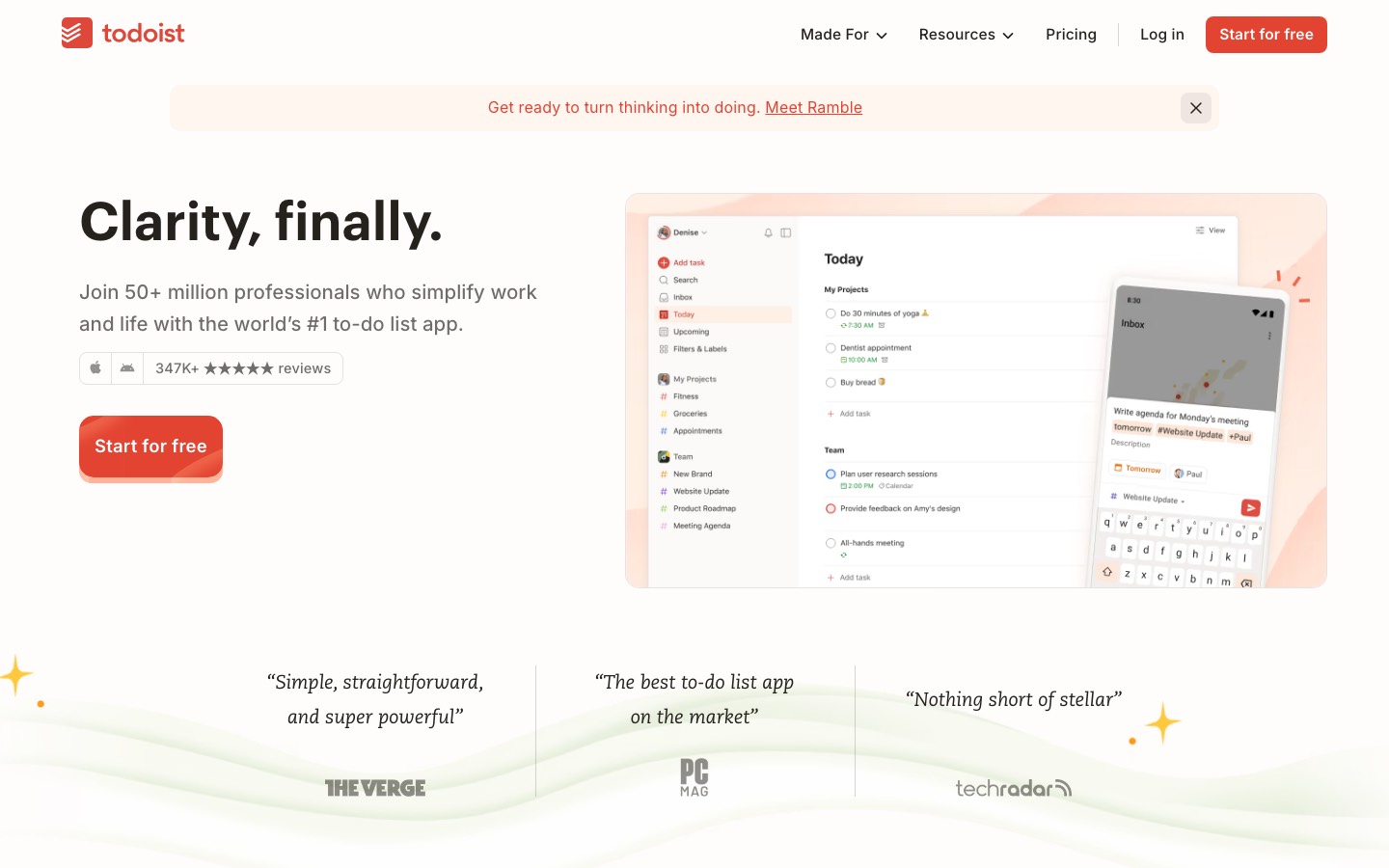
Cross-platform to-do list with natural-language task entry. Here is what it does, as its own site describes it, and what it covers: public API, AI features, templates, tasks, natural-language input, calendar, kanban boards.
Typed tasks with dates and repeats, labels, filters and an API.
- Quick Add
- Capture tasks in natural language as they come to you, including recurring due dates and reminders.
- List, board and calendar layouts
- Switch any project between a list, a kanban board and a calendar. The calendar layout needs a paid plan.
- Filters, labels and priorities
- Saved filter views pull tasks from across projects: 3 on the free plan, 150 on Pro and Business.
- Shared projects
- Share a project to assign tasks and comment on them. Personal projects allow up to 5 people on every plan.
- Team workspace
- Business adds public and private team projects, folders, roles and permissions, and shared templates.
- Ramble and Task Assist
- Ramble turns spoken thoughts into tasks; free accounts get limited sessions. Task Assist is included from Pro.
Where it runs
- Web
- macOS
- Windows
- Linux
- iOS
- Android
- Browser extension
What it works with
- Google Calendar
- Claude
- ChatGPT
Who makes Todoist
Todoist is made by Todoist Inc., the remote company known until 2026 as Doist, which grew out of the task manager its founder built as a student in 2007. It earns money from Pro and Business subscriptions to Todoist and also makes the Twist team chat app.
- Based
- Remote by design, with team members in 94 cities and 38 countriestodoist.com
- Ownership
- Privately held. Privately held, with no parent company: its founder describes it on the company's site as bootstrapped, independent and profitable from day one.todoist.com
- Funding
- Bootstrapped: its Channel Partners page says Todoist has grown since day one without any VC funds or investors, and its founder calls it a completely bootstrapped company in an article on its site.todoist.comtodoist.com
- Team
- 108 team members of 43 nationalities, in 94 cities and 38 countriestodoist.com
- Founders and leaders
- Amir Salihefendic, Founder & CEOtodoist.com
- Hiring
- 2 open roles, both full-time and remote: General Counsel, under finance, and Apple Engineer, under Apple engineeringtodoist.com
- Affiliate program
- Todoist Channel Partner program, run through PartnerStack: ambassadors, affiliates and resellers earn up to 25% commission on each Todoist sale, from any country.todoist.com
- Lately
- Decide what’s urgent, and let the rest wait. · September 2026
- A clearer picture of your team’s work · Apr 23, 2026
- Scan notes, photos, and files for tasks – Task Capture (Beta) · Apr 21, 2026
- Just talk to your wrist – Ramble on Wear OS (Beta) · Mar 23, 2026
Read on Oct 18, 2026 from the company’s own pages and from news reports. What is not stated there is left out.
Part 05 · Standing
Where it stands
Its grades against its category, and whether to keep it or make your own
92/123
Other to-do list apps it is graded above
Todoist's GPA of 2.8 is higher than 92 of the 123 other to-do list apps we grade, and level with 10.
It stands best on platforms and integrations (A, above 108 of 123) and worst on free plan and trial (C, above 6).
Its paid plans start at $5 a month for each person, against a middle price of $3 for the category: 53 of the 68 others that charge start lower.
On features, ease of use and platforms it scores 3.3 out of 4. 2 tools score higher and cost less.
Each grade against the category
Every bar is all 124 to-do list apps we grade, cut by the letter each got. Todoist’s own letter is outlined.
- CValue for moneyAbove 13 of 123
- CFree plan and trialAbove 6 of 123
- CFeaturesAbove 8 of 123
- AEase of useAbove 105 of 123
- APlatforms and integrationsAbove 108 of 123
Price against what you get
Each dot is one of 99 to-do list apps. Further left costs less; higher up scores better on features, ease of use and platforms. Todoist is the marked dot.
What paid plans start at, a month (each step along is roughly double) →
Keep it, or make your own?
Whether this is something you could build for yourself with an AI app builder, and what you would give up.
Keep it
The plain part of Todoist you could make: tasks, natural-language input, kanban boards, calendar and templates. What surrounds it you could not. The 5 things listed below take a company, not a weekend.
It is one of the better ones too: its GPA of 2.8 is higher than 92 of the 123 other to-do list apps we grade. It costs $60 a year.
What you could make
- Tasks, natural-language input, kanban boards, calendar and templates: an app builder makes these well.
What you could not
- Apps for macOS, Windows, Linux, iOS and Android that stay in step with each other.
- It is priced for each person, which means accounts and billing for a team.
- It plugs into other products, Google Calendar, Claude and ChatGPT among them, and has an API.
- AI features, unless you pay a model provider for each request yourself.
- What a company asks for before it lets staff use something: roles and permissions.
What this rests on. Todoist’s listing: what it does, where it runs, what it plugs into and what it costs. It is a judgement about the kind of software this is. We have not built a replacement for it, and making your own means looking after it too. How we decide, and every tool’s verdict.
Part 06 · Refunds
After you pay
Getting your money back, getting out, and getting help
What happens once you have paid: whether you can get your money back, how to leave, and how to reach a person when something goes wrong. Each is graded from Todoist’s own terms and help pages.
Refunds and cancelling
Good · checked Oct 12, 2026
Pay for a year and you get 30 days to change your mind. On Pro you refund yourself from the settings, with nobody to ask, and the 30 days start again at each yearly renewal. It's a B and not an A because monthly payments don't come back, and a Business team has to write in for its money.
- Refund window
- 30 days
- How you cancel
- Yourself, in settings
- Getting your money back
A yearly Pro plan cancelled within 30 days of purchase or renewal is refunded in full, and one bought on the website can be refunded from the subscription settings. A yearly Business plan is refunded within 30 days of purchase: cancel the team, then write in with the receipt. Monthly payments are not refundable unless consumer law requires it. Apple handles refunds for App Store purchases.
Stated on todoist.com- How to cancel Todoist
A Pro plan paid by card is cancelled under Settings, then Subscription, in the web or desktop app, not the mobile app. A Business plan is cancelled by a team admin from the team's Subscription tab. A plan bought through the App Store or Google Play is cancelled in that store. Anyone locked out of the account is told to write in so the plan can be cancelled for them.
- Log in to Todoist on the web or in the desktop app (the Subscription tab is not in the mobile app)
- Click your avatar at the top-left
- Select Settings
- Select Subscription
- Click Cancel plan
- Choose a reason for cancelling
- Click Cancel subscription to confirm
- Within 30 days on a yearly plan, pick between cancelling at the end of the period and ending it now with a refund, then confirm
- What you keep afterwards
Pro features stay until the end of the billing period, then the account drops to the free Beginner plan. Tasks, projects and comments are kept, but projects beyond 5 become view-only, oldest first, filters beyond 3 cannot be opened, and automatic backups stop, though earlier backups stay available. A separate article on deleting an account says each project can be exported as a CSV file.
Stated on todoist.com- Renewals
The terms say a subscription renews automatically each period until it is cancelled, and that you must cancel before it renews to avoid the next charge. They mention no reminder before a renewal. The refund help article adds that a yearly Pro plan cancelled within 30 days of a renewal is refunded in full.
Stated on todoist.com
In your favour
- A yearly Pro or Business plan comes back in full if you cancel within 30 days of buying it.
- The 30 days start again when a yearly Pro plan renews, so a renewal you forgot about isn't money lost.
- On Pro bought on the website you cancel and refund yourself in the settings, with nobody to email.
- After you cancel you keep every task, project and comment on the free Beginner plan.
Watch out for
- Monthly payments aren't refundable, unless consumer law where you live says otherwise.
- Bought it in the App Store? Apple decides the refund, not Todoist.
- Back on Beginner, projects beyond 5 go view-only, oldest first, until you archive some or pay again.
- A Business team can't refund itself: cancel the team, then write in with the receipt.
Customer support
Ordinary · checked Oct 12, 2026
You get a ticket form and a written help centre, on every plan including the free one. What you don't get is a phone line, a stated reply time or any hours, so there's no telling how long you'd wait. That's what most apps at this price offer, and it's a C.
Ways to get help
Contact form or ticket
A ticket submitted through the contact page, for questions and problems. The help article that points to it is marked for Beginner, Pro and Business, and says there is no phone support.
Stated on todoist.comHelp centre
Written articles on features, billing, teams, integrations and troubleshooting, offered in 19 languages and open to anyone without logging in.
Stated on todoist.com
Not listed on Todoist’s pages: live chat, phone.
- When people answer
Its pages do not say.
- How fast it says it replies
Its pages do not say.
- What depends on your plan
The help article on contacting support is marked as applying to Beginner, Pro and Business alike. None of the pages read describes a priority queue, live chat or any other difference by plan.
Stated on todoist.com
In your favour
- Free users can send a ticket too, not only people who pay.
- The help centre has step-by-step articles on cancelling, refunds and deleting an account.
Watch out for
- There is no phone support, and Todoist says so plainly.
- No page says when the support team works or how fast it aims to reply.
What these two grades rest on. Read on 12 October 2026: Todoist's terms of service, its help articles on refunds, cancelling, managing a Pro subscription, deleting an account and phone support, and its plans and billing FAQ. Its contact page showed our reader only a log-in prompt, so the ticket form itself was not read. Nobody here cancelled a plan or contacted its support. They are graded apart from the five that make the GPA. How we grade refunds and support.
Part 07 · Alternatives
The alternatives
The tools it is most often weighed against, side by side





TickTick, Things 3, Any.do, Superlist and Microsoft To Do
The 5 tools Todoist is most often weighed against, with where each one differs from it.
- 3.4GPA
TickTick
Free plan · from $49.99/yr
To-do list with a calendar, habit tracker and Pomodoro timer built in.
- Todoist also covers templates.
- TickTick also covers Pomodoro timer and habit tracking.
- 2.6GPA
Things 3
Free trial · from $9.99 one-time
Personal task manager for Apple devices, sold as a one-time purchase.
- Todoist has a free plan. Things 3 does not, though it has a free trial.
- Only Todoist lists a web app.
- Only Todoist lists Windows, Linux and Android apps.
- 2.8GPA
Any.do
Free plan · from $4.99/mo
To-do list and calendar app with separate family and team plans.
- Only Todoist lists a Linux app.
- Todoist also covers natural-language input.
- Any.do also covers Gantt & timelines and workflow automation.
- 2.6GPA
Superlist
Free plan · from $5/mo
To-do lists that hold tasks and notes together, with AI meeting notes.
- Only Todoist lists Windows and Linux apps.
- Only Todoist lists a browser extension.
- Todoist also covers templates, natural-language input, calendar and kanban boards.
- 3.6GPA
Microsoft To Do
Free
Free to-do list from Microsoft that syncs with Outlook tasks.
- Only Todoist lists a Linux app.
- Only Todoist lists a browser extension.
- Todoist also covers templates, natural-language input, calendar and kanban boards.
Part 08 · Questions
Quick answers
The questions people ask about it, each answered in a line or two
18
Questions, each answered in a line or two
The short version of everything above, for when you only need the answer. Each one is told in full in its part of the guide.
Is Todoist free?
Todoist has a free plan. Beginner plan: 5 personal projects, task reminders, list and board layouts, 3 filter views and 1 week of activity history.
How much does Todoist cost?
Todoist lists 3 plans. Beginner: $0.
What platforms does Todoist work on?
Todoist is available on Web, macOS, Windows, Linux, iOS and Android. It also has a browser extension.
Does Todoist offer any discounts?
Todoist publicly lists the following: Save 20% with yearly billing.
How is Todoist rated?
Todoist's iPhone and iPad app averages 4.8 out of 5 from 129,494 ratings on the App Store in the United States, as read on Oct 5, 2026.
Is Todoist any good?
We have not tested Todoist, so this is what reviewers say. Often praised: Recurring tasks for routines, from daily chores to jobs that come round every few months, are the reason several reviewers and commenters give for using it.
Is Todoist open source?
Todoist is not described as open source on its own site, as read on Oct 4, 2026.
Does Todoist have an API?
Yes. Todoist offers a public API, according to its own site.
What does Todoist integrate with?
Todoist's listing names Google Calendar, Claude and ChatGPT. A listing names up to eight integrations, so it may connect to more.
Who makes Todoist?
Todoist is made by Todoist Inc. Privately held, with no parent company: its founder describes it on the company's site as bootstrapped, independent and profitable from day one.
What are the alternatives to Todoist?
The closest alternatives to Todoist in our directory are TickTick, Things 3, Any.do, Superlist and Microsoft To Do.
Does Todoist give refunds?
A yearly Pro plan cancelled within 30 days of purchase or renewal is refunded in full, and one bought on the website can be refunded from the subscription settings.
How do I cancel Todoist?
A Pro plan paid by card is cancelled under Settings, then Subscription, in the web or desktop app, not the mobile app.
What happens to my data if I cancel Todoist?
Pro features stay until the end of the billing period, then the account drops to the free Beginner plan.
How do I contact Todoist support?
Todoist's pages list these ways to get help: contact form or ticket and help centre.
How does Todoist compare with other to-do list apps?
Todoist's GPA of 2.8 is higher than 92 of the 123 other to-do list apps we grade, and level with 10.
Is Todoist good value for money?
ToolGPA grades Todoist C for value for money. Its paid plans start at $5 a month for each person, against a middle price of $3 for the category: 53 of the 68 others that charge start lower.
Could I make my own version of Todoist?
The plain part of Todoist you could make: tasks, natural-language input, kanban boards, calendar and templates.
Where this guide comes from
The prices, plans, platforms and features were read from Todoist’s own pages on Oct 4, 2026, and the grades were given on Oct 10, 2026. Based on Todoist's pricing, features, downloads and help pages as of 8 October 2026, its App Store reviews and Hacker News threads about it. Also tested with a demo account on 2026-05-06.
Every tool we list gets five grades, A to F, each with its reason, and a GPA that averages them. How each is decided is at toolgpa.com/grades. This guide is ToolGPA’s own work; it is not made, paid for or approved by Todoist Inc. Prices change, so check todoist.com before you buy.
Part 09 · About
About ToolGPA
Who made this guide, what else is on the site, and how to cite it
3,189
Tools graded, in 94 categories
ToolGPA grades software the way a school report grades a pupil: five subjects, a letter for each with the reason written beside it, and a GPA that averages them. Prices, plans and platforms are read from each maker’s own pages and dated, so you always know how fresh a figure is.
Every grade, review and ranking on ToolGPA is our own judgement. No company can pay for a grade or change one. Every tool on the site has a guide like this one, free to download and pass on. It all lives at toolgpa.com.
3,189
tools graded
94
categories
426
price changes on record
579
apps priced in 12 countries
What else is on toolgpa.com
- Todoist, kept up to dateEverything in this guide, with prices and grades as they are todaytoolgpa.com/tools/todoist
- How grades are givenThe rules behind every letter and every GPAtoolgpa.com/grades
- Value chartsWhat each tool costs against what it scores, for every categorytoolgpa.com/charts
- CompareAny two tools side by side, plan by plantoolgpa.com/compare
- Price changesEvery price rise and cut on record, each with its sourcetoolgpa.com/price-changes
- Prices by countryWhat apps cost on the App Store in 12 countriestoolgpa.com/prices-by-country
- Pay lessEvery public discount: yearly billing, students, nonprofitstoolgpa.com/save
- Keep or makeWhich tools are worth paying for, and which you could build yourselftoolgpa.com/keep-or-make
Scan for the live page
Prices and grades as they are today
Quoting this guide?
Please name ToolGPA and link to the live page, so readers can check the figures for themselves:
ToolGPA, "Todoist: The Insider's Guide", checked Oct 4, 2026. https://toolgpa.com/tools/todoist
Know someone choosing between to-do list apps?
Send them this guide: toolgpa.com/tools/todoist/guide
ToolGPA elsewhere: youtube.com/@toolgpa
See our other guides
The best-graded to-do list apps after Todoist, each with an Insider's Guide of its own.
- To-Do List Apps Insider's GuideEvery one of the 124 to-do list apps we grade, compared
- Apple Reminders Insider's GuideApple's free to-do app for iPhone, iPad, Mac and Apple Watch3.6 GPA
- Microsoft To Do Insider's GuideFree to-do list from Microsoft that syncs with Outlook tasks3.6 GPA
- Google Tasks Insider's GuideGoogle's to-do list, built into Gmail, Calendar, Chat and Docs3.4 GPA


Choosing software? Every tool graded, every price dated.
Compare tools at toolgpa.com ›Everything in this guide is ToolGPA’s own summary of what Todoist’s pages, its app-store listings and public reviews said on the dates shown. Grades are our judgement under the rules at toolgpa.com/grades. Every grade, review and ranking on ToolGPA is our own judgement. No company can pay for a grade or change one. Todoist is a trademark of its owner, and this guide is not made, paid for or approved by Todoist Inc. Prices and plans change: check todoist.com before you buy.