The FlowSavvy Insider’s Guide
Everything we know about FlowSavvy in one document: what it costs, its grades, getting a refund, getting help and what else to look at. Read it here, or keep a copy.
FlowSavvy
The Insider’s Guide
Calendar that auto-schedules tasks and replans when things change
Every plan, grade, refund rule and rival among daily planner apps, read from FlowSavvy’s own pages.
Made by Schezzy, LLC · checked Oct 5, 2026 · toolgpa.com
Contents
- 01WelcomeWhat it is, who it suits, its grades and the ten things to know first
- 02Insider tipsWhat most people miss: ways to pay less, settings worth changing and the catches
- 03What it costsEvery plan, the free plan, ways to pay less and how prices have moved
- 04What it doesIts main features, where it runs, what it works with and who makes it
- 05Where it standsIts grades against its category, and whether to keep it or make your own
- 06The alternativesThe tools it is most often weighed against, side by side
- 07Quick answersThe questions people ask about it, each answered in a line or two
- 08About ToolGPAWho made this guide, what else is on the site, and how to cite it
ToolGPA put this guide together from FlowSavvy’s own pages, its app-store listings and our grades. Every fact in it is on FlowSavvy’s page too, where it is kept up to date. Checked Oct 5, 2026.
Part 01 · Overview
Welcome
What it is, who it suits, its grades and the ten things to know first
2.6
GPA, above 35 of the 69 other daily planner apps we grade
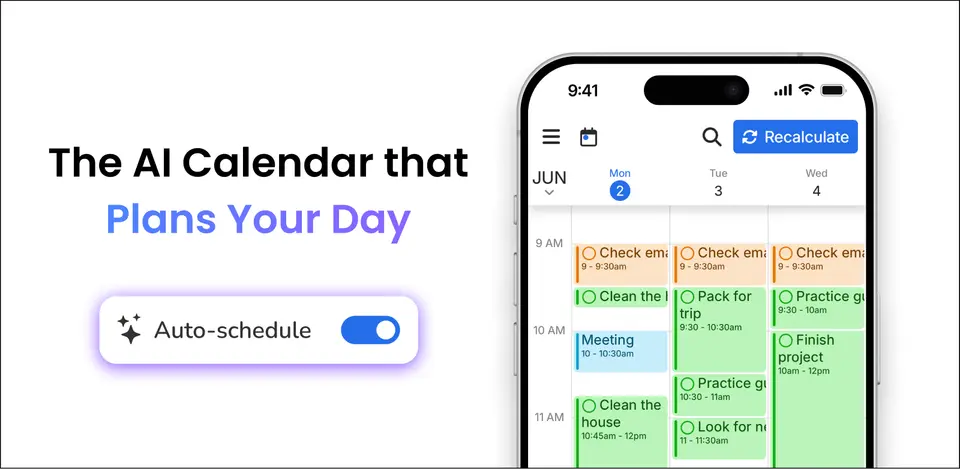
FlowSavvy is a calendar and task list that schedules tasks into free time automatically. It plans around events from Google, Outlook.com and iCloud calendars, works back from each task's due date and duration, and recalculates the schedule when something changes or a task is missed. The Basic plan is free; Pro extends the scheduling range and adds priorities, dependencies and an API.
To get you started, here are 9 things to know about FlowSavvy, taken from its own pages and our grades.
Give each task a due date and a length, and it slots them into your free time, then reshuffles when your day changes.
- 1
Best for letting the calendar time-block for you
FlowSavvy is a calendar that does the time blocking for you.
- 2
Paid plans start at $10 a month
As its pricing page puts it: $10 per month, billed yearly.
- 3
There is a free plan
Basic plan, free forever: unlimited auto-reschedules, auto-scheduling up to 2 weeks out, 1 set of scheduling hours, 3 repeating auto-scheduled tasks and 5 task lists.
- 4
It runs on 3 platforms
Web, iOS and Android.
- 5
Auto-scheduling
Places tasks into open time on the calendar based on due dates and durations, and can split a task around events. Basic plans 2 weeks ahead and Pro 8 weeks.
- 6
Automatic rescheduling
The schedule is rebuilt whenever an event or task changes, and a Recalculate button puts missed tasks back on the calendar. Reschedules are unlimited on both plans.
- 7
Scheduling hours
Sets of hours such as work or personal define when tasks may be scheduled. Basic includes one set; Pro allows unlimited profiles.
- 8
A 2.6 GPA, above 35 of 69
That is against the other daily planner apps we grade, on value, the free plan, features, ease of use and platforms.
- 9
Keep it
The plain part of FlowSavvy you could make: time blocking, calendar and tasks. What surrounds it you could not. The 5 things listed below take a company, not a weekend.
FlowSavvy at a glance
- Pricing
- Free plan, from $10 per month, billed yearly
- Free plan
- Yes
- Free trial
- 7-day free trial of the Pro plan, in addition to the free Basic plan.
- Runs on
- Web, iOS, Android
- Made by
- Schezzy, LLC
- Category
- Daily Planner Apps
- Our grade
- 2.6 GPA, good
- Store rating
- 4.8 on the App Store, 426 ratings
The report card
Best for letting the calendar time-block for you
FlowSavvy is a calendar that does the time blocking for you. Give each task a due date and a length, and it slots them into your free time, then reshuffles when your day changes. The free plan only plans 2 weeks ahead with 3 repeating tasks and 5 lists, priorities and the API are Pro at $10 a month billed yearly, and there's no desktop app or team plan.
| Subject | Grade | Comment |
|---|---|---|
| Value for money | C | Pro is $10 a month billed yearly, $14 month to month. The dearer quarter of this category starts at $10, so that's the top of the ordinary range and the monthly rate is past it. What it buys is the 8-week range, priorities, dependencies, unlimited lists and the API. |
| Free plan and trial | C | Basic is free forever with unlimited auto-reschedules and calendar sync. But you'll meet the caps: 2 weeks of planning, 1 set of scheduling hours, 3 repeating auto-scheduled tasks and 5 lists. |
| Features | B | It covers the auto-scheduling job: tasks placed in free time from their due dates and lengths, split around events, and the whole plan rebuilt when something moves. Two-way sync with Google, Outlook.com and iCloud, and tasks pulled from Todoist, Google Tasks, Microsoft To Do and Apple Reminders. |
| Ease of use | B | 4.8 from about 430 App Store ratings, short of the 1,000 ratings we want behind an A. You don't drag blocks around: it fills the calendar itself, and a Recalculate button puts missed tasks back. |
| Platforms and integrations | B | Web, iPhone and Android, with four calendar and task apps syncing both ways and a public API, an MCP server and Zapier on Pro. What keeps it off the top is the missing desktop app: on a computer it's the browser or an installed web app, nothing native. |
An A is worth 4 points, a B 3, a C 2, a D 1 and an F nothing. The GPA is the average of the five.
Who FlowSavvy is for
- Fits if you want tasks dropped onto your calendar without dragging blocks yourself
- Works for people who already keep events in Google, Outlook.com or iCloud
Who it is not for
- Skip it if you want a native Mac or Windows app, as on a computer it runs in the browser
- Tight if you're staying free and plan far ahead, since Basic only schedules 2 weeks out with 3 repeating tasks and 5 lists
- Not for you if you're planning for a team, because it's built for one person
- Watch out: priorities, dependencies, writing tasks back to your calendar and the API all need Pro
- Pricey if you pay monthly, at $14 against $10 a month billed yearly
Good to know
Good for
- Individuals who want tasks placed on the calendar without manual time blocking
- Deadline-driven workloads that shift often during the week
- People who already keep events in Google, Outlook.com or iCloud calendars
Worth knowing
- Basic schedules only 2 weeks ahead and is limited to 3 repeating auto-scheduled tasks, 5 task lists and 1 set of scheduling hours.
- Priority levels, task dependencies, syncing tasks out to other calendars, and the API, MCP and Zapier integrations all require Pro.
- There is no native desktop app. On a computer it runs in the browser or as an installed progressive web app.
- The vendor aims it at individuals and does not offer team or enterprise features.
Part 02 · Tips
Insider tips
What most people miss: ways to pay less, settings worth changing and the catches
7
Things most people miss, each from its own help pages
The things about FlowSavvy that are easy to miss until they cost you: ways to pay less, settings worth changing and the catches at renewal or when you leave. Each one is from FlowSavvy’s own pages, linked beside it.
Read on Oct 17, 2026. Read from FlowSavvy's help centre articles on scheduling settings, refunds, cancelling and changing plans on 17 October 2026. Not tried out: these tips are what its own pages say.
- 1
Setting
Lock started time blocks once you trust the schedule
Off by default, this setting in General stops in-progress and past tasks shifting when you add a task or edit an event. They only move when you press Recalculate. FlowSavvy suggests it once you're comfortable and want done work to stay put.
help.flowsavvy.app - 2
Setting
Choose Balanced or Front-load for how work is spread
Settings > General > Workload distribution decides whether tasks are spread evenly over the days or done as early as possible. If your calendar looks oddly empty, that's often why. Tasks close to their deadline are front-loaded either way.
help.flowsavvy.app - 3
Easy to miss
Turn off Busy on all-day events, or that day gets no tasks
A busy all-day event, say a birthday or a holiday from a shared calendar, blocks the whole day and shows as diagonal stripes. Open the event and turn off Busy. Big buffer or travel times on nearby events can squeeze tasks out too.
help.flowsavvy.app - 4
Easy to miss
Split a big project into a smaller task that repeats
Its help page turns a 20-hour task due January 10 into a 2-hour task first due January 1 that repeats daily for 10 days. You can set how many days early each one may start. On Basic, that uses one of your 3 repeating auto-scheduled tasks.
help.flowsavvy.app - 5
Pay less
Pay on the web or Android if you might want a refund
Web and Google Play subscriptions can be refunded by FlowSavvy if you subscribed within the last 30 days. App Store purchases are Apple's call, under Apple's own rules. A refund then takes about 5 to 10 business days to reach you.
help.flowsavvy.app - 6
Renewal
Cancel before your renewal date, not on it
FlowSavvy retries a failed renewal up to three times, so a charge after cancelling is usually a retry that started before you cancelled. On the web, cancel from the profile menu > Manage subscription > Cancel plan. Pro stays on until the period ends.
help.flowsavvy.app - 7
Leaving
Your tasks stay when Pro ends, only Pro features switch off
When a plan expires, your events, tasks and calendars stay on your account, and Pro features are turned off until a new plan starts. On Google Play you have to let the old plan run out before starting a different one.
help.flowsavvy.app
Part 03 · Pricing
What it costs
Every plan, the free plan, ways to pay less and how prices have moved
$10
A month to start. There is a free plan too
FlowSavvy has a free plan. Paid plans start at $10 per month, billed yearly.
Basic is free forever with unlimited auto-reschedules and calendar sync.
Basic
$0
Auto-scheduling up to 2 weeks out, calendar sync, 1 set of scheduling hours, 3 repeating auto-scheduled tasks and 5 task lists.
Pro
$10
per month, billed yearly ($14 billed monthly)
Auto-scheduling up to 8 weeks out, unlimited scheduling hours and lists, priorities, task dependencies, and API, MCP and Zapier access.
The free plan
Basic plan, free forever: unlimited auto-reschedules, auto-scheduling up to 2 weeks out, 1 set of scheduling hours, 3 repeating auto-scheduled tasks and 5 task lists.
Trying it first
7-day free trial of the Pro plan, in addition to the free Basic plan.
Read from flowsavvy.app on Oct 5, 2026.
Ways to pay less
Annual discount
Save 28% with yearly billing
Pro costs $10 a month when billed yearly against $14 billed monthly. FlowSavvy's pricing page labels the yearly option as a 28% saving.
Stated on flowsavvy.appEducation
50% off the first year for students
Students get 50% off the first year of the annual plan by emailing support from an institutional address. The discount is redeemed in a browser, not in the app stores.
Stated on help.flowsavvy.appOther savings
Referral program
Friends who sign up through your referral link get 1 month of Pro free, and you earn rewards such as free months of Pro once they continue on a paid subscription.
Stated on help.flowsavvy.app
What the app costs elsewhere
Each country’s App Store price for “FlowSavvy Pro”, against $6.99 in the United States, in dollars at the day’s rate. The four cheapest and the four dearest of 11.
| Country | Price there | In dollars | Against the US |
|---|---|---|---|
| Turkey | ₺179,99 | $3.66 | 48% less |
| Indonesia | Rp 119ribu | $6.66 | about the same |
| Australia | $9.99 | $6.97 | about the same |
| Canada | $9.99 | $7.02 | about the same |
| Germany | 7,99 € | $8.95 | 28% more |
| South Africa | R149.99 | $9.07 | 30% more |
| United Kingdom | £6.99 | $9.24 | 32% more |
| Philippines | ₱ 7,990.00 | $127.19 | 1720% more |
Part 04 · Features
What it does
Its main features, where it runs, what it works with and who makes it
3
Places it runs: Web, iOS and Android
Calendar that auto-schedules tasks and replans when things change. Here is what it does, as its own site describes it, and what it covers: public API, AI features, tasks, time blocking, auto-scheduling, calendar.
Two-way sync with Google, Outlook.com and iCloud, and tasks pulled from Todoist, Google Tasks, Microsoft To Do and Apple Reminders.
- Auto-scheduling
- Places tasks into open time on the calendar based on due dates and durations, and can split a task around events. Basic plans 2 weeks ahead and Pro 8 weeks.
- Automatic rescheduling
- The schedule is rebuilt whenever an event or task changes, and a Recalculate button puts missed tasks back on the calendar. Reschedules are unlimited on both plans.
- Scheduling hours
- Sets of hours such as work or personal define when tasks may be scheduled. Basic includes one set; Pro allows unlimited profiles.
- Calendar sync
- Two-way sync with Google Calendar, Outlook.com and iCloud on both plans. Writing FlowSavvy tasks back to those calendars is a Pro feature.
- Priorities and dependencies
- Pro adds priority levels and dependency chains for tasks that must follow an order. On the free plan, tasks are prioritized by due date.
- Task app sync, API and MCP
- Syncs tasks with Todoist, Google Tasks, Microsoft To Do and Apple Reminders. A public API, an MCP server for ChatGPT and Claude, and Zapier are Pro-only.
Where it runs
- Web
- iOS
- Android
What it works with
- Google Calendar
- Outlook Calendar
- iCloud Calendar
- Todoist
- Google Tasks
- Microsoft To Do
- Apple Reminders
- Zapier
Who makes FlowSavvy
FlowSavvy is made by Schezzy, LLC, whose site names Jacob Barnes and Lucas Barnes as its co-founders. It earns money from FlowSavvy Pro subscriptions, sold alongside a free plan, and pays affiliates a share of what referred customers pay.
- Founders and leaders
- Jacob Barnes, Co-founder and co-creator of FlowSavvyflowsavvy.app
- Lucas Barnes, Co-founderflowsavvy.app
- Affiliate program
- A 40% commission on all payments from customers you refer, run through FirstPromoter. Applicants need an existing audience; coupon sites and paid ads on its brand keywords are not allowed.flowsavvy.firstpromoter.com
- Referral program
- A friend who signs up with your link gets one month of FlowSavvy Pro free, and you get a free month of Pro when they go on to a paid subscription.help.flowsavvy.app
- Lately
- Redesigned the integrations directory · Oct 5, 2026
- Added 2-way sync with Google Tasks and Microsoft To Do · Sep 26, 2026
- Added an official ChatGPT plugin · Aug 28, 2026
- Zapier Integration · Aug 17, 2026
Read on Oct 18, 2026 from the company’s own pages and from news reports. What is not stated there is left out.
Part 05 · Standing
Where it stands
Its grades against its category, and whether to keep it or make your own
35/69
Other daily planner apps it is graded above
FlowSavvy's GPA of 2.6 is higher than 35 of the 69 other daily planner apps we grade, and level with 12.
It stands best on ease of use (B, above 37 of 69) and worst on free plan and trial (C, above 6).
Its paid plans start at $10 a month, against a middle price of $4.17 for the category: 42 of the 52 others that charge start lower.
On features, ease of use and platforms it scores 3.0 out of 4. 6 tools score higher and cost less.
Each grade against the category
Every bar is all 70 daily planner apps we grade, cut by the letter each got. FlowSavvy’s own letter is outlined.
- CValue for moneyAbove 11 of 69
- CFree plan and trialAbove 6 of 69
- BFeaturesAbove 32 of 69
- BEase of useAbove 37 of 69
- BPlatforms and integrationsAbove 25 of 69
Price against what you get
Each dot is one of 57 daily planner apps. Further left costs less; higher up scores better on features, ease of use and platforms. FlowSavvy is the marked dot.
What paid plans start at, a month (each step along is roughly double) →
Keep it, or make your own?
Whether this is something you could build for yourself with an AI app builder, and what you would give up.
Keep it
The plain part of FlowSavvy you could make: time blocking, calendar and tasks. What surrounds it you could not. The 5 things listed below take a company, not a weekend.
It costs $120 a year.
What you could make
- Time blocking, calendar and tasks: an app builder makes these well.
What you could not
- A scheduler that rearranges your day as things move.
- A real app for iOS and Android. Something home-made would be a web page.
- It plugs into other products, Google Calendar, Outlook Calendar and iCloud Calendar among them, and has an API.
- AI features, unless you pay a model provider for each request yourself.
- The depth: we grade its features B, which means it covers the whole job.
What this rests on. FlowSavvy’s listing: what it does, where it runs, what it plugs into and what it costs. It is a judgement about the kind of software this is. We have not built a replacement for it, and making your own means looking after it too. How we decide, and every tool’s verdict.
Part 06 · Alternatives
The alternatives
The tools it is most often weighed against, side by side





Motion, SkedPal, Reclaim.ai, Trevor AI and TimeHero
The 5 tools FlowSavvy is most often weighed against, with where each one differs from it.
- 2.4GPA
Motion
Free trial · from $19/mo
AI work planner that auto-schedules tasks on your calendar.
- FlowSavvy has a free plan. Motion does not, though it has a free trial.
- Only Motion lists macOS and Windows apps.
- FlowSavvy also covers time blocking.
- 2.4GPA
SkedPal
Free trial · from $9.95/mo
Auto-scheduling calendar that time-blocks your to-do list.
- FlowSavvy has a free plan. SkedPal does not, though it has a free trial.
- Only SkedPal lists macOS, Windows and Linux apps.
- SkedPal also covers natural-language input and time tracking.
- 2.0GPA
Reclaim.ai
Free plan · from $10/mo
AI scheduling layer for Google Calendar and Outlook.
- Only FlowSavvy lists iOS and Android apps.
- Reclaim.ai also covers booking links and habit tracking.
- 2.6GPA
Trevor AI
Free plan · from $5/mo
Web planner that time-blocks tasks into your calendar with AI.
- Only FlowSavvy lists iOS and Android apps.
- Trevor AI also covers reports.
- 2.2GPA
TimeHero
Free trial · from $4.60/mo
Task and project planner that schedules work around your calendar.
- FlowSavvy has a free plan. TimeHero does not, though it has a free trial.
- Only FlowSavvy lists an Android app.
- Only TimeHero lists macOS and Windows apps.
Part 07 · Questions
Quick answers
The questions people ask about it, each answered in a line or two
17
Questions, each answered in a line or two
The short version of everything above, for when you only need the answer. Each one is told in full in its part of the guide.
Is FlowSavvy free?
FlowSavvy has a free plan. Basic plan, free forever: unlimited auto-reschedules, auto-scheduling up to 2 weeks out, 1 set of scheduling hours, 3 repeating auto-scheduled tasks and 5 task lists.
How much does FlowSavvy cost?
FlowSavvy lists 2 plans. Basic: $0.
What platforms does FlowSavvy work on?
FlowSavvy is available on Web, iOS and Android.
Does FlowSavvy offer any discounts?
FlowSavvy publicly lists the following: Save 28% with yearly billing; 50% off the first year for students; Referral program.
How is FlowSavvy rated?
FlowSavvy's iPhone and iPad app averages 4.8 out of 5 from 426 ratings on the App Store in the United States, as read on Oct 5, 2026.
Does FlowSavvy have a Windows app?
No Windows app was listed when its pages were read on Oct 5, 2026. FlowSavvy is listed for Web, iOS and Android.
Does FlowSavvy have a macOS app?
No macOS app was listed when its pages were read on Oct 5, 2026. FlowSavvy is listed for Web, iOS and Android.
Is FlowSavvy open source?
FlowSavvy is not described as open source on its own site, as read on Oct 5, 2026.
Does FlowSavvy have an API?
Yes. FlowSavvy offers a public API, according to its own site.
What does FlowSavvy integrate with?
FlowSavvy's listing names Google Calendar, Outlook Calendar, iCloud Calendar, Todoist, Google Tasks, Microsoft To Do, Apple Reminders and Zapier.
Does FlowSavvy have a student discount?
50% off the first year for students. Students get 50% off the first year of the annual plan by emailing support from an institutional address.
Does FlowSavvy have a free trial?
Yes. 7-day free trial of the Pro plan, in addition to the free Basic plan.
Who makes FlowSavvy?
FlowSavvy is made by Schezzy, LLC.
What are the alternatives to FlowSavvy?
The closest alternatives to FlowSavvy in our directory are Motion, SkedPal, Reclaim.ai, Trevor AI and TimeHero.
How does FlowSavvy compare with other daily planner apps?
FlowSavvy's GPA of 2.6 is higher than 35 of the 69 other daily planner apps we grade, and level with 12.
Is FlowSavvy good value for money?
ToolGPA grades FlowSavvy C for value for money. Its paid plans start at $10 a month, against a middle price of $4.17 for the category: 42 of the 52 others that charge start lower.
Could I make my own version of FlowSavvy?
The plain part of FlowSavvy you could make: time blocking, calendar and tasks.
Where this guide comes from
The prices, plans, platforms and features were read from FlowSavvy’s own pages on Oct 5, 2026, and the grades were given on Oct 10, 2026. Graded from this listing, whose facts were read from FlowSavvy's own pages on 5 October 2026, and its App Store rating. Also tested with a demo account on 2026-08-20.
Every tool we list gets five grades, A to F, each with its reason, and a GPA that averages them. How each is decided is at toolgpa.com/grades. This guide is ToolGPA’s own work; it is not made, paid for or approved by Schezzy, LLC. Prices change, so check flowsavvy.app before you buy.
- flowsavvy.app
- flowsavvy.app/pricing
- flowsavvy.app/download
- help.flowsavvy.app/en/articles/9007150-pricing-and-discounts
- help.flowsavvy.app/en/articles/9958874-referral-program
- help.flowsavvy.app/en/articles/8502482-install-flowsavvy-as-a-standalone-app-on-desktop
- help.flowsavvy.app/en/articles/13339919-sync-with-google-outlook-and-icloud-calendar
- help.flowsavvy.app/en/articles/15410896-integrations-api
- help.flowsavvy.app/en/articles/17207028-how-to-integrate-google-tasks-with-flowsavvy
Part 08 · About
About ToolGPA
Who made this guide, what else is on the site, and how to cite it
3,189
Tools graded, in 94 categories
ToolGPA grades software the way a school report grades a pupil: five subjects, a letter for each with the reason written beside it, and a GPA that averages them. Prices, plans and platforms are read from each maker’s own pages and dated, so you always know how fresh a figure is.
Every grade, review and ranking on ToolGPA is our own judgement. No company can pay for a grade or change one. Every tool on the site has a guide like this one, free to download and pass on. It all lives at toolgpa.com.
3,189
tools graded
94
categories
426
price changes on record
579
apps priced in 12 countries
What else is on toolgpa.com
- FlowSavvy, kept up to dateEverything in this guide, with prices and grades as they are todaytoolgpa.com/tools/flowsavvy
- How grades are givenThe rules behind every letter and every GPAtoolgpa.com/grades
- Value chartsWhat each tool costs against what it scores, for every categorytoolgpa.com/charts
- CompareAny two tools side by side, plan by plantoolgpa.com/compare
- Price changesEvery price rise and cut on record, each with its sourcetoolgpa.com/price-changes
- Prices by countryWhat apps cost on the App Store in 12 countriestoolgpa.com/prices-by-country
- Pay lessEvery public discount: yearly billing, students, nonprofitstoolgpa.com/save
- Keep or makeWhich tools are worth paying for, and which you could build yourselftoolgpa.com/keep-or-make
Scan for the live page
Prices and grades as they are today
Quoting this guide?
Please name ToolGPA and link to the live page, so readers can check the figures for themselves:
ToolGPA, "FlowSavvy: The Insider's Guide", checked Oct 5, 2026. https://toolgpa.com/tools/flowsavvy
Know someone choosing between daily planner apps?
Send them this guide: toolgpa.com/tools/flowsavvy/guide
ToolGPA elsewhere: youtube.com/@toolgpa
See our other guides
The best-graded daily planner apps after FlowSavvy, each with an Insider's Guide of its own.
- Daily Planner Apps Insider's GuideEvery one of the 70 daily planner apps we grade, compared
- Hero Assistant Insider's GuideDaily assistant app combining calendar, to-dos, habits and notes3.4 GPA
- LiveIt Insider's GuidePersonal organizer joining planner, journal, notes and habits3.4 GPA
- Open Sunsama Insider's GuideSelf-hostable daily planner with time blocking and an MCP server3.2 GPA



Choosing software? Every tool graded, every price dated.
Compare tools at toolgpa.com ›Everything in this guide is ToolGPA’s own summary of what FlowSavvy’s pages, its app-store listings and public reviews said on the dates shown. Grades are our judgement under the rules at toolgpa.com/grades. Every grade, review and ranking on ToolGPA is our own judgement. No company can pay for a grade or change one. FlowSavvy is a trademark of its owner, and this guide is not made, paid for or approved by Schezzy, LLC. Prices and plans change: check flowsavvy.app before you buy.