
Cleanup.pictures review (2026): is the free plan enough?
Browser tool that erases objects, people and text from photos
Black Friday: is there a Cleanup.pictures sale?
Cleanup.pictures report card
Good · out of 4.0 · graded Nov 13, 2026
Best for wiping an object or watermark out of a photo
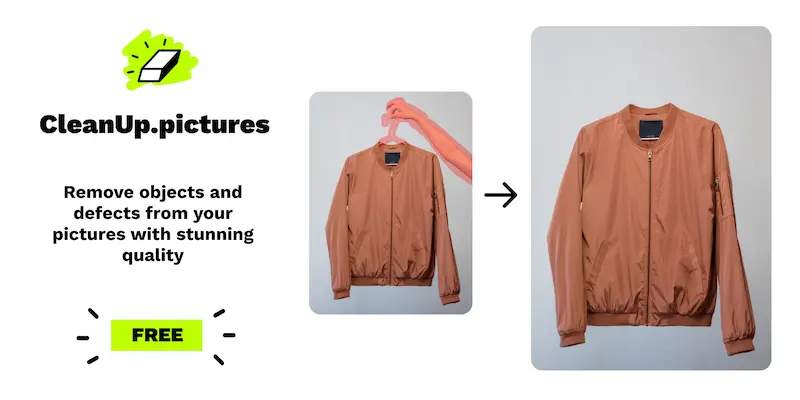
Cleanup.pictures removes objects, people, text and blemishes from a photo: you paint over the bit, and it fills in the background. The free version has no image limit, but exports stop at 720p. If you need full resolution, or the background tools that sit in its sister product, you're paying.
Who Cleanup.pictures is for
- Fits if you only need to remove a stray object or a watermark now and then
- Works for people happy with 720p exports, since that part is free
Who Cleanup.pictures is not for
- Tight if you need print or full-size output: free exports stop at 720p
- Not for you if you want to share one subscription, as each Pro plan is for one user
- Too light for background removal or generative fill, which the site sends you to Clipdrop Pro for, from $11
- Watch out: refunds are full within 14 days and prorated after, and the site calls them rare
Why Cleanup.pictures gets a 2.8
Five grades, each with its reason. The GPA is their average: an A is 4 points, an F is none.
- AValue for money$3 a month billed yearly ($36 a year), against $8.33 for the cheaper quarter of AI image tools. Monthly billing is $5, still low.
- BFree plan and trialUnlimited images for free, so one person can live on it. The catch is that free exports are capped at 720p.
- CFeaturesObject, person, text, logo and watermark removal, defect retouching and an API. It does that one job fully, but it's a smaller job than the whole category, and background tools live in Clipdrop.
- BEase of useNo store rating on record. It's a web page where you paint over what you want gone, with nothing to set up.
- CPlatforms and integrationsWeb only, with an inpainting API. No desktop or phone app, and no list of integrations.
What these grades rest on. Graded from this listing, whose facts were read from Cleanup.pictures's own pages on 13 November 2026. Not based on using the product, and shorter than our full reviews. How we review and grade.
Make Cleanup.pictures? Put this grade on your site

Paste this where you want the badge. It links here and follows the grade if it changes. About badges
<a href="https://toolgpa.com/tools/cleanup-pictures#review"><img src="https://toolgpa.com/badge/cleanup-pictures.svg" alt="Cleanup.pictures: 2.8 GPA on ToolGPA" width="196" height="56"></a>Where Cleanup.pictures stands among AI image and video generators
Cleanup.pictures's GPA of 2.8 is higher than 147 of the 168 other AI image and video generators we grade, and level with 11.
It stands best on value for money (A, above 149 of 168) and worst on platforms and integrations (C, above 2).
Its paid plans start at $3 a month, against a middle price of $11.88 for the category: 2 of the 120 others that charge start lower.
On features, ease of use and platforms it scores 2.3 out of 4. 2 tools score higher and cost less.
Each grade against the category
Every bar is all 169 AI image and video generators we grade, cut by the letter each got. Cleanup.pictures’s own letter is outlined.
- AValue for moneyAbove 149 of 168, level with 19
- BFree plan and trialAbove 148 of 168, level with 16
- CFeaturesAbove 6 of 168, level with 97
- BEase of useAbove 119 of 168, level with 42
- CPlatforms and integrationsAbove 2 of 168, level with 72
Price against what you get
Each dot is one of 123 AI image and video generators. Further left costs less, and higher up scores better on features, ease of use and platforms. Point at a dot to see which tool it is.
Features, ease of use and platforms, averaged
What paid plans start at, a month (each step along is roughly double) →
- The best score at each price
- Has a free plan
- No free plan
Keep Cleanup.pictures, or make your own?
You could make this
What Cleanup.pictures does at its core is plain work, and that is the kind of thing an AI app builder makes well.
You would give up 2 things, listed below, and little else. It costs $36 a year. An AI app builder starts at about $20 a month on our listings, and you only need it while you build.
What you could make
- It runs in a browser, which is where something home-made would run too.
What you could not
- An API that other software can build on.
- AI features, unless you pay a model provider for each request yourself.
What this rests on. Cleanup.pictures’s listing: what it does, where it runs, what it plugs into and what it costs. It is a judgement about the kind of software this is. We have not built a replacement for it, and making your own means looking after it too. How we decide, and every tool’s verdict.
What is Cleanup.pictures?
Cleanup.pictures removes unwanted objects, people, text, logos and defects from a photo using AI inpainting: paint over the area and the tool fills in the background. Export is capped at 720p on the free version and unlimited on Pro. It also offers an inpainting API with usage-based pricing.
Worth knowing
- Free exports are capped at 720p; higher resolution needs Pro.
- Each Pro subscription is for a single user.
- The pricing section also points to Clipdrop Pro, starting at $11, for background tools and generative fill.
- Refunds are described as rare after purchase: full within 14 days, prorated after.
Key features
- Object and person removal
- Brush over an unwanted object or person and the AI fills in what was behind it.
- Text, logo and watermark removal
- Erases text, date stamps, logos and watermarks from pictures.
- Defect retouching
- Cleans cracks, blemishes and other defects on photos.
- Any import size
- Images of any size can be imported; the free export is limited to 720px.
- Inpainting API
- An API is offered for developers, with usage-based pricing documented separately.
Cleanup.pictures pricing
As of Nov 13, 2026, Cleanup.pictures has a free plan, and paid plans start at $3 per month, billed yearly ($5 billed monthly).
- Starts at
- $3 per month, billed yearly ($5 billed monthly)
- Free plan
- Unlimited images with export limited to 720p.
- Free trial
- None listed
| Plan | Price | What you get |
|---|---|---|
| Free | $0 | Unlimited images; export limited to 720p. |
| Pro | $3per month, billed yearly ($5 billed monthly) | Unlimited resolution and a high-quality refiner; the FAQ gives $36 a year. One user per subscription. |
Read from cleanup.pictures on Nov 13, 2026. Prices change, so confirm with Cleanup.pictures before you buy.
Cleanup.pictures alternatives
- Cleanup.pictures vs Clipdrop
Free plan · from $15/mo
- Cleanup.pictures vs Photoroom
Free trial · from $12.99/mo
- Cleanup.pictures vs Pixelcut
Free plan · from $8/mo
- Cleanup.pictures vs Magic Studio
Free plan · from $4.99/mo
- Cleanup.pictures vs PicWish
Free plan · from $4.99/mo





Common questions
Does Cleanup.pictures have an Android app?
No Android app was listed when its pages were read on Nov 13, 2026. Cleanup.pictures is listed for Web.
Does Cleanup.pictures have an iPhone app?
No iPhone app was listed when its pages were read on Nov 13, 2026. Cleanup.pictures is listed for Web.
Is Cleanup.pictures open source?
Cleanup.pictures is not described as open source on its own site, as read on Nov 13, 2026.
Does Cleanup.pictures have an API?
Yes. Cleanup.pictures offers a public API, according to its own site.
Sources for this page
The prices, plans, platforms and features above were read from these pages on Nov 13, 2026.