
FeedFlow review (2026): is it any good?
Free, open-source RSS reader for mobile and desktop
FeedFlow report card
Very good · out of 4.0 · graded Oct 10, 2026
Best for a free, plain feed reader on every device
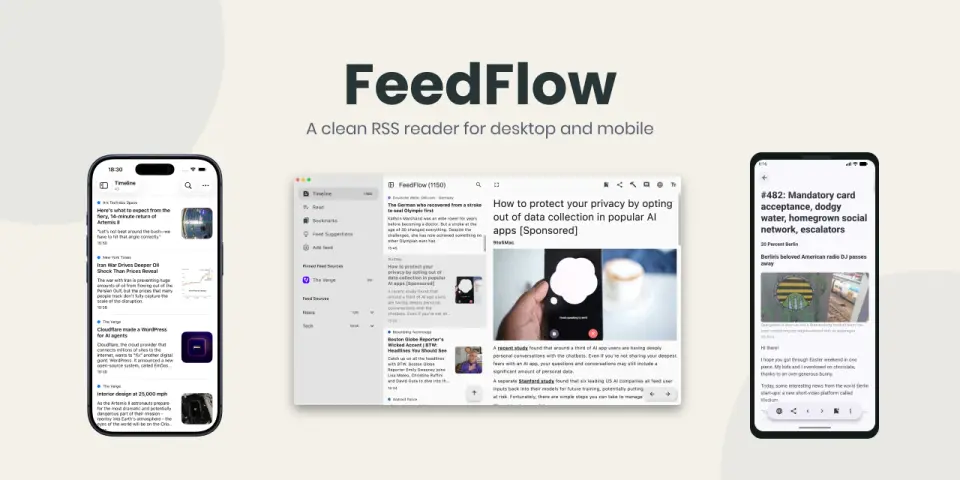
FeedFlow is a free, open-source RSS reader for Android, iPhone, Mac, Windows and Linux that shows your feeds as one list in date order, with no account. It has no sync service of its own, so you plug in iCloud, Dropbox, Google Drive or a feed account, there's no web app, no newsletters, podcasts or YouTube, and on iPhone it needs iOS 17.
Who FeedFlow is for
- Fits if you want the same free reader on your phone, tablet and computer
- Works for FreshRSS, Miniflux or Feedbin users who want an open-source app
Who FeedFlow is not for
- Skip it if you read in a browser tab, as there's no web app
- Not for you if you want syncing to just happen, because you supply the service it syncs through
- Not for you if your iPhone or iPad can't run iOS 17, which the App Store listing requires
- Too light for newsletters, podcasts or YouTube, which aren't on record
- Watch out: it's one developer's project, paid for by optional tips and donations rather than a paid plan
Why FeedFlow gets a 3.2
Five grades, each with its reason. The GPA is their average: an A is 4 points, an F is none.
- AValue for moneyFree and substantial: the complete app on five platforms, with nothing to weigh up, in a category whose middle plan is $3.33 a month. The project runs on donations and optional App Store tips of $1.99 to $22.99.
- AFree plan and trialFree outright, Apache 2.0, with no account to make and nothing held back: every sync option and offline reading are in it. You could read on this for years and never pay.
- CFeaturesThe basics, with the gaps the listing admits: one chronological list, Reader Mode, offline articles, blocked words, categories, bookmarks, search and OPML in and out, but no sync service of its own, no web app, and no newsletters, podcasts or YouTube.
- BEase of useNo store rating on record, but there's nothing to set up: no account to create, just install it, add feeds or import an OPML file, and read. Syncing is the one part that asks anything of you.
- BPlatforms and integrationsPhone and computer: Android, iPhone, iPad, Mac, Windows and Linux, and it connects to FreshRSS, Miniflux, Feedbin and BazQux. No web app, which is what keeps it off the top mark.
What these grades rest on. Graded from this listing, whose facts were read from FeedFlow's own pages on 6 October 2026. Also tested with a demo account on 2026-08-09. How we review and grade.
Make FeedFlow? Put this grade on your site

Paste this where you want the badge. It links here and follows the grade if it changes. About badges
<a href="https://toolgpa.com/tools/feedflow#review"><img src="https://toolgpa.com/badge/feedflow.svg" alt="FeedFlow: 3.2 GPA on ToolGPA" width="196" height="56"></a>Where FeedFlow stands among read-later and bookmark apps
FeedFlow's GPA of 3.2 is higher than 61 of the 66 other read-later and bookmark apps we grade, and level with 5.
It stands best on free plan and trial (A, above 47 of 66) and worst on features (C, above 0).
FeedFlow has no paid plan.
On features, ease of use and platforms it scores 2.7 out of 4, and no tool on the category's chart scores higher without costing more.
Each grade against the category
Every bar is all 67 read-later and bookmark apps we grade, cut by the letter each got. FeedFlow’s own letter is outlined.
- AValue for moneyAbove 43 of 66, level with 23
- AFree plan and trialAbove 47 of 66, level with 19
- CFeaturesAbove 0 of 66, level with 33
- BEase of useAbove 32 of 66, level with 32
- BPlatforms and integrationsAbove 26 of 66, level with 35
Price against what you get
Each dot is one of 60 read-later and bookmark apps. Further left costs less, and higher up scores better on features, ease of use and platforms. Point at a dot to see which tool it is.
Features, ease of use and platforms, averaged
What paid plans start at, a month (each step along is roughly double) →
- The best score at each price
- Has a free plan
- No free plan
Keep FeedFlow, or make your own?
Your call
A read-later list at its plainest is saved links with tags.
FeedFlow is free, so making your own saves no money. Make it only if you want it built your way.
What you could make
- RSS reader: an app builder makes this well.
What you could not
- Apps for macOS, Windows, Linux, iOS and Android that stay in step with each other.
- It plugs into other products, iCloud, Dropbox and Google Drive among them.
What this rests on. FeedFlow’s listing: what it does, where it runs, what it plugs into and what it costs. It is a judgement about the kind of software this is. We have not built a replacement for it, and making your own means looking after it too. How we decide, and every tool’s verdict.
What is FeedFlow?
FeedFlow is a free, open-source RSS reader by Marco Gomiero with apps for Android, iOS, macOS, Windows and Linux. It shows feeds as one chronological list with no algorithmic ranking, opens articles in Reader Mode or a browser, and can save article content for offline reading. No account is required: the library stays on the device, or syncs through iCloud, Dropbox, Google Drive, FreshRSS, Miniflux, Feedbin or BazQux Reader.
Worth knowing
- There is no web app; reading happens in the Android, iOS, macOS, Windows and Linux apps.
- Syncing between devices needs a service you supply: iCloud, Dropbox, Google Drive, or a FreshRSS, Miniflux, Feedbin or BazQux account.
- The project is developed by Marco Gomiero and funded by optional tips and donations rather than a paid plan.
- The App Store listing requires iOS or iPadOS 17 or later.
Key features
- Chronological timeline
- Feeds appear as a single list in the order they were published, with no algorithmic ranking. Filters narrow it by read status, bookmarks, source or category.
- Reading modes
- Articles open in Reader Mode with adjustable text size, in the in-app browser, or in a browser of your choice.
- Offline reading
- Article content can be saved during sync so full articles are available without a connection, and cache cleanup tools keep storage in check.
- Sync on your terms
- Keep the library local, sync it through iCloud, Dropbox or Google Drive, or connect directly to FreshRSS, Miniflux, Feedbin or BazQux Reader.
- Blocked words and organization
- Blocked words hide articles that contain chosen keywords or phrases. Feeds are grouped into categories, and articles can be bookmarked and searched.
- Import, export and feed suggestions
- OPML import and export move feed lists between readers, articles can be imported and exported as CSV, and curated feed suggestions cover ten categories.
FeedFlow pricing
As of Oct 6, 2026, FeedFlow is free to use.
- Starts at
- Free
- Free plan
- Free and open source under the Apache 2.0 license, with no account required. The App Store listing offers optional tips from $1.99 to $22.99, and the site has a donation link.
- Free trial
- None listed
| Plan | Price | What you get |
|---|---|---|
| Free | $0 | The complete app on Android, iOS, macOS, Windows and Linux, including every sync option and offline reading. |
Read from feedflow.dev on Oct 6, 2026. Prices change, so confirm with FeedFlow before you buy.
Works with
- iCloud
- Dropbox
- Google Drive
- FreshRSS
- Miniflux
- Feedbin
- BazQux Reader
Who makes FeedFlow
FeedFlow is an open-source RSS reader written by Marco Gomiero, whose name carries the copyright on the site, and released under the Apache 2.0 licence. The apps are free on every store and the site links a donation page instead of selling a plan.
- Ownership
- Community project. An open-source project with no company behind it. The site's footer credits Marco Gomiero and says the code is open source under Apache 2.0, and the repository is held under his own GitHub account rather than an organisation.feedflow.dev
- Founders and leaders
- Marco Gomiero, Creatorfeedflow.dev
- Lately
- 1.18.0-desktop · Sep 27, 2026
- 1.17.0-desktop · Sep 1, 2026
- 1.16.1-desktop · Aug 16, 2026
- 1.15.1-desktop · Jul 16, 2026
Read on Oct 18, 2026 from the company’s own pages and from news reports. What is not stated there is left out.
FeedFlow alternatives
- FeedFlow vs Folo
Free plan · from $4.17/mo
- FeedFlow vs Reeder
Free plan · from $14.99/yr
- FeedFlow vs Feeder
Free plan · from $7.99/mo




Common questions
Is FeedFlow open source?
Yes. FeedFlow is open source, according to its own site.
Does FeedFlow work offline?
Yes, according to its own site. What works without a connection differs by plan and platform, so check the vendor's page for the detail.
Sources for this page
The prices, plans, platforms and features above were read from these pages on Oct 6, 2026.