
Anybox review (2026): is the free plan enough?
Native bookmark manager for Mac, iPhone and iPad
Black Friday: is there a Anybox sale?
Anybox report card
Good · out of 4.0 · graded Nov 16, 2026
Best for finding bookmarks from the keyboard on Mac and iPhone
Anybox is a bookmark manager for Mac, iPhone and iPad, meant to replace the one in your browser, with a Spotlight-style Quick Find for saved links. Pro is $14.99 a year or $49.99 once. The free version stops at 50 links in total, sync runs only through one iCloud account, there are no feeds or highlights, and the FAQ says no Windows or web version is planned.
Who Anybox is for
- Fits if you're on Mac, iPhone and iPad and your browser's bookmarks have become a mess
- Works for people who automate with Shortcuts, AppleScript, Raycast or Alfred
Who Anybox is not for
- Skip it if you use Windows or want your bookmarks on the web, as the FAQ says neither is planned
- Tight if you're staying free, because it stops at 50 saved links in total and 12 on Anydock
- Not for you if your devices sit on different iCloud accounts, since iCloud is the only way it syncs
- Too light for reading or highlighting, as no feeds, reader or highlights are on record
- Watch out: there's no education discount or other offer, and lifetime Pro is now $49.99, up from $39.99
Why Anybox gets a 2.6
Five grades, each with its reason. The GPA is their average: an A is 4 points, an F is none.
- AValue for money$14.99 a year works out at $1.25 a month, under the $1.75 that is 60% of the cheapest quarter for reading apps here, and $49.99 buys it outright. Monthly it's $1.99. The FAQ rules out education discounts and any other offer.
- CFree plan and trialThe free version has most features, Quick Find and Quick Save included, with export if you leave, but it stops dead at 50 saved links in total and 12 on Anydock. Fifty links is a fortnight for most people.
- CFeaturesIt does bookmarking fully, and that's a smaller job than this category's: nested tags, folders, self-filling Smart Lists, archiving a page as PDF, web archive or screenshot, notes, images and files, plus Shortcuts, AppleScript and a local MCP server. No feeds, and no reader or highlights on record.
- BEase of use4.7 from 521 App Store ratings, short of the 1,000 our top mark asks for. Saving is a browser extension, the share menu or one shortcut, and iCloud syncs it with no new account to make.
- CPlatforms and integrationsOne family of devices: Mac, iPhone and iPad, with browser extensions and hooks into Raycast, Alfred, PopClip and Shortcuts. The FAQ says there are no plans for a Windows or web version.
What these grades rest on. Graded from this listing, whose facts were read from Anybox's own pages on 16 November 2026, and its App Store rating. Not based on using the product, and shorter than our full reviews. How we review and grade.
Make Anybox? Put this grade on your site

Paste this where you want the badge. It links here and follows the grade if it changes. About badges
<a href="https://toolgpa.com/tools/anybox#review"><img src="https://toolgpa.com/badge/anybox.svg" alt="Anybox: 2.6 GPA on ToolGPA" width="196" height="56"></a>Where Anybox stands among read-later and bookmark apps
Anybox's GPA of 2.6 is higher than 27 of the 66 other read-later and bookmark apps we grade, and level with 9.
It stands best on value for money (A, above 43 of 66) and worst on features (C, above 0).
Its paid plans start at $1.25 a month when paid by the year, against a middle price of $3.33 for the category: 1 of the 37 others that charge start lower.
On features, ease of use and platforms it scores 2.3 out of 4. 3 tools score higher and cost less.
Each grade against the category
Every bar is all 67 read-later and bookmark apps we grade, cut by the letter each got. Anybox’s own letter is outlined.
- AValue for moneyAbove 43 of 66, level with 23
- CFree plan and trialAbove 3 of 66, level with 22
- CFeaturesAbove 0 of 66, level with 33
- BEase of useAbove 32 of 66, level with 32
- CPlatforms and integrationsAbove 2 of 66, level with 23
Price against what you get
Each dot is one of 60 read-later and bookmark apps. Further left costs less, and higher up scores better on features, ease of use and platforms. Point at a dot to see which tool it is.
Features, ease of use and platforms, averaged
What paid plans start at, a month (each step along is roughly double) →
- The best score at each price
- Has a free plan
- No free plan
Keep Anybox, or make your own?
You could make this
A read-later list at its plainest is saved links with tags.
What Anybox does at its core is bookmarks and read later, and that is the kind of thing an AI app builder makes well. You would give up 3 things, listed below, and little else. It costs $14.99 a year. An AI app builder starts at about $20 a month on our listings, and you only need it while you build.
What you could make
- Bookmarks and read later: an app builder makes these well.
What you could not
- Apps for macOS and iOS that stay in step with each other.
- It plugs into other products, Raycast, Alfred and PopClip among them.
- Hooks into the device itself: Siri and Shortcuts.
What this rests on. Anybox’s listing: what it does, where it runs, what it plugs into and what it costs. It is a judgement about the kind of software this is. We have not built a replacement for it, and making your own means looking after it too. How we decide, and every tool’s verdict.
What is Anybox?
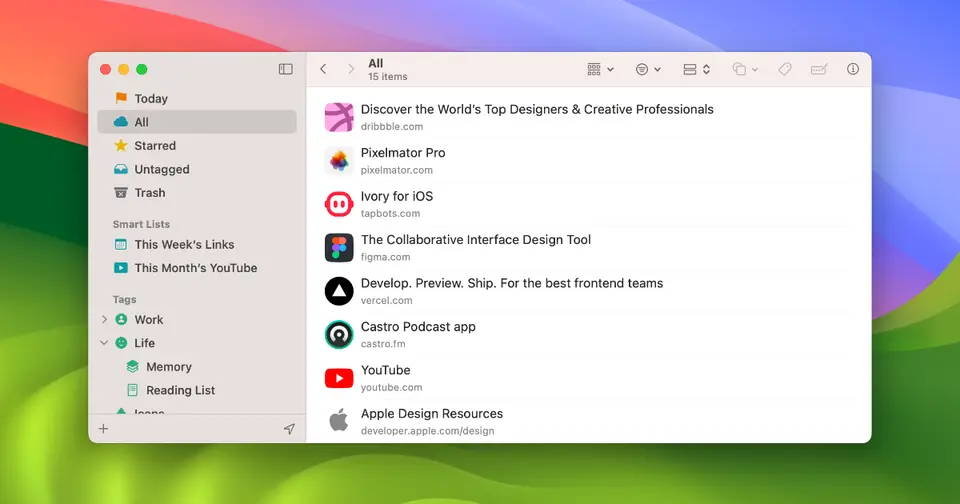
Anybox is a bookmark manager built as native apps for Mac, iPhone and iPad, with sync through iCloud. Links are saved from browser extensions, the share menu or a Quick Save shortcut, organized with nested tags, folders and Smart Lists, and found again through a Spotlight-style Quick Find. It also stores notes, images and files and can archive a page as a PDF, web archive or screenshot. The free version is limited to 50 saved links.
Worth knowing
- Apple platforms only: the FAQ says there are no plans for a Windows or web version.
- The free version stops at 50 saved links in total; unlimited links need Pro.
- Sync runs through iCloud only, so every device must be signed in to the same iCloud account.
- The FAQ says there is no education discount or any other special offer.
Key features
- Native apps with iCloud sync
- Anybox runs as native apps on iPhone, iPad and Mac and syncs through Apple's CloudKit. The vendor says no personal data is collected.
- Quick Find and Quick Save
- Quick Find is a Spotlight-like panel, opened with a global shortcut, that searches bookmarks offline and opens or shares them. Quick Save captures the current browser tab with its details.
- Anydock
- A floating, Dock-like bookmarks bar on the Mac desktop, also available as a menu bar icon. It holds 12 links on the free version and 30 on Pro.
- Nested tags, folders and Smart Lists
- Bookmarks are categorized with nested tags and folders, and Smart Lists gather them automatically by attributes such as URL and date added.
- Archives and other data types
- A bookmark can be archived as a PDF, a web archive or a screenshot, and notes, images and files can be saved alongside links.
- Automation and MCP server
- Siri Shortcuts, AppleScript and URL schemes automate saving and opening links, and the Mac app includes a local MCP server so AI agents can search and save items.
Anybox pricing
As of Nov 16, 2026, Anybox has a free plan, and paid plans start at $1.99 per month, $14.99 per year, or $49.99 lifetime (Pro).
- Starts at
- $1.99 per month, $14.99 per year, or $49.99 lifetime (Pro)
- Free plan
- Most features, including Quick Find and Quick Save, with 50 saved links in total and up to 12 links on Anydock. Bookmarks can be exported.
- Free trial
- None listed
| Plan | Price | What you get |
|---|---|---|
| Free | $0 | Most features, such as Quick Find and Quick Save, with 50 saved links in total, up to 12 links on Anydock and bookmark export. |
| Pro (monthly) | $1.99per month | Unlimited saved links and up to 30 links on Anydock, bought as an App Store subscription. |
| Pro (yearly) | $14.99per year | The same Pro features, billed once a year through the App Store. |
| Pro (lifetime) | $49.99one-time purchase | The same Pro features for a single payment; the site and the US App Store both list it at $49.99. |
Read from anybox.app on Nov 16, 2026. Prices change, so confirm with Anybox before you buy.
1 price change on recordWhat the app costs in other countries
Ways to pay less
- Annual discountAbout 37% less with yearly billing
Pro costs $14.99 a year against $1.99 a month, which adds up to $23.88 over twelve months.
Stated on anybox.app - Lifetime licenseLifetime Pro for a single payment
The pricing section lists a Lifetime purchase of Pro at $49.99, and the US App Store listing shows the same amount as an in-app purchase.
Stated on anybox.app
How people rate the Anybox app
4.7
out of 5 for the iPhone and iPad app
- 5 stars85%
- 4 stars7%
- 3 stars3%
- 2 stars1%
- 1 star3%
521 ratings on the App Store in the United States, read Oct 6, 2026. It rates the app, not everything the product does. See the listing
Works with
Anybox alternatives
- Anybox vs GoodLinks
From $9.99 one-time
- Anybox vs Raindrop.io
Free plan · from $28/yr
- Anybox vs Plinky
Free plan · from $3.99/mo
- Anybox vs Pinboard
From $22/yr
- Anybox vs Karakeep
Free plan · from $4/mo




Common questions
Does Anybox have an Android app?
No Android app was listed when its pages were read on Nov 16, 2026. Anybox is listed for macOS and iOS.
Does Anybox have a Windows app?
No Windows app was listed when its pages were read on Nov 16, 2026. Anybox is listed for macOS and iOS.
Is Anybox open source?
Anybox is not described as open source on its own site, as read on Nov 16, 2026.
Does Anybox work offline?
Yes, according to its own site. What works without a connection differs by plan and platform, so check the vendor's page for the detail.
Sources for this page
The prices, plans, platforms and features above were read from these pages on Nov 16, 2026. What people say is linked where it appears.