
Plinky review (2026): is the free plan enough?
Link-saving app for iPhone, iPad and Mac with tags and reminders
Black Friday: is there a Plinky sale?
Plinky report card
Fair · out of 4.0 · graded Oct 10, 2026
Best for saving links from any app on Apple devices
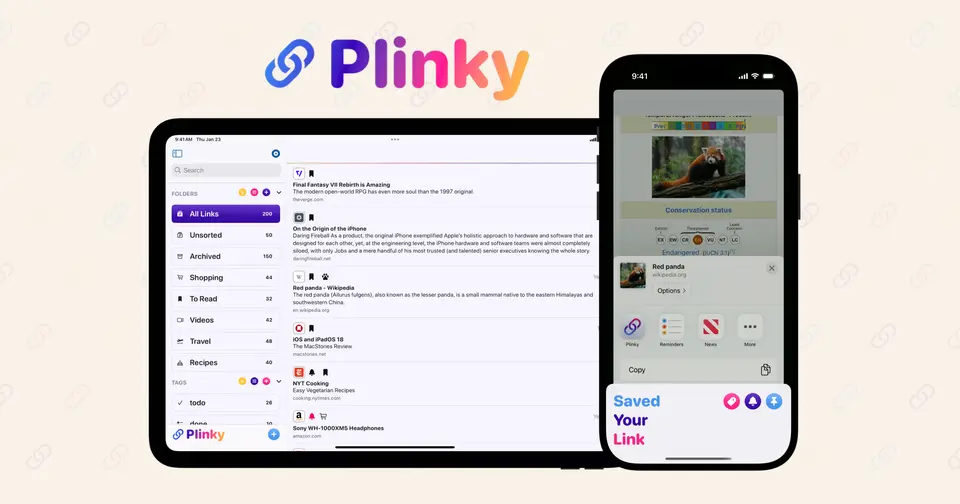
Plinky is a place to drop links on iPhone, iPad and Mac, saved from any app and sorted with folders, tags and reminders that bring a link back later. Free caps links, tags, folders, reminders and pins without saying at what numbers, there's no trial, Pro is $39.99 a year, the lifetime unlock is $159.99, and it's Apple only on iOS 18.5 or macOS 26 and up.
Who Plinky is for
- Fits if you want one place for links from every app and browser on your Apple devices
- Works for people who save videos, recipes and social posts as well as articles, and use Shortcuts
Who Plinky is not for
- Skip it if you use Android, Windows or the web, as no version is listed for them
- Tight if you're staying free, since links, tags, folders, reminders and pins are all capped at numbers the listing doesn't give
- Pricey if you want to pay once, as the lifetime unlock is $159.99, about four years of Pro
- Too light for reading, as it leans on Safari's Reader Mode with no highlights or saved page copies
- Not for you if your Apple devices are older, since it needs iOS 18.5 or macOS 26 or later
Why Plinky gets a 2.2
Five grades, each with its reason. The GPA is their average: an A is 4 points, an F is none.
- CValue for money$39.99 a year is $3.33 a month, which is exactly the middle price for a reading app here. Ordinary, in other words, for a tool that saves links. The lifetime unlock at $159.99 is the bad deal: four years of Pro up front. Unread Premium subscribers do get yearly Pro at half price.
- CFree plan and trialYou can save links for free, but links, tags, folders, reminders and pins are all capped, and the App Store listing doesn't put numbers on any of them. So you find out where free ends by hitting it, and there's no trial of Pro either.
- CFeaturesIt does its one job, keeping links, pretty fully: folders, tags, pins, reminders that resurface a link at a set time, widgets, Shortcuts and a developer API. But that's a smaller job than most reading apps take on. Reading leans on Safari's Reader Mode, and the listing offers no highlights and no saved page copy.
- BEase of useNo store rating on record, so we go on the listing, and there's nothing to set up: install it, hit the share button or a browser extension, and the link is in. Suggested tags give you somewhere to start instead of a blank box.
- CPlatforms and integrationsOne family of devices: iPhone, iPad and Mac, with extensions for Chrome, Firefox and Safari plus Shortcuts and an API. No Android, Windows or web app is listed, and it needs iOS 18.5 or macOS 26 or later, so older Apple kit is out too.
What these grades rest on. Graded from this listing, whose facts were read from Plinky's own pages on 6 October 2026. Also tested with a demo account on 2026-04-27. How we review and grade.
Make Plinky? Put this grade on your site

Paste this where you want the badge. It links here and follows the grade if it changes. About badges
<a href="https://toolgpa.com/tools/plinky#review"><img src="https://toolgpa.com/badge/plinky.svg" alt="Plinky: 2.2 GPA on ToolGPA" width="196" height="56"></a>Where Plinky stands among read-later and bookmark apps
Plinky's GPA of 2.2 is higher than 6 of the 66 other read-later and bookmark apps we grade, and level with 5.
It stands best on ease of use (B, above 32 of 66) and worst on features (C, above 0).
Its paid plans start at $3.33 a month when paid by the year, against a middle price of $3.33 for the category: 16 of the 37 others that charge start lower.
On features, ease of use and platforms it scores 2.3 out of 4. 14 tools score higher and cost less.
Each grade against the category
Every bar is all 67 read-later and bookmark apps we grade, cut by the letter each got. Plinky’s own letter is outlined.
- CValue for moneyAbove 10 of 66, level with 24
- CFree plan and trialAbove 3 of 66, level with 22
- CFeaturesAbove 0 of 66, level with 33
- BEase of useAbove 32 of 66, level with 32
- CPlatforms and integrationsAbove 2 of 66, level with 23
Price against what you get
Each dot is one of 60 read-later and bookmark apps. Further left costs less, and higher up scores better on features, ease of use and platforms. Point at a dot to see which tool it is.
Features, ease of use and platforms, averaged
What paid plans start at, a month (each step along is roughly double) →
- The best score at each price
- Has a free plan
- No free plan
Keep Plinky, or make your own?
You could make this
A read-later list at its plainest is saved links with tags.
What Plinky does at its core is bookmarks and read later, and that is the kind of thing an AI app builder makes well. You would give up 3 things, listed below, and little else. It costs $39.99 a year. An AI app builder starts at about $20 a month on our listings, and you only need it while you build.
What you could make
- Bookmarks and read later: an app builder makes these well.
What you could not
- Apps for macOS and iOS that stay in step with each other.
- It plugs into other products, Shortcuts, Spotlight and Apple Intelligence among them, and has an API.
- Hooks into the device itself: widgets, Shortcuts and the lock screen.
What this rests on. Plinky’s listing: what it does, where it runs, what it plugs into and what it costs. It is a judgement about the kind of software this is. We have not built a replacement for it, and making your own means looking after it too. How we decide, and every tool’s verdict.
What is Plinky?
Plinky is a link-saving app for iPhone, iPad and Mac made by Red Panda Club. Links from any app or browser are saved through a share extension or browser extensions for Chrome, Firefox and Safari, then organized with folders, tags, pins and reminders. Saving links is free up to limits the App Store listing does not spell out, and Plinky Pro, sold monthly, yearly or as a lifetime unlock, removes them.
Worth knowing
- Apple platforms plus browser extensions only; no Android, Windows or web app is listed.
- The free version caps saved links, tags, folders, reminders and pins, and the listing does not state the numbers.
- The App Store listing requires iOS or iPadOS 18.5 or macOS 26 or later.
- The lifetime unlock is $159.99, about four times the price of a year of Plinky Pro.
Key features
- Saving from any app or browser
- A share extension on iPhone and iPad and browser extensions for Chrome, Firefox and Safari save links from other apps and the web. Chromium browsers such as Edge, Brave and Arc use the Chrome extension.
- Folders, tags and pins
- Links are organized into folders and tags, with suggested tags to start from, and the links, folders and tags used most can be pinned to the top.
- Reminders
- A reminder can be set on any link so that it resurfaces inside Plinky at a chosen date and time, without a separate to-do app.
- Reader Mode
- Links can open in Safari's Reader Mode without leaving Plinky, either for every article by default or through a swipe or long-press action.
- Widgets and customization
- Widgets for the Home Screen, Lock Screen and Control Center show recent or pinned links or the contents of a folder or tag, and the colors and layout of links, tags and folders can be changed.
- Shortcuts, URL schemes and API
- Shortcuts actions cover what the app itself can do, and URL schemes and a developer API let other tools save, update and manage links.
Plinky pricing
As of Oct 6, 2026, Plinky has a free plan, and paid plans start at $3.99 per month, or $39.99 per year (US App Store).
- Starts at
- $3.99 per month, or $39.99 per year (US App Store)
- Free plan
- Plinky can be used and links saved for free, within limits the listing does not put numbers on. Unlimited saved links, tags, folders, reminders and pinned links need Plinky Pro.
- Free trial
- None listed
| Plan | Price | What you get |
|---|---|---|
| Free | $0 | Save and organize links with capped numbers of links, tags, folders, reminders and pins. The caps are not stated on the listing. |
| Plinky Pro | $3.99per month, or $39.99 per year (US App Store) | Unlimited saved links, tags, folders, reminders and pinned links on iPhone, iPad and Mac. |
| Plinky Lifetime Unlock | $159.99one-time payment that never renews | The same unlimited features as Plinky Pro for a single payment instead of a subscription. |
Read from apps.apple.com on Oct 6, 2026. Prices change, so confirm with Plinky before you buy.
Ways to pay less
- Annual discountAbout 16% off with the annual subscription
The US App Store listing gives Plinky Pro as $3.99 a month or $39.99 a year, so a year paid up front costs about 16% less than twelve monthly payments.
Stated on apps.apple.com - Lifetime licenseLifetime unlock for $159.99
The App Store listing offers a lifetime option with one payment of $159.99 that never renews, as an alternative to subscribing to Plinky Pro.
Stated on apps.apple.com - Other savings50% off for Unread Premium subscribers
Unread Premium subscribers can get a yearly Plinky Pro subscription at 50% off through Apple's contingent pricing, and the discount lasts while both subscriptions stay active.
Stated on plinky.app
Works with
Plinky alternatives
- Plinky vs GoodLinks
From $9.99 one-time
- Plinky vs Anybox
Free plan · from $1.99/mo
- Plinky vs Raindrop.io
Free plan · from $28/yr
- Plinky vs Instapaper
Free plan · from $5.99/mo
- Plinky vs Matter
Free plan · from $7.99/mo




Common questions
Does Plinky have an Android app?
No Android app was listed when its pages were read on Oct 6, 2026. Plinky is listed for macOS and iOS.
Does Plinky have a Windows app?
No Windows app was listed when its pages were read on Oct 6, 2026. Plinky is listed for macOS and iOS.
Is Plinky open source?
Plinky is not described as open source on its own site, as read on Oct 6, 2026.
Does Plinky have an API?
Yes. Plinky offers a public API, according to its own site.
Sources for this page
The prices, plans, platforms and features above were read from these pages on Oct 6, 2026.