
Raindrop.io review (2026): is the free plan enough?
Bookmark manager with collections, tags and highlights
Black Friday: is there a Raindrop.io sale?
Our verdict
First of our top three read-later and bookmark apps
For: Most people, for links, articles and highlights in one library
Raindrop.io keeps links, articles, uploaded files and highlights in collections with tags, and syncs them across the web, Mac, Windows, iPhone, Android and browser extensions. The free plan has unlimited bookmarks, collections, highlights and devices, with sharing and collaboration included, and Pro is $28 a year or $3 a month. Its iPhone and iPad app averages 4.5 from about 400 ratings. Know the limits: full-text search, permanent copies of saved pages, reminders and the AI assistant need Pro, as do notes on highlights. Free accounts can upload 100 MB of files a month, and desktop apps are listed for Mac and Windows only.
See all three and how we rankRaindrop.io report card
Very good · out of 4.0 · graded Oct 10, 2026
Best for all-round bookmarking on every device
Raindrop.io is a bookmark manager on web, Mac, Windows, phones and browsers, with no cap on bookmarks, collections or devices on the free plan and Pro at $28 a year. Full-text search, saved page copies, reminders, notes on highlights and the AI assistant are Pro only, free uploads stop at 100 MB a month, there's no Linux app, and its App Store rating is 4.49.
Who Raindrop.io is for
- Fits if you want one bookmark library on every browser, laptop and phone you own
- Works for people who share link collections or highlight passages in web pages, PDFs and EPUBs
Who Raindrop.io is not for
- Skip it if you want full-text search or saved copies of pages without paying, as both are Pro
- Not for you if you want a desktop app on Linux, since the download page lists macOS and Windows only
- Not for you if you'd rather not build collections and tags, because sorting is the work it asks of you
- Tight if you annotate a lot, as notes on highlights need Pro and each bookmark holds at most 100 highlights
- Watch out: Pro's $28 a year is before tax, and the AI assistant is still in beta
Why Raindrop.io gets a 3.2
Five grades, each with its reason. The GPA is their average: an A is 4 points, an F is none.
- BValue for moneyPro is $28 a year, which is $2.33 a month, inside the cheapest quarter for reading tools here. For that you get full-text search, a saved copy of every page, reminders, daily backups, the AI assistant and 10 GB of uploads a month.
- AFree plan and trialUnlimited bookmarks, collections, highlights and devices, with sharing and collaboration thrown in. The caps are 100 MB of file uploads a month and 100 highlights per bookmark, and most people will never touch either. Plenty stay free for years.
- BFeaturesIt covers the whole bookmarking job: collections, tags and filters, four views, highlights in web pages, PDFs and EPUBs, shared collections and public pages that need no sign-up. Pro adds full-text search including YouTube transcripts, a web archive and a beta AI assistant.
- CEase of use4.49 from 416 App Store ratings, which falls just under the 4.5 we want for a B, so middling it is. The work is yours as well: collections to build, tags to pick and a view to choose before the library looks like anything.
- APlatforms and integrationsThe full set: web, Mac, Windows, iPhone, Android and browser extensions, with an API and hooks into Zapier, IFTTT, Make, n8n, Notion and Readwise. The one gap is Linux, as the download page lists macOS and Windows only.
What these grades rest on. Graded from this listing, whose facts were read from Raindrop.io's own pages on 5 October 2026, and its App Store rating. Also tested with a demo account on 2026-05-10. How we review and grade.
Make Raindrop.io? Put this grade on your site

Paste this where you want the badge. It links here and follows the grade if it changes. About badges
<a href="https://toolgpa.com/tools/raindrop-io#review"><img src="https://toolgpa.com/badge/raindrop-io.svg" alt="Raindrop.io: 3.2 GPA on ToolGPA" width="196" height="56"></a>Where Raindrop.io stands among read-later and bookmark apps
Raindrop.io's GPA of 3.2 is higher than 61 of the 66 other read-later and bookmark apps we grade, and level with 5.
It stands best on platforms and integrations (A, above 62 of 66) and worst on ease of use (C, above 7).
Its paid plans start at $2.33 a month when paid by the year, against a middle price of $3.33 for the category: 7 of the 37 others that charge start lower.
On features, ease of use and platforms it scores 3.0 out of 4, and no tool on the category's chart scores higher without costing more.
Each grade against the category
Every bar is all 67 read-later and bookmark apps we grade, cut by the letter each got. Raindrop.io’s own letter is outlined.
- BValue for moneyAbove 35 of 66, level with 7
- AFree plan and trialAbove 47 of 66, level with 19
- BFeaturesAbove 34 of 66, level with 28
- CEase of useAbove 7 of 66, level with 24
- APlatforms and integrationsAbove 62 of 66, level with 4
Price against what you get
Each dot is one of 60 read-later and bookmark apps. Further left costs less, and higher up scores better on features, ease of use and platforms. Point at a dot to see which tool it is.
Features, ease of use and platforms, averaged
What paid plans start at, a month (each step along is roughly double) →
- The best score at each price
- Has a free plan
- No free plan
Keep Raindrop.io, or make your own?
You could make this
A read-later list at its plainest is saved links with tags.
What Raindrop.io does at its core is bookmarks, highlights and read later, and that is the kind of thing an AI app builder makes well. You would give up 6 things, listed below, and little else. It costs $28 a year. An AI app builder starts at about $20 a month on our listings, and you only need it while you build.
What you could make
- Bookmarks, highlights and read later: an app builder makes these well.
What you could not
- Apps for macOS, Windows, iOS and Android that stay in step with each other.
- It plugs into other products, Zapier, IFTTT and Make among them, and has an API.
- AI features, unless you pay a model provider for each request yourself.
- What a company asks for before it lets staff use something: roles and permissions.
- Sharing with other people, which means accounts and invitations.
- The depth: we grade its features B, which means it covers the whole job.
What this rests on. Raindrop.io’s listing: what it does, where it runs, what it plugs into and what it costs. It is a judgement about the kind of software this is. We have not built a replacement for it, and making your own means looking after it too. How we decide, and every tool’s verdict.
What is Raindrop.io?
Raindrop.io is a bookmark manager that keeps links, articles, uploaded files and highlights in collections with tags, and syncs them across browser extensions, desktop apps and mobile apps. Collections can be shared with collaborators or published as public pages. The Pro plan adds full-text search, permanent copies of saved pages, reminders and an AI assistant.
Worth knowing
- Full-text search, the web archive, reminders and the AI assistant are limited to Pro.
- Free accounts can upload 100 MB of files a month; Pro raises the limit to 10 GB.
- Notes on highlights require Pro, and each bookmark holds at most 100 highlights.
- The download page lists desktop apps for macOS and Windows only.
Key features
- Collections, tags and filters
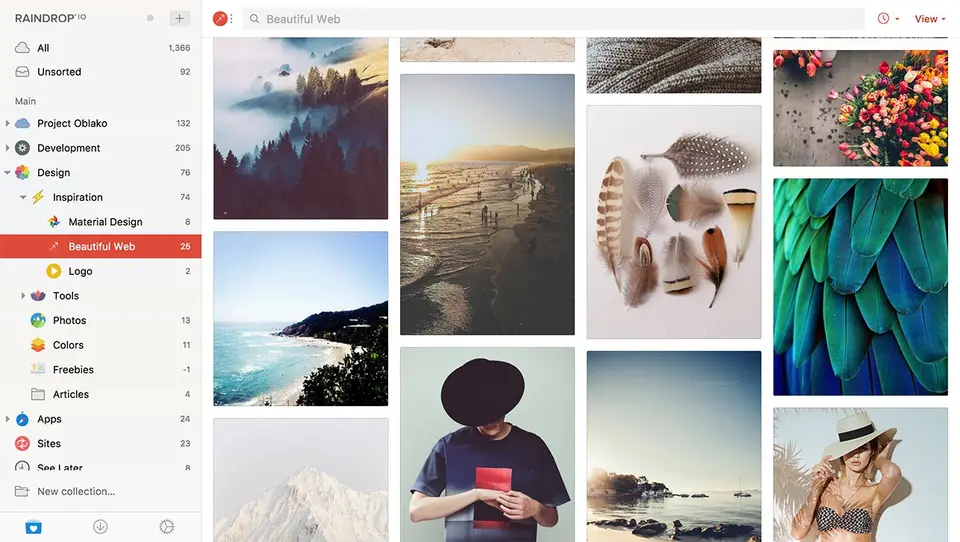
- Bookmarks are grouped into collections and classified with tags, then narrowed by type, tag or domain. Grid, headlines, masonry and list views are available.
- Highlights
- Save passages from web pages, PDFs and EPUBs in several colors, up to 100 per bookmark on any plan. Adding notes to highlights requires Pro.
- Full-text search
- On Pro, search covers the full content of saved pages, PDFs, EPUBs and YouTube transcripts instead of only titles and tags.
- Web archive and backups
- Pro keeps a saved copy of each bookmarked page in case the original changes or disappears, and runs automatic backups of the whole library.
- Sharing and public pages
- Invite members to a collection with per-collection permissions, or publish a collection as a public page that needs no sign-up. Both work on the free plan.
- Stella AI assistant
- A chat assistant, in beta for Pro users, that answers questions about saved content, summarizes it and helps organize collections.
Raindrop.io tips most people miss
Shortcut
Type #tag, type:article or notag:true into search
The search box takes operators: #coffee for a tag, -#coffee to leave it out, type:article or -type:video, created:2024-01 for a month, notag:true for untagged links, ❤️ for favourites and link:github to search URLs. Add match:OR to match either word.
help.raindrop.ioPrivacy
Public collections can show up in search results, tags and all
Raindrop's help says public pages can be crawled and appear in search results, and it doesn't mention a way to stop that. Anyone with the link can see them, tags included, and nested collections go public with their parent. Every public collection also shows on your username.raindrop.page profile.
help.raindrop.ioSetting
On Pro, send your daily backups to Dropbox or Drive
Pro makes a backup each day you change something and keeps the last 30 under Settings → Backups. Turn on Cloud backup on the same page to copy them to Dropbox, OneDrive or Google Drive. Files come as HTML, CSV or TXT, and the help recommends HTML, a standard bookmarks file most browsers and apps can import.
help.raindrop.ioLeaving
Let Pro lapse and your saved page copies go after about a month
Your bookmarks, collections, tags and highlights all stay when Pro ends. But the web archive copies become inaccessible and are permanently deleted after about a month, full-text search stops and automatic backups stop. If you lean on those copies, decide before Pro runs out.
help.raindrop.ioRenewal
Renewed and didn't mean to? There's a 30-day refund
Raindrop's Pro help page says that if you cancel within 30 days of buying or renewing, you can ask for a full refund on web and Google Play payments. App Store purchases are refunded by Apple, not Raindrop. You keep Pro until the end of the period either way.
help.raindrop.ioPay less
Paying through Google Play? Pick yearly from the start
Google Play can't switch you from monthly to yearly. Raindrop's help says you'd have to cancel, wait for Pro to run out, then subscribe again. On the web you ask the team, and on the App Store it's Change subscription in the app. Same features wherever you buy.
help.raindrop.io
Read on Oct 17, 2026. Read from Raindrop.io's help centre (search filters, public pages, backups, and the Pro page on cancelling, refunds and what ends with Pro) on 17 October 2026. Not tried out: these tips are what its own pages say.
Raindrop.io pricing
As of Oct 5, 2026, Raindrop.io has a free plan, and paid plans start at $28 per year, or $3 per month.
- Starts at
- $28 per year, or $3 per month
- Free plan
- Unlimited bookmarks, collections, highlights and devices, with sharing and collaboration included. File uploads are limited to 100 MB a month.
- Free trial
- None listed
| Plan | Price | What you get |
|---|---|---|
| Free | $0 | Unlimited bookmarks, collections, highlights and devices, sharing and collaboration, and 100 MB of file uploads a month. |
| Pro | $3per month, or $28 per year (before tax) | AI assistant, full-text search, web archive, reminders, annotations, duplicate and broken-link finder, daily backups and 10 GB of uploads a month. |
Read from raindrop.io on Oct 5, 2026. Prices change, so confirm with Raindrop.io before you buy.
Ways to pay less
- Annual discountAbout 20% off with yearly billing
The pricing page marks yearly billing as 20% off, and the US prices it loads are $28 a year against $3 a month.
Stated on raindrop.io
How people rate the Raindrop.io app
4.5
out of 5 for the iPhone and iPad app
- 5 stars79%
- 4 stars6%
- 3 stars5%
- 2 stars3%
- 1 star6%
416 ratings on the App Store in the United States, read Oct 5, 2026. It rates the app, not everything the product does. See the listing
Works with
Who makes Raindrop.io
Raindrop.io is made by Rustem Mussabekov, who started it as a side project in 2013 and left his full-time job in 2019 to work on it as his own company. It earns money only from Pro subscriptions, with no advertising.
- Founded
- 2013blog.raindrop.io
- Based
- Astana, Kazakhstanraindrop.io
- Ownership
- Privately held. Privately held. Its security and privacy page calls Raindrop.io an independent, bootstrapped product with no investors and no corporate parent; the site's copyright line names Rustem Mussabekov.help.raindrop.io
- Funding
- Bootstrapped: its security and privacy page says Raindrop.io has no investors and that its revenue comes entirely from Pro subscriptions.help.raindrop.io
- Founders and leaders
- Rustem Mussabekov, Founderblog.raindrop.io
- Lately
- AI suggestions for tags and collections are now much faster · Sep 11, 2026
- Chat with YouTube Videos · Jun 15, 2026
- OneDrive as additional automatic backup destination · Feb 21, 2026
- Meet Stella — Your AI-Powered Second Brain · Feb 5, 2026
Read on Oct 18, 2026 from the company’s own pages and from news reports. What is not stated there is left out.
Raindrop.io alternatives
- Raindrop.io vs Pinboard
From $22/yr
- Raindrop.io vs Linkwarden
Free plan · from $3/mo
- Raindrop.io vs Karakeep
Free plan · from $4/mo
- Raindrop.io vs Anybox
Free plan · from $1.99/mo
- Raindrop.io vs Diigo
Free plan · from $40/yr





Common questions
Does Raindrop.io have a Linux app?
No Linux app was listed when its pages were read on Oct 5, 2026. Raindrop.io is listed for Web, macOS, Windows, iOS and Android.
Is Raindrop.io open source?
Raindrop.io is not described as open source on its own site, as read on Oct 5, 2026.
Does Raindrop.io have an API?
Yes. Raindrop.io offers a public API, according to its own site.
Sources for this page
The prices, plans, platforms and features above were read from these pages on Oct 5, 2026. What people say is linked where it appears.