The Pipedrive Insider’s Guide
Everything we know about Pipedrive in one document: what it costs, its grades, getting a refund, getting help and what else to look at. Read it here, or keep a copy.
Pipedrive
The Insider’s Guide
Sales CRM organized around visual deal pipelines
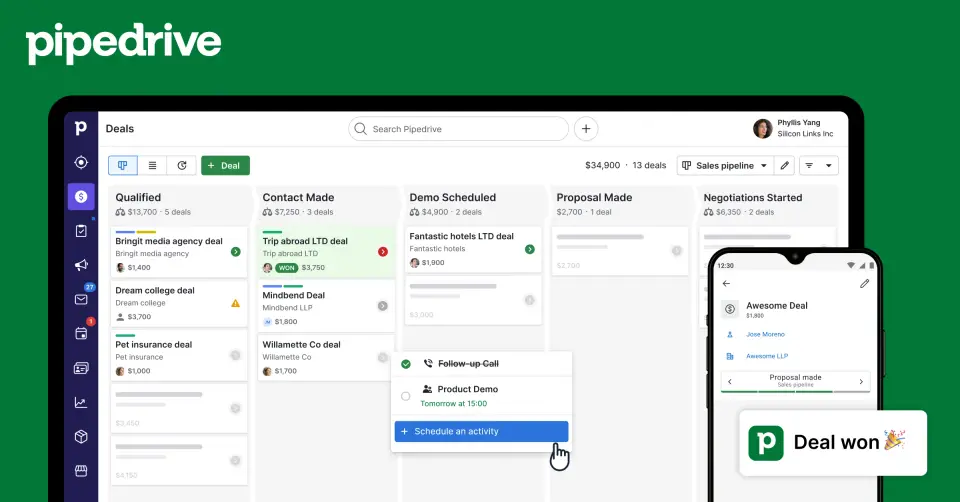
Every plan, grade, refund rule and rival among CRM tools, read from Pipedrive’s own pages.
Made by Pipedrive Inc. · checked Oct 9, 2026 · toolgpa.com
Contents
- 01WelcomeWhat it is, who it suits, its grades and the ten things to know first
- 02What it costsEvery plan, the free plan, ways to pay less and how prices have moved
- 03What it doesIts main features, where it runs, what it works with and who makes it
- 04Where it standsIts grades against its category, and whether to keep it or make your own
- 05After you payGetting your money back, getting out, and getting help
- 06The alternativesThe tools it is most often weighed against, side by side
- 07Quick answersThe questions people ask about it, each answered in a line or two
- 08About ToolGPAWho made this guide, what else is on the site, and how to cite it
ToolGPA put this guide together from Pipedrive’s own pages, its app-store listings and our grades. Every fact in it is on Pipedrive’s page too, where it is kept up to date. Checked Oct 9, 2026.
Part 01 · Overview
Welcome
What it is, who it suits, its grades and the ten things to know first
2.2
GPA, above 4 of the 48 other CRM tools we grade
Pipedrive is a sales CRM that arranges leads and deals in kanban-style pipelines, with activity reminders, email sync, workflow automation and sales reports built around them. It is sold per seat in four plans, and extras such as LeadBooster, Smart Docs and Projects are paid add-ons. There is no free plan, only a 14-day trial.
To get you started, here are 10 things to know about Pipedrive, taken from its own pages and our grades.
- 1
Best for sales teams that think in deal pipelines
Pipedrive is a CRM built around deal cards moving across a board, with email sync, automations, AI and reports on top.
- 2
Paid plans start at $14 a month for each person
As its pricing page puts it: $14 per seat / month, billed annually ($24 billed monthly).
- 3
You can try it first
14-day free trial with full access, no credit card required
- 4
It runs on 3 platforms
Web, iOS and Android.
- 5
Visual sales pipelines
Deals move through customizable kanban-style pipelines, with custom fields, activity reminders and products or services linked to each deal.
- 6
Email sync and scheduling
Two-way email sync, group emailing, templates and meeting scheduling keep conversations attached to the contact and deal.
- 7
Workflow automation
Automations and sequences take over repetitive steps such as follow-ups and data entry, and webhooks pass events to other systems.
- 8
Refunds: no set window
Pipedrive's terms leave no room for doubt: all fees are non-refundable, and that covers an account you paid for and barely used. The exit is at least yours to take, from the Billing tab, and you keep the account to the end of the term.
- 9
A 2.2 GPA, above 4 of 48
That is against the other CRM tools we grade, on value, the free plan, features, ease of use and platforms.
- 10
Keep it
To replace Pipedrive you would be making connections to other products, each kept working as those products change. That is not a weekend's work, with an AI app builder or without one.
Pipedrive at a glance
- Pricing
- Free trial, from $14 per seat / month, billed annually ($24 billed monthly)
- Free plan
- No
- Free trial
- 14-day free trial with full access, no credit card required
- Runs on
- Web, iOS, Android
- Made by
- Pipedrive Inc., since 2010
- Category
- CRM Software
- Our grade
- 2.2 GPA, fair
- Store rating
- 3.7 on the App Store, 675 ratings
The report card
Best for sales teams that think in deal pipelines
Pipedrive is a CRM built around deal cards moving across a board, with email sync, automations, AI and reports on top. Lite is $14 a seat on yearly billing, $24 monthly, but automation waits for Growth at $39. There's no free plan, LeadBooster, Projects and Campaigns are paid add-ons, unassigned seats are still billed, and the phone app rates 3.75.
| Subject | Grade | Comment |
|---|---|---|
| Value for money | C | Lite is $14 a seat a month on yearly billing, or $24 monthly, which is ordinary for this category once you see what Lite is: leads, deals, contacts and pipelines. Automation waits for Growth at $39, and LeadBooster, Campaigns, Smart Docs and Projects are add-ons from $13.33 to $41 a month. |
| Free plan and trial | C | No free plan. The 14-day trial gives full access and doesn't ask for a card, so you can have a proper look at it. After that you pay or you're out. |
| Features | B | Kanban pipelines with custom fields, two-way email sync, sequences and automations, an AI assistant that says which deals to chase, call recording that updates the CRM, reports and forecasts. The sales job covered and nothing beyond it: no marketing or support suite, and that's deliberate. |
| Ease of use | D | 3.75 from about 680 App Store ratings, below the line where we stop calling a score fair. Dragging deal cards along a board is a simple enough idea, but nearly one rating in five is a single star, so a lot of people on the phone app are unhappy with it. |
| Platforms and integrations | B | Web, iPhone and Android, with no desktop app. The marketplace lists more than 500 integrations, Gmail, Slack, Zoom, Teams, Zapier, QuickBooks and Xero among them, and there's an API with webhooks. |
An A is worth 4 points, a B 3, a C 2, a D 1 and an F nothing. The GPA is the average of the five.
Who Pipedrive is for
- Fits if your sales process is a row of stages and you want every deal on one board
- Works for teams that only need deal tracking, not a marketing or support suite as well
Who it is not for
- Skip it if you want a free plan, because there isn't one once the trial ends
- Pricey if you want the add-ons too, as LeadBooster, Campaigns, Projects and Smart Docs run from $13.33 to $41 a month
- Not for you if you work mainly from your phone, where the app's ratings are the worst in this category
- Pricey if you need automation, which starts on Growth at $39 a seat, or $49 billed monthly
- Watch out: seats are billed whether or not anyone uses them, and fees aren't refunded
Good to know
Good for
- Small and mid-sized sales teams that want a pipeline-first CRM
- Teams that need deal tracking without a wider marketing or service suite
- Buyers who want full access during a trial before choosing a plan
Worth knowing
- There is no free plan; a paid subscription is needed once the 14-day trial ends.
- LeadBooster, Projects, Campaigns, Web Visitors and Smart Docs are paid add-ons, starting from $13.33 to $41 a month.
- Prices here come from a September 13, 2026 archive copy of the US pricing page, because the live page turned our reader away; they exclude VAT.
- Seats are charged whether or not they are assigned to a user, and Pipedrive's terms say fees are non-refundable.
Part 02 · Pricing
What it costs
Every plan, the free plan, ways to pay less and how prices have moved
$14
A month to start, for each person
Pipedrive is a paid product with a free trial, starting at $14 per seat / month, billed annually ($24 billed monthly).
Lite
$14
per seat / month, billed annually ($24 billed monthly)
The entry plan: leads, deals, contacts and pipelines organized in one workspace.
Growth
$39
per seat / month, billed annually ($49 billed monthly)
Adds automation for emails and follow-ups on top of Lite.
Premium
$59
per seat / month, billed annually ($79 billed monthly)
Pipedrive's full-cycle sales tools, from lead to close. Marked as the most popular plan.
Ultimate
$79
per seat / month, billed annually ($99 billed monthly)
The complete set of Pipedrive capabilities.
Trying it first
14-day free trial with full access, no credit card required
Read from web.archive.org on Oct 9, 2026, where its own pages could not be read.
Ways to pay less
Annual discount
Save up to 42% with annual billing
The US pricing page says annual billing saves up to 42%: Lite is $14 per seat a month billed annually against $24 billed monthly.
Stated on web.archive.org
How its prices have moved
- Jul 6, 2025Advanced: $34 per seat / month, billed annually → $39 per seat / month, billed annuallyThe archived copy of 6 July 2025 shows $39; the copy before it that was read, of 1 January 2025, shows $34. The price changed between the two.
- Jan 1, 2025Advanced: $29 per seat / month, billed annually → $34 per seat / month, billed annuallyThe archived copy of 1 January 2025 shows $34; the copy before it that was read, of 15 July 2024, shows $29. The price changed between the two.
- Jul 15, 2024Advanced: $27.90 per user / month, billed annually → $29 per seat / month, billed annuallyThe archived copy of 15 July 2024 shows $29; the copy before it that was read, of 5 January 2024, shows $27.90. The price changed between the two.
- Jul 15, 2024Essential: $14.90 per user / month, billed annually → $14 per seat / month, billed annuallyThe archived copy of 15 July 2024 shows $14; the copy before it that was read, of 5 January 2024, shows $14.90. The price was rounded down between the two.
- Jul 15, 2024Professional: $49.90 per user / month, billed annually → $49 per seat / month, billed annuallyThe archived copy of 15 July 2024 shows $49; the copy before it that was read, of 5 January 2024, shows $49.90. The price was rounded down between the two.
- Jul 15, 2024Power: $64.90 per user / month, billed annually → $64 per seat / month, billed annuallyThe archived copy of 15 July 2024 shows $64; the copy before it that was read, of 5 January 2024, shows $64.90. The price was rounded down between the two.
Part 03 · Features
What it does
Its main features, where it runs, what it works with and who makes it
3
Places it runs: Web, iOS and Android
Sales CRM organized around visual deal pipelines. Here is what it does, as its own site describes it, and what it covers: public API, AI features, transcription, kanban boards, sales pipeline, workflow automation.
The sales job covered and nothing beyond it: no marketing or support suite, and that's deliberate.
- Visual sales pipelines
- Deals move through customizable kanban-style pipelines, with custom fields, activity reminders and products or services linked to each deal.
- Email sync and scheduling
- Two-way email sync, group emailing, templates and meeting scheduling keep conversations attached to the contact and deal.
- Workflow automation
- Automations and sequences take over repetitive steps such as follow-ups and data entry, and webhooks pass events to other systems.
- AI assistant and Nova
- An AI assistant recommends which deals to focus on, an email tool drafts and summarizes messages, and Nova records and transcribes calls and updates the CRM afterwards.
- Reports and forecasting
- Customizable reports and dashboards track sales performance, with revenue forecasts on the higher plans.
- Add-ons and marketplace
- LeadBooster, Campaigns, Smart Docs, Projects and Web Visitors extend the CRM at extra cost. The marketplace lists more than 500 integrations.
Where it runs
- Web
- iOS
- Android
What it works with
- Gmail
- Slack
- Zoom
- Microsoft Teams
- Zapier
- QuickBooks
- Xero
- Asana
Who makes Pipedrive
Pipedrive is made by Pipedrive Inc., a privately held company started in Estonia in 2010 and now headquartered in New York. It earns money from subscriptions to its sales CRM, and its majority shareholder is the investment firm Vista Equity Partners.
- Founded
- 2010pipedrive.com
- Based
- New York, with offices in Tallinn, Tartu, Lisbon, London and other citiespipedrive.com
- Ownership
- Privately held. Privately held, with an investment firm as majority owner: its press releases say it is backed by majority shareholder Vista Equity Partners alongside other technology investors.pipedrive.com
- Funding
- Its jobs page lists a majority investment by Vista Equity Partners and says it has been a unicorn since 2020; its press releases mention other technology investors without naming them. These pages give no amounts.pipedrive.compipedrive.com
- Team
- 850+ people across eight countries, according to its About page; its jobs page says 800+pipedrive.com
- Founders and leaders
- Paulo Cunha, CEOpipedrive.com
- Timo Rein, Co-founderpipedrive.com
- Urmas Purde, Co-founderpipedrive.com
- Ragnar Sass, Co-founderpipedrive.com
- Hiring
- 4 listings: a Principal AI/ML Scientist & Engineer in Lisbon, London and Dublin, and a Principal Security Engineer in Londonpipedrive.com
- Affiliate program
- 20% of the revenue from each new paying customer for its first 12 months, rising to 30% at 2 to 5 sales a month and a custom rate at 6 or more. 90-day cookie, no cap on earnings, run through PartnerStack.pipedrive.com
- Reseller program
- Solution providers resell Pipedrive and sell consulting, onboarding and implementation, in three tiers: Authorized, Gold and Platinum. Margins are not published.pipedrive.com
- Partner program
- Technology partners integrate their own software with Pipedrive and are listed in its marketplace. No payment terms are published.pipedrive.com
- Lately
- Pipedrive launches Nova to turn sales meetings into CRM intelligence · Sep 16, 2026
- Pipedrive MCP Connector is now available in Claude’s official marketplace · Aug 18, 2026
- Pipedrive acquires Outfunnel, bringing its top-rated marketplace app home · Aug 5, 2026
- Pipedrive launches native MCP server, bringing CRM workflows directly into AI assistants · Jun 30, 2026
Read on Oct 7, 2026 from the company’s own pages and from news reports. What is not stated there is left out.
Part 04 · Standing
Where it stands
Its grades against its category, and whether to keep it or make your own
4/48
Other CRM tools it is graded above
Pipedrive's GPA of 2.2 is higher than 4 of the 48 other CRM tools we grade, and level with 14.
It stands best on features (B, above 18 of 48) and worst on ease of use (D, above 0).
Its paid plans start at $14 a month for each person, against a middle price of $24 for the category: 13 of the 46 others that charge start lower.
On features, ease of use and platforms it scores 2.3 out of 4. 11 tools score higher and cost less.
Each grade against the category
Every bar is all 49 CRM tools we grade, cut by the letter each got. Pipedrive’s own letter is outlined.
- CValue for moneyAbove 18 of 48
- CFree plan and trialAbove 4 of 48
- BFeaturesAbove 18 of 48
- DEase of useAbove 0 of 48
- BPlatforms and integrationsAbove 5 of 48
Price against what you get
Each dot is one of 47 CRM tools. Further left costs less; higher up scores better on features, ease of use and platforms. Pipedrive is the marked dot.
What paid plans start at, a month (each step along is roughly double) →
Keep it, or make your own?
Whether this is something you could build for yourself with an AI app builder, and what you would give up.
Keep it
To replace Pipedrive you would be making connections to other products, each kept working as those products change. That is not a weekend's work, with an AI app builder or without one.
That makes this kind of software worth paying for, not this one in particular: 30 of the 48 other CRM tools grade higher. It costs $168 a year.
What you could make
- Sales pipeline and kanban boards: an app builder makes these well.
What you could not
- Connections to other products, each kept working as those products change.
- Speech turned into text you can trust.
- A real app for iOS and Android. Something home-made would be a web page.
- It is priced for each person, which means accounts and billing for a team.
- AI features, unless you pay a model provider for each request yourself.
- The depth: we grade its features B, which means it covers the whole job.
What this rests on. Pipedrive’s listing: what it does, where it runs, what it plugs into and what it costs. It is a judgement about the kind of software this is. We have not built a replacement for it, and making your own means looking after it too. How we decide, and every tool’s verdict.
Part 05 · Refunds
After you pay
Getting your money back, getting out, and getting help
What happens once you have paid: whether you can get your money back, how to leave, and how to reach a person when something goes wrong. Each is graded from Pipedrive’s own terms and help pages.
Refunds and cancelling
Ordinary · checked Oct 18, 2026
Pipedrive's terms leave no room for doubt: all fees are non-refundable, and that covers an account you paid for and barely used. The exit is at least yours to take, from the Billing tab, and you keep the account to the end of the term. The cancellation flow does walk you past an offer to chat before it lets you finish. No refunds with a door you can open is the ordinary deal, so a C.
- Refund window
- No set window
- How you cancel
- Yourself, in settings
- Getting your money back
The terms state that all fees are non-refundable, and spell out that there are no refunds or credits for periods when the account went unused or only partly used, was deactivated, or where the terms were ended during a subscription term. Cancelling will not produce a refund under any circumstances. Downgrading mid-term also returns nothing for the price difference.
Stated on pipedrive.com- How to cancel Pipedrive
Only a user with account settings access can do it. Open the Billing tab and pick Cancel my subscription at the foot of the page, review what the account holds, choose a reason, then pass an offer to chat with a Customer Solutions Expert, answer a short questionnaire and confirm. The terms add that cancelling takes effect at the end of the current subscription term, not immediately.
- Open the Billing tab and select Cancel my subscription at the bottom of the page
- Review the data and the features the account comes with
- Choose a reason for leaving, then click Continue to cancel
- To skip the offer of a chat, click I'm not interested, continue to cancel
- Fill in the short questionnaire
- Tick the box consenting to losing access to your data
- Click Cancel my plan, then look for the confirmation email
- What you keep afterwards
You keep the account and your data until the end of the billing cycle, then lose access. A cancelled paid account and its data are scheduled for permanent deletion, typically within 180 days of closure, and a closed trial within 60 days; the terms promise deletion within a month if you ask sooner. Pipedrive tells you to export everything first, and says you can import it back if you reopen in time.
Stated on support.pipedrive.com- Renewals
The terms say every subscription renews automatically for successive terms, yearly ones yearly and monthly ones monthly, with fees charged in advance on each renewal date. Upgrades take effect at once and are charged pro rata; downgrades wait for the next renewal date. Pipedrive may change fees on at least a month's notice, taking effect at the next renewal. No reminder before a renewal is mentioned.
Stated on pipedrive.com
In your favour
- You cancel from the Billing tab yourself, with no email to write and no notice period.
- The account and your data stay available until the end of the term you paid for.
- A cancelled account is typically kept for about 180 days, so a change of heart is not fatal.
- Pipedrive says a price rise comes with at least a month's notice and only bites at the next renewal.
Watch out for
- All fees are non-refundable, including for time on an account you never used.
- Downgrade mid-term and you get nothing back for the difference.
- The cancellation flow puts an offer to chat and a questionnaire between you and the exit.
- Export your data before you go: the account and everything in it are deleted on a timer.
Customer support
Excellent · checked Oct 18, 2026
Live chat with Pipedrive is open to every user, around the clock, and email is answered the same way. Buy the two dearest plans and you can ask to be called, with the hours for each language printed on the page. Add a large knowledge base and a status page and this is about as good as business software gets. A chatbot greets you first, and phone cover is weekday-only, but neither costs it the A.
Ways to get help
Live chat
The contact page says all users are eligible for 24/7 live chat support, reached by signing in and clicking the Quick help question mark, then Chat with us. It adds that a chatbot is available to all users by the same route, and that a chat can be started from the login page if you cannot sign in.
Stated on support.pipedrive.comPhone
Users with account settings access on the Premium or Ultimate plans can ask to be called, by clicking the Quick help question mark and then Call me. The contact page lists the hours by language.
Stated on support.pipedrive.comEmail
The contact page gives an address you can write to at any time and says the support team works around the clock. No separate target reply time is given for email.
Stated on support.pipedrive.comHelp centre
A knowledge base organised by topic, with a billing section covering invoices, seats, switching plans, cancelling and deleting an account, alongside an Academy and a public status page. It is open without signing in.
Stated on support.pipedrive.com
- When people answer
The contact page says the support team works around the clock and that live chat is available 24/7 to all users. Phone support is narrower: English from Monday to Friday, 7:00 to 23:00 Central European time, and Portuguese from Monday to Friday, 10:00 to 23:00.
Stated on support.pipedrive.com- How fast it says it replies
Its pages do not say.
- What depends on your plan
Live chat, the chatbot and email are listed as open to all users whatever they pay. Phone support is limited to users with account settings access on the Premium and Ultimate plans. No page read describes a priority queue or a service-level agreement.
Stated on support.pipedrive.com
In your favour
- Live chat is open to every user, day or night, not just the dearer plans.
- The contact page prints the phone hours by language instead of leaving them vague.
- You can start a chat from the login page when you are locked out.
- The knowledge base covers the awkward jobs, cancelling and deleting an account included.
Watch out for
- A chatbot answers through the same Quick help button before a person does.
- Phone support needs the Premium or Ultimate plan and account settings access.
- The phone lines are weekday-only and cover two languages.
- No page states a target reply time for email.
What these two grades rest on. Read on 18 October 2026: Pipedrive's terms of service, including the fees, subscription term and termination sections, its knowledge-base articles on cancelling a paid account and on deleting an account, the billing section of the knowledge base, and its contact page. Nobody here cancelled a plan, asked for a refund or contacted Pipedrive's support. They are graded apart from the five that make the GPA. How we grade refunds and support.
Part 06 · Alternatives
The alternatives
The tools it is most often weighed against, side by side




HubSpot, Close, Zoho CRM, Attio and folk
The 5 tools Pipedrive is most often weighed against, with where each one differs from it.
- 3.2GPA
HubSpot
Free plan · from $20/mo
Free CRM at the center of a marketing, sales and service suite.
- HubSpot has a free plan. Pipedrive does not, though it has a free trial.
- Only HubSpot lists a browser extension.
- Pipedrive also covers transcription and kanban boards.
- 2.4GPA
Close
Free trial · from $9/mo
Sales CRM with built-in calling, SMS, email and an AI teammate.
- Only Close lists macOS and Windows apps.
- Pipedrive also covers kanban boards.
- 2.6GPA
Zoho CRM
Free plan · from $14/mo
Sales CRM with a free edition, process automation and Zia AI.
- Zoho CRM has a free plan. Pipedrive does not, though it has a free trial.
- Pipedrive also covers transcription and kanban boards.
- 2.4GPA
Attio
Free plan · from $35/mo
CRM with a customizable data model, workflows and AI agents.
- Attio has a free plan. Pipedrive does not, though it has a free trial.
- Only Attio lists a browser extension.
- Pipedrive also covers kanban boards.
- 2.2GPA
folk
Free trial · from $24/mo
CRM that pulls contacts from LinkedIn, email and WhatsApp.
- Only folk lists macOS and Windows apps.
- Only folk lists a browser extension.
- Pipedrive also covers transcription and kanban boards.
Part 07 · Questions
Quick answers
The questions people ask about it, each answered in a line or two
19
Questions, each answered in a line or two
The short version of everything above, for when you only need the answer. Each one is told in full in its part of the guide.
Is Pipedrive free?
No, Pipedrive is a paid product, but you can try it first. 14-day free trial with full access, no credit card required.
How much does Pipedrive cost?
Pipedrive lists 4 plans. Lite: $14 per seat / month, billed annually ($24 billed monthly).
What platforms does Pipedrive work on?
Pipedrive is available on Web, iOS and Android.
Does Pipedrive offer any discounts?
Pipedrive publicly lists the following: Save up to 42% with annual billing.
How is Pipedrive rated?
Pipedrive's iPhone and iPad app averages 3.7 out of 5 from 675 ratings on the App Store in the United States, as read on Oct 5, 2026.
Does Pipedrive have a Windows app?
No Windows app was listed when its pages were read on Oct 9, 2026. Pipedrive is listed for Web, iOS and Android.
Does Pipedrive have a macOS app?
No macOS app was listed when its pages were read on Oct 9, 2026. Pipedrive is listed for Web, iOS and Android.
Is Pipedrive open source?
Pipedrive is not described as open source on its own site, as read on Oct 9, 2026.
Does Pipedrive have an API?
Yes. Pipedrive offers a public API, according to its own site.
What does Pipedrive integrate with?
Pipedrive's listing names Gmail, Slack, Zoom, Microsoft Teams, Zapier, QuickBooks, Xero and Asana.
Who makes Pipedrive?
Pipedrive is made by a company of the same name. Privately held, with an investment firm as majority owner: its press releases say it is backed by majority shareholder Vista Equity Partners alongside other technology investors.
What are the alternatives to Pipedrive?
The closest alternatives to Pipedrive in our directory are HubSpot, Close, Zoho CRM, Attio and folk.
Does Pipedrive give refunds?
The terms state that all fees are non-refundable, and spell out that there are no refunds or credits for periods when the account went unused or only partly used, was deactivated, or where the terms were ended during a subscription term.
How do I cancel Pipedrive?
Only a user with account settings access can do it. Open the Billing tab and pick Cancel my subscription at the foot of the page, review what the account holds, choose a reason, then pass an offer to chat with a Customer Solutions Expert, answer a short questionnaire and confirm.
What happens to my data if I cancel Pipedrive?
You keep the account and your data until the end of the billing cycle, then lose access.
How do I contact Pipedrive support?
Pipedrive's pages list these ways to get help: live chat, phone, email and help centre.
How does Pipedrive compare with other CRM tools?
Pipedrive's GPA of 2.2 is higher than 4 of the 48 other CRM tools we grade, and level with 14.
Is Pipedrive good value for money?
ToolGPA grades Pipedrive C for value for money. Its paid plans start at $14 a month for each person, against a middle price of $24 for the category: 13 of the 46 others that charge start lower.
Could I make my own version of Pipedrive?
To replace Pipedrive you would be making connections to other products, each kept working as those products change.
Where this guide comes from
The prices, plans, platforms and features were read from Pipedrive’s own pages on Oct 9, 2026, and the grades were given on Oct 10, 2026. Graded from this listing, whose facts were read from Pipedrive's own pages on 4 October 2026, and its App Store rating. Its pricing page would not load when we went back to check it. Also tested with a demo account on 2026-09-29.
Every tool we list gets five grades, A to F, each with its reason, and a GPA that averages them. How each is decided is at toolgpa.com/grades. This guide is ToolGPA’s own work; it is not made, paid for or approved by Pipedrive Inc. Prices change, so check pipedrive.com before you buy.
- web.archive.org/web/20260913122841/https://www.pipedrive.com/en/pricing
- web.archive.org/web/20261005173529/https://www.pipedrive.com/en/pricing
- pipedrive.com
- pipedrive.com/en/blog/monday-alternative
- pipedrive.com/en/blog/best-crm-software
- pipedrive.com/en/blog/financial-services-crm
- pipedrive.com/en/blog/pipedrive-vs-pipeline
- support.pipedrive.com/en/article/how-does-pricing-work-in-pipedrive
- pipedrive.com/en/features
- pipedrive.com/en/about
- pipedrive.com/en/terms-of-service
- developers.pipedrive.com/
Part 08 · About
About ToolGPA
Who made this guide, what else is on the site, and how to cite it
3,189
Tools graded, in 94 categories
ToolGPA grades software the way a school report grades a pupil: five subjects, a letter for each with the reason written beside it, and a GPA that averages them. Prices, plans and platforms are read from each maker’s own pages and dated, so you always know how fresh a figure is.
Every grade, review and ranking on ToolGPA is our own judgement. No company can pay for a grade or change one. Every tool on the site has a guide like this one, free to download and pass on. It all lives at toolgpa.com.
3,189
tools graded
94
categories
426
price changes on record
579
apps priced in 12 countries
What else is on toolgpa.com
- Pipedrive, kept up to dateEverything in this guide, with prices and grades as they are todaytoolgpa.com/tools/pipedrive
- How grades are givenThe rules behind every letter and every GPAtoolgpa.com/grades
- Value chartsWhat each tool costs against what it scores, for every categorytoolgpa.com/charts
- CompareAny two tools side by side, plan by plantoolgpa.com/compare
- Price changesEvery price rise and cut on record, each with its sourcetoolgpa.com/price-changes
- Prices by countryWhat apps cost on the App Store in 12 countriestoolgpa.com/prices-by-country
- Pay lessEvery public discount: yearly billing, students, nonprofitstoolgpa.com/save
- Keep or makeWhich tools are worth paying for, and which you could build yourselftoolgpa.com/keep-or-make
Scan for the live page
Prices and grades as they are today
Quoting this guide?
Please name ToolGPA and link to the live page, so readers can check the figures for themselves:
ToolGPA, "Pipedrive: The Insider's Guide", checked Oct 9, 2026. https://toolgpa.com/tools/pipedrive
Know someone choosing between CRM tools?
Send them this guide: toolgpa.com/tools/pipedrive/guide
ToolGPA elsewhere: youtube.com/@toolgpa
See our other guides
The best-graded CRM tools after Pipedrive, each with an Insider's Guide of its own.
- CRM Software Insider's GuideEvery one of the 49 CRM tools we grade, compared
- HubSpot Insider's GuideFree CRM at the center of a marketing, sales and service suite3.2 GPA
- Bigin by Zoho CRM Insider's GuidePipeline-based CRM from Zoho for small businesses2.8 GPA
- Bitrix24 Insider's GuideFlat-priced CRM with tasks, chat, video calls and a site builder2.8 GPA


Choosing software? Every tool graded, every price dated.
Compare tools at toolgpa.com ›Everything in this guide is ToolGPA’s own summary of what Pipedrive’s pages, its app-store listings and public reviews said on the dates shown. Grades are our judgement under the rules at toolgpa.com/grades. Every grade, review and ranking on ToolGPA is our own judgement. No company can pay for a grade or change one. Pipedrive is a trademark of its owner, and this guide is not made, paid for or approved by Pipedrive Inc. Prices and plans change: check pipedrive.com before you buy.