Safari review (2026): is it any good?
Apple's built-in browser for Mac, iPhone, iPad and Apple Vision Pro
Safari report card
Very good · out of 4.0 · graded Oct 10, 2026
Best for people who live on Apple devices
Safari comes installed on every Mac, iPhone and iPad, limits cross-site tracking by default and keeps your passwords and tabs in step across your devices, for nothing. But it stops at Apple's border: there's no Windows or Android version, so one non-Apple device breaks the chain. It has no ad blocker, AI or VPN on the list, and a newer Safari only arrives when you update the whole operating system.
Who Safari is for
- Fits if you use a Mac, iPhone and iPad together and want your tabs and passwords on all three
- Works for planning things with family, since Tab Groups can be shared
Who Safari is not for
- Skip it if you own a Windows PC or an Android phone, as Safari is Apple devices only
- Not for you if you want the newest browser without updating your whole operating system
- Watch out: there's no ad blocker, AI or VPN on the feature list
- Tight if you pick text out of images a lot, as Live Text supports seven languages
Why Safari gets a 3.2
Five grades, each with its reason. The GPA is their average: an A is 4 points, an F is none.
- AValue for moneyFree, with no paid tier of any kind. It arrives with the operating system on every Mac, iPhone, iPad and Vision Pro, so there's nothing to buy, nothing to subscribe to and nothing held back for payers.
- AFree plan and trialFree outright and already installed before you ask: tracking prevention, Tab Groups, Profiles, sync, passkeys and the Reading List are simply there. No account to make, no plan above it.
- BFeaturesThe job is covered, plus two things tied to Apple devices: Tab Groups you share with other people, and Handoff passing the page you're reading to the device in your hand. Also a Privacy Report, Profiles, passkeys in iCloud Keychain, Reader and offline reading. No ad blocker, no AI and no VPN on the list, though.
- BEase of use4.4 from about 180,000 App Store ratings. It's running the moment the device is, with nothing to install. The catch: a newer Safari only turns up when you update the whole operating system.
- CPlatforms and integrationsOne family of devices and no further: Mac, iPhone, iPad and Vision Pro, with Handoff between them. Apple says it no longer offers Safari for Windows or any other non-Apple system, so a single PC in the house breaks the chain.
What these grades rest on. Graded from this listing, whose facts were read from Apple's own pages on 5 October 2026, and its App Store rating. Also tested with a demo account on 2026-06-01. How we review and grade.
Make Safari? Put this grade on your site
Paste this where you want the badge. It links here and follows the grade if it changes. About badges
<a href="https://toolgpa.com/tools/safari#review"><img src="https://toolgpa.com/badge/safari.svg" alt="Safari: 3.2 GPA on ToolGPA" width="196" height="56"></a>Where Safari stands among browsers
Safari's GPA of 3.2 is higher than 44 of the 60 other browsers we grade, and level with 8.
It stands best on value for money (A, above 22 of 60) and worst on platforms and integrations (C, above 4).
Safari has no paid plan.
On features, ease of use and platforms it scores 2.7 out of 4. Nothing scores higher for less, though at least one tool matches that score at a lower price.
Each grade against the category
Every bar is all 61 browsers we grade, cut by the letter each got. Safari’s own letter is outlined.
- AValue for moneyAbove 22 of 60, level with 38
- AFree plan and trialAbove 21 of 60, level with 39
- BFeaturesAbove 49 of 60, level with 7
- BEase of useAbove 28 of 60, level with 26
- CPlatforms and integrationsAbove 4 of 60, level with 34
Price against what you get
Each dot is one of 54 browsers. Further left costs less, and higher up scores better on features, ease of use and platforms. Point at a dot to see which tool it is.
Features, ease of use and platforms, averaged
What paid plans start at, a month (each step along is roughly double) →
- The best score at each price
- Has a free plan
- No free plan
Keep Safari, or make your own?
Keep it
To replace Safari you would be making a web browser. That is not a weekend's work, with an AI app builder or without one.
It is one of the better ones too: its GPA of 3.2 is higher than 44 of the 60 other browsers we grade.
What you could make
- Read later: an app builder makes this well.
What you could not
- A web browser.
- Passkeys, which rest on security you cannot improvise.
- Apps for macOS and iOS that stay in step with each other.
- Sharing with other people, which means accounts and invitations.
- The depth: we grade its features B, which means it covers the whole job.
What this rests on. Safari’s listing: what it does, where it runs, what it plugs into and what it costs. It is a judgement about the kind of software this is. We have not built a replacement for it, and making your own means looking after it too. How we decide, and every tool’s verdict.
What is Safari?
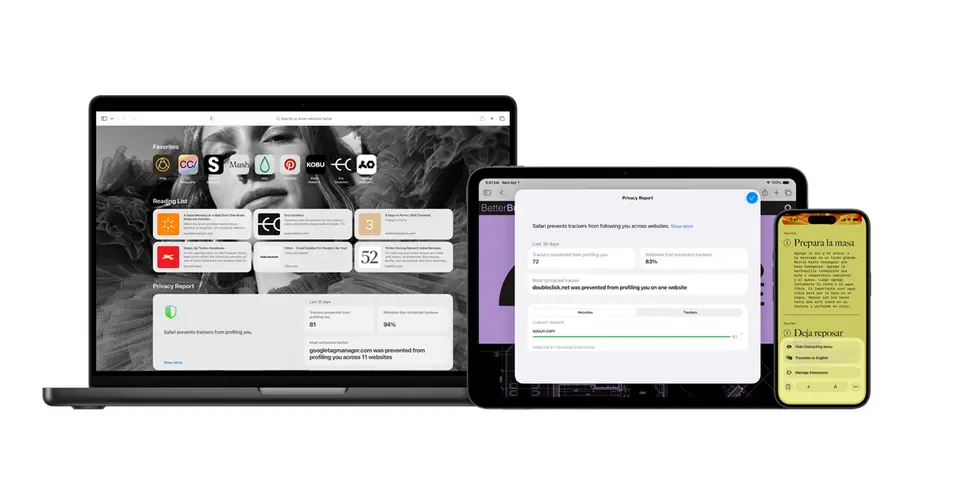
Safari is the web browser Apple includes with the operating system on Mac, iPhone, iPad and Apple Vision Pro. It limits cross-site tracking by default with Intelligent Tracking Prevention, organizes tabs into Tab Groups and Profiles, and syncs passwords, bookmarks, history and tabs between a person's Apple devices. Apple no longer offers it for Windows or other non-Apple operating systems.
Worth knowing
- Safari runs only on Apple devices. Apple says it no longer offers Safari updates for Windows or other non-Apple operating systems.
- New versions arrive with operating system updates, so getting the latest Safari means updating macOS, iOS, iPadOS or visionOS.
- Live Text, which selects text inside images and paused video, is supported in seven languages.
Key features
- Intelligent Tracking Prevention
- On-device intelligence limits cross-site tracking and hides the IP address from known trackers. A Privacy Report lists the trackers stopped on the current site and over the past week.
- Tab Groups and Profiles
- Tab Groups save named sets of tabs, sync between devices and can be shared with other people. Profiles keep history, extensions, cookies and favorites separate for topics such as Work and Personal.
- Sync and Handoff
- Passwords, bookmarks, history and tabs sync across Mac, iPad and iPhone, and Handoff passes the page being viewed from one nearby device to another.
- Passkeys and iCloud Keychain
- iCloud Keychain stores and autofills passkeys, passwords and credit card numbers on trusted devices. Safari also warns about suspicious websites and upgrades HTTP to HTTPS when available.
- Reader, Reading List and translation
- Reader removes ads and navigation from articles, Reading List saves pages to read later on any iCloud-connected device, even offline, and whole web pages can be translated in the browser.
- Extensions and web apps
- Third-party extensions for iPhone, iPad and Mac come from the Safari category on the App Store. A website can be saved to the Mac Dock or the iPhone and iPad Home Screen as a web app.
Safari pricing
As of Oct 5, 2026, Safari is free to use.
- Starts at
- Free
- Free plan
- Safari is included with the operating system on Apple devices and is listed as free on the App Store. There is no paid tier.
- Free trial
- None listed
| Plan | Price | What you get |
|---|---|---|
| Free | $0 | The full browser on Mac, iPhone, iPad and Apple Vision Pro, included with the device's operating system. |
Read from apps.apple.com on Oct 5, 2026. Prices change, so confirm with Safari before you buy.
Leaving Safari
Not graded · checked Oct 18, 2026
Safari comes with the device and costs nothing, so there is no plan, no renewal and nothing to claim back. You do not even need an account to use it. The only thing that could be closed is the Apple Account that syncs your bookmarks, tabs and passwords across devices, and Apple says you can delete that whenever you like. Be careful what you wish for: deleting it takes everything else with it.
- Closing your account
There is no subscription attached to Safari. The account behind synced bookmarks, tabs, history and passwords is your Apple Account, and Apple says you can permanently delete it at any time and for any reason by signing in to its Data and Privacy page and asking. Apple adds that an AppleCare plan has to be cancelled first, because an account with one active cannot be deleted.
Stated on support.apple.com- What you keep afterwards
Apple says a deleted Apple Account and the data on its servers go permanently, apart from what it must keep by law, and that it cannot reopen the account or restore anything afterwards. The email address or phone number cannot be used for a new account for several years. Apple advises backing up anything in iCloud first, and suggests deactivating instead, where that is offered, if you may want to come back.
Stated on support.apple.com
In your favour
- Nothing is charged for Safari, so there is no renewal to watch and no refund to chase.
- You can use the browser without an Apple Account at all; the account is only for syncing.
- Apple lets you delete the account yourself, at any time and for any reason.
Watch out for
- Deleting the Apple Account wipes everything in iCloud, not just your bookmarks and tabs.
- Apple says the deletion is permanent and that it cannot restore the data later.
- The email address or phone number is locked out of a new Apple Account for several years.
- You cannot delete the account at all while an AppleCare plan is still running.
Safari customer support
Good · checked Oct 18, 2026
Safari has no help desk of its own, so you get Apple's, and Apple's is better resourced than almost anything a paid browser offers: a Safari support hub, a full user guide for each platform, a chat that runs in Messages, a phone line in the countries Apple lists and a busy public forum. It falls short of an A because the contact page names no hours and no reply time, and live help is not offered everywhere.
Ways to get help
Live chat
The Contact Apple Support page offers a chat that opens in the Messages app on your device. It covers Apple products generally rather than Safari on its own, and the page gives no hours for it.
Stated on support.apple.comPhone
The same page lists live phone support country by country. Where a country is not on the list, the page says live support is not offered there, and numbers are tied to their own country.
Stated on support.apple.comHelp centre
A Safari Support hub links the common jobs, from updating the browser to clearing history and cookies, blocking pop-ups and fixing pages that will not load, and points to the Safari User Guide for iPhone, iPad and Mac.
Stated on support.apple.comCommunity or forum
The Apple Support Community is a public forum where Apple customers and volunteers answer questions about any Apple product, Safari included, without a support plan.
Stated on discussions.apple.com
Not listed on Safari’s pages: email, contact form or ticket.
- When people answer
Its pages do not say.
- How fast it says it replies
Its pages do not say.
- What depends on your plan
Its pages do not say.
In your favour
- You can reach a person by chat or phone about a browser you never paid for.
- The Safari User Guide is written for each platform and kept current with each release.
- The support hub answers the common questions without making you contact anyone.
- The public forum is free to read and post in, with no account tier involved.
Watch out for
- No hours and no target reply time are published on the contact page.
- Live support is not offered in every country, and Apple says so on that page.
- Phone numbers generally only work from inside their own country.
- There is no queue for Safari itself: every question goes through Apple's general support.
What these two grades rest on. Read on 18 October 2026: Apple's Safari Support hub, the Safari User Guide for Mac, the Contact Apple Support page, Apple's article on deleting an Apple Account, the Apple Support Community and Safari's App Store listing. Nobody here closed an account or contacted Apple's support. They are graded apart from the five that make the GPA. How we grade refunds and support.
How people rate the Safari app
4.4
out of 5 for the iPhone and iPad app
179,693 ratings on the App Store in the United States, read Oct 5, 2026. It rates the app, not everything the product does. See the listing
Works with
- iCloud Keychain
- Apple Pay
- Apple Wallet
- Apple Notes
Jobs at Apple
Any open roles at Apple are on its own careers page. We can’t read a count from there, so have a look.
Applications go to Apple, not to us.
Safari alternatives
- Safari vs Brave
Free plan · from $3.00/mo
- Safari vs Orion
Free plan · from $5/mo


Common questions
Does Safari have an Android app?
No Android app was listed when its pages were read on Oct 5, 2026. Safari is listed for macOS and iOS.
Does Safari have a Windows app?
No Windows app was listed when its pages were read on Oct 5, 2026. Safari is listed for macOS and iOS.
Is Safari open source?
Safari is not described as open source on its own site, as read on Oct 5, 2026.
Sources for this page
The prices, plans, platforms and features above were read from these pages on Oct 5, 2026. What people say is linked where it appears.