
Shift review (2026): is the free plan enough?
Build-your-own desktop browser for multiple inboxes, apps and Spaces
Black Friday: is there a Shift sale?
Shift report card
Fair · out of 4.0 · graded Oct 10, 2026
Best for several email accounts in one desktop window
Shift is a desktop browser you lay out yourself for people with several inboxes: Gmail, Outlook or Yahoo accounts side by side, with Spaces keeping each client apart. The free plan covers 5 Spaces with 10 apps each, and Shift AI is described only as limited. Past that it's $19.99 a month, against $7 for Rambox Pro. It's Mac and Windows only, team pricing isn't published, and refunds close 14 days after a payment.
Who Shift is for
- Fits if you check three or four Gmail, Outlook or Yahoo inboxes every day
- Works for keeping each client in its own Space, with its own apps, tabs and logins
Who Shift is not for
- Pricey if you outgrow the free plan, at $19.99 a month against $7 for Rambox Pro
- Skip it if you're on Linux or want it on your phone, as it's Mac and Windows only
- Tight if you need more than 5 Spaces, or more than 10 apps in a Space, without paying
- Watch out: free Shift AI is only described as limited, with no number given
- Watch out: team billing isn't priced publicly, and refunds are only within 14 days of a payment
Why Shift gets a 2.0
Five grades, each with its reason. The GPA is their average: an A is 4 points, an F is none.
- DValue for moneyAdvanced is $19.99 a month, or $199.99 a year, which is exactly where this category's dearest tenth begins. The two apps doing the same job cost a fraction: Rambox Pro $7, Wavebox Pro $8.33 paid annually. For the gap you get unlimited Spaces, more Shift AI and support that will video-call you.
- BFree plan and trialFree forever with 5 Spaces and 10 apps in each, which is 50 apps in all. A freelancer with six clients will run out of Spaces, and Shift AI is described only as limited, with no number against it.
- CFeaturesFor a pile of accounts it covers the job: Spaces with their own apps, tabs and extensions, several logins per app, Gmail, Outlook and Yahoo inboxes side by side, 4,500-odd apps in the library and any Chrome extension. That's a smaller job than a browser's, and it's the whole of what Shift does.
- CEase of useNo rating on record, and the headline feature is that you build the thing yourself: apps, bars and controls dragged where you want them. Templates spare you the blank page, but there are still Spaces to plan and several email accounts to sign into.
- CPlatforms and integrationsDesktop only, and only two of them: Mac and Windows. No Linux, no phone, so whatever you build stays on that one machine. Chrome extensions and the 4,500-app library are what it reaches instead.
What these grades rest on. Graded from this listing, whose facts were read from Shift's own pages on 5 October 2026. Also tested with a demo account on 2026-06-24. How we review and grade.
Make Shift? Put this grade on your site

Paste this where you want the badge. It links here and follows the grade if it changes. About badges
<a href="https://toolgpa.com/tools/shift#review"><img src="https://toolgpa.com/badge/shift.svg" alt="Shift: 2.0 GPA on ToolGPA" width="196" height="56"></a>Where Shift stands among browsers
Shift's GPA of 2.0 is higher than 6 of the 60 other browsers we grade, and level with 5.
It stands best on free plan and trial (B, above 15 of 60) and worst on value for money (D, above 0).
Its paid plans start at $16.67 a month when paid by the year, against a middle price of $9.50 for the category: 13 of the 19 others that charge start lower.
On features, ease of use and platforms it scores 2.0 out of 4. 31 tools score higher and cost less.
Each grade against the category
Every bar is all 61 browsers we grade, cut by the letter each got. Shift’s own letter is outlined.
- DValue for moneyAbove 0 of 60, level with 3
- BFree plan and trialAbove 15 of 60, level with 5
- CFeaturesAbove 2 of 60, level with 46
- CEase of useAbove 5 of 60, level with 22
- CPlatforms and integrationsAbove 4 of 60, level with 34
Price against what you get
Each dot is one of 54 browsers. Further left costs less, and higher up scores better on features, ease of use and platforms. Point at a dot to see which tool it is.
Features, ease of use and platforms, averaged
What paid plans start at, a month (each step along is roughly double) →
- The best score at each price
- Has a free plan
- No free plan
Keep Shift, or make your own?
Keep it
To replace Shift you would be making a web browser. That is not a weekend's work, with an AI app builder or without one.
That makes this kind of software worth paying for, not this one in particular: 49 of the 60 other browsers grade higher. It costs $199.99 a year.
What you could not
- A web browser.
- A real app for macOS and Windows. Something home-made would be a web page.
- AI features, unless you pay a model provider for each request yourself.
What this rests on. Shift’s listing: what it does, where it runs, what it plugs into and what it costs. It is a judgement about the kind of software this is. We have not built a replacement for it, and making your own means looking after it too. How we decide, and every tool’s verdict.
What is Shift?
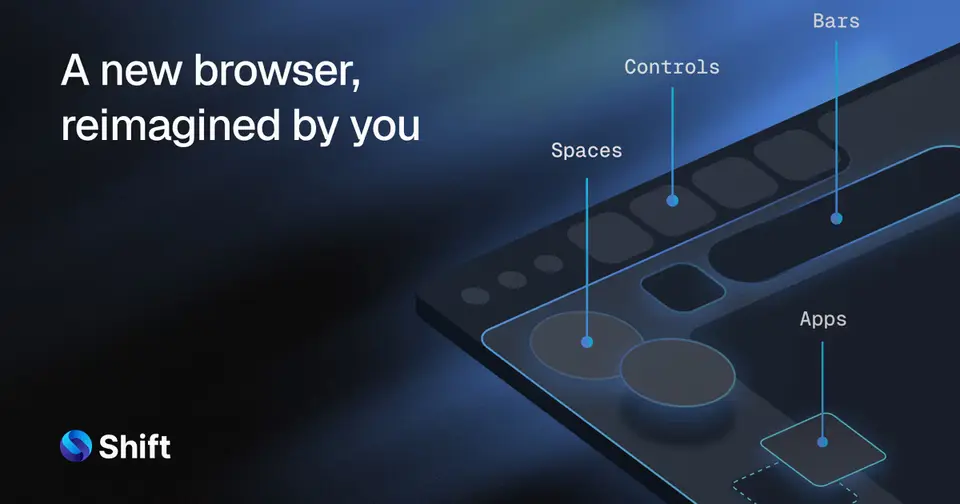
Shift is a desktop browser for Mac and Windows from Shift Technologies Inc. that people lay out themselves: apps, bars and controls can be dragged anywhere in the window, or a template can serve as the starting layout. Spaces separate work, hobbies and projects with their own apps, tabs and extensions, and several Gmail, Outlook or Yahoo accounts stay available side by side. An optional assistant, Shift AI, is built into the sidebar and address bar.
Worth knowing
- The free plan is limited to 5 Spaces, 10 apps per Space and limited Shift AI usage.
- Shift is available on desktop for Mac and Windows only; no Linux or mobile version is listed.
- Team setups with consolidated billing and a central dashboard are not priced publicly; the pricing page says to contact Shift.
- Refunds are offered only within 14 days of a purchase or renewal payment.
Key features
- Browser Builder and templates
- Apps, bars and controls can be dragged anywhere in the window, unused controls can be removed, and templates offer ready-made layouts with the sidebar at the side, top or bottom.
- Spaces
- Spaces separate work, hobbies and projects, each with its own apps, tabs and extensions. Several logins for the same app can be toggled without signing out.
- Multiple inboxes
- Several Gmail, Outlook or Yahoo email accounts can be opened side by side, with the apps and extensions used alongside them kept in the same Space.
- Shift AI
- An optional assistant summarizes pages and videos, drafts replies and answers questions using context from Spaces, apps, history and open tabs, with a separate chat in each Space.
- App library and Chrome extensions
- More than 4,500 apps can be connected from Shift's library in one click, any Chrome extension can be added, and Shift offers to add apps that are missing.
- Download scanning and site checks
- Downloads are screened through Avira's file reputation service, visited URLs are checked with Google Web Risk, and passwords are encrypted and stored locally.
Shift pricing
As of Oct 5, 2026, Shift has a free plan, and paid plans start at $19.99 per month, or $199.99 billed annually (Advanced).
- Starts at
- $19.99 per month, or $199.99 billed annually (Advanced)
- Free plan
- 5 Spaces with 10 apps per Space, the Browser Builder and templates, and limited Shift AI usage. No credit card is needed to download.
- Free trial
- None listed
| Plan | Price | What you get |
|---|---|---|
| Free | $0 | 5 Spaces with 10 apps per Space, the Browser Builder and templates, limited Shift AI usage, and email and chatbot support. |
| Advanced | $19.99per month, or $199.99 billed annually | Unlimited Spaces and apps per Space, expanded Shift AI usage and priority customer support with video calling. |
Read from shift.com on Oct 5, 2026. Prices change, so confirm with Shift before you buy.
Ways to pay less
- Annual discountSave $40 with annual billing
Shift Advanced is $199.99 billed annually, against $19.99 a month. Shift's pricing page labels the annual option as a $40 saving.
Stated on shift.com
Works with
Jobs at Shift
Any open roles at Shift are on its own careers page. We can’t read a count from there, so have a look.
Applications go to Shift, not to us.
Shift alternatives
- Shift vs Wavebox
Free plan · from $8.33/mo
- Shift vs Rambox
Free plan · from $7.00/mo
- Shift vs Arc
Free
- Shift vs Vivaldi
Free




Common questions
Does Shift have an Android app?
No Android app was listed when its pages were read on Oct 5, 2026. Shift is listed for macOS and Windows.
Does Shift have an iPhone app?
No iPhone app was listed when its pages were read on Oct 5, 2026. Shift is listed for macOS and Windows.
Is Shift open source?
Shift is not described as open source on its own site, as read on Oct 5, 2026.
Sources for this page
The prices, plans, platforms and features above were read from these pages on Oct 5, 2026.