
Dia review (2026): is the free plan enough?
AI browser for work that answers questions across tabs and tools
Black Friday: is there a Dia sale?
Dia report card
Fair · out of 4.0 · graded Oct 10, 2026
Best for an AI browser that reads across your work tools
Dia is the Arc team's AI browser: ask it something and it answers from your tabs and your Slack, Notion and Google Workspace. The free version is a browser with no AI at all. Chat is $10 a month on the plan card while the FAQ on the same page says $20, the Morning Brief and reports need Better Days at $100, AI pauses when your Tasks run out, and it's Mac and Windows only, with paid plans not yet on Windows.
Who Dia is for
- Fits if your working day is spread over Slack, Notion, Google Workspace and Teams
- Works for people who want a daily brief and meeting notes pulled up before each call
Who Dia is not for
- Skip it if you want AI for free, as the free plan is the browser alone and chat starts on the paid plans
- Pricey if you want the Morning Brief and reports, which need Better Days at $100 a month
- Not for you if you browse on a phone or Linux, and on Windows the paid plans aren't live yet
- Watch out: the plan card says $10 a month for Better Answers while the FAQ on the same page says $20
- Tight if you use the AI a lot, since it pauses when your Tasks run out unless you buy $20 credit blocks
Why Dia gets a 2.0
Five grades, each with its reason. The GPA is their average: an A is 4 points, an F is none.
- DValue for moneyThe Better Answers card says $10 a month, the top of what browsers charge, and the FAQ on the same page still says $20, so even Dia isn't sure. Worse, the parts people come for, the Morning Brief, the reports, the decks, need Better Days at $100 a month against a category middle of $8.33.
- CFree plan and trialBetter Browser is free, with profiles, tab groups, split view, picture-in-picture, ad and tracker blocking and sync. It also has no AI whatsoever, which is the only reason anyone picks Dia, so that's a wall on day one. The 14-day card-free trial is the honest look.
- BFeaturesIt covers the browser job, and the AI chats on any page drawing on your open tabs and your Slack, Notion and Google Workspace, preps meetings with the agenda opened for you, and assembles reports and decks from it all. Paid plans don't reach Windows yet, though.
- CEase of useNo rating on record. Tab groups get named for you and split-view layouts are remembered, but the AI is only worth anything once you've connected Slack, Notion, Google Workspace and Teams, and then there's the Tasks meter to keep an eye on.
- CPlatforms and integrationsDesktop and nothing else: macOS and Windows, no Linux, no phone app of any kind. It connects to Slack, Notion, Gmail, Calendar, Outlook, Teams, GitHub and Figma, but the paid plans aren't live on Windows yet.
What these grades rest on. Graded from this listing, whose facts were read from Dia's own pages on 9 October 2026. Also tested with a demo account on 2026-07-29. How we review and grade.
Make Dia? Put this grade on your site

Paste this where you want the badge. It links here and follows the grade if it changes. About badges
<a href="https://toolgpa.com/tools/dia#review"><img src="https://toolgpa.com/badge/dia.svg" alt="Dia: 2.0 GPA on ToolGPA" width="196" height="56"></a>Where Dia stands among browsers
Dia's GPA of 2.0 is higher than 6 of the 60 other browsers we grade, and level with 5.
It stands best on features (B, above 49 of 60) and worst on value for money (D, above 0).
Its paid plans start at $10 a month, against a middle price of $9.50 for the category: 10 of the 19 others that charge start lower.
On features, ease of use and platforms it scores 2.3 out of 4. 18 tools score higher and cost less.
Each grade against the category
Every bar is all 61 browsers we grade, cut by the letter each got. Dia’s own letter is outlined.
- DValue for moneyAbove 0 of 60, level with 3
- CFree plan and trialAbove 6 of 60, level with 8
- BFeaturesAbove 49 of 60, level with 7
- CEase of useAbove 5 of 60, level with 22
- CPlatforms and integrationsAbove 4 of 60, level with 34
Price against what you get
Each dot is one of 54 browsers. Further left costs less, and higher up scores better on features, ease of use and platforms. Point at a dot to see which tool it is.
Features, ease of use and platforms, averaged
What paid plans start at, a month (each step along is roughly double) →
- The best score at each price
- Has a free plan
- No free plan
Keep Dia, or make your own?
Keep it
To replace Dia you would be making a web browser. That is not a weekend's work, with an AI app builder or without one.
That makes this kind of software worth paying for, not this one in particular: 49 of the 60 other browsers grade higher. It costs $120 a year.
What you could not
- A web browser.
- An AI model, which you rent by the request and build your app around.
- A real app for macOS and Windows. Something home-made would be a web page.
- It plugs into other products, Slack, Notion and Gmail among them.
- End-to-end encryption done properly.
- What a company asks for before it lets staff use something: single sign-on.
- The depth: we grade its features B, which means it covers the whole job.
What this rests on. Dia’s listing: what it does, where it runs, what it plugs into and what it costs. It is a judgement about the kind of software this is. We have not built a replacement for it, and making your own means looking after it too. How we decide, and every tool’s verdict.
What is Dia?
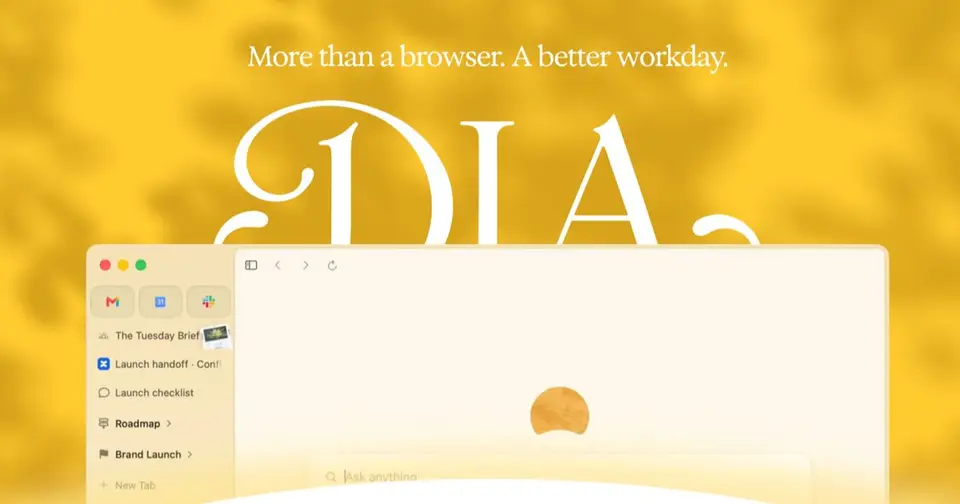
Dia is an AI browser for macOS and Windows from The Browser Company of New York, the makers of Arc. Its free plan is a browser with profiles, tab groups, split view and a built-in ad and tracking blocker but no AI features. Paid plans add a chat assistant that draws on open tabs and connected tools such as Slack, Notion and Google Calendar, a daily Morning Brief, and generated reports and slide decks.
Worth knowing
- The free Better Browser plan has no AI features; chat needs Better Answers at $10 per month, and the Morning Brief and reports need Better Days at $100.
- Paid usage is metered in Tasks. When the monthly allowance runs out, AI features pause unless extra usage is bought in $20 credit blocks.
- Dia is offered for macOS and Windows only. Paid plans began with new Mac users on August 17, and the FAQ says they do not yet apply on Windows.
- The plans page disagrees with itself: the Better Answers card shows $10 a month, while the FAQ further down the page still says $20.
Key features
- Chat with context from tabs and tools
- On paid plans, a question asked on any page is answered using open tabs and connected tools such as Slack, Notion, Google Workspace and Microsoft Teams.
- Morning Brief
- A daily brief lays out the calendar, inbox and key links before the workday starts. It is part of the Better Days plan.
- Reports, decks and recaps
- Dia gathers context scattered across tools into a shareable report or a slide deck with headers and layout. These are part of the Better Days plan.
- Meeting prep
- Before a call, Dia opens the meeting page, agenda, notes and related documents and shows a countdown to the start time.
- Profiles, tab groups and split view
- Profiles keep work, freelance and personal tabs, logins and AI separate. Related tabs are grouped under descriptive names, and split view layouts are remembered.
- Privacy controls
- Ad and tracker blocking are built in, memory and chat personalization can be switched off, and synced data is end-to-end encrypted. Dia for Work adds SSO and admin tools.
Dia pricing
As of Oct 9, 2026, Dia has a free plan, and paid plans start at $10 per month (Better Answers).
- Starts at
- $10 per month (Better Answers)
- Free plan
- Better Browser: the browser with profiles and tab groups, split view, picture-in-picture video, a built-in ad and tracking blocker and cross-device sync, but no AI features.
- Free trial
- 14-day free trial of the Better Days plan for new users, no credit card required
| Plan | Price | What you get |
|---|---|---|
| Better Browser | $0 | The browser with no AI features: profiles and tab groups, split view, picture-in-picture video, ad and tracking blocking and cross-device sync. |
| Better Answers | $10per month on the plan card; the page's FAQ still says $20 | Adds chat on any page with context from tabs and connected tools, within a monthly usage allowance measured in Tasks. |
| Better Days | $100per month | 6x the usage of Better Answers, plus the daily Morning Brief, meeting prep and follow-up, and generated reports, decks and recaps. |
Read from diabrowser.com on Oct 9, 2026. Prices change, so confirm with Dia before you buy.
Works with
Jobs at The Browser Company of New York
The Browser Company of New York, the company behind Dia, has 2 open roles. Here are the newest; open one to read the whole job and apply on The Browser Company of New York’s own site.
- Offensive AI Security EngineerView and apply
Engineering · Remote - North America · posted 8 weeks ago
- Software Engineer, CompilerView and apply
Engineering · Remote - North America · posted 6 months ago
Read from The Browser Company of New York’s job board on Ashby on Nov 17, 2026 and checked every week. Applications go to The Browser Company of New York, not to us.
Dia alternatives
- Dia vs Comet
Free plan · from $20.00
- Dia vs Arc
Free
- Dia vs Opera
Free plan · from $4/mo


Common questions
Does Dia have an Android app?
No Android app was listed when its pages were read on Oct 9, 2026. Dia is listed for macOS and Windows.
Does Dia have an iPhone app?
No iPhone app was listed when its pages were read on Oct 9, 2026. Dia is listed for macOS and Windows.
Is Dia open source?
Dia is not described as open source on its own site, as read on Oct 9, 2026.
Is Dia end-to-end encrypted?
Dia describes itself as end-to-end encrypted on its own site. Nobody here has audited that.
Sources for this page
The prices, plans, platforms and features above were read from these pages on Oct 9, 2026.