PeaZip review (2026): is it any good?
Free file archiver for Linux, macOS and Windows
PeaZip report card
Very good · out of 4.0 · graded Nov 12, 2026
Best for a free archiver on Windows, Mac or Linux
PeaZip opens over 200 archive types, makes formats like 7z and Zstandard, and runs on Linux, macOS and Windows for nothing. The interface is identical everywhere rather than native to any one system, and Linux ARM support is experimental.
Who PeaZip is for
- Fits if you want one free archiver across Windows, Mac and Linux
- Works for people who want to turn archive jobs into scripts
Who PeaZip is not for
- Skip it if you want an interface that looks native on macOS or Windows, as it is the same everywhere
- Watch out: Linux ARM support is listed as experimental
- Not for you if you need a phone app, as it is for computers only
- Watch out: donations are requested on the site, with nobody offering paid support
Why PeaZip gets a 3.2
Five grades, each with its reason. The GPA is their average: an A is 4 points, an F is none.
- AValue for moneyFree, open-source software with the same feature set on all three systems, under 60% of the cheaper quarter.
- AFree plan and trialFree outright with no cap. The site asks for donations but locks nothing.
- BFeaturesOpens 200+ formats, encrypts with password plus keyfile, exports tasks to a script and has hash, duplicate and search tools. Nothing in the listing is missing from the job.
- BEase of useNo rating on record. You install it or run it portable, with nothing to configure.
- CPlatforms and integrationsLinux, macOS and Windows, which is computers only. No phone app and no listed integrations.
What these grades rest on. Graded from this listing, whose facts were read from PeaZip's own pages on 12 November 2026. Not based on using the product, and shorter than our full reviews. How we review and grade.
Make PeaZip? Put this grade on your site

Paste this where you want the badge. It links here and follows the grade if it changes. About badges
<a href="https://toolgpa.com/tools/peazip#review"><img src="https://toolgpa.com/badge/peazip.svg" alt="PeaZip: 3.2 GPA on ToolGPA" width="196" height="56"></a>Where PeaZip stands among desktop utilities
PeaZip's GPA of 3.2 is higher than 94 of the 96 other desktop utilities we grade, and level with 2.
It stands best on free plan and trial (A, above 53 of 96) and worst on platforms and integrations (C, above 62).
PeaZip has no paid plan.
On features, ease of use and platforms it scores 2.7 out of 4, and no tool on the category's chart scores higher without costing more.
Each grade against the category
Every bar is all 97 desktop utilities we grade, cut by the letter each got. PeaZip’s own letter is outlined.
- AValue for moneyAbove 24 of 96, level with 72
- AFree plan and trialAbove 53 of 96, level with 43
- BFeaturesAbove 69 of 96, level with 26
- BEase of useAbove 34 of 96, level with 62
- CPlatforms and integrationsAbove 62 of 96, level with 25
Price against what you get
Each dot is one of 52 desktop utilities. Further left costs less, and higher up scores better on features, ease of use and platforms. Point at a dot to see which tool it is.
Features, ease of use and platforms, averaged
What paid plans start at, a month (each step along is roughly double) →
- The best score at each price
- Has a free plan
- No free plan
Keep PeaZip, or make your own?
Keep it
PeaZip is free, so making your own would save you nothing.
And it is not the kind of software a weekend replaces. It is one of the better ones too: its GPA of 3.2 is higher than 94 of the 96 other desktop utilities we grade.
What you could make
- File compression: an app builder makes this well.
What you could not
- A file manager working directly on your disk.
- Apps for macOS, Windows and Linux that stay in step with each other.
- The depth: we grade its features B, which means it covers the whole job.
What this rests on. PeaZip’s listing: what it does, where it runs, what it plugs into and what it costs. It is a judgement about the kind of software this is. We have not built a replacement for it, and making your own means looking after it too. How we decide, and every tool’s verdict.
What is PeaZip?
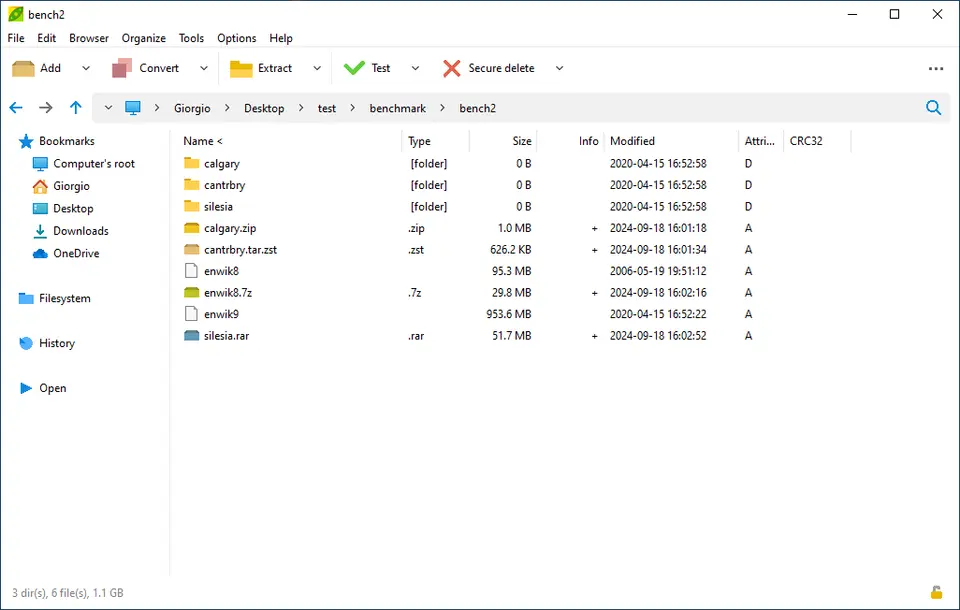
PeaZip is a free archive manager that opens and extracts RAR, TAR, ZIP and over 200 other formats. It is released under the LGPLv3 license and builds on 7-Zip, Zstandard, Brotli and other open components. It can run as a portable app and exports tasks as command-line scripts.
Worth knowing
- The interface is the same on every platform rather than native to macOS or Windows.
- The project asks for donations on its site; the software itself is not paid.
- Linux ARM support is listed as experimental.
Key features
- 200+ formats
- Opens and extracts over 200 archive types and creates formats such as 7z, Zstandard, Brotli and zpaq.
- Two-factor encryption
- Supports password plus keyfile protection for all formats that support encryption.
- Console export
- The Console tab turns a task set up in the GUI into a CLI script for reuse or scripting.
- File tools
- Includes hash and checksum checks, duplicate finding, archive conversion, search in archives and tabbed browsing.
- Portable use
- Runs without installation, so it can be used from removable drives or a network share.
- Same UI everywhere
- Offers the same interface on Linux, macOS and Windows.
PeaZip pricing
As of Nov 12, 2026, PeaZip is free to use.
- Starts at
- Free
- Free plan
- None
- Free trial
- None listed
| Plan | Price | What you get |
|---|---|---|
| PeaZip | $0 | Free, open-source software with the same full feature set on Linux, macOS and Windows. |
Read from peazip.github.io on Nov 12, 2026. Prices change, so confirm with PeaZip before you buy.
PeaZip alternatives
- PeaZip vs 7-Zip
Free
- PeaZip vs WinRAR
Free trial · from $29 one-time
- PeaZip vs Keka
Free plan · from $3.99 one-time
- PeaZip vs BetterZip
Free trial · from $35 one-time


Common questions
Does PeaZip have an Android app?
No Android app was listed when its pages were read on Nov 12, 2026. PeaZip is listed for Linux, macOS and Windows.
Does PeaZip have an iPhone app?
No iPhone app was listed when its pages were read on Nov 12, 2026. PeaZip is listed for Linux, macOS and Windows.
Is PeaZip open source?
Yes. PeaZip is open source, according to its own site.
Sources for this page
The prices, plans, platforms and features above were read from these pages on Nov 12, 2026.