
AlDente review (2026): is the free plan enough?
Charge limiter and battery care app for MacBooks
Black Friday: is there a AlDente sale?
AlDente report card
Fair · out of 4.0 · graded Nov 18, 2026
Best for looking after a MacBook battery that's always plugged in
AlDente's charge limit often stops holding after macOS updates, and on macOS 27 the Mac's own calibration fills the battery to 100% every few days while the maker says it cannot stop it. Since version 1.40, lid-closed setups lose external displays and dock devices, and some users found charging blocked while plugged in, down to 9%. The helper keeps asking to be reinstalled, and the free version cannot hold the limit while the Mac sleeps.
Who AlDente is for
- Fits if your MacBook sits plugged in at a desk most of the day
- Works for people who'd rather pay $24.99 once than renew every year
Who AlDente is not for
- Skip it if you don't own a MacBook, as that's the only thing it runs on, from macOS 12 through macOS 27
- Tight if you're staying free, because the limit can't hold while the laptop is asleep or shut down
- Watch out: heat protection, Sailing Mode, calibration, schedules and battery stats are all Pro only
- Not for you if your Mac stays offline for weeks, since Pro switches to free after 30 days without a license check
- Watch out: prices vary by country, and the page's own text shows 11,49 € and 23,99 € beside the $13.99 and $24.99 US prices
Why AlDente gets a 2.0
Five grades, each with its reason. The GPA is their average: an A is 4 points, an F is none.
- AValue for moneyPro is $13.99 a year, or $24.99 once for a lifetime license. Paid utilities here sit around $15 for a one-time price, so $24.99 for good is still less than a year of the category's middle subscription. One key activates on up to three macOS user accounts.
- CFree plan and trialThe free version sets the charge limit, which sounds like the whole point until you read the catch: it can't control charging while the MacBook is asleep or shut down, so close the lid and it fills to 100% anyway. Heat protection, schedules and stats are all Pro.
- DFeaturesWas C. Down to D because of one problem people report: the charge limit often stops holding, especially after macOS updates.
- CEase of useWas B. Down to C because of three problems people report: it can leave a plugged-in Mac not charging, or drain it; version 1.40 drops external displays and docks when the lid is closed; keeps asking to reinstall its helper, sometimes in a loop.
- DPlatforms and integrationsMacBooks only, on macOS 12 Monterey through macOS 27, so one operating system and not even all of it. It works with Apple Shortcuts, and Pro comes with Setapp. But it's one kind of computer, and that's that.
What these grades rest on. Graded from this listing, whose facts were read from AppHouseKitchen's own pages on 9 October 2026. Problems people report, and lawsuits, fines and breaches, were read from reviews, news, app-store reviews and court and regulator records on 18 November 2026. How we review and grade.
Make AlDente? Put this grade on your site

Paste this where you want the badge. It links here and follows the grade if it changes. About badges
<a href="https://toolgpa.com/tools/aldente#review"><img src="https://toolgpa.com/badge/aldente.svg" alt="AlDente: 2.0 GPA on ToolGPA" width="196" height="56"></a>The worst thing about AlDente
The charge limit you pay for often stops holding
People set AlDente to stop at 75% or 80% and find the Mac at 87% to 100%. It has broken after macOS updates since 2022, and on macOS 27 the Mac's own calibration fills the battery every few days while the maker says AlDente cannot stop it. Pro buyers pay $13.99 a year or $24.99 for that limit, then lose time on reinstalls, resets and system-file workarounds that often do not last.
Took a letter off its grade for Features
Reported bygithub.com (Sep 29, 2026)github.com (Oct 7, 2026)github.com (Aug 21, 2026)github.com (May 5, 2026)github.com (Sep 13, 2022)setapp.com (Oct 23, 2026)news.ycombinator.com (Aug 11, 2025)macos-tahoe.com (Sep 30, 2026)
What else goes wrong
- 2
It can leave a plugged-in Mac not charging, or drain it
On AlDente Pro 1.40 one user's Mac ran down to 9% while plugged in and charged again only after AlDente was quit. Another sat at 60% for three hours under a 75% limit until it was replugged. A Setapp reviewer's laptop stopped charging when he needed it, another found the battery drained overnight on macOS 26.5, and an M2 MacBook Air stayed stuck at 88% after AlDente was removed, until its leftover helper was deleted.
Took a letter off its grade for Ease of use
Reported bygithub.com (Oct 25, 2026)github.com (Oct 21, 2026)setapp.com (Aug 30, 2026)forums.macrumors.com (Feb 25, 2024)
- 3
Version 1.40 drops external displays and docks when the lid is closed
After the 1.40 update in October 2026, Macs used with the lid closed and a monitor saw screens go dark every few seconds, dock USB devices drop, and the Mac sleep and lock in the middle of work. Sixteen users joined one thread within a week. Version 1.40.1 fixed one cause, but users on 1.40.1 still report drops several times an hour, and the maker's advice is to go back to 1.39.4.
Took a letter off its grade for Ease of use
Reported bygithub.com (Oct 24, 2026)github.com (Nov 3, 2026)github.com (Oct 19, 2026)setapp.com (Oct 28, 2026)
- 4
Keeps asking to reinstall its helper, sometimes in a loop
AlDente controls charging through a helper tool that needs admin rights. Users say it asks to install the helper at every startup (two Setapp reviewers, May 2026), almost every week for months (more than twenty times for one user, September 2026), or loops on an update that reports success and then asks again (November 2026). Version 1.37.2 had said it fixed the repeated prompts.
Took a letter off its grade for Ease of use
Reported bysetapp.com (May 20, 2026)github.com (Sep 25, 2026)github.com (Nov 2, 2026)github.com (Nov 5, 2026)
AlDente on the record
Data breachResolvedFeb 6, 2025
Helper tool accepted commands from any local program (CVE-2025-1078)
AlDente's privileged helper accepted connections from any program on the Mac without checking the caller, in versions 1.0 to 1.29. A researcher showed a local program could reach its functions, which read and write the Mac's system management controller values and create power assertions. Rated medium (CVSS 5.3) with a public proof of concept, and fixed in version 1.30. No attack or user data loss has been reported.
Reported bycveawg.mitre.org (Feb 6, 2025)winslow1984.com (Dec 13, 2024)cvemon.intruder.io (Feb 6, 2025)
Found on Nov 18, 2026 by searching reviews, news, app-store reviews, and court and regulator records. A problem is listed only when at least three places report it and it is still true, and each one took a letter off the grade it belongs to. Cases are described as they stand today: an ongoing case is a claim, not a finding.
Where AlDente stands among desktop utilities
AlDente's GPA of 2.0 is higher than 34 of the 186 other desktop utilities we grade, and level with 32.
It stands best on value for money (A, above 93 of 186) and worst on features (D, above 0).
Its paid plans start at $1.17 a month when paid by the year, against a middle price of $2.99 for the category: 5 of the 37 others that charge start lower.
On features, ease of use and platforms it scores 1.3 out of 4. 32 tools score higher and cost less.
Each grade against the category
Every bar is all 187 desktop utilities we grade, cut by the letter each got. AlDente’s own letter is outlined.
- AValue for moneyAbove 93 of 186, level with 93
- CFree plan and trialAbove 10 of 186, level with 71
- DFeaturesAbove 0 of 186, level with 80
- CEase of useAbove 62 of 186, level with 94
- DPlatforms and integrationsAbove 1 of 186, level with 129
Price against what you get
Each dot is one of 104 desktop utilities. Further left costs less, and higher up scores better on features, ease of use and platforms. Point at a dot to see which tool it is.
Features, ease of use and platforms, averaged
What paid plans start at, a month (each step along is roughly double) →
- The best score at each price
- Has a free plan
- No free plan
Keep AlDente, or make your own?
You could make this
It depends on the utility: a converter or a calculator is an afternoon.
What AlDente does at its core is plain work, and that is the kind of thing an AI app builder makes well. You would give up 3 things, listed below, and little else. It costs $13.99 a year. An AI app builder starts at about $20 a month on our listings, and you only need it while you build.
What you could not
- A native app living in the menu bar.
- Readings from inside the operating system.
- A real app for macOS. Something home-made would be a web page.
What this rests on. AlDente’s listing: what it does, where it runs, what it plugs into and what it costs. It is a judgement about the kind of software this is. We have not built a replacement for it, and making your own means looking after it too. How we decide, and every tool’s verdict.
What is AlDente?
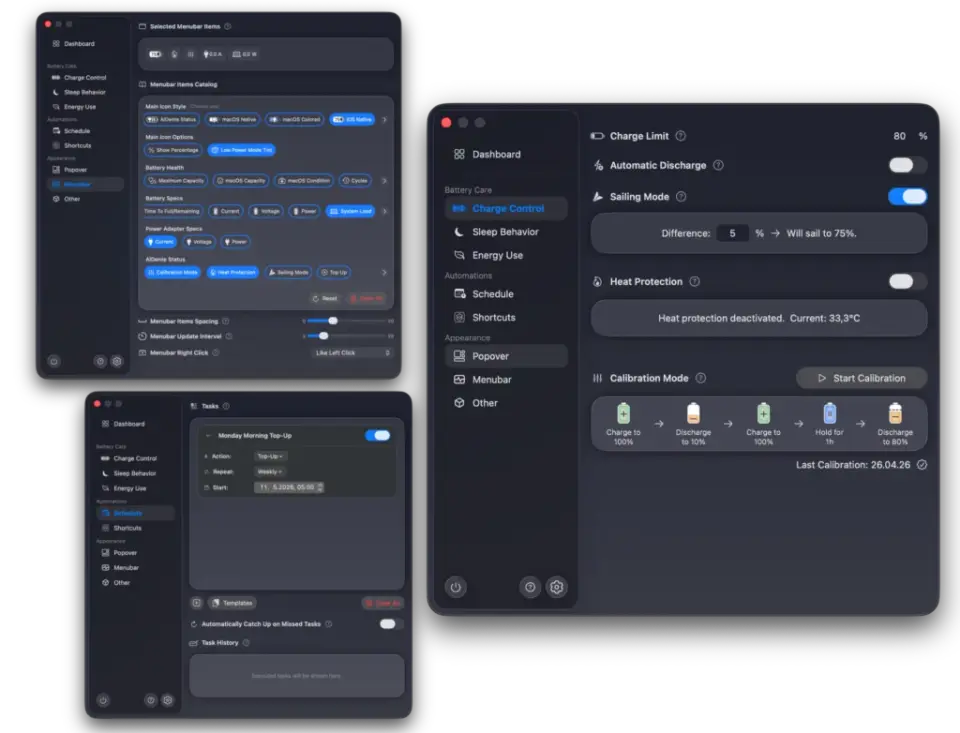
AlDente is a macOS menu bar app from AppHouseKitchen that limits how far a MacBook's battery charges, with the aim of slowing battery wear. The free version sets a charge limit and can discharge the battery while the laptop stays plugged in. AlDente Pro, sold as a yearly subscription or a lifetime license, adds heat protection, a sailing range, calibration, schedules and battery statistics.
Worth knowing
- For MacBooks only, on macOS 12 Monterey through macOS 27; the site lists the supported models.
- AlDente Free cannot control charging while the MacBook is asleep or shut down, so it can still charge to 100% with the lid closed.
- AlDente Pro checks its license online at least once every 30 days; after 30 days offline it switches to the free version.
- Prices vary by country through Paddle: the page's own text shows 11,49 € and 23,99 €, and its price feed returns $13.99 and $24.99 for US buyers.
Key features
- Charge Limiter
- Sets the charge level a plugged-in MacBook holds. Once the limit is reached, charging pauses and the laptop runs from the adapter. Included in AlDente Free.
- Discharge
- Runs the MacBook on battery while it stays plugged in, to bring the charge down to the limit. Pro's Automatic Discharge starts this whenever the limit is below the current level.
- Heat Protection
- A Pro feature that pauses charging automatically when the battery gets too hot, since charging a hot battery speeds up wear.
- Sailing Mode
- A Pro feature that sets a range instead of a single limit: at 75 to 80%, the battery drifts down to 75% before it is charged back to 80%.
- Calibration Mode and schedules
- Pro charges to 100%, discharges to 10%, recharges and holds for an hour, then returns to the limit. Schedules can run this and six other actions on set days.
- Stats and Power Flow
- Pro shows battery capacity, temperature and system load, plus a live diagram of how power moves between the charger, the battery and the MacBook.
AlDente pricing
As of Oct 9, 2026, AlDente has a free plan, and paid plans start at $13.99 / year, or $24.99 one-time for a lifetime license.
- Starts at
- $13.99 / year, or $24.99 one-time for a lifetime license
- Free plan
- AlDente Free includes the Charge Limiter and manual Discharge. It cannot control charging while the MacBook is asleep or shut down.
- Free trial
- None listed
| Plan | Price | What you get |
|---|---|---|
| AlDente Free | $0 | Charge Limiter and Discharge. The features page marks every other feature as part of AlDente Pro. |
| AlDente Pro: Subscription License | $13.99per year, billed annually (US price; page text shows 11,49 €) | All features, including Heat Protection, Sailing Mode, Calibration Mode and schedules. One key activates on up to three macOS user accounts. |
| AlDente Pro: Lifetime License | $24.99one-time purchase (US price; page text shows 23,99 €) | The same Pro features bought once instead of renewed yearly, with the same limit of three activations. |
| AlDente Pro via Setapp | $9.99per month (Setapp subscription) | AlDente Pro as part of Setapp, which the pricing page describes as including more than 240 other Mac and iOS apps. |
Read from apphousekitchen.com on Oct 9, 2026. Prices change, so confirm with AlDente before you buy.
Ways to pay less
- Lifetime licenseLifetime License for AlDente Pro
AlDente Pro can be bought once as a Lifetime License instead of the yearly subscription. The pricing page's feed returns $24.99 for US buyers.
Stated on apphousekitchen.com - EducationStudent discount through Student App Centre
The vendor's FAQ says a student discount is available through Student App Centre. It does not state the size of the discount.
Stated on apphousekitchen.com - Other savingsIncluded with a Setapp subscription
The pricing page says Setapp, at $9.99 a month, includes AlDente Pro along with more than 240 other apps.
Stated on apphousekitchen.com
Works with
Jobs at AppHouseKitchen
Any open roles at AppHouseKitchen are on its own careers page. We can’t read a count from there, so have a look.
Applications go to AppHouseKitchen, not to us.
AlDente alternatives
- AlDente vs iStat Menus
Free trial · from $11.99 one-time
- AlDente vs Stats
Free
- AlDente vs CleanMyMac
Free trial · from $39.99/yr


Common questions
Does AlDente have an Android app?
No Android app was listed when its pages were read on Oct 9, 2026. AlDente is listed for macOS.
Does AlDente have an iPhone app?
No iPhone app was listed when its pages were read on Oct 9, 2026. AlDente is listed for macOS.
Is AlDente open source?
AlDente is not described as open source on its own site, as read on Oct 9, 2026.
Sources for this page
The prices, plans, platforms and features above were read from these pages on Oct 9, 2026.
- apphousekitchen.com/aldente-overview/pricing/
- checkout.paddle.com/api/2.0/prices?product_ids=647748,647568&customer_country=US
- apphousekitchen.com/aldente-overview/
- apphousekitchen.com/aldente-overview/features/
- apphousekitchen.com/faq/
- apphousekitchen.com/about/
- apphousekitchen.com/imprint/
- apphousekitchen.com/