
PicPick review (2026): is the free plan enough?
Windows screen capture, image editor and design tools in one app
Black Friday: is there a PicPick sale?
PicPick report card
Good · out of 4.0 · graded Nov 13, 2026
Best for screenshots with a built-in image editor on Windows
PicPick captures the screen, edits the image and records video, and it is free for personal use. But it runs on Windows only, work use needs the Pro licence at $30 a year, and the free version has no support.
Who PicPick is for
- Fits if you capture and mark up screenshots on a Windows PC for personal use
- Works for people who want a color picker and pixel ruler in the same tool
Who PicPick is not for
- Skip it if you use a Mac or Linux, since only Windows is listed
- Not for you if it is for work, as business use needs Pro at $30 a year per user
- Tight if you want support, because free users get none and only manual updates
- Watch out: the page mentions a limited-time lifetime option but shows no price
Why PicPick gets a 2.6
Five grades, each with its reason. The GPA is their average: an A is 4 points, an F is none.
- BValue for moneyFree for personal use, and Professional is $30 a year, shown as a limited-time price, about $2.50 a month and so around the cheaper quarter of this category.
- BFree plan and trialFree for personal, non-commercial use with the capture, editor and design tools. Work use needs paying, and support and automatic updates are Pro.
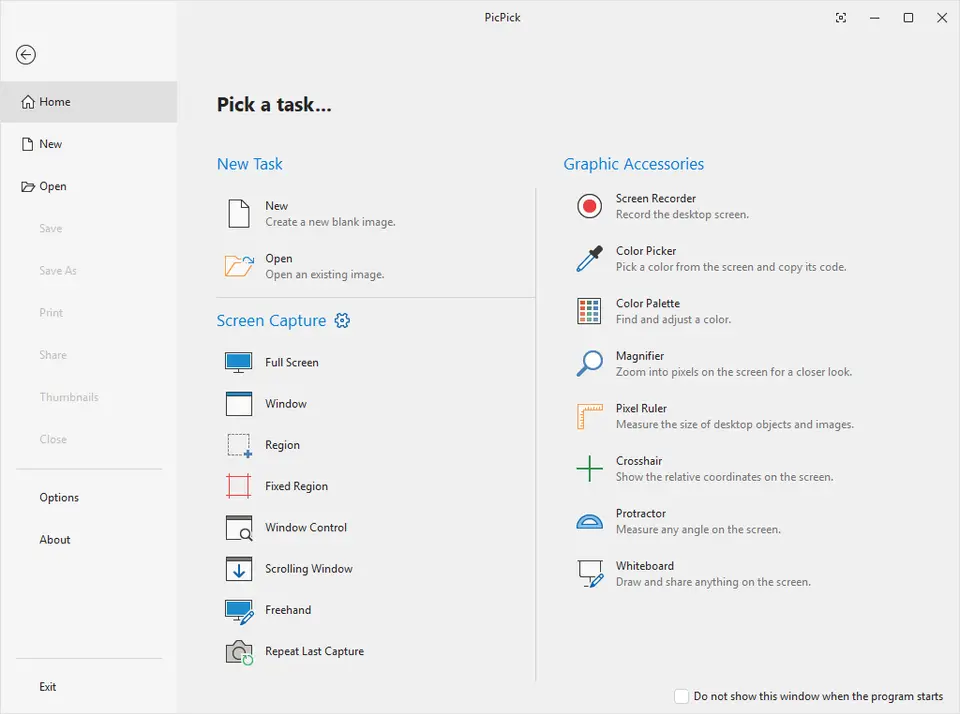
- BFeaturesMany capture modes, a ribbon-style editor, screen recording, color picker, pixel ruler and whiteboard. Nothing in the listing is missing from the job.
- BEase of useInstall and press a capture hotkey with nothing to set up. No store rating is on record.
- DPlatforms and integrationsWindows only. The download page lists no Mac or Linux version.
What these grades rest on. Graded from this listing, whose facts were read from PicPick's own pages on 13 November 2026. Not based on using the product, and shorter than our full reviews. How we review and grade.
Make PicPick? Put this grade on your site

Paste this where you want the badge. It links here and follows the grade if it changes. About badges
<a href="https://toolgpa.com/tools/picpick#review"><img src="https://toolgpa.com/badge/picpick.svg" alt="PicPick: 2.6 GPA on ToolGPA" width="196" height="56"></a>Where PicPick stands among desktop utilities
PicPick's GPA of 2.6 is higher than 69 of the 186 other desktop utilities we grade, and level with 46.
It stands best on features (B, above 113 of 186) and worst on platforms and integrations (D, above 0).
Its paid plans start at $2.50 a month when paid by the year, against a middle price of $2.99 for the category: 14 of the 36 others that charge start lower.
On features, ease of use and platforms it scores 2.3 out of 4. 7 tools score higher and cost less.
Each grade against the category
Every bar is all 187 desktop utilities we grade, cut by the letter each got. PicPick’s own letter is outlined.
- BValue for moneyAbove 28 of 186, level with 26
- BFree plan and trialAbove 75 of 186, level with 31
- BFeaturesAbove 113 of 186, level with 72
- BEase of useAbove 78 of 186, level with 108
- DPlatforms and integrationsAbove 0 of 186, level with 110
Price against what you get
Each dot is one of 103 desktop utilities. Further left costs less, and higher up scores better on features, ease of use and platforms. Point at a dot to see which tool it is.
Features, ease of use and platforms, averaged
What paid plans start at, a month (each step along is roughly double) →
- The best score at each price
- Has a free plan
- No free plan
Keep PicPick, or make your own?
Keep it
Nothing PicPick does is plain enough to make in a weekend. The 5 things listed below take a company.
It costs $30 a year.
What you could not
- Capture tools hooked into the operating system.
- Recording the screen with its sound, and somewhere to keep the video.
- Storing and serving files for other people.
- A real app for Windows. Something home-made would be a web page.
- The depth: we grade its features B, which means it covers the whole job.
What this rests on. PicPick’s listing: what it does, where it runs, what it plugs into and what it costs. It is a judgement about the kind of software this is. We have not built a replacement for it, and making your own means looking after it too. How we decide, and every tool’s verdict.
What is PicPick?
PicPick is a Windows screen capture tool bundled with an image editor, a screen recorder and design utilities such as a color picker, pixel ruler and whiteboard. It is free for personal, non-commercial use, and a Pro license is required for commercial and business use.
Worth knowing
- Windows only; the download page lists Windows versions and no Mac or Linux build.
- The free version is limited to personal, non-commercial use, and work use needs Pro.
- A Pro license is per user, installable on up to two computers for that user.
- The page mentions a limited-time lifetime option but does not show its price.
Key features
- Many capture modes
- Full screen, active window, scrolling window, region, fixed region and freehand, with hotkeys, auto-save and multi-monitor support.
- Screen recording
- Record the full screen, a window or a region with system audio and microphone, saved to a local file.
- Ribbon-style image editor
- Annotate with text, arrows, shapes and callouts, and apply shadows, blur, watermarks, frames and mosaics.
- Design utilities
- Includes a color picker, pixel ruler, magnifier, protractor, crosshair and whiteboard.
- Share and send
- Send captures to Google Drive, Dropbox, OneDrive, FTP or email, or get a shareable web link.
PicPick pricing
As of Nov 13, 2026, PicPick has a free plan, and paid plans start at $30 per year (Professional, listed as a limited-time price).
- Starts at
- $30 per year (Professional, listed as a limited-time price)
- Free plan
- Free for personal, non-commercial use with the capture, image editor and design tools, manual updates and no technical support.
- Free trial
- None listed
| Plan | Price | What you get |
|---|---|---|
| Free | $0 | Personal, non-commercial use only. Screen capture, image editor and design tools, with manual updates and ads. |
| Professional | $30per year, per user | Commercial and business use, auto updates, priority support and no ads. Shown as $30, down from a crossed-out $36. |
Read from picpick.app on Nov 13, 2026. Prices change, so confirm with PicPick before you buy.
Ways to pay less
- Lifetime licenseLifetime license, limited-time offer
The pricing page says a one-time lifetime license is available as a limited-time offer, with no recurring fees.
Stated on picpick.app
Works with
PicPick alternatives
- PicPick vs Snipaste
Free plan · from $8.99 one-time
- PicPick vs Greenshot
Free plan · from $1.99 one-time
- PicPick vs FastStone Capture
Free trial · from $29.95 one-time
- PicPick vs Screenpresso
Free plan





Common questions
Does PicPick have an Android app?
No Android app was listed when its pages were read on Nov 13, 2026. PicPick is listed for Windows.
Does PicPick have an iPhone app?
No iPhone app was listed when its pages were read on Nov 13, 2026. PicPick is listed for Windows.
Is PicPick open source?
PicPick is not described as open source on its own site, as read on Nov 13, 2026.
Sources for this page
The prices, plans, platforms and features above were read from these pages on Nov 13, 2026.