
SumatraPDF review (2026): is it any good?
Small, free PDF, eBook and comic reader for Windows
SumatraPDF report card
Good · out of 4.0 · graded Nov 13, 2026
Best for opening PDFs and ebooks quickly on Windows
SumatraPDF is a free, open-source reader for PDF, EPUB, MOBI, comic, DjVu, XPS and CHM files, with a portable build. It only reads, so it will not edit a PDF, and the desktop app is Windows only.
Who SumatraPDF is for
- Fits if you want a light Windows viewer for PDFs, ebooks and comics
- Works for people who keep a portable reader on a USB stick
Who SumatraPDF is not for
- Too light for editing, as the pages list no way to change text or pages
- Skip it if you use a Mac or Linux, since the FAQ says there is no version for them
- Not for you if you want phone apps, as none is listed
- Watch out: support is a GitHub discussions forum and documentation, not a help desk
Why SumatraPDF gets a 2.8
Five grades, each with its reason. The GPA is their average: an A is 4 points, an F is none.
- AValue for moneyFree and open source, with no ads or bundled software, and anyone can download and run it.
- AFree plan and trialThe whole app is free to download and use, with nothing held back.
- DFeaturesIt opens many document formats but the pages list no editing, so for a PDF editing category it covers one narrow function, viewing.
- BEase of useNo store rating is on record, but you install or unzip it and open a file, with nothing to set up.
- CPlatforms and integrationsA Windows desktop app in 32-bit, 64-bit and ARM64 builds, plus a browser version. There is no Mac, Linux or phone app.
What these grades rest on. Graded from this listing, whose facts were read from SumatraPDF's own pages on 13 November 2026. Not based on using the product, and shorter than our full reviews. How we review and grade.
Make SumatraPDF? Put this grade on your site
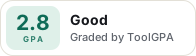
Paste this where you want the badge. It links here and follows the grade if it changes. About badges
<a href="https://toolgpa.com/tools/sumatrapdf#review"><img src="https://toolgpa.com/badge/sumatrapdf.svg" alt="SumatraPDF: 2.8 GPA on ToolGPA" width="196" height="56"></a>Where SumatraPDF stands among PDF editors
SumatraPDF's GPA of 2.8 is higher than 31 of the 45 other PDF editors we grade, and level with 7.
It stands best on free plan and trial (A, above 39 of 45) and worst on features (D, above 0).
SumatraPDF has no paid plan.
On features, ease of use and platforms it scores 2.0 out of 4. Nothing scores higher for less, though at least one tool matches that score at a lower price.
Each grade against the category
Every bar is all 46 PDF editors we grade, cut by the letter each got. SumatraPDF’s own letter is outlined.
- AValue for moneyAbove 31 of 45, level with 14
- AFree plan and trialAbove 39 of 45, level with 6
- DFeaturesAbove 0 of 45, level with 1
- BEase of useAbove 11 of 45, level with 32
- CPlatforms and integrationsAbove 5 of 45, level with 16
Price against what you get
Each dot is one of 32 PDF editors. Further left costs less, and higher up scores better on features, ease of use and platforms. Point at a dot to see which tool it is.
Features, ease of use and platforms, averaged
What paid plans start at, a month (each step along is roughly double) →
- The best score at each price
- Has a free plan
- No free plan
Keep SumatraPDF, or make your own?
Keep it
SumatraPDF is free, so making your own would save you nothing.
It is one of the better ones too: its GPA of 2.8 is higher than 31 of the 45 other PDF editors we grade.
What you could make
- Documents: an app builder makes this well.
What you could not
- A real app for Windows. Something home-made would be a web page.
What this rests on. SumatraPDF’s listing: what it does, where it runs, what it plugs into and what it costs. It is a judgement about the kind of software this is. We have not built a replacement for it, and making your own means looking after it too. How we decide, and every tool’s verdict.
What is SumatraPDF?
SumatraPDF is a free, open-source reader for PDF, EPUB, MOBI, comic book, DjVu, XPS and CHM files. It is a native Windows app with a portable option, plus a browser version. It is built for viewing documents quickly and does not position itself as a PDF editor.
Worth knowing
- Windows only for the desktop app; the FAQ says there is no Mac or Linux version.
- The home page presents it as a reader; the pages read do not list editing features such as changing text or pages.
- Support is through a GitHub discussions forum and documentation.
Key features
- Many document formats
- Opens PDF, EPUB, MOBI, CBZ and CBR comics, DjVu, XPS, CHM and common image formats, including JPEG XL and HEIC.
- Light and fast
- The site describes an app that opens documents instantly with minimal memory use.
- Portable option
- Can run without installation, for example from a USB drive.
- Customization
- Keyboard shortcuts, themes and the toolbar layout can be changed.
- Windows builds
- Native 32-bit, 64-bit and ARM64 builds for Windows 7, 8, 10 and 11.
- Web version
- A browser version is linked from the site's main navigation at web.sumatrapdfreader.org.
SumatraPDF pricing
As of Nov 13, 2026, SumatraPDF is free to use.
- Starts at
- Free
- Free plan
- Everything: the app is free and open source, with no ads or bundled software.
- Free trial
- None listed
| Plan | Price | What you get |
|---|---|---|
| Free | $0 | Free and open source, with no ads, bundled software or subscription. |
Read from sumatrapdfreader.org on Nov 13, 2026. Prices change, so confirm with SumatraPDF before you buy.
SumatraPDF alternatives
- SumatraPDF vs PDF-XChange Editor
Free plan · from $62 one-time
- SumatraPDF vs Foxit PDF Editor
Free trial · from $129.99/yr
- SumatraPDF vs PDF Reader Pro
Free plan · from $59.99/yr



Common questions
Does SumatraPDF have an Android app?
No Android app was listed when its pages were read on Nov 13, 2026. SumatraPDF is listed for Windows and Web.
Does SumatraPDF have an iPhone app?
No iPhone app was listed when its pages were read on Nov 13, 2026. SumatraPDF is listed for Windows and Web.
Is SumatraPDF open source?
Yes. SumatraPDF is open source, according to its own site.
Does SumatraPDF work offline?
Yes, according to its own site. What works without a connection differs by plan and platform, so check the vendor's page for the detail.
Sources for this page
The prices, plans, platforms and features above were read from these pages on Nov 13, 2026.