
Scrite review (2026): is it worth $19 a year?
Screenwriting app with Indian language support
Black Friday: is there a Scrite sale?
Scrite report card
Fair · out of 4.0 · graded Nov 12, 2026
Best for screenwriting in Indian languages, paid once
Scrite is a screenwriting program for Mac, Windows and Linux with a structure canvas, a relationship graph and support for Indian languages. Plans start at $19 for a year, paid once, with no renewal. There's no sync across devices and no live collaboration, and a purchase can't be refunded.
Who Scrite is for
- Fits if you write screenplays in Hindi or another Indian language
- Works for writers who would rather pay once than subscribe
Who Scrite is not for
- Skip it if you need to write with someone else live, as there's no real-time collaboration
- Not for you if you work across devices, because files don't sync
- Watch out: plans can't be cancelled or refunded once bought
- Tight if you want Open Screenplay Format export or email support, as those need Annual Pro
- Watch out: the basic plan covers 1 device and the site says app prices may differ by region
Why Scrite gets a 2.4
Five grades, each with its reason. The GPA is their average: an A is 4 points, an F is none.
- AValue for money$19 for a year, or $36 for the Pro year, paid once with no renewal. That works out to $1.60 to $3 a month, well under what writing tools charge.
- CFree plan and trialA 30-day trial with no card, but no free plan afterwards.
- CFeaturesEditor, structure canvas, notebook, reports and imports. The listing says it has no device sync and no real-time collaboration.
- CEase of useNo store rating on record. The canvas and notebook take some learning.
- CPlatforms and integrationsMac, Windows and Linux only. Imports Final Draft and Fountain files, but no phone or web version.
What these grades rest on. Graded from this listing, whose facts were read from Scrite's own pages on 12 November 2026. Not based on using the product, and shorter than our full reviews. How we review and grade.
Make Scrite? Put this grade on your site
Paste this where you want the badge. It links here and follows the grade if it changes. About badges
<a href="https://toolgpa.com/tools/scrite#review"><img src="https://toolgpa.com/badge/scrite.svg" alt="Scrite: 2.4 GPA on ToolGPA" width="196" height="56"></a>Where Scrite stands among writing tools
Scrite's GPA of 2.4 is higher than 39 of the 100 other writing tools we grade, and level with 12.
It stands best on value for money (A, above 65 of 100) and worst on features (C, above 0).
Its paid plans start at $1.58 a month when paid by the year, against a middle price of $8.33 for the category: 1 of the 62 others that charge start lower.
On features, ease of use and platforms it scores 2.0 out of 4. 6 tools score higher and cost less.
Each grade against the category
Every bar is all 101 writing tools we grade, cut by the letter each got. Scrite’s own letter is outlined.
- AValue for moneyAbove 65 of 100, level with 35
- CFree plan and trialAbove 12 of 100, level with 55
- CFeaturesAbove 0 of 100, level with 63
- CEase of useAbove 5 of 100, level with 52
- CPlatforms and integrationsAbove 5 of 100, level with 45
Price against what you get
Each dot is one of 79 writing tools. Further left costs less, and higher up scores better on features, ease of use and platforms. Point at a dot to see which tool it is.
Features, ease of use and platforms, averaged
What paid plans start at, a month (each step along is roughly double) →
- The best score at each price
- Has a free plan
- No free plan
Keep Scrite, or make your own?
Your call
A writing app at its plainest is a page that saves what you type.
You could make the core of Scrite for yourself: templates and documents. What you would give up is listed below. Whether that is worth the price is your call. At $19 a year it costs less than the weekend it would take to replace, which is the argument for keeping it.
What you could make
- Templates and documents: an app builder makes these well.
What you could not
- Apps for macOS, Windows and Linux that stay in step with each other.
What this rests on. Scrite’s listing: what it does, where it runs, what it plugs into and what it costs. It is a judgement about the kind of software this is. We have not built a replacement for it, and making your own means looking after it too. How we decide, and every tool’s verdict.
What is Scrite?
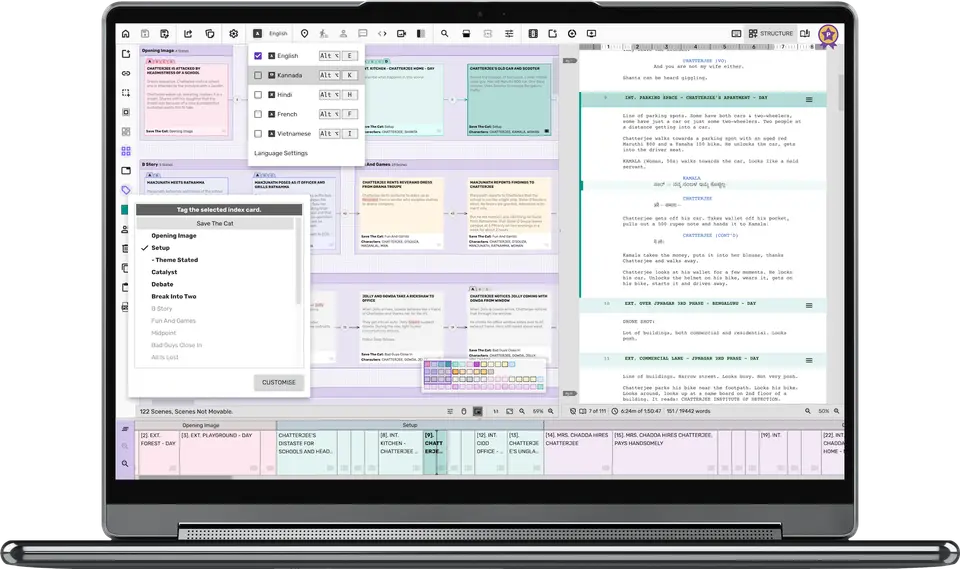
Scrite is a screenwriting program for macOS, Windows and Linux, made by IEDN Technologies in Bengaluru. It combines a screenplay editor with a structure canvas, notebook and relationship graph, and lists support for Indian languages. A 30-day trial needs no card.
Worth knowing
- Plans are not auto-renewed and, once purchased, cannot be cancelled or refunded.
- It does not sync files across devices or support real-time collaboration, whatever the activation limit.
- Early bird prices apply when buying during the trial or in the last 30 days of an active plan; the standard prices are listed first.
- The site says plans shown in the app may differ by billing region and offers.
Key features
- Screenplay editor
- A screenplay editor is included on every plan, including the free trial.
- Structure canvas
- Plot structure is laid out visually, and the structure and notebook views are available on all plans.
- Relationship graph
- A graph of character relationships is included; saving it as a PDF is not part of Annual Basic.
- Indian languages
- The pricing table lists Indian language support on every plan.
- Imports
- Final Draft, Fountain, HTML and Open Screenplay Format files can be imported; exporting Open Screenplay Format needs Annual Pro or higher.
- Reports
- Character, location, notes, subset, statistics and two-column reports can be previewed and saved, with some saved reports limited by plan.
Scrite pricing
As of Nov 12, 2026, Scrite is a paid product with a free trial, starting at $19 for 1 year; $15 early bird price.
- Starts at
- $19 for 1 year; $15 early bird price
- Free plan
- None
- Free trial
- 30-day free trial with no credit card required.
| Plan | Price | What you get |
|---|---|---|
| Annual Basic | $19for 1 year, paid once, with no auto-renewal | $15 early bird price. 1 device, watermark removed; no email support or Open Screenplay Format export. |
| Annual Pro | $36for 1 year, paid once, with no auto-renewal | $29 early bird price. 2 devices, email support, scene metadata report and Open Screenplay Format export. |
| Pro Long Term | $69for 3 years, paid once, with no auto-renewal | $59 early bird price. 3 devices, with the same features as Annual Pro. |
Read from scrite.io on Nov 12, 2026. Prices change, so confirm with Scrite before you buy.
Ways to pay less
- EducationStudent and educator pricing
Students and educators get special pricing by signing up with an academic email address; the pricing page does not state the amounts.
Stated on scrite.io
Works with
- Final Draft
- Fountain
Scrite alternatives
- Scrite vs Final Draft
Free trial · from $99.99/yr
- Scrite vs Fade In
Free trial · from $79.95 one-time
- Scrite vs Celtx
Free plan · from $11.24/mo
- Scrite vs WriterDuet
Free plan · from $7.49/mo
- Scrite vs Arc Studio
Free plan · from $69/yr





Common questions
Does Scrite have an Android app?
No Android app was listed when its pages were read on Nov 12, 2026. Scrite is listed for macOS, Windows and Linux.
Does Scrite have an iPhone app?
No iPhone app was listed when its pages were read on Nov 12, 2026. Scrite is listed for macOS, Windows and Linux.
Is Scrite open source?
Scrite is not described as open source on its own site, as read on Nov 12, 2026.
Sources for this page
The prices, plans, platforms and features above were read from these pages on Nov 12, 2026.