JotterPad
Markdown and Fountain editor for books, papers and screenplays
What is JotterPad?
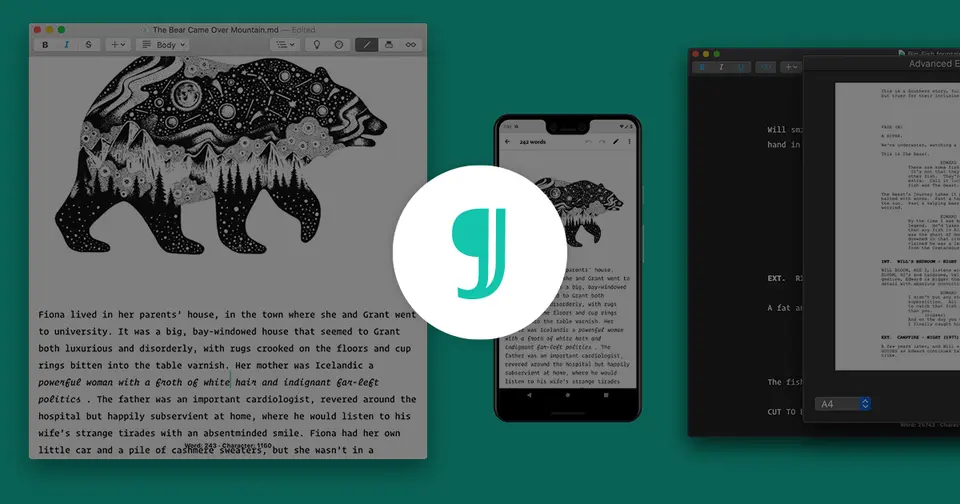
JotterPad is a Markdown and Fountain editor for writing books, screenplays, academic papers and articles on Android, iPhone, iPad, Mac and the web. It turns plain-text markup into formatted documents through templates, and exports to Word, PDF, Final Draft and ePub. The Pro Cloud subscription adds sync with Google Drive, Dropbox, OneDrive and iCloud and unlocks the apps on every platform.
JotterPad has a free plan. Paid plans start at $29.99 per year on the App Store; $3.33 per month billed annually on the web. See every plan
Good for
- Writers who draft in Markdown or Fountain across a phone, a tablet and a computer
- Students formatting APA or MLA papers with BibTeX citations
- Screenwriters who need Final Draft (.fdx) export
Worth knowing
- Cloud sync, Fountain and LaTeX files, Word and Final Draft export and blog publishing need a paid plan, and free PDFs carry a watermark.
- No Windows or Linux app is listed: there are apps for Android, iPhone, iPad and Mac, and a web editor for other computers.
- Prices depend on where you buy: the website lists $3.33 a month billed annually, the US App Store $29.99 a year or $6.99 a month.
- The vendor says canceled subscriptions and the lifetime purchase are not refunded.
Key features
- Markdown, Fountain and LaTeX editing
- Documents are written in lightweight markup and shown formatted as you type. LaTeX support is labeled beta, and Fountain files need a paid plan.
- Templates for papers, books and scripts
- Templates lay a document out as an APA or MLA paper, a novel, a screenplay, a report, a letter or presentation slides when it is printed to PDF.
- Cloud sync and offline work
- Pro Cloud syncs files with Google Drive, Dropbox and OneDrive, plus iCloud on Mac and iOS. The apps keep working offline and sync once back online.
- Citations with BibTeX
- Citations are added by uploading Bib files or pasting BibTeX into a Markdown document, then printed as references in APA, MLA, Chicago or AMA style.
- Export and blog publishing
- Exports to Word, PDF, Final Draft (.fdx), HTML and ePub, and can send a piece to Ghost, WordPress or Tumblr as a draft or a published post.
- Plugins and Wizard A.I.
- Plugins add mind maps, Mermaid diagrams, music notation and TeX or chemistry equations. Wizard A.I., built on GPT-3, drafts outlines, summaries and paraphrases.
JotterPad pricing
- Starts at
- $29.99 per year on the App Store; $3.33 per month billed annually on the web
- Free plan
- Free with limited access: Markdown editing, importing .md, .fountain and .fdx files, Unsplash images, and printing Markdown to PDF with a watermark. No cloud sync.
- Free trial
- None listed
| Plan | Price | What you get |
|---|---|---|
| Free | $0 | Limited access: Markdown editing, file import and Unsplash images. PDFs print with a watermark, and cloud sync and Fountain files are not included. |
| Pro Cloud (App Store) | $29.99per year, or $6.99 per month, as an in-app purchase | The Pro Cloud subscription bought inside the iPhone, iPad and Mac app, at the prices on the US App Store listing. |
| Pro Cloud (web) | $3.33per month, billed annually | Sold on jotterpad.app. Unlocks the Android, iOS, Mac and web apps with cloud sync, Fountain and LaTeX files, and Word and Final Draft export. |
| Pro | $24.99 - $49.99in-app purchase on the App Store; basis not shown | Two purchases named Pro on the US App Store listing. The help center describes Pro and Creative as lifetime licenses for one platform, without cloud sync. |
| Pro Cloud (Lifetime) | $159.99one-time purchase | Pro Cloud without a subscription, sold on jotterpad.app. The vendor says it cannot be canceled or refunded. |
Read from jotterpad.app on Oct 9, 2026. Prices change, so confirm with JotterPad before you buy.
Ways to pay less
- Lifetime licensePro Cloud lifetime purchase for $159.99
The Pro page sells Pro Cloud (Lifetime) as a single $159.99 payment in place of the subscription. It cannot be canceled or refunded.
Stated on jotterpad.app - Annual discountAbout 64% less with annual billing on the App Store
The US App Store listing prices Pro Cloud at $29.99 per year or $6.99 per month, which comes to $83.88 over twelve months.
Stated on apps.apple.com
Works with
- Google Drive
- Dropbox
- Microsoft OneDrive
- iCloud
- WordPress
- Ghost
- Tumblr
- Unsplash
JotterPad alternatives
- JotterPad vs iA Writer
Free trial · from $19.99 one-time
- JotterPad vs Ulysses
Free trial · from $39.99/yr
- JotterPad vs 1Writer
From $4.99 one-time
- JotterPad vs Highland Pro
Free trial · from $4.99/mo
- JotterPad vs Scrivener
Free trial · from $23.99 one-time




Common questions
Is JotterPad free?
JotterPad has a free plan. Free with limited access: Markdown editing, importing .md, .fountain and .fdx files, Unsplash images, and printing Markdown to PDF with a watermark. No cloud sync. Paid plans start at $29.99 per year on the App Store; $3.33 per month billed annually on the web.
How much does JotterPad cost?
JotterPad lists 5 plans. Free: $0. Pro Cloud (App Store): $29.99 per year, or $6.99 per month, as an in-app purchase. Pro Cloud (web): $3.33 per month, billed annually. Pro: $24.99 - $49.99 in-app purchase on the App Store; basis not shown. Pro Cloud (Lifetime): $159.99 one-time purchase. Prices were read from jotterpad.app on Oct 9, 2026.
What platforms does JotterPad work on?
JotterPad is available on Web, macOS, iOS and Android.
Does JotterPad offer any discounts?
JotterPad publicly lists the following: Pro Cloud lifetime purchase for $159.99; About 64% less with annual billing on the App Store.
Does JotterPad have a Windows app?
No Windows app was listed when its pages were read on Oct 9, 2026. JotterPad is listed for Web, macOS, iOS and Android.
Does JotterPad have a Linux app?
No Linux app was listed when its pages were read on Oct 9, 2026. JotterPad is listed for Web, macOS, iOS and Android.
Is JotterPad open source?
JotterPad is not described as open source on its own site, as read on Oct 9, 2026.
Does JotterPad work offline?
Yes, according to its own site. What works without a connection differs by plan and platform, so check the vendor's page for the detail.
What does JotterPad integrate with?
JotterPad's listing names Google Drive, Dropbox, Microsoft OneDrive, iCloud, WordPress, Ghost, Tumblr and Unsplash. A listing names up to eight integrations, so it may connect to more.
Who makes JotterPad?
JotterPad is made by Two App Studio Pte. Ltd. It dates from 2013.
What are the alternatives to JotterPad?
The closest alternatives to JotterPad in our directory are iA Writer, Ulysses, 1Writer, Highland Pro and Scrivener. Each one has a side-by-side comparison with JotterPad.
Sources for this page
The prices, plans, platforms and features above were read from these pages on Oct 9, 2026.
- jotterpad.app/pro
- jotterpad.app/
- apps.apple.com/us/app/jotterpad-novel-screenplay/id1520190857
- play.google.com/store/apps/details?id=com.jotterpad.x&hl=en_US&gl=US
- help.jotterpad.app/en/article/pro-cloud-12y3npl/
- help.jotterpad.app/en/article/creative-1jlfio4/
- help.jotterpad.app/en/article/pro-mac-tq89bc/
- help.jotterpad.app/en/article/what-is-jotterpad-19afqd6/
- help.jotterpad.app/en/article/refund-policy-1szmcki/