
Supergrow review (2026): is it worth $31 a month, billed yearly?
LinkedIn content planner that writes in your own voice
Black Friday: is there a Supergrow sale?
Supergrow report card
Fair · out of 4.0 · graded Nov 13, 2026
Best for writing and scheduling LinkedIn posts in your own voice
Supergrow is built for LinkedIn: it learns your writing style, interviews you to find ideas, makes carousels and schedules posts. It covers one network only, there's no free plan after a 7-day trial, and every extra person means the Teams plan at $189 for 5.
Who Supergrow is for
- Fits if LinkedIn is your main channel and you want AI to draft in your voice
- Works for executives or small leadership teams of up to 5 with approvals
Who Supergrow is not for
- Not for you if you post anywhere but LinkedIn, as the pages list no other network
- Tight if you want a free plan, because after the 7-day trial it's paid
- Pricey if you're a team: $189 a month for 5 accounts
- Watch out: approvals, team analytics and leaderboards need Teams, and 6 or more accounts means an Enterprise quote
Why Supergrow gets a 2.2
Five grades, each with its reason. The GPA is their average: an A is 4 points, an F is none.
- CValue for money$31 a month on yearly billing for 1 account ($39 monthly), a little above the category middle of $24.99 for a LinkedIn-only tool. Teams is $189 for 5 accounts.
- CFree plan and trialNo free plan. A 7-day trial on every plan, and the account pauses afterwards if you don't pick one; the pages don't say a card is needed.
- CFeaturesVoice profile, AI interviews, repurposing, carousels, scheduling and analytics. The pages list LinkedIn only, and approvals and team analytics are Teams only.
- CEase of useNo store rating on record. Training the voice and connecting your account takes setup.
- BPlatforms and integrationsWeb only. Links to Slack, YouTube, Claude and ChatGPT, and an MCP, but no apps.
What these grades rest on. Graded from this listing, whose facts were read from Supergrow's own pages on 13 November 2026. Not based on using the product, and shorter than our full reviews. How we review and grade.
Make Supergrow? Put this grade on your site

Paste this where you want the badge. It links here and follows the grade if it changes. About badges
<a href="https://toolgpa.com/tools/supergrow#review"><img src="https://toolgpa.com/badge/supergrow.svg" alt="Supergrow: 2.2 GPA on ToolGPA" width="196" height="56"></a>Where Supergrow stands among social media schedulers
Supergrow's GPA of 2.2 is higher than 36 of the 90 other social media schedulers we grade, and level with 28.
It stands best on platforms and integrations (B, above 20 of 90) and worst on features (C, above 2).
Its paid plans start at $31 a month, against a middle price of $24.46 for the category: 52 of the 79 others that charge start lower.
On features, ease of use and platforms it scores 2.3 out of 4. 12 tools score higher and cost less.
Each grade against the category
Every bar is all 91 social media schedulers we grade, cut by the letter each got. Supergrow’s own letter is outlined.
- CValue for moneyAbove 15 of 90, level with 56
- CFree plan and trialAbove 27 of 90, level with 58
- CFeaturesAbove 2 of 90, level with 69
- CEase of useAbove 6 of 90, level with 79
- BPlatforms and integrationsAbove 20 of 90, level with 69
Price against what you get
Each dot is one of 80 social media schedulers. Further left costs less, and higher up scores better on features, ease of use and platforms. Point at a dot to see which tool it is.
Features, ease of use and platforms, averaged
What paid plans start at, a month (each step along is roughly double) →
- The best score at each price
- Has a free plan
- No free plan
Keep Supergrow, or make your own?
Keep it
The plain part of Supergrow you could make: calendar, kanban boards and reports. What surrounds it you could not. The 3 things listed below take a company, not a weekend.
It costs $372 a year.
What you could make
- Calendar, kanban boards and reports: an app builder makes these well.
What you could not
- A score built from what the top results for each keyword cover.
- It plugs into other products, LinkedIn, Claude and ChatGPT among them.
- AI features, unless you pay a model provider for each request yourself.
What this rests on. Supergrow’s listing: what it does, where it runs, what it plugs into and what it costs. It is a judgement about the kind of software this is. We have not built a replacement for it, and making your own means looking after it too. How we decide, and every tool’s verdict.
What is Supergrow?
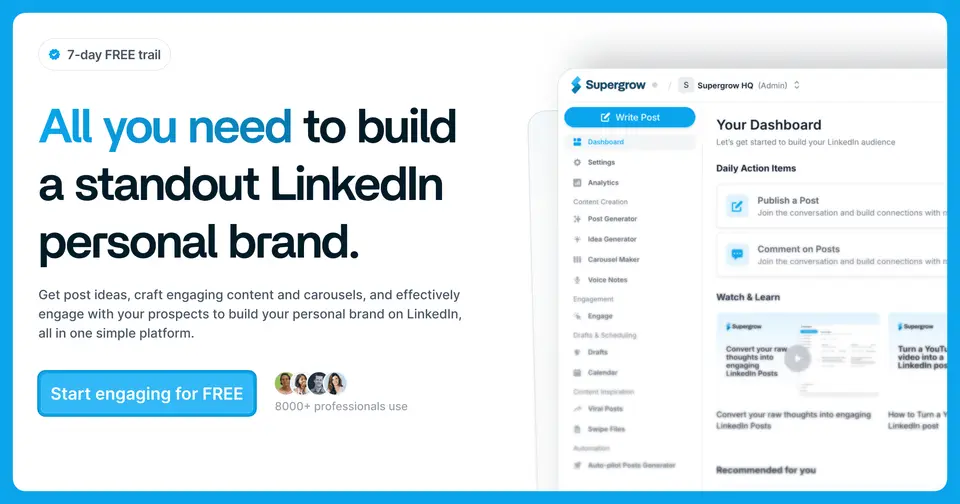
Supergrow is a LinkedIn-focused tool for creators, executives and employee-advocacy teams. It learns a writing style, interviews you by AI to draw out ideas, repurposes videos and articles, makes carousels and schedules posts, with analytics and, on Teams, approval workflows.
Worth knowing
- The scheduling described is for LinkedIn; the pages do not list other networks.
- Each plan includes a fixed number of accounts (1 on Pro, 5 on Teams); more than 5 needs Enterprise pricing.
- Approval workflows, team analytics and leaderboards are only on Teams and above.
- There is no free plan; an account pauses if no plan is chosen after the trial.
Key features
- Content DNA
- Builds a profile of how you write so drafts match your voice rather than generic AI output.
- Postcast AI interviews
- An AI interviews you by voice or text and turns the answers into post ideas; unlimited on every plan.
- Repurposing and carousels
- Turn YouTube videos, articles and PDFs into posts, and turn a post into branded carousel slides.
- Scheduling
- Calendar and kanban views, a queue and automatic first-comment scheduling.
- Approvals for teams
- Teams adds review chains, an organization dashboard, publishing on behalf of members and Slack notifications.
- Supergrow MCP
- Draft and schedule posts from Claude or ChatGPT through an MCP connection.
Supergrow pricing
As of Nov 13, 2026, Supergrow is a paid product with a free trial, starting at $31 per month for 1 account, billed annually ($39 billed monthly).
- Starts at
- $31 per month for 1 account, billed annually ($39 billed monthly)
- Free plan
- None
- Free trial
- 7-day free trial on every plan.
| Plan | Price | What you get |
|---|---|---|
| Pro | $31per month for 1 account, billed annually ($39 billed monthly) | 1 account with voice profile, AI interviews, repurposing, scheduling, carousel maker, analytics and MCP. |
| Teams | $189per month for 5 accounts, billed annually ($199 billed monthly) | Everything in Pro for 5 accounts, plus approval workflows, an organization dashboard and team analytics. |
| Enterprise | Custom | For more than 5 executives: custom integrations and API, SLA, invoice billing and custom reporting. |
Read from supergrow.ai on Nov 13, 2026. Prices change, so confirm with Supergrow before you buy.
Ways to pay less
- Annual discount20% off Pro with yearly billing
Supergrow's FAQ states Pro is $31 a month billed annually instead of $39, and Teams is $189 instead of $199.
Stated on supergrow.ai
Works with
Supergrow alternatives
- Supergrow vs Taplio
Free trial · from $32/mo
- Supergrow vs AuthoredUp
Free trial · from $16.63/mo
- Supergrow vs Hypefury
Free trial · from $5/mo
- Supergrow vs Typefully
Free plan
- Supergrow vs FeedHive
Free trial · from €15/mo





Common questions
Does Supergrow have an Android app?
No Android app was listed when its pages were read on Nov 13, 2026. Supergrow is listed for Web.
Does Supergrow have an iPhone app?
No iPhone app was listed when its pages were read on Nov 13, 2026. Supergrow is listed for Web.
Is Supergrow open source?
Supergrow is not described as open source on its own site, as read on Nov 13, 2026.
Sources for this page
The prices, plans, platforms and features above were read from these pages on Nov 13, 2026.