TomatoBar review (2026): is it any good?
Free open-source Pomodoro timer for the Mac menu bar
TomatoBar report card
Good · out of 4.0 · graded Oct 10, 2026
Best for a no-frills Pomodoro timer in the Mac menu bar
TomatoBar is a free, open-source Pomodoro timer in your Mac's menu bar, with adjustable work and rest intervals, a few sounds and a keyboard shortcut, and then it stops. There's no task list, no reports and no sync, and it's Mac only. Homebrew has disabled its cask, and before February 2026 it went more than two years without a release.
Who TomatoBar is for
- Fits if you want a plain Pomodoro timer in the Mac menu bar at no cost
- Works for people who want to start the timer from a script or read its log themselves
Who TomatoBar is not for
- Skip it if you're not on a Mac, as it's macOS only, and version 3.0 on needs Big Sur or newer
- Too light for anyone who wants a task list, reports or sync between devices
- Not for you if you install everything through Homebrew, since its cask there is marked as disabled
- Watch out: before the 3.6 releases of February 2026, the last one, 3.5.0, was from September 2023
Why TomatoBar gets a 2.6
Five grades, each with its reason. The GPA is their average: an A is 4 points, an F is none.
- AValue for moneyFree and open source under the MIT license, straight from the project's GitHub releases, with no paid version anywhere in the repository. The middle of this category is $3.99 a month.
- AFree plan and trialFree outright, with nothing to upgrade to: the intervals, the three sounds, the break notifications, the global shortcut and the JSON log are all there is, and all of it is included.
- CFeaturesIt does the Pomodoro job fully, and that job is a small one. Work, short rest and long rest lengths, sets, three sounds, break notifications with a Skip button, a global shortcut. The README describes no task list, no reports and no sync, and your history is a JSON log file.
- CEase of useNo store rating on record, and getting it onto the Mac is the awkward part: you download it from GitHub releases, and Homebrew has had its tomatobar cask disabled since September 1, 2026 for failing the Gatekeeper check. After that it's one menu bar popover.
- DPlatforms and integrationsOne operating system. macOS only, and version 3.0 and later need Big Sur or newer. No integrations listed, though opening a tomatobar:// URL will start or stop the timer from a script.
What these grades rest on. Graded from this listing, whose facts were read from TomatoBar's own pages on 9 October 2026. Also tested with a demo account on 2026-03-29. How we review and grade.
Make TomatoBar? Put this grade on your site

Paste this where you want the badge. It links here and follows the grade if it changes. About badges
<a href="https://toolgpa.com/tools/tomatobar#review"><img src="https://toolgpa.com/badge/tomatobar.svg" alt="TomatoBar: 2.6 GPA on ToolGPA" width="196" height="56"></a>Where TomatoBar stands among focus apps
TomatoBar's GPA of 2.6 is higher than 35 of the 83 other focus apps we grade, and level with 13.
It stands best on free plan and trial (A, above 64 of 83) and worst on platforms and integrations (D, above 0).
TomatoBar has no paid plan.
On features, ease of use and platforms it scores 1.7 out of 4. Nothing scores higher for less, though at least one tool matches that score at a lower price.
Each grade against the category
Every bar is all 84 focus apps we grade, cut by the letter each got. TomatoBar’s own letter is outlined.
- AValue for moneyAbove 47 of 83, level with 36
- AFree plan and trialAbove 64 of 83, level with 19
- CFeaturesAbove 5 of 83, level with 56
- CEase of useAbove 1 of 83, level with 20
- DPlatforms and integrationsAbove 0 of 83, level with 10
Price against what you get
Each dot is one of 70 focus apps. Further left costs less, and higher up scores better on features, ease of use and platforms. Point at a dot to see which tool it is.
Features, ease of use and platforms, averaged
What paid plans start at, a month (each step along is roughly double) →
- The best score at each price
- Has a free plan
- No free plan
Keep TomatoBar, or make your own?
Your call
A focus timer at its plainest counts down 25 minutes and keeps a log.
TomatoBar is free, so making your own saves no money. Make it only if you want it built your way.
What you could make
- Pomodoro timer: an app builder makes this well.
What you could not
- A native app living in the menu bar.
- A real app for macOS. Something home-made would be a web page.
What this rests on. TomatoBar’s listing: what it does, where it runs, what it plugs into and what it costs. It is a judgement about the kind of software this is. We have not built a replacement for it, and making your own means looking after it too. How we decide, and every tool’s verdict.
What is TomatoBar?
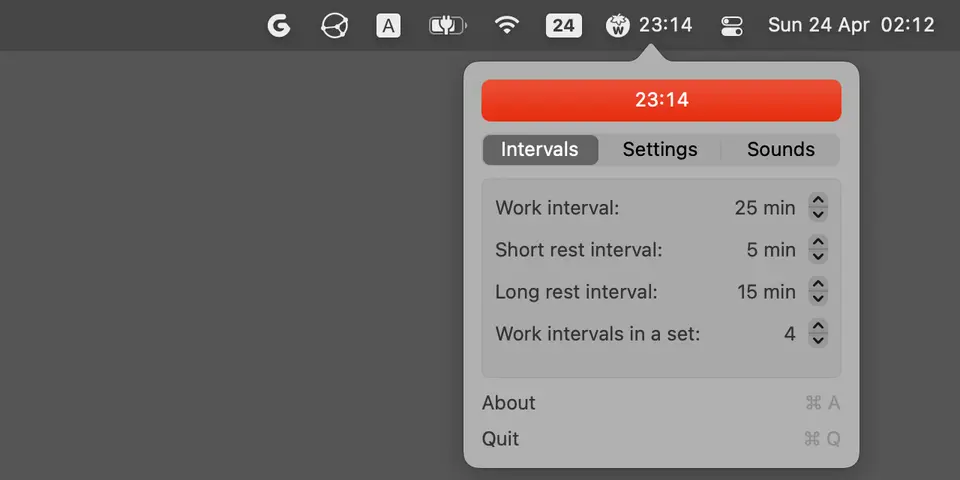
TomatoBar is a free, open-source Pomodoro timer that sits in the macOS menu bar. It covers the basics of the technique: adjustable work and rest intervals, optional sound effects, notifications when a break starts or ends, and a global keyboard shortcut to start or stop the timer. The app runs sandboxed with no entitlements and is published on GitHub under the MIT license.
Worth knowing
- macOS only. Version 3.0 and later need macOS Big Sur or newer; older macOS versions and the Touch Bar are supported only by releases before 3.0.
- The README describes no task list, reports or sync between devices; session history is kept only as a JSON log file.
- Homebrew marks its tomatobar cask as disabled since September 1, 2026 for failing the Gatekeeper check, though the README still gives the Homebrew command.
- The latest stable version, 3.6.1, is dated February 19, 2026. Before the 3.6 releases that month, the previous one, 3.5.0, came out in September 2023.
Key features
- Adjustable intervals
- Set the length of the work interval, the short rest and the long rest, and how many work intervals make up a set before the long rest is taken.
- Menu bar timer
- Start and stop the timer from a menu bar popover. Showing the countdown in the menu bar, stopping after a break and launching at login are each a setting.
- Optional sounds
- Three sound effects, named Windup, Ding and Ticking, can each be switched on or off. Version 3.6.0 added volume controls for them.
- Break notifications
- A notification says when it is time for a short or long break and when the break is over. The break notification carries a Skip button.
- Global shortcut and URL control
- A global keyboard shortcut starts or stops the timer, and so does opening the tomatobar://startStop URL, for example from the command line.
- JSON event log
- Each change of timer state is written in JSON to a log file inside the app's container, which other tools can read to analyze how time was spent.
TomatoBar pricing
As of Oct 9, 2026, TomatoBar is free to use.
- Starts at
- Free
- Free plan
- Free and open-source software under the MIT license, downloaded from the project's GitHub releases. The repository lists no paid version.
- Free trial
- None listed
| Plan | Price | What you get |
|---|---|---|
| TomatoBar | $0 | The complete Mac app: adjustable intervals, three sound effects, break notifications, a global shortcut and a JSON event log. |
Read from github.com on Oct 9, 2026. Prices change, so confirm with TomatoBar before you buy.
TomatoBar alternatives
- TomatoBar vs Flow
Free plan · from $17.99/yr
- TomatoBar vs Be Focused
Free plan · from $2.99/mo
- TomatoBar vs Session
Free plan · from $3.33/mo
- TomatoBar vs Focus - Deep Work Timer
Free plan · from $6.99/mo
- TomatoBar vs Pomofocus
Free plan · from $3/mo




Common questions
Does TomatoBar have an Android app?
No Android app was listed when its pages were read on Oct 9, 2026. TomatoBar is listed for macOS.
Does TomatoBar have an iPhone app?
No iPhone app was listed when its pages were read on Oct 9, 2026. TomatoBar is listed for macOS.
Is TomatoBar open source?
Yes. TomatoBar is open source, according to its own site.
Sources for this page
The prices, plans, platforms and features above were read from these pages on Oct 9, 2026.
- github.com/ivoronin/TomatoBar
- raw.githubusercontent.com/ivoronin/TomatoBar/main/LICENSE
- raw.githubusercontent.com/ivoronin/TomatoBar/main/TomatoBar/en.lproj/Localizable.strings
- github.com/ivoronin/TomatoBar/releases/tag/v3.6.1
- github.com/ivoronin/TomatoBar/releases/tag/v3.6.0
- github.com/ivoronin/TomatoBar/releases/tag/v1.0.0
- api.github.com/repos/ivoronin/TomatoBar/releases?per_page=8
- formulae.brew.sh/cask/tomatobar
- formulae.brew.sh/api/cask/tomatobar.json