Session review (2026): is the free plan enough?
Pomodoro focus timer with analytics for Mac, iPhone and iPad
Black Friday: is there a Session sale?
Session report card
Fair · out of 4.0 · graded Oct 10, 2026
Best for a Pomodoro timer that logs where your focus went
Session is a Pomodoro timer that files each session under a category, like writing or a client, and shows where your focused hours went. It's Apple only. Free remembers just the past 2 days and won't let you change session lengths, and blocking, sync and Slack muting are Pro, with the blocker on the Mac only.
Who Session is for
- Fits if you want to see how many focused hours went on each client or subject
- Works for Slack users who want their status to show busy when the timer starts, on Pro
Who Session is not for
- Skip it if you use Windows or Android, as it's Apple devices only
- Tight if you're staying free, because you only see the past 2 days and can't change the session length
- Not for you if you need apps blocked on your phone, since the blocker is Mac only and Pro only
- Watch out: device sync, Slack muting and creating Apple Calendar events all need Pro
- Watch out: the vendor says prices differ slightly by region, so $39.99 a year may not be what you see
Why Session gets a 2.2
Five grades, each with its reason. The GPA is their average: an A is 4 points, an F is none.
- CValue for moneyPro is $39.99 a year, $3.33 a month, which lands mid-table for this category, or $4.99 billed monthly. Students can ask for 30% off for one year, non-renewing. Nothing here undercuts the field.
- CFree plan and trialUnlimited sessions and breaks, and your calendar events in the app. The caps are where it hurts, though: analytics go back 2 days, and you can't change the session length without Pro. You do get 7 days of Pro free on signing up, with no subscription started.
- CFeaturesSessions filed by category, a full log on Pro, a Slack status that flips when the timer starts, finished sessions written to Apple Calendar, Shortcuts and AppleScript. The gap the pricing page admits: app and website blocking is Mac only, so your phone isn't blocked at all.
- BEase of use4.8 from about 360 App Store ratings, too few of them for an A. Start a session, pick a category, and it asks what you learned when the timer ends.
- CPlatforms and integrationsMac, iPhone and iPad, with Slack, Apple Calendar, Shortcuts and AppleScript wired in. One family of devices: no Windows, Android or web version is listed.
What these grades rest on. Graded from this listing, whose facts were read from Session's own pages on 4 October 2026, and its App Store rating. Also tested with a demo account on 2026-04-14. How we review and grade.
Make Session? Put this grade on your site
Paste this where you want the badge. It links here and follows the grade if it changes. About badges
<a href="https://toolgpa.com/tools/session#review"><img src="https://toolgpa.com/badge/session.svg" alt="Session: 2.2 GPA on ToolGPA" width="196" height="56"></a>Where Session stands among focus apps
Session's GPA of 2.2 is higher than 8 of the 83 other focus apps we grade, and level with 14.
It stands best on ease of use (B, above 22 of 83) and worst on free plan and trial (C, above 5).
Its paid plans start at $3.33 a month, against a middle price of $2.99 for the category: 27 of the 49 others that charge start lower.
On features, ease of use and platforms it scores 2.3 out of 4. 22 tools score higher and cost less.
Each grade against the category
Every bar is all 84 focus apps we grade, cut by the letter each got. Session’s own letter is outlined.
- CValue for moneyAbove 8 of 83, level with 26
- CFree plan and trialAbove 5 of 83, level with 38
- CFeaturesAbove 5 of 83, level with 56
- BEase of useAbove 22 of 83, level with 40
- CPlatforms and integrationsAbove 11 of 83, level with 42
Price against what you get
Each dot is one of 70 focus apps. Further left costs less, and higher up scores better on features, ease of use and platforms. Point at a dot to see which tool it is.
Features, ease of use and platforms, averaged
What paid plans start at, a month (each step along is roughly double) →
- The best score at each price
- Has a free plan
- No free plan
Keep Session, or make your own?
You could make this
A focus timer at its plainest counts down 25 minutes and keeps a log.
What Session does at its core is Pomodoro timer and time tracking, and that is the kind of thing an AI app builder makes well. You would give up 3 things, listed below, and little else. It costs $39.96 a year. An AI app builder starts at about $20 a month on our listings, and you only need it while you build.
What you could make
- Pomodoro timer and time tracking: an app builder makes these well.
What you could not
- Blocking that reaches every browser and app and is hard to switch off.
- Apps for macOS and iOS that stay in step with each other.
- Hooks into the device itself: Shortcuts.
What this rests on. Session’s listing: what it does, where it runs, what it plugs into and what it costs. It is a judgement about the kind of software this is. We have not built a replacement for it, and making your own means looking after it too. How we decide, and every tool’s verdict.
What is Session?
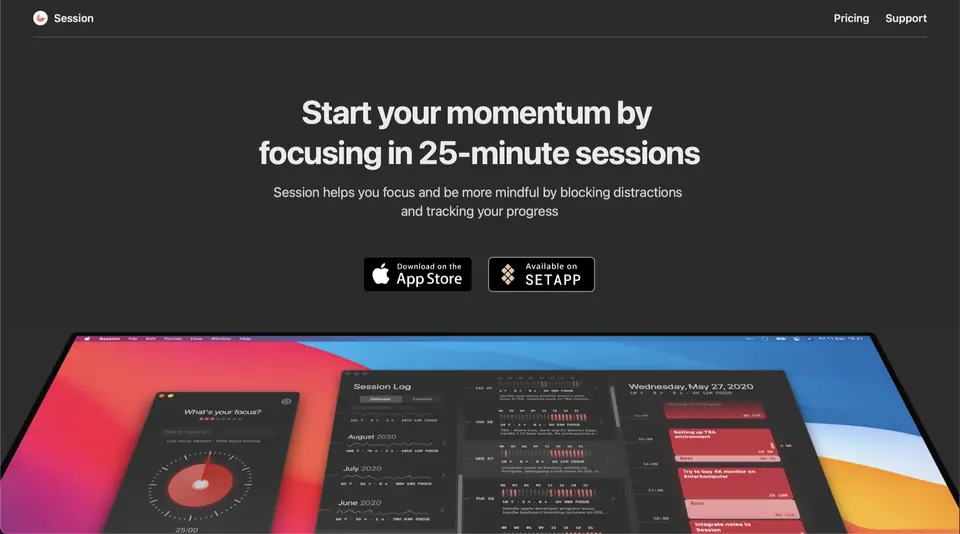
Session is a Pomodoro timer for Apple devices that records what you worked on and for how long. Each session can be filed under a category, and the app asks what you learned when the timer ends. The Pro plan adds custom session lengths, the full session log, blocking of distracting apps and websites on Mac, and real-time sync between devices.
Worth knowing
- Apple platforms only: macOS, iOS and iPadOS. No Windows, Android or web version is listed.
- The free plan shows analytics for the past 2 days only, and custom session and break lengths need Pro.
- Blocking needs Pro, and the pricing page lists website and app blocking as Mac only.
- Real-time device sync, Slack muting and Apple Calendar event creation are Pro features.
Key features
- Pomodoro sessions
- Work in 25-minute sessions separated by breaks. Setting your own session and break lengths needs Pro.
- Focus analytics by category
- Tracks how long you focus on each category, such as writing, coding or a client. Free shows the past 2 days and Pro opens the full session log.
- App and website blocking on Mac
- Pro blocks the apps and websites you choose while a session runs. Website blocking works in Safari, Chrome, Brave and Microsoft Edge.
- Calendar events
- Every plan shows your calendar events inside Session. Pro can also create an Apple Calendar event automatically when a session finishes.
- Slack status
- Pro updates your Slack status when the timer starts and restores it when the timer ends.
- Device sync and automation
- Pro syncs in real time, so a session started on a Mac can be ended on iOS, and adds automation through AppleScript on macOS and Apple Shortcuts on iOS.
Session pricing
As of Oct 4, 2026, Session has a free plan, and paid plans start at $3.33 / month, billed yearly ($39.99).
- Starts at
- $3.33 / month, billed yearly ($39.99)
- Free plan
- Unlimited sessions and breaks, analytics for the past 2 days, and your calendar events shown inside Session.
- Free trial
- 7 days of Pro free on creating an account, with no subscription started
| Plan | Price | What you get |
|---|---|---|
| Free | $0 | Unlimited sessions and breaks, analytics for the past 2 days, and calendar events shown in the app. |
| Pro Yearly | $3.33per month, billed yearly ($39.99) | Custom session and break lengths, full session log, Mac app and website blocking, Slack muting, device sync and automation. |
| Pro Monthly | $4.99per month, billed monthly | The same Pro features paid month to month. The vendor notes that prices differ slightly by region. |
Read from stayinsession.com on Oct 4, 2026. Prices change, so confirm with Session before you buy.
Ways to pay less
- Annual discountYearly billing costs about a third less
Pro is $39.99 billed yearly ($3.33 a month) against $4.99 billed monthly, which works out about 33% cheaper over a year.
Stated on stayinsession.com - EducationStudent discount: 30% off for one year
Students are eligible for a 30% discount for one year, non-renewing, by contacting support with a .edu email address or other proof of student status.
Stated on stayinsession.com
Session refunds and cancellation
Ordinary · checked Oct 18, 2026
Session's terms page is a list of what Free and Pro include and nothing else: no refunds, no billing, no cancelling. Nowhere on the site is a refund mentioned, so assume there isn't one, and if you bought through the App Store it is Apple's decision anyway. Getting out is at least simple, a Manage Billing link in the app or the usual Subscriptions screen on your Apple device. Silence on refunds with an easy exit is the ordinary deal, so a C.
- Refund window
- None stated
- How you cancel
- Yourself, in settings
- Getting your money back
Its pages do not say.
- How to cancel Session
The support page says a subscription bought in the direct-download version is cancelled inside the app, under Settings, then Account, then Manage Billing. One bought through the App Store is cancelled in Apple's Subscriptions screen instead, on iOS or on a Mac. Session notes that the direct and App Store versions use different billing systems.
- Open the Session app you bought from, the direct-download version rather than the App Store one
- Open Settings, then Account
- Click Manage Billing
- If the subscription is not there, check you are signed in with the email you subscribed with
- What you keep afterwards
No page read says what happens to a Pro account after a cancellation, whether the paid features run to the end of the period or what becomes of the session history. The support page covers only deleting the account outright, which is done in the app under Settings, then Account, then Delete Account, and it does not say what is kept or for how long.
Stated on stayinsession.com- Renewals
The pricing page says subscriptions renew automatically unless they are cancelled, and that prices differ slightly by region. It mentions no reminder before a renewal and no refund after one. It also says the 7-day Pro trial given when you create an account starts no subscription, so nothing is charged when it runs out.
Stated on stayinsession.com
In your favour
- Pro can be tried for 7 days without starting a subscription, so nothing is charged at the end of it.
- Cancelling a direct purchase is a Manage Billing link inside the app, with nobody to write to.
- The support page spells out the cancelling steps for the App Store and the direct version separately.
- Deleting the account outright is a button in the app rather than a request by email.
Watch out for
- No page on the site mentions refunds at all, so assume there are none.
- Subscriptions renew by themselves, and nothing promises a reminder beforehand.
- Bought it in the App Store? Apple handles the billing, the cancelling and any refund.
- No page says whether Pro runs to the end of the period you paid for after you cancel.
Session customer support
Ordinary · checked Oct 18, 2026
This is a one-developer app and the support shows it, in both directions. There is an address to write to and a Discord to ask in, and the FAQ is honest enough to list known problems it says it cannot fix. What there isn't is any promise: no hours, no reply time, no ticket to track, and nothing that changes if you pay. That is where most small apps sit, and it's a C.
Ways to get help
Email
The support page gives an address to write to for any question, and the student discount is arranged the same way by writing in from a .edu address. No hours or reply time are given with it.
Stated on stayinsession.comHelp centre
The support page itself is the help centre: an FAQ grouped by subject, covering accounts and subscriptions, syncing, notifications, calendars, the website and app blockers, AppleScript and Shortcuts, and known issues on older versions of macOS.
Stated on stayinsession.comCommunity or forum
A Discord community channel, offered on the support page alongside the address as the other way to ask a question. A separate feature-request page collects and votes on ideas from the community.
Stated on stayinsession.com
Not listed on Session’s pages: live chat, phone.
- When people answer
Its pages do not say.
- How fast it says it replies
Its pages do not say.
- What depends on your plan
Its pages do not say.
In your favour
- Free users get the same address, the same Discord and the same FAQ as anyone paying.
- The FAQ is unusually frank, listing known problems it marks as impossible to fix.
- Feature requests have their own page where the community can vote on them.
Watch out for
- No page states support hours or a target reply time.
- There is no ticket system, so a message you send has nothing to track it by.
- There is no phone line and no live chat.
- Nothing on the pages we read gives paying users a faster route than free ones.
What these two grades rest on. Read on 18 October 2026: Session's terms and conditions page, its pricing page and its support page, whose FAQ answers on cancelling a subscription, deleting an account and finding invoices were opened in a browser because they do not load without one. No refund policy was found on any of them. Nobody here cancelled a plan or contacted its support. They are graded apart from the five that make the GPA. How we grade refunds and support.
How people rate the Session app
4.8
out of 5 for the iPhone and iPad app
- 5 stars90%
- 4 stars5%
- 3 stars<1%
- 2 stars2%
- 1 star2%
364 ratings on the App Store in the United States, read Oct 5, 2026. It rates the app, not everything the product does. See the listing
Works with
Session alternatives
- Session vs Forest
Free plan · from $5.99/mo
- Session vs Rize
Free trial · from $9.99/mo
- Session vs Toggl
Free plan · from $9/mo
- Session vs Freedom
Free plan · from $3.33/mo




Featured in
- The best focus apps in 2026Best of
Common questions
Does Session have an Android app?
No Android app was listed when its pages were read on Oct 4, 2026. Session is listed for macOS and iOS.
Does Session have a Windows app?
No Windows app was listed when its pages were read on Oct 4, 2026. Session is listed for macOS and iOS.
Is Session open source?
Session is not described as open source on its own site, as read on Oct 4, 2026.
Sources for this page
The prices, plans, platforms and features above were read from these pages on Oct 4, 2026. What people say is linked where it appears.