
Swit review (2026): is the free plan enough?
Team chat with built-in task and project management
Black Friday: is there a Swit sale?
Swit report card
Fair · out of 4.0 · graded Nov 13, 2026
Best for team chat with tasks and projects in the same place
Swit puts chat channels and task boards in one app, with messages that turn into tasks. The cheap Startup plan is sold as 25 fixed seats at $450 a year, plug-ins cost extra and it is cloud only. If you are a team of five, that floor or the $6 Growth plan is what you will really pay.
Who Swit is for
- Fits if you want chat and a task board without two separate tools
- Works for a team that wants a trial before paying, with no card needed
Who Swit is not for
- Tight if you are small, since Startup is 25 seats at $450 a year
- Pricey if you want automation at $99, or approvals, goals and guests at $5 a person each
- Skip it if you need on-premises hosting, because the vendor says there is none
- Watch out: SAML sign-on starts at Business, and two-factor and audit logs at Business Pro
- Tight if you stay free, with the hub only, 5 integrations and 1 year of history
Why Swit gets a 2.2
Five grades, each with its reason. The GPA is their average: an A is 4 points, an F is none.
- CValue for moneyStartup is $1.50 a seat but sold as 25 seats, $450 a year, so one person pays that. Growth is $6 a seat, near the middle of the category.
- CFree plan and trialFree plan with unlimited seats, but only the chat hub, 5 integrations, 5 GB and 1 year of history. A 30-day trial of paid plans needs no card.
- CFeaturesChat, tasks and projects, with a task plug-in. Automation, approvals, goals and guests are paid add-ons.
- CEase of useNo rating on record. Workspaces, projects and plug-ins all need setting up.
- BPlatforms and integrationsWeb, Windows, Mac, iPhone and Android. Only one integration is listed.
What these grades rest on. Graded from this listing, whose facts were read from Swit's own pages on 13 November 2026. Not based on using the product, and shorter than our full reviews. How we review and grade.
Make Swit? Put this grade on your site
Paste this where you want the badge. It links here and follows the grade if it changes. About badges
<a href="https://toolgpa.com/tools/swit#review"><img src="https://toolgpa.com/badge/swit.svg" alt="Swit: 2.2 GPA on ToolGPA" width="196" height="56"></a>Where Swit stands among team communication apps
Swit's GPA of 2.2 is higher than 9 of the 75 other team communication apps we grade, and level with 19.
It stands best on platforms and integrations (B, above 9 of 75) and worst on features (C, above 1).
Its paid plans start at $1.50 a month for each person, against a middle price of $6.90 for the category: 1 of the 51 others that charge start lower.
On features, ease of use and platforms it scores 2.3 out of 4. 6 tools score higher and cost less.
Each grade against the category
Every bar is all 76 team communication apps we grade, cut by the letter each got. Swit’s own letter is outlined.
- CValue for moneyAbove 7 of 75, level with 39
- CFree plan and trialAbove 5 of 75, level with 35
- CFeaturesAbove 1 of 75, level with 61
- CEase of useAbove 11 of 75, level with 46
- BPlatforms and integrationsAbove 9 of 75, level with 41
Price against what you get
Each dot is one of 66 team communication apps. Further left costs less, and higher up scores better on features, ease of use and platforms. Point at a dot to see which tool it is.
Features, ease of use and platforms, averaged
What paid plans start at, a month (each step along is roughly double) →
- The best score at each price
- Has a free plan
- No free plan
Keep Swit, or make your own?
Keep it
To replace Swit you would be making chat that a whole team counts on staying up. That is not a weekend's work, with an AI app builder or without one.
That makes this kind of software worth paying for, not this one in particular: 47 of the 75 other team communication apps grade higher. It costs $18 a year.
What you could make
- Tasks, kanban boards and goals: an app builder makes these well.
What you could not
- Chat that a whole team counts on staying up.
- Connections to other products, each kept working as those products change.
- Apps for macOS, Windows, iOS and Android that stay in step with each other.
- It is priced for each person, which means accounts and billing for a team.
- AI features, unless you pay a model provider for each request yourself.
What this rests on. Swit’s listing: what it does, where it runs, what it plugs into and what it costs. It is a judgement about the kind of software this is. We have not built a replacement for it, and making your own means looking after it too. How we decide, and every tool’s verdict.
What is Swit?
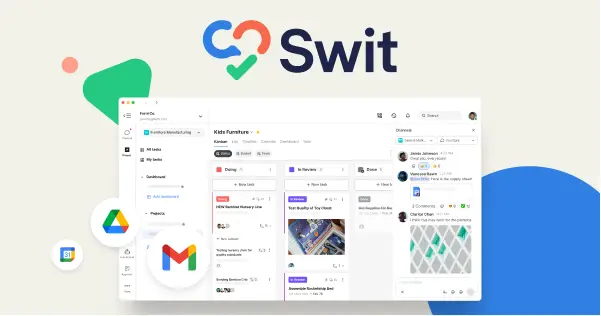
Swit combines team chat channels with task and project management in one workspace. Messages can be turned into tasks, task cards can be shared into channels, and several workspaces can be managed under one organization. Optional plug-ins add AI features, automation, approvals, goals and guests.
Worth knowing
- Startup is sold as 25 fixed seats; Growth caps at 100 seats.
- Plug-ins cost extra: Automation $99 for 100K actions a month, and Approvals, Goals and Guests $5 per user a month each.
- Swit is cloud only; the vendor says there is no on-premises version.
- SAML-based SSO starts at Business; two-factor authentication and audit logs are listed from Business Pro.
Key features
- Channels and chat
- Unlimited channels and chats on every plan, with posts shareable across workspaces inside an organization.
- Tasks and projects
- Task cards carry checklists, subtasks, assignees and priorities, and a project dashboard shows progress and workload.
- Messages to tasks
- On the Hub plan, a channel message can become a task, and a task card can be dragged into a chat channel.
- AI plug-in
- Chat, Taskify, Summarize, Write, Rephrase and Translate are sold as a plug-in available on all paid plans.
- Plug-ins for work processes
- Automation, Approvals, Goals and Guests are add-ons, priced separately on the pricing page.
Swit pricing
As of Nov 13, 2026, Swit has a free plan, and paid plans start at $1.50 per user / month, billed yearly, for 25 fixed seats ($450 a year).
- Starts at
- $1.50 per user / month, billed yearly, for 25 fixed seats ($450 a year)
- Free plan
- Unlimited seats, up to 2 workspaces, 5 GB of storage per organization, 25 MB attachments and 1 year of message history.
- Free trial
- 30-day free trial on paid plans, no credit card required
| Plan | Price | What you get |
|---|---|---|
| Free | $0 | Hub only. Up to 5 integrations, unlimited channels, projects and chats, basic project features. |
| Startup | $1.50per user / month, billed yearly ($1.80 billed monthly) | Sold as 25 fixed seats, $450 a year. 5 GB per user, unlimited history and integrations, full projects. |
| Growth | $6per user / month, billed yearly ($11 billed monthly) | Up to 100 seats, up to 5 workspaces and 20 GB of storage per user. |
| Business | $11per user / month, billed yearly ($21 billed monthly) | Unlimited seats, up to 10 workspaces, 100 GB per user and SAML-based SSO. |
| Business Pro | Custom | Sold through sales, billed yearly. Adds 1 TB per user, two-factor authentication, audit logs and download control. |
| Enterprise | Custom | Sold through sales, billed yearly. 10 TB per user, EKM, IP-based access control and data residency. |
Read from swit.io on Nov 13, 2026. Prices change, so confirm with Swit before you buy.
Ways to pay less
- Annual discountSave up to 47% with yearly billing
The pricing page shows yearly rates against monthly ones, such as $11 per user on Business billed yearly versus $21 billed monthly.
Stated on swit.io
Works with
Swit alternatives
- Swit vs Slack
Free plan · from $7.25/mo
- Swit vs Microsoft Teams
Free plan · from $4.00/mo
- Swit vs Twist
Free plan · from $6/mo
- Swit vs Lark
Free plan · from $6/mo
- Swit vs Mattermost
Free plan





Common questions
Does Swit have a Linux app?
No Linux app was listed when its pages were read on Nov 13, 2026. Swit is listed for Web, Windows, macOS, iOS and Android.
Is Swit open source?
Swit is not described as open source on its own site, as read on Nov 13, 2026.
Sources for this page
The prices, plans, platforms and features above were read from these pages on Nov 13, 2026.