
Teamflow review (2026): is the free plan enough?
Virtual office for remote teams with spatial video meetings
Black Friday: is there a Teamflow sale?
Teamflow report card
Fair · out of 4.0 · graded Nov 13, 2026
Best for a virtual office with spatial video
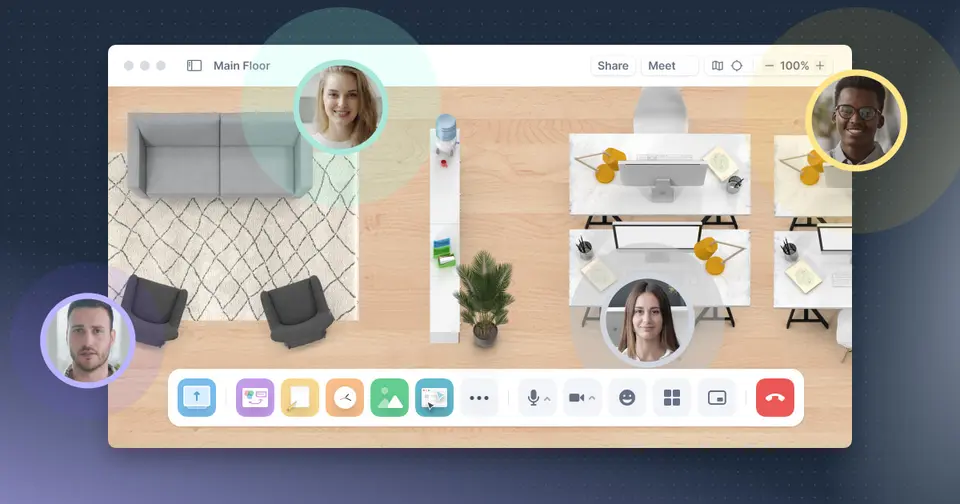
Teamflow is a virtual office with spatial video meetings and embedded apps. The free plan covers 5 employees and 45-minute meetings, and the paid plans are $15 and $25 per employee a month on yearly billing. The phone apps are in beta.
Who Teamflow is for
- Fits if you are five or fewer and want a free virtual office
- Works for a remote team that wants meetings with apps open together
Who Teamflow is not for
- Pricey if you want unlimited meeting time, at $15 per employee a month
- Tight if you stay free, with 5 employees and 45-minute meetings
- Watch out: guest limits are 10, 15 and 25 across the three plans
- Watch out: the iOS and Android apps are described as beta
- Watch out: the amounts shown are the yearly view, with 20% off
Why Teamflow gets a 2.0
Five grades, each with its reason. The GPA is their average: an A is 4 points, an F is none.
- DValue for moneySeed is $15 per employee a month billed yearly, above the $14 the dearer quarter starts at, and meeting time is unlimited only on paid plans.
- CFree plan and trialFree for up to 5 employees, but with 45-minute meetings, 10 guests and 5 open apps.
- CFeaturesSpatial meetings, embedded apps, whiteboards and recording. Guest and app limits rise only on paid plans.
- CEase of useNo rating on record. You set up an office and rooms for the team.
- BPlatforms and integrationsMac, Windows, iPhone and Android, with some integrations. The phone apps are beta and there is no web version listed.
What these grades rest on. Graded from this listing, whose facts were read from Teamflow's own pages on 13 November 2026. Not based on using the product, and shorter than our full reviews. How we review and grade.
Make Teamflow? Put this grade on your site

Paste this where you want the badge. It links here and follows the grade if it changes. About badges
<a href="https://toolgpa.com/tools/teamflow#review"><img src="https://toolgpa.com/badge/teamflow.svg" alt="Teamflow: 2.0 GPA on ToolGPA" width="196" height="56"></a>Where Teamflow stands among team communication apps
Teamflow's GPA of 2.0 is higher than 0 of the 75 other team communication apps we grade, and level with 8.
It stands best on platforms and integrations (B, above 9 of 75) and worst on value for money (D, above 0).
Its paid plans start at $15 a month for each person, against a middle price of $6.90 for the category: 39 of the 51 others that charge start lower.
On features, ease of use and platforms it scores 2.3 out of 4. 25 tools score higher and cost less.
Each grade against the category
Every bar is all 76 team communication apps we grade, cut by the letter each got. Teamflow’s own letter is outlined.
- DValue for moneyAbove 0 of 75, level with 6
- CFree plan and trialAbove 5 of 75, level with 35
- CFeaturesAbove 1 of 75, level with 61
- CEase of useAbove 11 of 75, level with 46
- BPlatforms and integrationsAbove 9 of 75, level with 41
Price against what you get
Each dot is one of 66 team communication apps. Further left costs less, and higher up scores better on features, ease of use and platforms. Point at a dot to see which tool it is.
Features, ease of use and platforms, averaged
What paid plans start at, a month (each step along is roughly double) →
- The best score at each price
- Has a free plan
- No free plan
Keep Teamflow, or make your own?
Keep it
To replace Teamflow you would be making chat that a whole team counts on staying up. That is not a weekend's work, with an AI app builder or without one.
That makes this kind of software worth paying for, not this one in particular: 67 of the 75 other team communication apps grade higher. It costs $180 a year.
What you could not
- Chat that a whole team counts on staying up.
- Video calls.
- An endless canvas that stays smooth with hundreds of things on it.
- Apps for macOS, Windows, iOS and Android that stay in step with each other.
- Several people working in it at the same moment.
What this rests on. Teamflow’s listing: what it does, where it runs, what it plugs into and what it costs. It is a judgement about the kind of software this is. We have not built a replacement for it, and making your own means looking after it too. How we decide, and every tool’s verdict.
What is Teamflow?
Teamflow is a virtual office where remote team members move around a shared space, join conversations and meetings, and open documents and apps together. It has desktop apps for Mac and Windows and beta apps for iOS and Android. Pricing is per employee and limits how many guests can be in a meeting.
Worth knowing
- The $15 and $25 prices are on the yearly view of the page, which shows a 20% yearly discount; the monthly-billed amounts were not readable in the page text.
- The free plan covers only up to 5 employees and 45-minute meetings.
- Guest limits per meeting are 10, 15 and 25 on the three plans.
- The iOS and Android apps are described as beta.
Key features
- Virtual office
- Team members share a persistent space they can enter between meetings to talk or co-work.
- Meetings with embedded apps
- Documents and apps can be stored in a meeting space, with shared cursors so everyone can follow along.
- Whiteboards
- The site describes opening a whiteboard in the office to work through problems together.
- Screen sharing and recording
- The comparison table lists single and multi screen share and meeting recording.
- Desktop and mobile apps
- Mac and Windows apps are offered, with beta apps for Android and iOS.
Teamflow pricing
As of Nov 13, 2026, Teamflow has a free plan, and paid plans start at $15 per employee / month, billed yearly.
- Starts at
- $15 per employee / month, billed yearly
- Free plan
- Free plan for up to 5 employees: 10 guests at a time, 45-minute meetings and 5 apps open per person.
- Free trial
- 7-day free trial on Seed and Business
| Plan | Price | What you get |
|---|---|---|
| Free | $0per employee / month, for up to 5 employees | 10 guests at a time, 45-minute meetings and 5 apps open per person. |
| Seed | $15per employee / month, billed yearly | 15 guests at a time, unlimited meeting time and 8 apps open per person. |
| Business | $25per employee / month, billed yearly | 25 guests at a time, unlimited meeting time and unlimited open apps. |
Read from teamflowhq.com on Nov 13, 2026. Prices change, so confirm with Teamflow before you buy.
Ways to pay less
- Annual discount20% off yearly billing
The pricing page toggle reads 'Pay Yearly - 20% Discount'.
Stated on teamflowhq.com
Works with
Teamflow alternatives
- Teamflow vs Gather
Free trial · from $12/mo
- Teamflow vs SpatialChat
Free plan · from $399/mo
- Teamflow vs Kumospace
Free plan · from $16/mo
- Teamflow vs Topia
Free plan · from $4/mo
- Teamflow vs Roam
Free trial · from $19.50/mo





Common questions
Does Teamflow have a Linux app?
No Linux app was listed when its pages were read on Nov 13, 2026. Teamflow is listed for macOS, Windows, iOS and Android.
Is Teamflow open source?
Teamflow is not described as open source on its own site, as read on Nov 13, 2026.
Sources for this page
The prices, plans, platforms and features above were read from these pages on Nov 13, 2026.