
Bitwarden review (2026): is the free plan enough?
Open-source password manager with a free plan and self-hosting
Black Friday: is there a Bitwarden sale?
Our verdict
First of our top three password managers
For: Most people
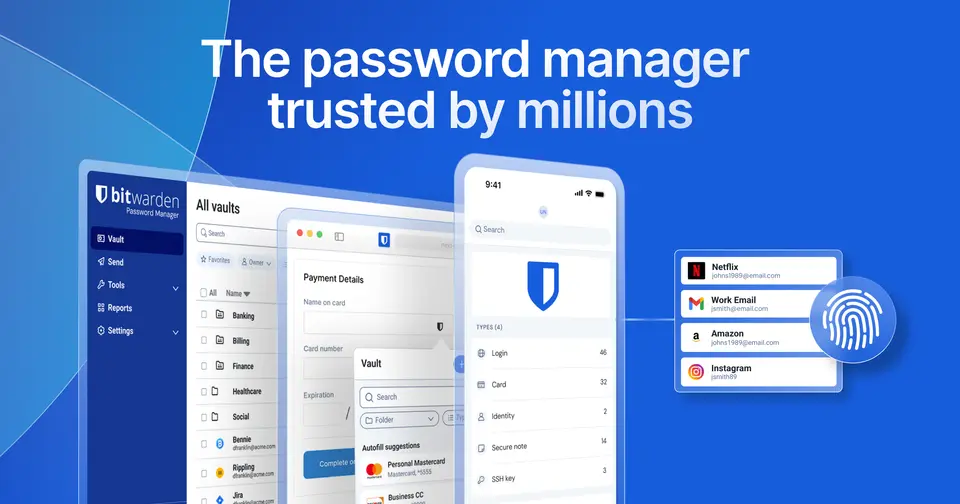
Bitwarden's free plan stores unlimited logins and passkeys on unlimited devices, and it runs in a browser and on Mac, Windows, Linux, iPhone and Android. It is open source and end-to-end encrypted, and it can be run on your own server instead of Bitwarden's cloud. Premium is $1.65 a month, billed annually at $19.80, and Families covers up to 6 users for $3.99 a month, billed annually. Its iPhone and iPad app averages 4.8 from about 33,500 ratings. Know the limits: the free plan leaves out the integrated authenticator, file attachments and vault health reports, and individual plans share items with only one other Bitwarden user.
See all three and how we rankBitwarden report card
Excellent · out of 4.0 · graded Oct 10, 2026
Best for a free password manager on every device
Bitwarden is an open-source password manager whose free plan keeps unlimited logins and passkeys on unlimited devices, with Premium at $1.65 a month billed yearly for two-factor codes and attachments. On your own you can share with just one other person, and more means Families at $3.99 a month. Free has no attachments, authenticator, health reports or emergency access, and single sign-on needs Enterprise.
Who Bitwarden is for
- Fits if you want a free password manager on all your devices with no limit on logins
- Works for a household of up to 6 at $3.99 a month, or anyone who wants to host it themselves
Who Bitwarden is not for
- Tight if you're staying free and want two-factor codes, attachments, health reports or emergency access, as all are paid
- Skip it if you share logins with several people but don't want Families, since solo plans share with one other user
- Not for you if you want a VPN or scam warnings bundled in, because Bitwarden sticks to passwords
- Watch out: listed prices assume yearly billing and leave out tax
- Pricey if your company wants single sign-on and policies, which need Enterprise at $6 a user a month
Why Bitwarden gets a 3.8
Five grades, each with its reason. The GPA is their average: an A is 4 points, an F is none.
- AValue for moneyThe useful version costs nothing, and Premium is $1.65 a month, billed as $19.80 a year, against $2.99 for the middle of this category and $2.49 where its lowest-priced quarter starts. Families covers 6 people for $3.99 a month.
- AFree plan and trialThe one free plan in this category with no cap on logins or devices: unlimited logins, passkeys, notes and cards on unlimited devices, with no time limit. File attachments, the built-in authenticator and emergency access are the paid extras.
- AFeaturesIt covers the whole job, plus two things none of the paid rivals here offer: the code is open source, and you can run the whole service on your own server. Passwords, passkeys, autofill, a generator, Send for links that disappear, then two-factor codes and 5 GB of encrypted attachments on Premium.
- AEase of use4.76 from about 33,500 App Store ratings, the highest in this category. Sign up free and your logins fill in across your devices. The self-hosting is optional and most people will never go near it.
- BPlatforms and integrationsNo common device is left out: web, Mac, Windows, Linux, iPhone, Android and a browser extension. There's no list of integrations and no public API on the listing, though. The only connecting out to other software is directory sync, SCIM and single sign-on, and those are business plans.
What these grades rest on. Graded from this listing, whose facts were read from Bitwarden's own pages on 9 October 2026, and its App Store rating. Also tested with a demo account on 2026-02-20. How we review and grade.
Make Bitwarden? Put this grade on your site
Paste this where you want the badge. It links here and follows the grade if it changes. About badges
<a href="https://toolgpa.com/tools/bitwarden#review"><img src="https://toolgpa.com/badge/bitwarden.svg" alt="Bitwarden: 3.8 GPA on ToolGPA" width="196" height="56"></a>Where Bitwarden stands among password managers
Bitwarden's GPA of 3.8 is higher than 49 of the 49 other password managers we grade.
It stands best on features (A, above 47 of 49) and worst on platforms and integrations (B, above 16).
Its paid plans start at $1.65 a month, against a middle price of $2.50 for the category: 1 of the 29 others that charge start lower.
On features, ease of use and platforms it scores 3.7 out of 4, and no tool on the category's chart scores higher without costing more.
Each grade against the category
Every bar is all 50 password managers we grade, cut by the letter each got. Bitwarden’s own letter is outlined.
- AValue for moneyAbove 38 of 49, level with 11
- AFree plan and trialAbove 37 of 49, level with 12
- AFeaturesAbove 47 of 49, level with 2
- AEase of useAbove 41 of 49, level with 8
- BPlatforms and integrationsAbove 16 of 49, level with 25
Price against what you get
Each dot is one of 38 password managers. Further left costs less, and higher up scores better on features, ease of use and platforms. Point at a dot to see which tool it is.
Features, ease of use and platforms, averaged
What paid plans start at, a month (each step along is roughly double) →
- The best score at each price
- Has a free plan
- No free plan
Keep Bitwarden, or make your own?
Keep it
To replace Bitwarden you would be making a password vault, the last thing anyone should make for themselves. That is not a weekend's work, with an AI app builder or without one.
It is one of the better ones too: its GPA of 3.8 is higher than 49 of the 49 other password managers we grade. It costs $19.80 a year. Bitwarden is open source, so there is a third way: take its code and run it yourself.
What you could not
- A password vault, the last thing anyone should make for themselves.
- Passkeys, which rest on security you cannot improvise.
- Apps for macOS, Windows, Linux, iOS and Android that stay in step with each other.
- End-to-end encryption done properly.
- What a company asks for before it lets staff use something: single sign-on and SCIM.
- The depth: we grade its features A, which means it covers the whole job.
What this rests on. Bitwarden’s listing: what it does, where it runs, what it plugs into and what it costs. It is a judgement about the kind of software this is. We have not built a replacement for it, and making your own means looking after it too. How we decide, and every tool’s verdict.
What is Bitwarden?
Bitwarden is an open-source, end-to-end encrypted password manager for individuals, families and organizations. Its free plan stores unlimited logins and passkeys on unlimited devices, and paid plans add an integrated authenticator, encrypted attachments, emergency access and organization sharing. Businesses get event logs, directory sync and SSO, and the service can be run on your own server instead of Bitwarden's cloud.
Worth knowing
- The free plan leaves out file attachments, the integrated authenticator, vault health reports and emergency access.
- Individual plans share items with only one other Bitwarden user; unlimited sharing starts with Families.
- Listed prices are based on annual subscriptions, and taxes are not included.
- SSO integration and enterprise policies require the Enterprise plan.
Key features
- Unlimited free vault
- The free plan stores unlimited logins, passkeys, notes, cards and identities and works on unlimited devices through browser, mobile and desktop apps.
- Open source
- Bitwarden's code is open source, and the company describes its security as independently verified.
- Passkeys, autofill and generator
- Stores and manages passkeys alongside passwords, autofills logins across devices and generates strong passwords and usernames.
- Bitwarden Send
- Shares sensitive information through a link that disappears. Free accounts can send text only; file sharing comes with paid plans.
- Self-hosting
- Bitwarden can be deployed on premises or in a private cloud. Families and Enterprise organizations can be moved to a self-hosted server.
- Business controls
- Teams adds event logs, directory synchronization and SCIM provisioning. Enterprise adds policies, SSO integration and granular access control.
Bitwarden tips most people miss
Setting
Save your two-step login recovery code the day you turn it on
Lose your second factor without it and you may not get back into your vault. In the web app it's under Settings, Security, Two-step login, View recovery code. Each time you use it Bitwarden makes a new one, so save that one too.
bitwarden.comPrivacy
Pick the EU server at sign-up if that's where you want your data
Bitwarden runs separate US and EU clouds, picked from the Server dropdown on the sign-up screen. An account only exists in the region it was made in, and Bitwarden can't move it for you. Switching later means exporting and starting a new account.
bitwarden.comSetting
Don't set the vault timeout to Never
Set it in each app's settings (Account security in the extension and on mobile). Lock, the default action, keeps your data on the device so you can unlock offline with a PIN or biometrics, while Log out wipes it. Bitwarden warns that Never stores your encryption key unencrypted.
bitwarden.comShortcut
Ctrl+Shift+L fills your login, and pressing it again cycles
In the browser extension, Ctrl+Shift+L (Cmd on a Mac) autofills the last used login for the site; press it again to step through the others. Ctrl+Shift+9 makes and copies a password and Ctrl+Shift+N locks the vault. Change them on your browser's extension shortcuts page.
bitwarden.comLeaving
Only a JSON export keeps your passkeys and cards
CSV leaves out cards, identities, passkeys and SSH keys. The .zip option adds attachments, and no export includes Trash or Sends. An account-restricted encrypted export only goes back into the same account, so pick password-protected if you're moving.
bitwarden.comRenewal
Refunds are only for subscriptions under 30 days old
Bitwarden's cancellation page offers a refund within 30 days of a subscription starting; older ones aren't eligible. Cancel under Settings, Subscription before the Next charge date and Premium runs to the end of the cycle. Reinstate subscription turns renewal back on.
bitwarden.comLeaving
Let Premium lapse and your 2FA codes and YubiKey stop working
You go back to free. Saved authenticator keys stay, but no codes are made, attachments can't be downloaded, and YubiKey or Duo stop working for sign-in. Keep an authenticator app or email method switched on too, or you'll sign in with no second step at all.
bitwarden.com
Read on Oct 17, 2026. Read from Bitwarden's help centre (two-step login recovery, server regions, vault timeout, keyboard shortcuts, exporting, cancelling and Premium renewal) on 17 October 2026. Not tried out: these tips are what its own pages say.
Bitwarden pricing
As of Oct 9, 2026, Bitwarden has a free plan, and paid plans start at $1.65 per month, billed annually at $19.80 (Premium).
- Starts at
- $1.65 per month, billed annually at $19.80 (Premium)
- Free plan
- Free for 1 user: unlimited logins, passkeys, notes, cards and identities on unlimited devices, a password generator and text-only Send. No file attachments or integrated authenticator.
- Free trial
- 14-day free trial of the Families, Teams and Enterprise plans, started from the sign-up pages the pricing page links to
| Plan | Price | What you get |
|---|---|---|
| Free | $0 | 1 user. Unlimited passwords and passkeys on unlimited devices, a password and username generator, and two-step login. |
| Premium | $1.65per month, billed annually at $19.80 | Adds the integrated authenticator, 5 GB of encrypted file attachments, emergency access, security reports and priority support. |
| Families | $3.99per month for up to 6 users, billed annually at $47.88 | 6 premium accounts with unlimited sharing and collections, plus shared organization storage. |
| Teams | $4per user / month, billed annually | Secure credential sharing for a team, event logs, directory synchronization and SCIM provisioning. |
| Enterprise | $6per user / month, billed annually | Everything in Teams, plus enterprise policies, passwordless SSO integration, granular access control and self-hosting. |
Read from bitwarden.com on Oct 9, 2026. Prices change, so confirm with Bitwarden before you buy.
Ways to pay less
- Other savingsFree Families plan for Enterprise users
Bitwarden's pricing page states that the Enterprise plan includes a free Families plan for all of its users.
Stated on bitwarden.com
How people rate the Bitwarden app
4.8
out of 5 for the iPhone and iPad app
- 5 stars89%
- 4 stars6%
- 3 stars2%
- 2 stars<1%
- 1 star3%
33,529 ratings on the App Store in the United States, read Oct 5, 2026. It rates the app, not everything the product does. See the listing
Who makes Bitwarden
Bitwarden is made by Bitwarden, Inc., a privately held company in Santa Barbara, California, that publishes its code as open source. It earns money from paid business and personal plans next to a free plan, and says it serves over 80,000 businesses and more than 15 million users.
- Founded
- 2016bitwarden.com
- Based
- Santa Barbara, California, with employees in the U.S. and around the worldbitwarden.com
- Ownership
- Privately held. Privately held. In September 2022 PSG took a minority position and a seat on the board, with existing investor Battery Ventures also taking part, according to its own blog. Bitwarden, Inc. is the parent company of 8bit Solutions LLC.bitwarden.com
- Funding
- Announced a $100 million growth investment led by PSG on 6 September 2022, with existing investor Battery Ventures taking part, according to its own blog. TechCrunch called it the first fully disclosed outside funding and reported an undisclosed Series A in 2019.bitwarden.comtechcrunch.com
- Founders and leaders
- Michael Sullivan, Chief Executive Officerbitwarden.com
- Kyle Spearrin, Founder & Chief Innovation Officerbitwarden.com
- Andrew Hartnett, Chief Technology Officerbitwarden.com
- Gary Orenstein, Chief Customer Officerbitwarden.com
- Hiring
- 34 open roles on its job board, read Nov 17, 2026. See the roles
- Reseller program
- Reseller program for companies that resell Bitwarden to other organizations. The page does not publish margins or other terms; partners apply through the site.bitwarden.com
- Partner program
- Managed Service Provider program with a customer portal for managing client licenses and organizations, and tiered discounts as the provider grows. The discount rates are not published.bitwarden.com
- Lately
- September 2026 product update for Bitwarden Business plans · Sep 30, 2026
- Bitwarden Privileged Controls: Secure your most sensitive accounts in minutes · Sep 29, 2026
- Enterprise fill assist delivers custom rules for enhanced autofill · Sep 29, 2026
- Bitwarden is committed to achieving FedRAMP Class D (High) Certification · Sep 15, 2026
Read on Oct 18, 2026 from the company’s own pages and from news reports. What is not stated there is left out.
Jobs at Bitwarden
Bitwarden has 34 open roles, most in Engineering (17), Sales (10) and Customer Support (3). Here are the newest; open one to read the whole job and apply on Bitwarden’s own site.
- Public Sector - Account ExecutiveNewView and apply
Sales and partnerships · Sales · Remote, U.S. · posted 5 days ago
- Implementation Engineer, Customer Support (APAC)NewView and apply
Customer success and support · Customer Support · Remote, APAC · posted 8 days ago
- Principal Implementation Engineer, Customer SupportNewView and apply
Customer success and support · Customer Support · Remote, United Kingdom · posted 8 days ago
- Implementation Engineer, Customer SupportNewView and apply
Customer success and support · Customer Support · Remote, U.S. · posted 8 days ago
- View and apply
Read from Bitwarden’s job board on Greenhouse on Nov 17, 2026 and checked every week. Applications go to Bitwarden, not to us.
Bitwarden alternatives
- Bitwarden vs 1Password
Free trial · from $3.99/mo
- Bitwarden vs Proton Pass
Free plan · from $2.99/mo
- Bitwarden vs Dashlane
Free trial · from $5.42/mo
- Bitwarden vs NordPass
Free plan · from $4.99/mo



Featured in
Common questions
Is Bitwarden open source?
Yes. Bitwarden is open source, according to its own site. It can also be run on a server of your own.
Is Bitwarden end-to-end encrypted?
Bitwarden describes itself as end-to-end encrypted on its own site. Nobody here has audited that.
Sources for this page
The prices, plans, platforms and features above were read from these pages on Oct 9, 2026. What people say is linked where it appears.