Google Sheets
Browser-based spreadsheet, free with a Google Account
Our verdict
First of our top three spreadsheet and database tools
For: Most people
Google Sheets is a spreadsheet that runs in a browser and in iPhone and Android apps. It is free with a personal Google Account: anyone signed in can create, edit and share spreadsheets, several people can work in one file at the same time, and revision history restores earlier versions. Excel files can be edited directly. Its iPhone and iPad app averages 4.8 from about 1.9 million ratings. Know the limits: no Windows or Mac desktop app is listed, a spreadsheet is capped at 20 million cells or 100 MB, and editing offline on a computer needs Chrome or Edge with an extension. The business version comes only with Google Workspace, from $7 per user a month with a 1-year commitment.
See all three and how we rankWhat is Google Sheets?
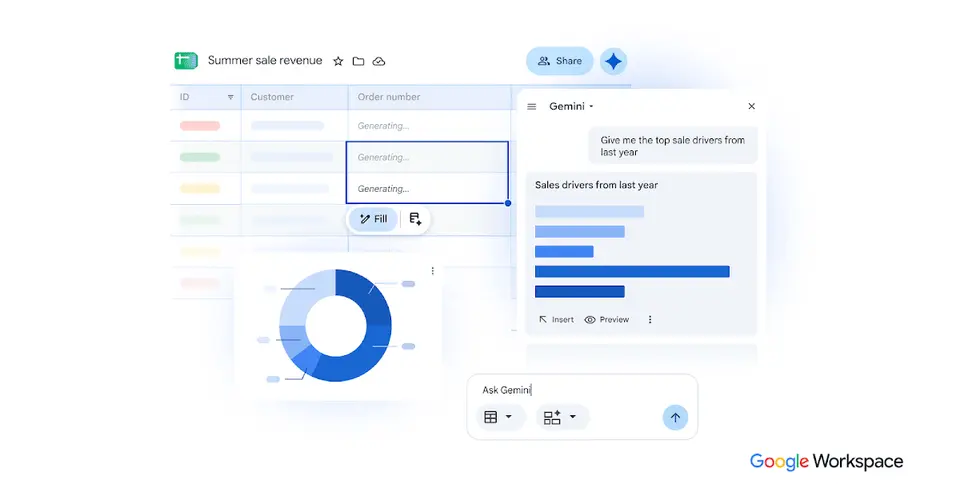
Google Sheets is an online spreadsheet in which several people can edit the same file at once, with sharing controls and revision history. It is free with a personal Google Account and is also part of every Google Workspace business plan. Gemini in Sheets, which builds spreadsheets and writes formulas from prompts, is reserved for Business Standard and higher editions.
Google Sheets has a free plan. Paid plans start at $7 per user / month with a 1-year commitment (Workspace Business Starter). See every plan
Good for
- Teams that edit and review the same spreadsheet together in a browser
- Organizations that already pay for Google Workspace
- Analysts pulling BigQuery or Looker data into a spreadsheet
Worth knowing
- There is no standalone paid Sheets plan; the business version comes only as part of Google Workspace, with Gmail, Drive and Meet.
- Gemini in Sheets is not in Business Starter; it starts at Business Standard, $14 per user / month on a 1-year commitment.
- A spreadsheet created in or converted to Google Sheets is capped at 20 million cells or 100 MB.
- Google's help lists Sheets for computer browsers, Android, iPhone and iPad; no Windows or Mac desktop app is listed.
Key features
- Co-editing and revision history
- Several people can work in one spreadsheet at the same time. Sharing settings control who can view, comment or edit, and revision history restores earlier versions.
- Gemini in Sheets
- Builds and edits spreadsheets from a prompt, writes and repairs formulas, and fills table columns with summarized or categorized data. Among Business editions it starts at Business Standard.
- Sheets canvas
- Turns the data in a sheet into interactive mini-apps such as dashboards, heat maps and Kanban boards from a text prompt, without writing code.
- Connected Sheets and data connectors
- Connected Sheets analyzes BigQuery or Looker data from the grid without SQL, and connectors bring in data from sources such as Asana, HubSpot, QuickBooks and Salesforce.
- Excel files
- Microsoft Excel files can be edited directly without making a copy, or converted to Sheets format. Gemini features such as Sheets canvas need the file converted first.
- Offline editing
- Spreadsheets can be created, viewed and edited without a connection. On a computer this requires Chrome or Microsoft Edge with the Google Docs Offline extension.
Google Sheets pricing
- Starts at
- $7 per user / month with a 1-year commitment (Workspace Business Starter)
- Free plan
- Free with a personal Google Account: anyone signed in can create, edit and share spreadsheets. Some Gemini in Sheets features are available only on Google Workspace plans.
- Free trial
- 14-day Google Workspace trial
| Plan | Price | What you get |
|---|---|---|
| Personal Google Account | $0 | Create, edit and share spreadsheets in a browser or the mobile apps, with co-editing, revision history and offline access. |
| Business Starter | $7per user / month, 1-year commitment ($8.40 flexible) | Google Workspace with Sheets and 30 GB of pooled storage per user. Gemini in Sheets is not included. |
| Business Standard | $14per user / month, 1-year commitment ($16.80 flexible) | 2 TB of pooled storage per user. The lowest Business edition that includes Gemini in Sheets. |
| Business Plus | $22per user / month, 1-year commitment ($26.40 flexible) | Everything in Standard with 5 TB of pooled storage per user, plus Vault, eDiscovery and advanced endpoint management. |
| Enterprise | Custom | No minimum or maximum user count, with data loss prevention, context-aware access and data regions; priced through Google sales. |
Read from workspace.google.com on Oct 5, 2026. Prices change, so confirm with Google Sheets before you buy.
Ways to pay less
- Annual discountSave 16% with a 1-year commitment
Business Starter is $7 per user per month on the Annual/Fixed-Term Plan against $8.40 on the Flexible Plan. Standard drops from $16.80 to $14 and Plus from $26.40 to $22.
Stated on knowledge.workspace.google.com - NonprofitGoogle Workspace for Nonprofits at $0
Eligible nonprofits get Google Workspace for Nonprofits at $0, or Business Standard at $3.50 and Business Plus at $6.16 per user per month on a 1-year commitment.
Stated on google.com - EducationEducation Fundamentals at no charge
Google Workspace for Education Fundamentals, which includes Sheets, is available at no charge to qualifying institutions.
Stated on edu.google.com
What people say about Google Sheets
4.8
out of 5 for the iPhone and iPad app
1,859,427 ratings on the App Store in the United States, read Oct 7, 2026. It rates the app, not everything the product does. See the listing
Often praised
- Reviewers call the version used in a desktop browser powerful, and a commenter says it stands in for Excel in many workplaces because most people need only the basics. App Store reviews · Hacker News
Often criticised
- Reviewers say the iPhone and iPad app leaves out much of what the desktop version does, naming conditional formatting, pivot tables, scripts and keyboard shortcuts. App Store reviews
- Reviewers describe editing cells on a phone as error-prone, with typed text lost or a different cell selected from the one they tapped. App Store reviews
- Commenters who tried the built-in Gemini assistant for formatting or charts say it did not manage what they asked. Hacker News 1, 2, 3
Based on 10 App Store reviews of the iPhone and iPad app, eight of them three stars or lower and seven more than three years old, and about 16 Hacker News comments from August to October 2026, read Oct 7, 2026. These are themes summarised in our words, not our own verdict. Follow the links to read what was said.
Works with
- BigQuery
- Looker
- Salesforce
- HubSpot
- Asana
- QuickBooks
Google Sheets alternatives
- Google Sheets vs Microsoft Excel
Free plan · from $9.99/mo
- Google Sheets vs Zoho Sheet
Free plan · from $2.50/mo
- Google Sheets vs Numbers
Free plan · from $12.99/mo
- Google Sheets vs Proton Sheets
Free plan · from $3.99/mo


Common questions
Is Google Sheets free?
Google Sheets has a free plan. Free with a personal Google Account: anyone signed in can create, edit and share spreadsheets. Some Gemini in Sheets features are available only on Google Workspace plans. Paid plans start at $7 per user / month with a 1-year commitment (Workspace Business Starter).
How much does Google Sheets cost?
Google Sheets lists 5 plans. Personal Google Account: $0. Business Starter: $7 per user / month, 1-year commitment ($8.40 flexible). Business Standard: $14 per user / month, 1-year commitment ($16.80 flexible). Business Plus: $22 per user / month, 1-year commitment ($26.40 flexible). Enterprise: custom pricing. Prices were read from workspace.google.com on Oct 5, 2026.
What platforms does Google Sheets work on?
Google Sheets is available on Web, iOS and Android.
Does Google Sheets offer any discounts?
Google Sheets publicly lists the following: Save 16% with a 1-year commitment; Google Workspace for Nonprofits at $0; Education Fundamentals at no charge.
How is Google Sheets rated?
Google Sheets's iPhone and iPad app averages 4.8 out of 5 from 1,859,427 ratings on the App Store in the United States, as read on Oct 7, 2026. That is the store's rating of the app, not a score from us.
Is Google Sheets any good?
We have not tested Google Sheets, so this is what reviewers say. Often praised: Reviewers call the version used in a desktop browser powerful, and a commenter says it stands in for Excel in many workplaces because most people need only the basics. Often criticised: Reviewers say the iPhone and iPad app leaves out much of what the desktop version does, naming conditional formatting, pivot tables, scripts and keyboard shortcuts. The reviews page has every theme with its sources.
Does Google Sheets have a Windows app?
No Windows app was listed when its pages were read on Oct 5, 2026. Google Sheets is listed for Web, iOS and Android.
Does Google Sheets have a macOS app?
No macOS app was listed when its pages were read on Oct 5, 2026. Google Sheets is listed for Web, iOS and Android.
Is Google Sheets open source?
Google Sheets is not described as open source on its own site, as read on Oct 5, 2026.
Does Google Sheets work offline?
Yes, according to its own site. What works without a connection differs by plan and platform, so check the vendor's page for the detail.
Does Google Sheets have an API?
Yes. Google Sheets offers a public API, according to its own site.
What does Google Sheets integrate with?
Google Sheets's listing names BigQuery, Looker, Salesforce, HubSpot, Asana and QuickBooks. A listing names up to eight integrations, so it may connect to more.
Does Google Sheets have a student discount?
Education Fundamentals at no charge. Google Workspace for Education Fundamentals, which includes Sheets, is available at no charge to qualifying institutions.
Does Google Sheets have a free trial?
Yes. 14-day Google Workspace trial.
Who makes Google Sheets?
Google Sheets is made by Google.
What are the alternatives to Google Sheets?
The closest alternatives to Google Sheets in our directory are Microsoft Excel, Zoho Sheet, Numbers, Proton Sheets and LibreOffice Calc. Each one has a side-by-side comparison with Google Sheets.
Sources for this page
The prices, plans, platforms and features above were read from these pages on Oct 5, 2026. What people say is linked where it appears.
- workspace.google.com/products/sheets/
- workspace.google.com/pricing?region=US&hl=en
- knowledge.workspace.google.com/admin/billing/compare-flexible-and-annual-fixed-term-payment-plans
- support.google.com/docs/answer/6000292?hl=en
- support.google.com/docs/answer/6388102?hl=en
- support.google.com/drive/answer/37603?hl=en
- developers.google.com/workspace/sheets/api/guides/concepts
- google.com/nonprofits/offerings/workspace/
- edu.google.com/workspace-for-education/editions/compare-editions/