
Docmost review (2026): is the free plan enough?
Open-source collaborative wiki you deploy on your own servers
Black Friday: is there a Docmost sale?
Docmost report card
Good · out of 4.0 · graded Oct 10, 2026
Best for a wiki on your own servers
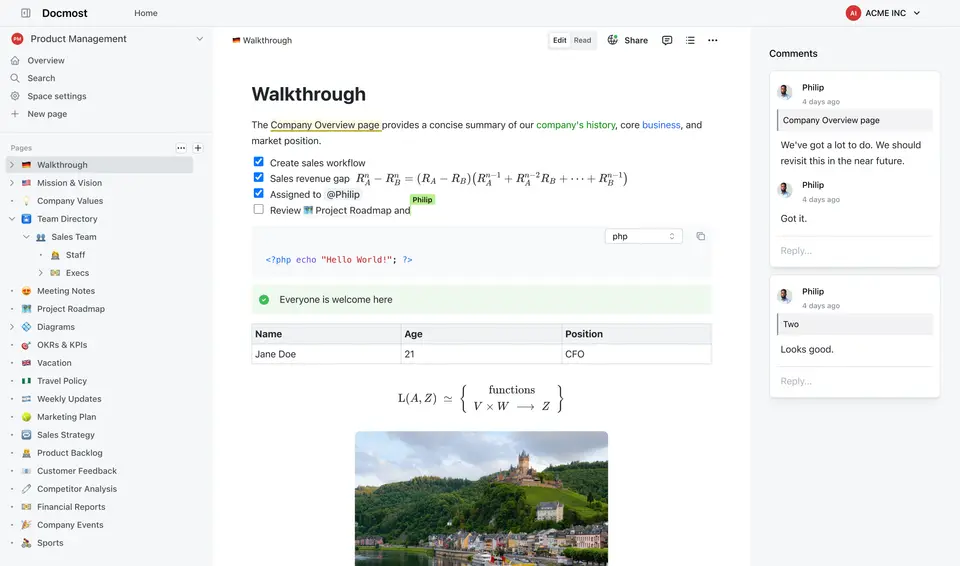
Docmost is a wiki you run on your own servers, with live co-editing, spaces with their own permissions and diagrams built in, all in the free open-source edition. There's no hosted version, so someone has to deploy and run it, and SSO, MFA, AI, templates and page-level permissions need Business, billed annually with a 10-seat minimum. Audit logs and SCIM are Enterprise only, at a custom price.
Who Docmost is for
- Fits if your documentation has to stay on your own servers, even air-gapped ones
- Works for teams leaving Notion for a self-hosted wiki, since Notion import is in the free edition
Who Docmost is not for
- Skip it if you want a hosted wiki, because Docmost only comes as something you run yourself
- Tight if you're staying free and need SSO, MFA, AI, templates or page-level permissions
- Pricey if you're a team of three, since Business has a 10-seat minimum and is billed annually
- Watch out: no monthly price is shown, and SCIM, audit logs and SIEM are Enterprise only at a custom price
- Not for you if you want phone or desktop apps, as none are on record
Why Docmost gets a 2.6
Five grades, each with its reason. The GPA is their average: an A is 4 points, an F is none.
- BValue for moneyBusiness is $6 a seat a month, inside the cheapest quarter of this category, and it adds SSO, page-level permissions, Bases, Kanban and AI. It's billed annually with a 10-seat minimum, so the smallest real bill is ten seats for a year, and you're still running the server yourself.
- BFree plan and trialThe Open Source edition is free under AGPL-3.0 and includes the editor, real-time collaboration, unlimited spaces, groups, page history, comments, diagrams, public sharing, full-text search and Notion import. SSO, MFA, templates and page-level permissions belong to Business.
- BFeaturesLive editing with cursors, a slash menu with tables, code blocks and equations, unlimited spaces with their own permissions and groups, Draw.io, Excalidraw and Mermaid diagrams inside a page, Bases and Kanban for structured content, and AI answers with citations that can run on your own model. The wiki job, covered.
- DEase of useThere's no hosted version at all: the pricing page covers self-managed editions only, so somebody has to deploy Docmost on your own infrastructure and keep it running, air-gapped or not.
- BPlatforms and integrationsA web app with Figma, Airtable, Google Drive, Google Sheets, Miro, Loom, Typeform and Draw.io connected, and API keys on the Business edition. No phone or desktop apps are on record.
What these grades rest on. Graded from this listing, whose facts were read from Docmost's own pages on 5 October 2026. Also tested with a demo account on 2026-07-24. How we review and grade.
Make Docmost? Put this grade on your site

Paste this where you want the badge. It links here and follows the grade if it changes. About badges
<a href="https://toolgpa.com/tools/docmost#review"><img src="https://toolgpa.com/badge/docmost.svg" alt="Docmost: 2.6 GPA on ToolGPA" width="196" height="56"></a>Where Docmost stands among docs and wiki tools
Docmost's GPA of 2.6 is higher than 47 of the 86 other docs and wiki tools we grade, and level with 17.
It stands best on features (B, above 54 of 86) and worst on ease of use (D, above 0).
Its paid plans start at $6 a month for each person, against a middle price of $18.50 for the category: 10 of the 57 others that charge start lower.
On features, ease of use and platforms it scores 2.3 out of 4. 7 tools score higher and cost less.
Each grade against the category
Every bar is all 87 docs and wiki tools we grade, cut by the letter each got. Docmost’s own letter is outlined.
- BValue for moneyAbove 50 of 86, level with 9
- BFree plan and trialAbove 41 of 86, level with 19
- BFeaturesAbove 54 of 86, level with 28
- DEase of useAbove 0 of 86, level with 24
- BPlatforms and integrationsAbove 28 of 86, level with 54
Price against what you get
Each dot is one of 79 docs and wiki tools. Further left costs less, and higher up scores better on features, ease of use and platforms. Point at a dot to see which tool it is.
Features, ease of use and platforms, averaged
What paid plans start at, a month (each step along is roughly double) →
- The best score at each price
- Has a free plan
- No free plan
Keep Docmost, or make your own?
You could make this
A wiki at its plainest is pages that link to each other.
What Docmost does at its core is wiki, and that is the kind of thing an AI app builder makes well. You would give up 7 things, listed below, and little else. It costs $72 a year. An AI app builder starts at about $20 a month on our listings, and you only need it while you build. Docmost is open source, so there is a third way: take its code and run it yourself.
What you could make
- Wiki: an app builder makes this well.
- It runs in a browser, which is where something home-made would run too.
What you could not
- A diagram editor.
- Databases with views, filters and links between them.
- A search API and an AI model, both rented, with your app around them.
- Several people working in it at the same moment.
- It plugs into other products, Figma, Airtable and Google Drive among them.
- What a company asks for before it lets staff use something: single sign-on and roles and permissions.
- The depth: we grade its features B, which means it covers the whole job.
What this rests on. Docmost’s listing: what it does, where it runs, what it plugs into and what it costs. It is a judgement about the kind of software this is. We have not built a replacement for it, and making your own means looking after it too. How we decide, and every tool’s verdict.
What is Docmost?
Docmost is a collaborative wiki and documentation tool that is deployed on your own infrastructure and can run in air-gapped environments. Several people can edit a page at once, and content is organized into spaces with their own permissions, with Draw.io, Excalidraw and Mermaid diagrams built in. The Open Source edition is free under AGPL-3.0; commercially licensed Business and Enterprise editions add SSO, AI search, databases and compliance features.
Worth knowing
- The pricing page covers self-managed editions only: you deploy and run Docmost on your own infrastructure.
- The Business edition has a 10-seat minimum and is priced on annual billing; no monthly price is shown.
- SSO, MFA, AI, Bases, Kanban, templates and page-level permissions are not in the free Open Source edition.
- SCIM, audit logs, SIEM and the page verification workflow are limited to Enterprise, which has custom pricing.
Key features
- Real-time collaborative editor
- Several people edit the same page at once with live cursors. The editor has a slash menu, @ mentions, tables, code blocks, math equations and Markdown shortcuts.
- Spaces and permissions
- Unlimited spaces separate content by team, project or department, each with its own permissions and groups. Page-level permissions need the Business edition.
- Built-in diagrams
- Draw.io, Excalidraw and Mermaid diagrams are created inside a page, and all three are included in the free Open Source edition.
- AI search, chat and MCP
- Business and Enterprise add AI answers grounded in your pages with source citations, running on a self-hosted or cloud LLM, and can expose the wiki as an MCP server.
- Bases and Kanban
- Bases organize content as structured databases with properties, filters, sorts and formulas, in table and Kanban views. They are part of the Business edition.
- Import and export
- Pages import from Markdown, HTML and Notion and export to Markdown and HTML on every edition. Confluence, DOCX and PDF import need Business.
Docmost pricing
As of Oct 5, 2026, Docmost has a free plan, and paid plans start at $6 per seat / month, billed annually (Business, 10-seat minimum).
- Starts at
- $6 per seat / month, billed annually (Business, 10-seat minimum)
- Free plan
- Open Source edition (AGPL-3.0): the editor, real-time collaboration, unlimited spaces, groups, page history, comments, diagrams, public sharing and full-text search.
- Free trial
- Free trial license key for the Business and Enterprise editions, generated in the customer portal
| Plan | Price | What you get |
|---|---|---|
| Community | $0 | Open-source edition: editor, real-time collaboration, unlimited spaces, page history, diagrams, public sharing, full-text search and Notion import. |
| Business | $6per seat / month, billed annually; minimum 10 seats | Adds Bases and Kanban, SSO, page-level permissions, AI and MCP, Confluence import, attachment search, MFA, API keys and email support. |
| Enterprise | Custom | Everything in Business, plus SCIM, audit logs, SIEM, retention controls, a page verification workflow and priority support. |
Read from docmost.com on Oct 5, 2026. Prices change, so confirm with Docmost before you buy.
Ways to pay less
- NonprofitSpecial pricing for non-profits
The pricing FAQ says Docmost offers special pricing for non-profit organizations through its sales team. No amount is stated.
Stated on docmost.com - EducationSpecial pricing for educational institutions
The same FAQ extends special pricing to educational institutions that contact the sales team. No amount is stated.
Stated on docmost.com
Works with
Docmost alternatives
- Docmost vs Outline
Free plan · from $10/mo
- Docmost vs BookStack
Free plan · from £450/yr
- Docmost vs Confluence
Free plan · from $6.70/mo
- Docmost vs XWiki
Free plan · from €309/yr





Common questions
Does Docmost have an Android app?
No Android app was listed when its pages were read on Oct 5, 2026. Docmost is listed for Web.
Does Docmost have an iPhone app?
No iPhone app was listed when its pages were read on Oct 5, 2026. Docmost is listed for Web.
Is Docmost open source?
Yes. Docmost is open source, according to its own site. It can also be run on a server of your own.
Sources for this page
The prices, plans, platforms and features above were read from these pages on Oct 5, 2026.