
Dubble
Chrome extension that records clicks as step-by-step guides
What is Dubble?
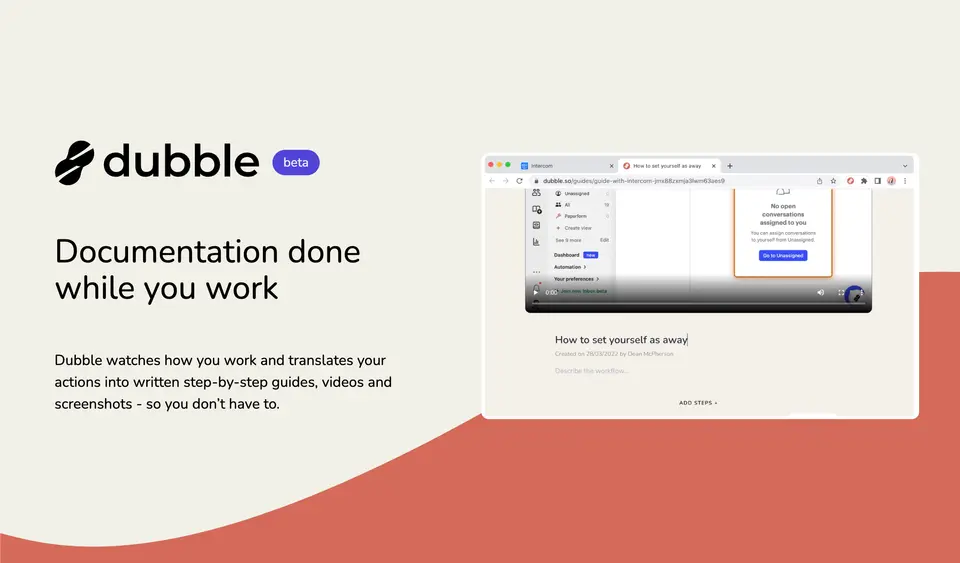
Dubble is a browser extension that records what a person does in a web app and turns it into a written step-by-step guide with a screenshot for each step. Guides are edited in a web editor, shared by link, downloaded as PDF or pasted into tools such as Notion and Confluence. The free plan allows unlimited guides, and a paid Pro plan adds screen and audio recording, collaborators and a Mac app in beta.
Dubble has a free plan. Paid plans start at $18 per month for 3 creators, billed annually ($24 billed monthly). See every plan
Good for
- Documenting browser-based processes as screenshot guides at no cost
- Small teams that paste how-to guides into Notion, Confluence or Google Docs
- IT support and onboarding staff writing repeatable how-to steps
Worth knowing
- Screen and audio recording, collaborators, API access and watermark-free output all need Pro.
- Capture runs through the Chrome extension; the Mac app is a beta limited to Pro, and other platforms are by early-access application.
- The plan table marks integrations, organization admin and SAML SSO as coming soon.
- The yearly toggle is labelled -20%, but the listed prices, $18 against $24 a month, differ by 25%.
Key features
- Record while working
- Pressing record in the Chrome extension captures each click and keystroke, and the guide with its screenshots is ready when the recording stops.
- Screenshot editing and redaction
- Descriptions are edited as rich text, and screenshots can be annotated, redacted, zoomed or replaced. Sensitive content can be blurred before recording starts.
- Screen and audio recording
- Pro records the screen with audio alongside the steps, and lets an editor pull new screenshots or create new steps from the existing video.
- Magic Copy and sharing
- A guide is shared by direct link, sent to private viewers or downloaded as PDF. Magic Copy pastes it into Notion, Confluence, Google Docs or any editor that takes rich content or Markdown.
- Team workspaces
- Pro includes 3 creators, lets collaborators edit and record guides together and adds workspace user administration. Enterprise adds multiple workspaces.
- Dubble for Mac (beta)
- A Mac app in beta records across native apps such as Finder, Excel or Numbers and web apps in Safari or Chrome. It is available to teams on Pro.
Dubble pricing
- Starts at
- $18 per month for 3 creators, billed annually ($24 billed monthly)
- Free plan
- Unlimited guides, sharing and exports, with screenshot annotation and redaction, PDF download and unlimited private viewers. No screen or audio recording, and output is watermarked.
- Free trial
- 14-day free trial of Pro
| Plan | Price | What you get |
|---|---|---|
| Free | $0 | Unlimited guides, image editing and redaction, blurring before recording, sharing by link, Magic Copy, PDF download and unlimited private viewers. |
| Pro | $18per month for 3 creators, billed annually ($24 billed monthly) | Extra creators $6 each a month billed annually, or $8 monthly. Adds screen and audio recording, collaborators, API access and no watermarks. |
| Enterprise | Custom | Priced on request. Adds multiple workspaces and unlimited creators; SAML SSO, organization admin and advanced integrations are marked coming soon. |
Read from dubble.so on Oct 9, 2026. Prices change, so confirm with Dubble before you buy.
Ways to pay less
- Annual discountYearly billing: $18 a month instead of $24
Pro is listed at $18 a month billed annually against $24 billed monthly, and $6 against $8 for each additional creator. The toggle labels the saving as 20%.
Stated on dubble.so
Works with
Dubble alternatives
- Dubble vs Scribe
Free plan · from $13/mo
- Dubble vs Tango
Free plan · from $15/mo
- Dubble vs Guidde
Free plan · from $19/mo
- Dubble vs Folge
Free plan · from $89 one-time
- Dubble vs Supademo
Free plan · from $38/mo





Common questions
Is Dubble free?
Dubble has a free plan. Unlimited guides, sharing and exports, with screenshot annotation and redaction, PDF download and unlimited private viewers. No screen or audio recording, and output is watermarked. Paid plans start at $18 per month for 3 creators, billed annually ($24 billed monthly).
How much does Dubble cost?
Dubble lists 3 plans. Free: $0. Pro: $18 per month for 3 creators, billed annually ($24 billed monthly). Enterprise: custom pricing. Prices were read from dubble.so on Oct 9, 2026.
What platforms does Dubble work on?
Dubble is available on Web and macOS. It also has a browser extension.
Does Dubble offer any discounts?
Dubble publicly lists the following: Yearly billing: $18 a month instead of $24.
Does Dubble have an Android app?
No Android app was listed when its pages were read on Oct 9, 2026. Dubble is listed for Web and macOS.
Does Dubble have an iPhone app?
No iPhone app was listed when its pages were read on Oct 9, 2026. Dubble is listed for Web and macOS.
Is Dubble open source?
Dubble is not described as open source on its own site, as read on Oct 9, 2026.
Does Dubble have an API?
Yes. Dubble offers a public API, according to its own site.
What does Dubble integrate with?
Dubble's listing names Zapier, Notion, Confluence and Google Docs. A listing names up to eight integrations, so it may connect to more.
Does Dubble have a free trial?
Yes. 14-day free trial of Pro.
Who makes Dubble?
Dubble is made by Paperform.
What are the alternatives to Dubble?
The closest alternatives to Dubble in our directory are Scribe, Tango, Guidde, Folge and Supademo. Each one has a side-by-side comparison with Dubble.
Sources for this page
The prices, plans, platforms and features above were read from these pages on Oct 9, 2026.