Mailspring review (2026): is the free plan enough?
Open-source desktop email client for Mac, Windows and Linux
Black Friday: is there a Mailspring sale?
Mailspring report card
Fair · out of 4.0 · graded Oct 10, 2026
Best for a free desktop inbox, Linux included
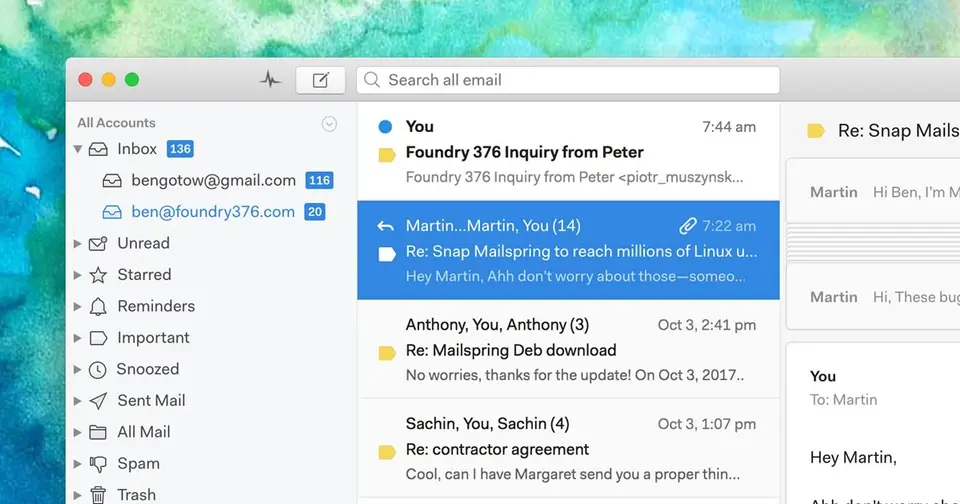
Mailspring is an open-source desktop mail app for Mac, Windows and Linux, and the free version takes unlimited accounts into one inbox with search and mail rules. Pro, at $8 a month, only lifts the weekly caps on snooze, send later and tracking. There's no phone app, no Exchange or POP3, the calendar is a read-only preview for Google accounts, there's no lifetime license, and Pro has no premium support.
Who Mailspring is for
- Fits if you're on Linux and want a desktop email app that takes several accounts
- Works for people who want read receipts and link tracking, at 5 a week free or unlimited on Pro
Who Mailspring is not for
- Skip it if you read mail on your phone too, as there's no iOS or Android version
- Not for you if your work account is Exchange only, because EWS and ActiveSync aren't supported
- Too light for anyone who needs a working calendar, since it's a read-only preview for Google accounts
- Tight if you stay free, at 15 snoozes, 5 send-later messages and 5 tracked messages a week
- Watch out: there's no lifetime license, and Pro at $8 a month doesn't include premium support
Why Mailspring gets a 2.4
Five grades, each with its reason. The GPA is their average: an A is 4 points, an F is none.
- CValue for moneyPro is $8 a month, or $85 a year, the $8.00 middle of this category. All it buys is the lifting of weekly caps on snooze, send later, reminders, receipts and tracking. No one-time or lifetime license is offered, and Pro doesn't include premium support.
- AFree plan and trialThe free version is a full mail client with unlimited accounts, a unified inbox, search, mail rules, signatures and templates, and no cap on any of that. A free Mailspring ID adds weekly allowances of Pro: 15 snoozes, 5 send-later messages and 5 tracked ones.
- CFeaturesThe basics: one inbox for several accounts, Gmail-style search across all of them, read receipts, link tracking, send later, snooze, reply reminders, translation and a grammar check. The holes are on its own pages: no Exchange or POP3, and a calendar that's a read-only preview for Google accounts.
- CEase of useNo rating on record. It's a desktop app with a familiar layout, but you add each account yourself and the free-plan allowances mean keeping track of how many snoozes and tracked messages you have left this week.
- CPlatforms and integrationsComputers only: Mac, Windows and Linux, but there's no iOS, Android or web version and the docs say the team is focused on the desktop. Mail syncs over IMAP straight from your provider to your machine.
What these grades rest on. Graded from this listing, whose facts were read from Mailspring's own pages on 5 October 2026. Also tested with a demo account on 2026-01-24. How we review and grade.
Make Mailspring? Put this grade on your site

Paste this where you want the badge. It links here and follows the grade if it changes. About badges
<a href="https://toolgpa.com/tools/mailspring#review"><img src="https://toolgpa.com/badge/mailspring.svg" alt="Mailspring: 2.4 GPA on ToolGPA" width="196" height="56"></a>Where Mailspring stands among email apps
Mailspring's GPA of 2.4 is higher than 54 of the 122 other email apps we grade, and level with 19.
It stands best on free plan and trial (A, above 97 of 122) and worst on features (C, above 1).
Its paid plans start at $7.08 a month when paid by the year, against a middle price of $4.92 for the category: 47 of the 76 others that charge start lower.
On features, ease of use and platforms it scores 2.0 out of 4. 47 tools score higher and cost less.
Each grade against the category
Every bar is all 123 email apps we grade, cut by the letter each got. Mailspring’s own letter is outlined.
- CValue for moneyAbove 13 of 122, level with 53
- AFree plan and trialAbove 97 of 122, level with 25
- CFeaturesAbove 1 of 122, level with 77
- CEase of useAbove 20 of 122, level with 73
- CPlatforms and integrationsAbove 10 of 122, level with 46
Price against what you get
Each dot is one of 107 email apps. Further left costs less, and higher up scores better on features, ease of use and platforms. Point at a dot to see which tool it is.
Features, ease of use and platforms, averaged
What paid plans start at, a month (each step along is roughly double) →
- The best score at each price
- Has a free plan
- No free plan
Keep Mailspring, or make your own?
Keep it
To replace Mailspring you would be making an email client: sending, receiving, threading and searching years of mail. That is not a weekend's work, with an AI app builder or without one.
It costs $85 a year. Mailspring is open source, so there is a third way: take its code and run it yourself.
What you could make
- Templates: an app builder makes this well.
What you could not
- An email client: sending, receiving, threading and searching years of mail.
- Apps for macOS, Windows and Linux that stay in step with each other.
- It plugs into other products, Gmail, Office 365 and iCloud among them.
What this rests on. Mailspring’s listing: what it does, where it runs, what it plugs into and what it costs. It is a judgement about the kind of software this is. We have not built a replacement for it, and making your own means looking after it too. How we decide, and every tool’s verdict.
What is Mailspring?
Mailspring is a desktop email client for Mac, Windows and Linux with a unified inbox for Gmail, iCloud, Office 365, Fastmail, Outlook.com, Yahoo and other IMAP accounts. The code is open source under the MIT license, and mail syncs directly between the provider and the computer. The app is free with unlimited accounts. A Mailspring Pro subscription lifts the weekly limits on snooze, send later, follow-up reminders, read receipts and link tracking.
Worth knowing
- There is no iOS, Android or web version; the docs say the team is focused on the desktop app.
- Exchange (EWS and ActiveSync) and POP3 are not supported. Microsoft 365 accounts connect over IMAP and SMTP.
- The calendar is a read-only preview for Google accounts; a full calendar is described as coming later.
- No one-time or lifetime license is offered, and Pro does not include premium support.
Key features
- Unified inbox
- One inbox for Gmail, iCloud, Office 365, Fastmail, Outlook.com, Yahoo and other IMAP accounts. The free version puts no limit on the number of accounts.
- Advanced search
- Mailspring indexes mail so that Gmail-style search queries can look through message contents across every connected account.
- Read receipts and link tracking
- Notifies you when a recipient opens a message or clicks a link. A free Mailspring ID can track 5 messages a week of each kind, and Pro is unlimited.
- Send later, snooze and reminders
- Schedule a message, snooze a conversation, or get a reminder when nobody replies. The free allowance is 5 send-later messages, 5 reminders and 15 snoozes a week.
- Translation and grammar check
- Translates drafts and incoming messages and checks grammar in the composer with LanguageTool. Both have weekly caps, which are higher on Pro.
- Open source with direct sync
- The full codebase is published under the MIT license. Mail syncs over IMAP straight from the provider to your machine, not through Mailspring's servers.
Mailspring pricing
As of Oct 5, 2026, Mailspring has a free plan, and paid plans start at $8 per month, or $85 per year (Mailspring Pro).
- Starts at
- $8 per month, or $85 per year (Mailspring Pro)
- Free plan
- Unlimited accounts, unified inbox, search, mail rules, signatures, templates and themes. A free Mailspring ID adds weekly allowances of Pro features, such as 15 snoozes and 5 send-later messages.
- Free trial
- None listed
| Plan | Price | What you get |
|---|---|---|
| Free | $0 | Complete email client with unlimited accounts and a unified inbox. Weekly allowances of Pro features: 15 snoozes, 5 send-later messages and 5 tracked messages. |
| Mailspring Pro | $8per month, or $85 per year | Unlimited snooze, send later, follow-up reminders, read receipts and link tracking, plus higher caps on translation, grammar check and contact profiles. |
Read from getmailspring.com on Oct 5, 2026. Prices change, so confirm with Mailspring before you buy.
Ways to pay less
- Annual discount11% off with annual billing
Mailspring Pro is billed monthly at $8 by default. The subscription docs list an annual plan at $85 a year, which they describe as an 11% discount.
Stated on getmailspring.com - Other savingsMulti-seat discounts for teams
The subscription docs say discounts on multi-seat licenses and annual team plans are available by contacting Foundry376's sales address.
Stated on getmailspring.com
Works with
- Gmail
- Office 365
- iCloud
- Fastmail
- Outlook.com
- Yahoo Mail
- LanguageTool
Mailspring alternatives
- Mailspring vs Mailbird
Free plan · from $34.49/yr
- Mailspring vs eM Client
Free plan · from $49.95/yr
- Mailspring vs Microsoft Outlook
Free plan · from $1.99/mo
- Mailspring vs Apple Mail
Free plan · from $0.99/mo





Common questions
Does Mailspring have an Android app?
No Android app was listed when its pages were read on Oct 5, 2026. Mailspring is listed for macOS, Windows and Linux.
Does Mailspring have an iPhone app?
No iPhone app was listed when its pages were read on Oct 5, 2026. Mailspring is listed for macOS, Windows and Linux.
Is Mailspring open source?
Yes. Mailspring is open source, according to its own site.
Sources for this page
The prices, plans, platforms and features above were read from these pages on Oct 5, 2026.
- getmailspring.com/
- getmailspring.com/pro
- getmailspring.com/download
- getmailspring.com/docs/about-mailspring-pro-subscriptions
- getmailspring.com/docs/free-plan-limits
- getmailspring.com/docs/cost-of-mailspring
- getmailspring.com/docs/exchange-with-mailspring
- getmailspring.com/docs/pop3-or-pop-protocol-support
- getmailspring.com/docs/mailspring-for-ios-or-android
- getmailspring.com/docs/does-mailspring-have-a-calendar