Apple Mail
Free built-in email app for iPhone, iPad and Mac
Apple Mail review
Very good · out of 4.0 · graded Oct 9, 2026
Best for everyday email if all your devices are Apple
Got an iPhone or a Mac? Then Apple Mail is already on it. It's free, and it reads your Gmail, Outlook and Yahoo mail in one inbox. It also stops senders seeing when you open their emails. The catch is in the name. There's no app for Windows or Android, so it only makes sense if everything you own is Apple.
Who Apple Mail is for
- Great if everything you own is Apple and you want mail that's already set up
- Handy when you have Gmail, Yahoo and a work Exchange account and want one inbox for all three
- Good for anyone who doesn't want senders knowing when they opened an email
- A treat if you want an address at your own domain for $0.99 a month
Who Apple Mail is not for
- Skip it if you also use a Windows PC or an Android phone, because there's no app for either
- Not for you if you need Gmail the second it lands, since commenters say it isn't pushed to the iPhone app
- Tight if you use an iCloud address on the free 5 GB, which the rest of your iCloud shares
- Too light for people who live by mail rules, which one reviewer says can't be reached from the iPhone
Why Apple Mail gets a 3.4
Five grades, each with its reason. The GPA is their average: an A is 4 points, an F is none.
- AValue for moneyThe app costs nothing. iCloud+ at $0.99 a month adds 50 GB, throwaway addresses and email at your own domain, shared with up to five other people. Proton wants $3.99 for a plan with one custom domain.
- AFree plan and trialThe whole app is free, and it reads Gmail, Outlook, Yahoo and Exchange accounts as well as iCloud. The tight spot is an iCloud address, which shares 5 GB with the rest of your iCloud.
- BFeaturesCategories, snooze, send later, unsend, VIPs and tracker blocking are all built in. But it's a plain mail app next to Outlook. One reviewer notes rules only live on the Mac, and the AI summaries hang on Apple Intelligence, which is still a beta.
- AEase of use4.6 from about 4.5 million App Store ratings. It's already on your iPhone, iPad and Mac, so there's nothing to download. Add your Gmail or Outlook account and your mail turns up.
- CPlatforms and integrationsiPhone, iPad, Mac, Apple Watch and Apple Vision, and that's where it ends. No Windows app, no Android app. An iCloud address can be read at iCloud.com or in Outlook on Windows, but that's not this app.
The good
So why bother with the mail app that came with your phone? Because it's already there, it's free, and it does more than you'd think.
It takes pretty much any account. iCloud, Gmail, Exchange, Yahoo, Outlook and plenty of others, all in one inbox or one at a time.
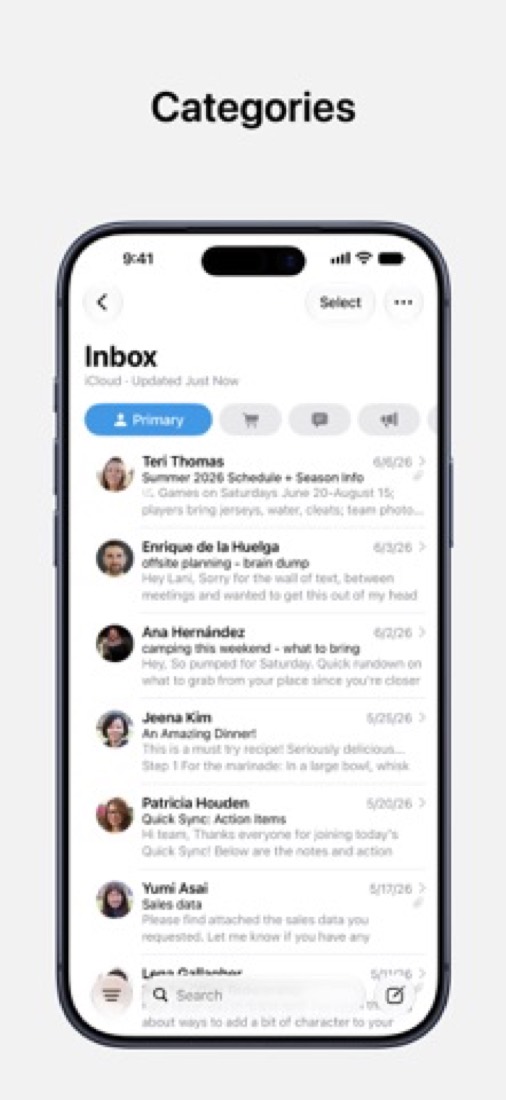
It sorts your mail for you now. Messages go into Primary, Transactions, Updates and Promotions, so the receipt for your trainers isn't sitting on top of an email from your sister.
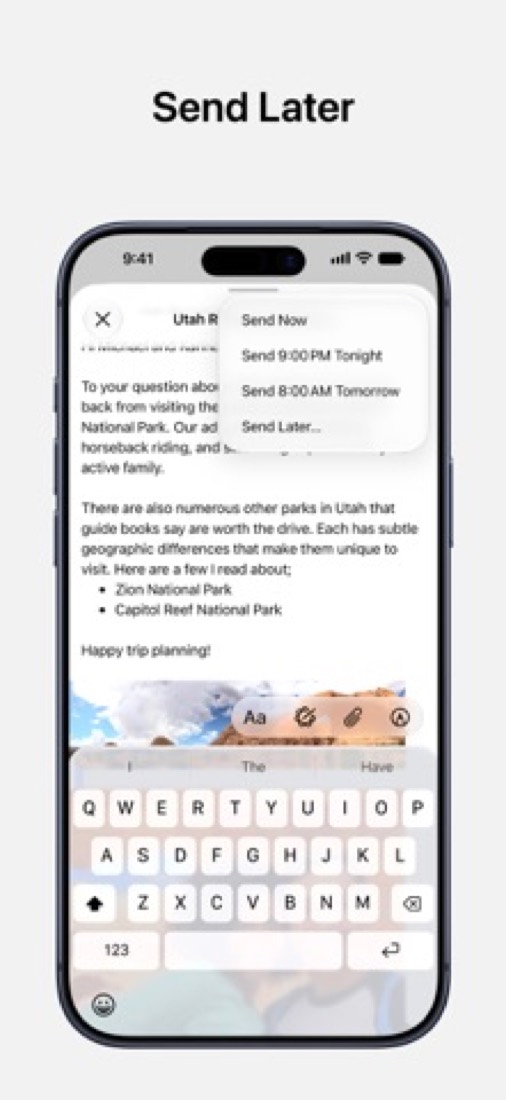
The handy stuff is all here. Send later, snooze and unsend. On a Mac, an email nobody has answered in 3 days pops back to the top of your inbox.
Then there's privacy. Mail Privacy Protection hides your IP address and stops senders seeing whether you opened their email.
And reviewers like that it stays in step across their iPhone, iPad and Mac.
The stuff that'll bug you
It's Apple only. There's no Mail app for Windows or Android. With an iCloud address you can read your mail at iCloud.com or in Outlook on Windows, and that's your lot.
Gmail is a sore point. Several Hacker News commenters say new Gmail messages aren't pushed to Mail on the iPhone, so they turn up late. A few moved to another app over it.
An iCloud address is tight on space. Its mail counts against your iCloud storage, which is 5 GB free and shared with everything else you keep in iCloud. When it's full, Apple says new mail stops arriving.
Rules are a Mac thing. One reviewer can't get at theirs from the iPhone, and says they don't sync between two Macs either.
The AI bits have strings attached. Priority Messages and summaries need Apple Intelligence, which Apple still calls a beta and offers in some languages only.
And if your work email is on Microsoft 365, check before you lean on the Mac app. Apple's own guide says the Mac connects to Exchange through a service called EWS, and Microsoft says it starts switching that off in October 2026.
Money
The app is free. There's no paid version of it.
What you might pay for is iCloud+, and only if you use an iCloud address or want its extras. It's $0.99 a month for 50 GB, $2.99 for 200 GB and $9.99 for 2 TB.
Every one of those adds Hide My Email, which makes up random addresses that forward to your real one. Good for the shop you'll buy from once.
They also add Custom Email Domain. That's email at a domain you own, shared with up to five other people. For a family that wants "anything@oursurname.com", $0.99 a month is hard to beat. Apple does say it isn't available in every country.
Need silly amounts of space? There's 6 TB at $29.99 and 12 TB at $59.99.
Already reading Gmail or Outlook in Mail? Then you don't need to give Apple a penny.
What actual users say
Apple Mail has 4.6 on the App Store from about 4.5 million ratings.
A few of the reviews Apple shows aren't about Mail at all. One is a thank-you to a plumber. So we went by the seven that are.
The split is over Categories. In January 2025 one reviewer loved having the inbox pre-sorted into four, after a couple of days of nudging senders into the right pile. Another hated it, though the first says you can go back to a plain list.
Someone else is cross that an update took delete and junk off the left swipe. They also spotted phishing emails landing in Primary, which is not where you want them.
The fans say it's solid and never crashes on them. One tried Spark, Airmail and Outlook and came back.
Hacker News is tougher. A couple of Mac users say search and Smart Mailboxes aren't dependable these days. But plenty still use it as the front end for Fastmail or their own domain.
What this review rests on. Based on Apple's Mail support pages, its Mail and iCloud user guides, its iCloud+ pricing page and the Mail listing on the App Store as of 9 October 2026, the reviews there and Hacker News threads about it. Not based on using the product: this is a read of everything that's public, not a test. How we review and grade.
What is Apple Mail?
Mail is Apple's own email app for iPhone, iPad, Mac, Apple Watch and Apple Vision. It reads iCloud, Gmail, Exchange, Yahoo, Outlook and other accounts in one inbox, sorts incoming messages into categories and blocks tracking by senders. The app is free. An iCloud Mail address can also be used in a browser at iCloud.com, and a paid iCloud+ plan adds Hide My Email addresses, custom email domains and more storage.
Apple Mail has a free plan. Paid plans start at $0.99 per month (iCloud+ with 50 GB). See every plan
Good for
- iPhone, iPad and Mac owners who want a mail app at no cost
- Reading iCloud, Gmail, Exchange and Yahoo mail in one inbox
- People who want protection from email tracking built in
Worth knowing
- The app is listed only for Apple devices. Elsewhere, iCloud Mail is reached in a browser at iCloud.com, which Apple describes for iCloud Mail accounts, or in Outlook on Windows.
- iCloud Mail counts against iCloud storage, 5 GB on the free tier. When it runs out, the iCloud address stops receiving new mail until space is freed or bought.
- Hide My Email and Custom Email Domain need iCloud+, and Apple notes that Custom Email Domain is not available in all countries or regions.
- Priority Messages, summaries and Writing Tools depend on Apple Intelligence, which Apple labels a beta and limits to certain languages and regions.
Key features
- Every account in one inbox
- Add iCloud, Gmail, Exchange, Yahoo, Outlook and other accounts, then read them in a single inbox or one mailbox at a time, with filters for unread or flagged messages.
- Automatic categories
- Mail sorts incoming messages into Primary, Transactions, Updates and Promotions, which keeps receipts and marketing email out of the main list.
- Priority Messages and summaries
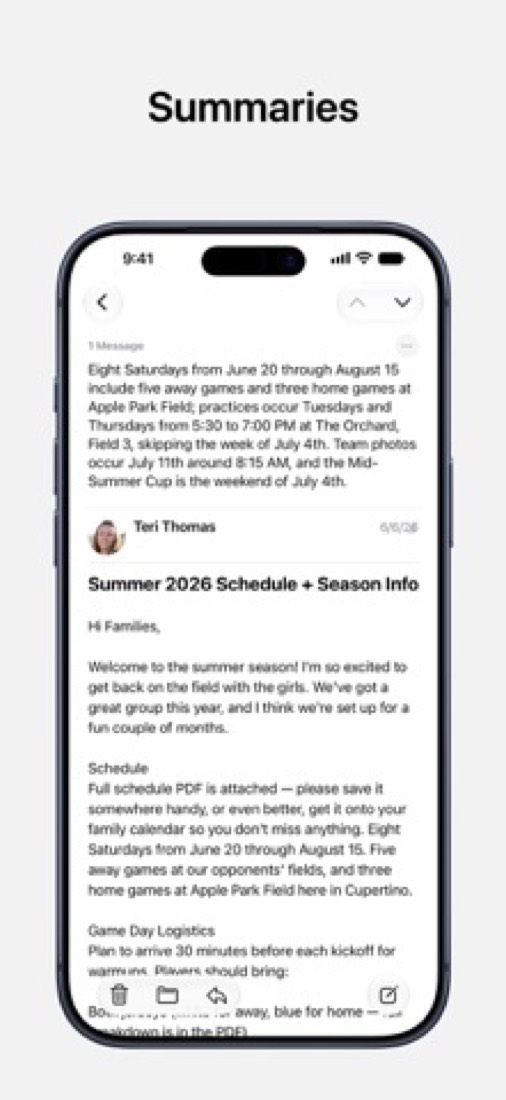
- With Apple Intelligence, urgent messages are shown in a section at the top of the inbox, messages and threads can be summarized, and Smart Reply drafts quick responses.
- Send later, snooze and unsend
- Schedule a message to send later, snooze one to come back to, or unsend it. On Mac, Mail can also remind you about messages that got no response.
- Mail Privacy Protection
- Hides your IP address from senders and downloads remote content privately in the background, so senders cannot tell whether or when a message was opened.
- Hide My Email and custom domains
- With iCloud+, send from unique, random addresses that forward to your real one, and use a domain you own with iCloud Mail, shared with up to five other people.
Apple Mail pricing
- Starts at
- $0.99 per month (iCloud+ with 50 GB)
- Free plan
- The Mail app is free on Apple devices and works with iCloud, Gmail, Exchange, Yahoo, Outlook and other accounts. An iCloud Mail address draws on the 5 GB of free iCloud storage.
- Free trial
- None listed
| Plan | Price | What you get |
|---|---|---|
| $0 | The Mail app on iPhone, iPad, Mac, Apple Watch and Apple Vision, plus iCloud Mail within the 5 GB of free iCloud storage. | |
| iCloud+ 50 GB | $0.99per month | 50 GB of iCloud storage, which iCloud Mail counts against, plus Hide My Email and Custom Email Domain. |
| iCloud+ 200 GB | $2.99per month | 200 GB of iCloud storage with the same Hide My Email and Custom Email Domain features. |
| iCloud+ 2 TB | $9.99per month | 2 TB of iCloud storage with the same mail features. Apple also sells 6 TB at $29.99 and 12 TB at $59.99 per month. |
Read from support.apple.com on Oct 5, 2026. Prices change, so confirm with Apple Mail before you buy.
What people say about Apple Mail
4.6
out of 5 for the iPhone and iPad app
- 5 stars84%
- 4 stars7%
- 3 stars3%
- 2 stars1%
- 1 star5%
4,486,353 ratings on the App Store in the United States, read Oct 7, 2026. It rates the app, not everything the product does. See the listing
Often praised
- Reviewers say it fits in with the rest of their Apple devices, with mail staying in step between iPhone, iPad and Mac. App Store reviews
- Commenters describe using it as the app in front of mail hosted elsewhere, such as Fastmail or their own domain, since it works with any provider. Hacker News 1, 2, 3
Often criticised
- Commenters with Gmail accounts say new mail is not pushed to it on the iPhone, and some moved to another app or another mail host because of that. Hacker News 1, 2, 3
- Mac users describe rough edges, such as rules and smart mailboxes that misbehave across more than one Mac and search they no longer rely on. App Store reviews · Hacker News 1, 2
Based on 7 App Store reviews about Mail, all but one from 2024 or later, and about 20 Hacker News comments from June to October 2026, read Oct 7, 2026. These are themes summarised in our words, not our own verdict. Follow the links to read what was said.
Works with
Apple Mail alternatives
- Apple Mail vs Spark Mail
Free plan · from $8.25/mo
- Apple Mail vs Microsoft Outlook
Free plan · from $1.99/mo
- Apple Mail vs Gmail
Free plan · from $7/mo
- Apple Mail vs Mimestream
Free trial · from $49.99/yr



Common questions
Is Apple Mail free?
Apple Mail has a free plan. The Mail app is free on Apple devices and works with iCloud, Gmail, Exchange, Yahoo, Outlook and other accounts. An iCloud Mail address draws on the 5 GB of free iCloud storage. Paid plans start at $0.99 per month (iCloud+ with 50 GB).
How much does Apple Mail cost?
Apple Mail lists 4 plans. Mail: $0. iCloud+ 50 GB: $0.99 per month. iCloud+ 200 GB: $2.99 per month. iCloud+ 2 TB: $9.99 per month. Prices were read from support.apple.com on Oct 5, 2026.
What platforms does Apple Mail work on?
Apple Mail is available on iOS, macOS and Web.
How is Apple Mail rated?
Apple Mail's iPhone and iPad app averages 4.6 out of 5 from 4,486,353 ratings on the App Store in the United States, as read on Oct 7, 2026. That is the store's rating of the app, not a score from us.
Is Apple Mail any good?
We have not tested Apple Mail, so this is what reviewers say. Often praised: Reviewers say it fits in with the rest of their Apple devices, with mail staying in step between iPhone, iPad and Mac. Often criticised: Commenters with Gmail accounts say new mail is not pushed to it on the iPhone, and some moved to another app or another mail host because of that. The reviews page has every theme with its sources.
Does Apple Mail have an Android app?
No Android app was listed when its pages were read on Oct 5, 2026. Apple Mail is listed for iOS, macOS and Web.
Does Apple Mail have a Windows app?
No Windows app was listed when its pages were read on Oct 5, 2026. Apple Mail is listed for iOS, macOS and Web.
Is Apple Mail open source?
Apple Mail is not described as open source on its own site, as read on Oct 5, 2026.
What does Apple Mail integrate with?
Apple Mail's listing names iCloud, Gmail, Microsoft Exchange, Yahoo Mail and Outlook. A listing names up to eight integrations, so it may connect to more.
Who makes Apple Mail?
Apple Mail is made by Apple Inc.
What are the alternatives to Apple Mail?
The closest alternatives to Apple Mail in our directory are Spark Mail, Microsoft Outlook, Gmail, Mimestream and Thunderbird. Each one has a side-by-side comparison with Apple Mail.
Sources for this page
The prices, plans, platforms and features above were read from these pages on Oct 5, 2026. What people say is linked where it appears.
- support.apple.com/mail
- apps.apple.com/us/app/mail/id1108187098
- support.apple.com/en-us/108047
- support.apple.com/guide/mail/welcome/mac
- support.apple.com/guide/mail/mail35803/mac
- support.apple.com/guide/mail/mlhlp1052/mac
- support.apple.com/guide/mail/mlhlp1205/mac
- support.apple.com/guide/icloud/mmaae54a2288/icloud
- support.apple.com/guide/icloud/mm6b1a17e3/icloud
- support.apple.com/guide/icloud/mme8ed800b5d/icloud