
Microsoft Outlook review (2026): is the free plan enough?
Microsoft's email and calendar app for desktop, mobile and web
Black Friday: is there a Microsoft Outlook sale?
Our verdict
First of our top three email apps
For: Most people
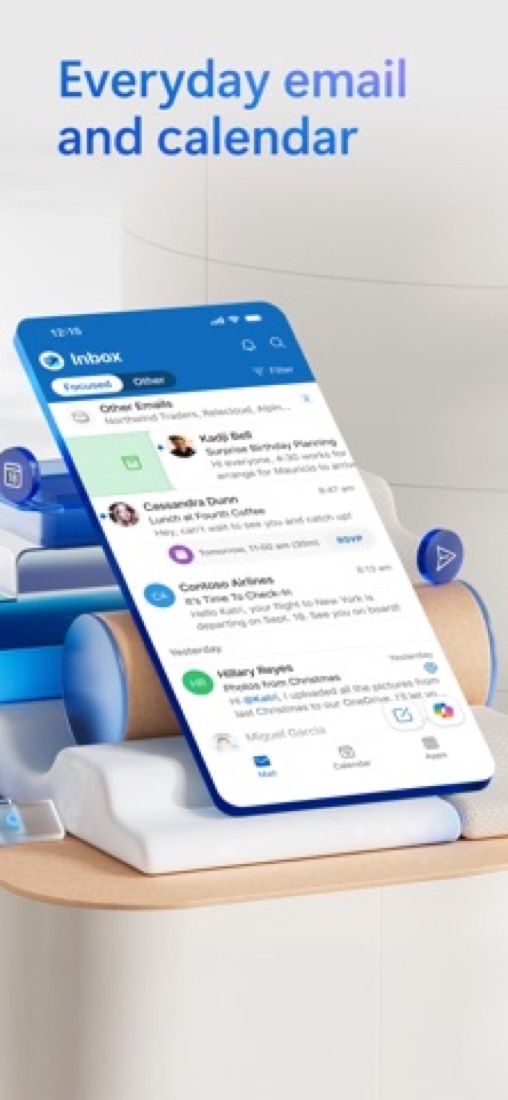
Outlook is free with an Outlook.com address and runs on the web, Windows, Mac, iPhone and Android. The same app also takes Gmail, Yahoo, iCloud and work or school accounts, and keeps email, calendar, contacts and to-do lists in one view. The free plan has 15 GB of mailbox storage, and its iPhone and iPad app averages 4.8 from about 9.3 million ratings. Know the limits: the free inbox shows ads, which Microsoft 365 Basic removes for $1.99 a month or $19.99 a year, no Linux app is listed, and on home plans Copilot in Outlook works only with Microsoft's own addresses, such as outlook.com and hotmail.com.
See all three and how we rankMicrosoft Outlook review
Excellent · out of 4.0 · graded Oct 10, 2026
Best for all your inboxes and a calendar in one app
Outlook is Microsoft's mail and calendar app, free on web, Windows, Mac and phones, and it takes Gmail, Yahoo, iCloud and work accounts too. The free inbox shows ads until you pay $1.99 a month, Windows has a new and a classic Outlook that do different things, the phone app can't set rules, and there's no Linux app. If inbox ads would bother you, look elsewhere.
Who Microsoft Outlook is for
- Fits if you have three or four email addresses and want them in one app with your calendar
- Works for offices on Microsoft 365, where mail, calendar and Teams sit together
Who Microsoft Outlook is not for
- Skip it if ads in your inbox would wind you up and you won't pay $1.99 a month to lose them
- Pricey if you want Copilot: it's on the $9.99 plan, and only for Microsoft addresses and the account owner
- Pricey if your business wants its own email domain and the desktop apps in one plan, at $23.50 a person
- Watch out: there's no Linux app, and on Windows the new Outlook lacks macros and old add-ins
- Too light for sorting mail on your phone, where reviewers say rules and subfolders need a computer
Why Microsoft Outlook gets a 3.6
Five grades, each with its reason. The GPA is their average: an A is 4 points, an F is none.
- AValue for moneyMicrosoft 365 Basic is $1.99 a month, or $19.99 a year, when the middle for this category is $8 and its lowest-priced quarter is $4. That takes the ads out and lifts your mailbox from 15 GB to 100 GB. Proton's lowest paid plan is $3.99 and stops at 15 GB.
- BFree plan and trialA free plan, not a trial: 15 GB for mail, apps for your phone and your computer, and your Gmail, Yahoo and iCloud accounts in the same place. What holds it back is the price you do pay, ads sitting in the inbox, plus a 15 GB ceiling.
- BFeaturesFocused Inbox, Sweep, snooze, a calendar, contacts and to-do lists in one window, parcel and flight tracking, Office files from the inbox. The fine print keeps it off the top mark: Copilot is on the $9.99 plan and Microsoft addresses only, and Focused Inbox on Windows skips Gmail.
- AEase of use4.79 from about 9.3 million App Store ratings, the most ratings in this category. Computers are messier: Windows has a new Outlook and a classic one, and Microsoft keeps a help page called "What version of Outlook do I have?"
- APlatforms and integrationsWeb, Windows, Mac, iPhone and Android, where Gmail lists no desktop app at all. It plugs into Teams, OneDrive, Word and Excel as well. No Linux app, though.
The good
So why pick Outlook over the mail app you already have? It takes all your accounts at once.
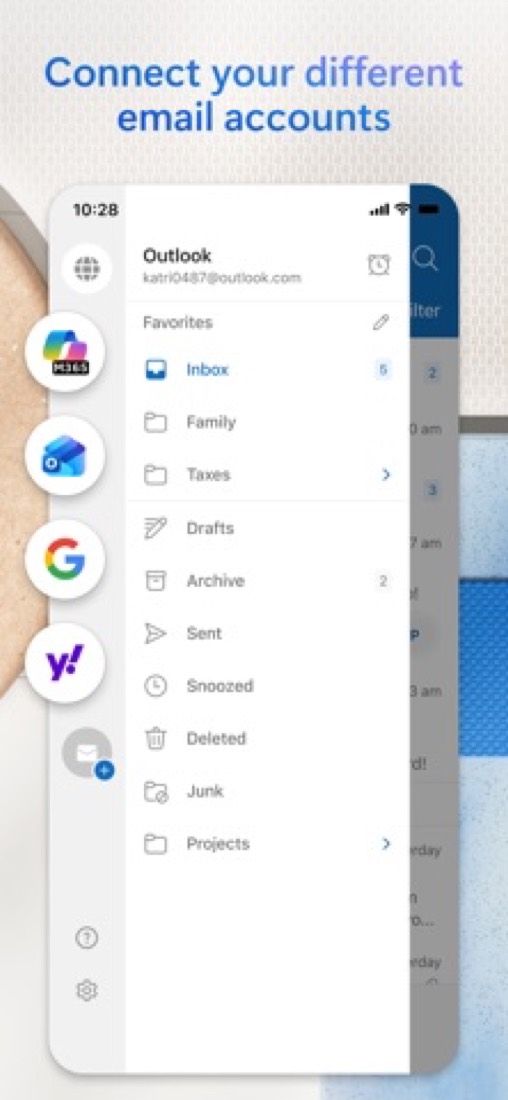
Outlook.com, Gmail, Yahoo, iCloud, your work address. Add them all and you switch between them without leaving the app, on the phone apps and the desktop ones.
Your calendar, contacts and to-do lists sit in the same window. So the dentist's email and "dentist thursday 3pm" end up side by side.
Focused Inbox splits your mail into two tabs, the important mail and everything else. Sweep can bin every email from one sender, or keep only the newest. Snooze hides an email until you're ready for it.
It runs on web, Windows, Mac, iPhone and Android. Gmail, for comparison, lists no desktop app at all.
All of that is on the free plan.
The stuff that'll bug you
Ads. The free inbox has them, marked with an ad label so you can tell them from real emails.
Adding your Gmail account doesn't get you out of it. Microsoft's own page says you'll see ads with Gmail too, unless you have a Microsoft 365 subscription. The cheapest one is $1.99 a month. The free mailbox also stops at 15 GB, with 5 GB for files.
Then there's the muddle on Windows. There's a "new" Outlook and a "classic" one, and they're different apps. Microsoft's own comparison, updated in September 2026, lists what the new one doesn't do. No macros, no old-style add-ins, and working offline is only partly there.
Focused Inbox has small print. On Windows it's only for Microsoft 365, Exchange and Outlook.com accounts, so a Gmail account you add doesn't get it.
The phone app is thinner than the desktop. App Store reviewers say you can't set up rules on it, or add a subfolder without going to a computer.
Copilot is fussy. On the home plans it only works with Microsoft addresses like outlook.com and hotmail.com, and only for the person paying.
And there's no Linux app.
Money
The free plan gives you 15 GB for mail, 5 GB of cloud storage and the apps on every device, with ads.
Microsoft 365 Basic is $1.99 a month, or $19.99 a year. Ads gone, mailbox up to 100 GB, and 100 GB for your files.
Personal is $9.99 a month, or $99.99 a year. That's mostly Word, Excel and PowerPoint, with 1 TB of storage and Copilot in Outlook. Family is $12.99 for up to six people, though only the owner gets the AI.
If email is all you're after, Personal is $8 a month more than Basic for an AI helper that only works on Microsoft addresses.
Running a business? Business Basic is $7 a person a month, paid yearly, with email at your own domain. But Outlook there is web and mobile only. Apps for business, at $10, adds desktop Outlook without the business email. The lowest plan with both is Business Standard with Copilot, at $23.50.
Students get 50% off Personal. The business trial runs a month but wants a card.
What actual users say
Outlook has 4.8 on the App Store from about 9.3 million ratings.
Seven of the ten written reviews Apple shows are more than three years old, though.
What do the happy ones say? That it has improved. One, writing in 2022 after five years of daily use, says they can do far more from the phone than before. A 2026 reviewer says all their accounts stay up to date, which hadn't always been the case.
The grumbles are mostly about what the phone app leaves out. No setting up rules, no adding subfolders, and an older review says calendar colors don't match the desktop. That 2026 reviewer also still gets plenty of spam after blocking and reporting it.
Hacker News is mostly people who have Outlook at work. Several say email and calendar together on Exchange are hard to replace, and that's why they stay.
They're less kind about the desktop apps. A few reckon Microsoft has let them drift, and two pick out the Mac version.
What this review rests on. Based on Microsoft's Outlook product and plans page, its business plans page and Outlook help pages as of 9 October 2026, its App Store reviews and Hacker News threads about it. Also tested with a demo account on 2026-06-01. How we review and grade.
Make Microsoft Outlook? Put this grade on your site
Paste this where you want the badge. It links here and follows the grade if it changes. About badges
<a href="https://toolgpa.com/tools/microsoft-outlook#review"><img src="https://toolgpa.com/badge/microsoft-outlook.svg" alt="Microsoft Outlook: 3.6 GPA on ToolGPA" width="196" height="56"></a>Where Microsoft Outlook stands among email apps
Microsoft Outlook's GPA of 3.6 is higher than 122 of the 122 other email apps we grade.
It stands best on ease of use (A, above 118 of 122) and worst on free plan and trial (B, above 69).
Its paid plans start at $1.67 a month when paid by the year, against a middle price of $4.92 for the category: 11 of the 76 others that charge start lower.
On features, ease of use and platforms it scores 3.7 out of 4, and no tool on the category's chart scores higher without costing more.
Each grade against the category
Every bar is all 123 email apps we grade, cut by the letter each got. Microsoft Outlook’s own letter is outlined.
- AValue for moneyAbove 88 of 122, level with 34
- BFree plan and trialAbove 69 of 122, level with 27
- BFeaturesAbove 79 of 122, level with 43
- AEase of useAbove 118 of 122, level with 4
- APlatforms and integrationsAbove 112 of 122, level with 10
Price against what you get
Each dot is one of 107 email apps. Further left costs less, and higher up scores better on features, ease of use and platforms. Point at a dot to see which tool it is.
Features, ease of use and platforms, averaged
What paid plans start at, a month (each step along is roughly double) →
- The best score at each price
- Has a free plan
- No free plan
Keep Microsoft Outlook, or make your own?
Keep it
To replace Microsoft Outlook you would be making an email client: sending, receiving, threading and searching years of mail. That is not a weekend's work, with an AI app builder or without one.
It is one of the better ones too: its GPA of 3.6 is higher than 122 of the 122 other email apps we grade. It costs $19.99 a year.
What you could make
- Calendar and tasks: an app builder makes these well.
What you could not
- An email client: sending, receiving, threading and searching years of mail.
- Filters that read every message as it arrives.
- Apps for macOS, Windows, iOS and Android that stay in step with each other.
- It plugs into other products, Microsoft Teams, OneDrive and Word among them.
- AI features, unless you pay a model provider for each request yourself.
- The depth: we grade its features B, which means it covers the whole job.
What this rests on. Microsoft Outlook’s listing: what it does, where it runs, what it plugs into and what it costs. It is a judgement about the kind of software this is. We have not built a replacement for it, and making your own means looking after it too. How we decide, and every tool’s verdict.
What is Microsoft Outlook?
Outlook is Microsoft's email, calendar and contacts app for Windows, Mac, iOS, Android and the web. It is free with an Outlook.com address and also connects Gmail, Yahoo, iCloud and work or school accounts in the same app. Paid plans are sold as Microsoft 365 rather than as Outlook on its own: the individual plans remove ads and raise mailbox storage, and the business plans add email at a company's own domain, hosted on Exchange.
Worth knowing
- Free accounts show ads in the inbox; a Microsoft 365 Basic, Personal or Family subscription removes them.
- Business Basic has only web and mobile Outlook. Apps for business ($10.00) adds desktop Outlook without business email; Business Standard with Copilot ($23.50) has both.
- On home plans, Copilot in Outlook currently works only with outlook.com, hotmail.com, live.com and msn.com addresses, and only for the subscription owner.
- Microsoft lists Outlook for Windows, macOS, iOS, Android and the web. No Linux app is listed.
Key features
- Several accounts in one app
- The desktop and mobile apps take Outlook.com, Gmail, Yahoo, iCloud and other mail services alongside work or school accounts, and switch between them without leaving the app.
- Focused Inbox, Sweep and snooze
- Focused Inbox and Sweep clear clutter out of the main view. Messages can be snoozed until later or flagged as important.
- Calendar, contacts and to-do lists
- Email, calendars, contacts and to-do lists sit in one view. Outlook can schedule events, set reminders, and track packages and flights on supported platforms.
- Copilot in Outlook
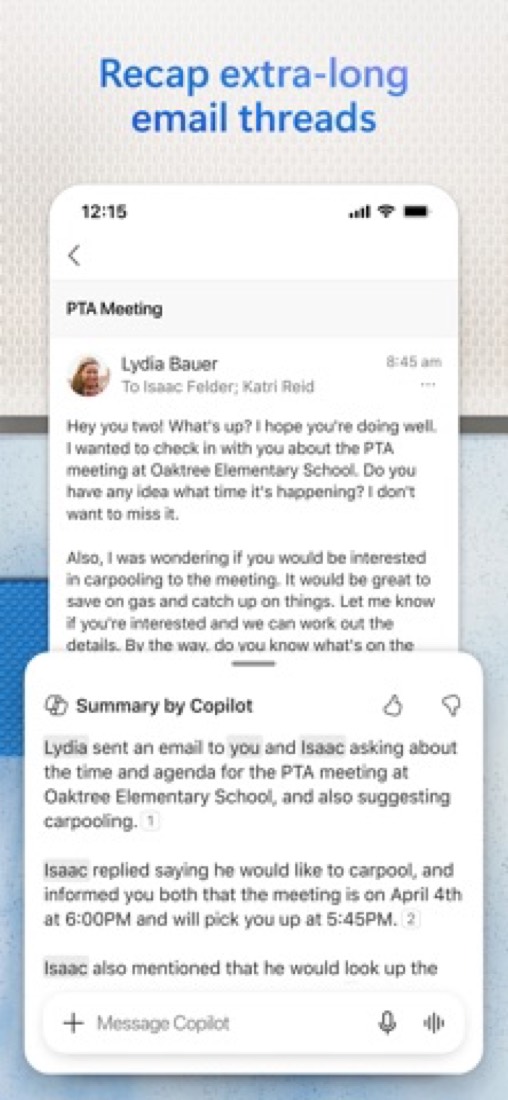
- Drafts a message from a prompt, adjusts tone, length and clarity, and summarizes long threads. Included with Microsoft 365 Personal and Family, with usage limits.
- Mailbox protection
- Outlook scans attachments and links for threats on Microsoft email addresses. Paid plans add mailbox encryption, checks on suspicious links and removal of dangerous attachments.
- Office files from the inbox
- Open, edit or send Word, Excel and PowerPoint documents from the inbox, and attach OneDrive files as links.
Microsoft Outlook tips most people miss
Renewal
Let your subscription lapse and new mail can bounce back to senders
When Microsoft 365 ends, your cloud storage drops back to the free 5 GB. Microsoft's help page says that once you're over either your cloud or your mailbox limit you can't send or receive email, and incoming mail is returned to the sender. Clear space before the plan runs out.
support.microsoft.comRenewal
Cancel within 30 days of a renewal charge to get it back, once
Microsoft's refund policy says you're entitled to a refund of your latest recurring charge if you cancel within 30 days of paying. That's one time per account, per product. In the US there are no part refunds on Basic, Personal or Family, so after that you just keep it until the period ends.
support.microsoft.comLeaving
Sign in once every two years or the free account can be closed
Microsoft's activity policy says you have to sign in to your Microsoft account at least once in any two-year stretch to keep it. An active subscription or an unspent gift card balance also keeps it open. Got an old Hotmail address you want to hang on to? Sign in now and then.
support.microsoft.comShortcut
Coming from Gmail? Switch Outlook's shortcuts to Gmail's
In Outlook.com and Outlook on the web, go to Settings → General → Accessibility and pick a shortcut set under Keyboard shortcuts: Outlook, Outlook.com, Gmail or Yahoo Mail. You can turn them off too. Shift+? shows the list for whichever set you chose.
support.microsoft.comPrivacy
Turn off personalised ads in Advertising Preferences
On a free inbox, Settings → General → Advertising Preferences controls how Microsoft picks your ads (Settings → Privacy Settings on the phone apps). In some regions Outlook can also read which brands email you to guess where you shop, if you opt in. You'll still see ads, just less targeted ones.
support.microsoft.comSetting
Still seeing ads after paying? Add the address that holds the plan
The ad-free perk belongs to the Microsoft account that bought Microsoft 365. Microsoft's help page says that if you're paying and still see ads, check that the Outlook.com address tied to the subscription is added to the Outlook app you're reading in, not just your other accounts.
support.microsoft.comEasy to miss
Copilot can work on a Gmail address in new Outlook for Windows
If your Microsoft 365 Personal, Family or Premium plan sits on a Microsoft account that uses your Gmail, Yahoo or iCloud address, new Outlook for Windows can link the two. Go to Accounts → Your accounts → Manage → Add Account. The option only shows when the addresses match.
support.microsoft.com
Read on Oct 17, 2026. Read from Microsoft's support pages on storage, subscription expiry, refunds, account activity, Outlook keyboard shortcuts, ads and linking accounts on 17 October 2026. Not tried out: these tips are what its own pages say.
Microsoft Outlook pricing
As of Oct 9, 2026, Microsoft Outlook has a free plan, and paid plans start at $1.99 per month, or $19.99 per year (Microsoft 365 Basic).
- Starts at
- $1.99 per month, or $19.99 per year (Microsoft 365 Basic)
- Free plan
- Free Outlook for 1 person: email and calendar on the web, desktop and mobile apps, 15 GB of mailbox storage, 5 GB of cloud storage and core spam filtering. The free inbox shows ads.
- Free trial
- One-month free trial of the Microsoft 365 business plans, credit card required; Personal and Family also offer a free trial
| Plan | Price | What you get |
|---|---|---|
| Outlook | $0 | For 1 person: email and calendar on web, desktop and mobile, 15 GB of mailbox storage, 5 GB of cloud storage and core spam filtering, with ads. |
| Microsoft 365 Basic | $1.99per month, or $19.99 per year | For 1 person: ad-free Outlook, 100 GB of mailbox storage, 100 GB of cloud storage and advanced Outlook security features. |
| Business Basic | $7.00per user / month, paid yearly ($5.40 without Teams) | Custom business email on Exchange for up to 300 users, with the web and mobile versions of Outlook only and 1 TB of cloud storage per user. |
| Microsoft 365 Personal | $9.99per month, or $99.99 per year | For 1 person on up to 5 devices at once: the Outlook desktop app with Copilot, 1 TB of cloud storage and Microsoft Defender. |
| Microsoft 365 Family | $12.99per month, or $129.99 per year | The Personal benefits for 1 to 6 people, who share 2 TB of cloud storage between them. AI features are for the subscription owner only. |
| Business Standard with Copilot | $23.50per user / month, paid yearly ($20.30 without Teams) | Adds desktop versions of Outlook and the other Office apps, plus Copilot grounded in work data. Business Premium with Copilot is $32.00. |
Read from microsoft.com on Oct 9, 2026. Prices change, so confirm with Microsoft Outlook before you buy.
Ways to pay less
- Annual discountAbout 16% lower with yearly billing
Paying yearly costs $19.99 for Microsoft 365 Basic, $99.99 for Personal and $129.99 for Family, against $1.99, $9.99 and $12.99 a month.
Stated on microsoft.com - EducationStudents save 50% on Microsoft 365 Personal
College and university students who verify their status get 50% off Microsoft 365 Personal, which includes the Outlook desktop app with Copilot. Eligibility is re-verified each year.
Stated on microsoft.com - NonprofitBusiness Basic free for eligible nonprofits
Microsoft lists Business Basic as a grant, free for up to 300 users. Nonprofit staff pricing is $3.50 per user / month for Business Standard and $5.50 for Business Premium, paid yearly.
Stated on microsoft.com
Microsoft Outlook refunds and cancellation
Excellent · checked Oct 18, 2026
Outlook's paid plans are Microsoft 365 subscriptions, so Microsoft's account-wide policy applies: 30 days to change your mind, and once per product it will hand back a renewal charge too if you cancel within 30 days of being billed. You cancel yourself in your account dashboard, and the Outlook.com mailbox stays for free afterwards. Business plans are tighter, which is what the watch list is for.
- Refund window
- 30 days
- How you cancel
- Yourself, in settings
- Getting your money back
Microsoft says a subscription bought directly from it may be refunded within 30 days of the initial purchase or before the first recurring billing date, whichever is sooner, by cancelling. It adds a right to a refund of the most recent recurring charge if you cancel within 30 days of that payment, once per Microsoft account per subscription product. Prorated refunds are offered only in a listed set of countries.
Stated on support.microsoft.com- How to cancel Microsoft Outlook
For a home subscription you sign in to the Microsoft account dashboard, open Services & subscriptions and select Cancel subscription; the page says eligibility for a refund is worked out during the cancellation. A business subscription is cancelled by an admin in the Microsoft 365 admin center. Purchases made through Google Play, the Apple App Store or a retailer are handled by that seller.
- Go to the Microsoft account dashboard and sign in with the account that bought the subscription
- Open Services & subscriptions and find the Microsoft 365 subscription
- Select Cancel subscription (the link may read Upgrade or Cancel)
- Read the Please review section at the top of the cancel page
- Select I don't want my subscription to go ahead, or I want to keep my benefits to stop
- What you keep afterwards
Microsoft says the storage allowance reverts to 5 GB of cloud storage, covering OneDrive and Outlook.com attachments, plus 15 GB of Outlook.com storage, and that everyone sharing a Family subscription is reduced too. Anyone over the free allowance cannot upload, edit or sync new files and cannot send or receive email in Outlook.com, and Microsoft says it may delete a OneDrive and all files in it after six months.
Stated on support.microsoft.com- Renewals
Subscriptions renew until recurring billing is turned off: the cancel article says a subscription that offers Turn on recurring billing instead of Cancel is already set to expire on the date shown. None of the pages read promises a reminder before a renewal. The refund policy adds that one recurring charge per product can be refunded if you cancel within 30 days of it.
Stated on support.microsoft.com
In your favour
- Thirty days to change your mind on a home plan, written down as policy rather than hinted at.
- Charged for a renewal you forgot about? Cancel within 30 days and that charge can come back, once per product.
- You cancel in your own account dashboard in a handful of clicks, with nobody to write to.
- The Outlook.com mailbox itself is free, so you keep your email and 15 GB after the subscription ends.
Watch out for
- Business subscriptions get seven days, not 30; after that you can only switch off the renewal and wait out the term.
- Go over the free storage after cancelling and Outlook.com stops sending and receiving mail until you are back under it.
- Microsoft says a OneDrive over the free allowance may be deleted, with everything in it, after six months.
- Bought it through the App Store, Google Play or a retailer? They decide the refund, not Microsoft.
Microsoft Outlook customer support
Excellent · checked Oct 18, 2026
You can get to a person. The contact page says live chat with a Microsoft specialist is among the options once you pick a product, and business admins can use the phone as well. Microsoft states its business hours too: technical support in English around the clock, billing support 9 to 5 on weekdays. Add one of the largest help libraries on the web and that is an A.
Ways to get help
Live chat
The contact page says that after you sign in and choose a product it shows self-help options first, and that more help is available if you need it, including live chat with a Microsoft specialist.
Stated on support.microsoft.comPhone
Microsoft's admin documentation describes phone support for Microsoft 365 for business, with a global list of numbers by country and a PIN-based verification step if you call from a number not registered to the organisation.
Stated on learn.microsoft.comContact form or ticket
An admin of a business subscription opens a service request in the Microsoft 365 admin center, chooses to be contacted by phone or email, and is shown the expected wait time in the Contact support pane. The contact page says this service is free.
Stated on learn.microsoft.comHelp centre
Outlook help and learning, part of Microsoft Support, with articles on the app, accounts and billing, readable by anyone without signing in, including the pages on cancelling and refunds.
Stated on support.microsoft.comCommunity or forum
Microsoft Q&A, the company's public question and answer site for its products, which anyone can read and post to. The contact page also links community forums.
Stated on learn.microsoft.com
- When people answer
For Microsoft 365 for business, Microsoft says technical support is provided in English 24 hours a day, 7 days a week, and in some cases in local languages, while billing support in most countries is provided in English from 9 AM to 5 PM, Monday through Friday. No hours are stated for home subscriptions.
Stated on learn.microsoft.com- How fast it says it replies
Its pages do not say.
- What depends on your plan
The contact page splits home accounts from business ones: home users get support in the browser, while business support runs through the Microsoft 365 admin center and is meant for admins, with a self-help route for other users. Business Assist, advice from small-business specialists, is a separate subscription you sign up for.
Stated on support.microsoft.com
In your favour
- A real person is reachable by chat, and business customers can use the phone too.
- Microsoft states its business hours in writing: technical help around the clock, billing on weekdays.
- The help centre is huge, free to read without an account, and covers cancelling and refunds properly.
- Opening a service request from the business admin centre costs nothing extra.
Watch out for
- No hours and no reply time are stated for home plans like Personal and Family.
- Business support goes through the admin centre, so an ordinary user of a work account is sent to self-help.
- You have to sign in before the contact page will show you which options you get.
- Business Assist is something you subscribe to, not part of the support your plan already includes.
What these two grades rest on. Read on 18 October 2026: Microsoft's pages on cancelling a Microsoft 365 subscription and its subscription refund policy, its documentation on cancelling a business subscription and on getting support, its contact page, the Outlook help centre and Microsoft Q&A. Outlook's paid plans are Microsoft 365 subscriptions, so this is Microsoft's account-wide policy. Nobody here cancelled a plan or contacted its support. They are graded apart from the five that make the GPA. How we grade refunds and support.
What people say about Microsoft Outlook
4.8
out of 5 for the iPhone and iPad app
- 5 stars84%
- 4 stars12%
- 3 stars2%
- 2 stars<1%
- 1 star<1%
9,298,244 ratings on the App Store in the United States, read Oct 7, 2026. It rates the app, not everything the product does. See the listing
Often praised
- Reviewers who have used the iPhone and iPad app over several years say it has steadily improved and lets them do more from the phone than it used to. App Store reviews
- Commenters say email and calendar together on Exchange are hard to replace at work, and that other mail apps fall short for them without that support. Hacker News 1, 2, 3
Often criticised
- Reviewers say the phone app leaves out things the desktop and web versions do, such as setting up rules, making subfolders or colour-coding calendar events. App Store reviews
- Several commenters say desktop Outlook has been neglected in recent years, and two of them single out the Mac version. Hacker News 1, 2, 3
- Spam filtering draws complaints, from junk that keeps reaching the inbox to Microsoft's own messages being marked as spam. App Store reviews · Hacker News 1, 2
Based on 10 App Store reviews of the iPhone and iPad app, seven of them more than three years old, and about 20 Hacker News comments from October 2025 to September 2026, read Oct 7, 2026. These are themes summarised in our words, not our own verdict. Follow the links to read what was said.
Works with
Jobs at Microsoft
Any open roles at Microsoft are on its own careers page. We can’t read a count from there, so have a look.
Applications go to Microsoft, not to us.
Microsoft Outlook alternatives
- Microsoft Outlook vs Gmail
Free plan · from $7/mo
- Microsoft Outlook vs Apple Mail
Free plan · from $0.99/mo
- Microsoft Outlook vs eM Client
Free plan · from $49.95/yr
- Microsoft Outlook vs Spark Mail
Free plan · from $8.25/mo




Common questions
Does Microsoft Outlook have a Linux app?
No Linux app was listed when its pages were read on Oct 9, 2026. Microsoft Outlook is listed for Web, Windows, macOS, iOS and Android.
Is Microsoft Outlook open source?
Microsoft Outlook is not described as open source on its own site, as read on Oct 9, 2026.
Sources for this page
The prices, plans, platforms and features above were read from these pages on Oct 9, 2026. What people say is linked where it appears.
- microsoft.com/en-us/microsoft-365/outlook/email-and-calendar-software-microsoft-outlook
- microsoft.com/en-us/microsoft-365/business/compare-all-microsoft-365-business-products
- microsoft.com/en-us/microsoft-365/college-student-pricing
- microsoft.com/en-us/microsoft-365/business/nonprofit-plans-and-pricing
- support.microsoft.com/en-us/onedrive/microsoft-storage-quotas