
Extra review (2026): is it any good?
Free AI email app that sorts Gmail and Outlook around your day
Extra report card
Very good · out of 4.0 · graded Oct 10, 2026
Best for a free AI inbox for your personal email
Extra is a free AI email app that sorts your Gmail or Outlook around your day: a Today tab lists what needs doing, receipts and packages get filed, and an assistant drafts replies. It costs nothing right now, but the FAQ says paid features may come later. There's no Android or Windows app, it takes Gmail and Outlook only, it needs a recent iOS or macOS, and it's offered in 18 countries.
Who Extra is for
- Fits if you're on iPhone and Mac and want your personal Gmail or Outlook sorted into categories
- Works for people who want AI help with email and pay nothing for it today
Who Extra is not for
- Skip it if you have an Android phone or a Windows PC, as there's no app for either
- Not for you if your mail isn't with Gmail or Outlook, as those are the only accounts it takes
- Watch out: it's free today, but the FAQ says paid features for power users may be introduced later
- Tight if your devices are older, as it needs iOS 18 or macOS 15.6 or later
- Watch out: it's offered in 18 listed countries only
Why Extra gets a 3.0
Five grades, each with its reason. The GPA is their average: an A is 4 points, an F is none.
- AValue for moneyIt's free, and no paid plan is listed. That includes the AI: the Today tab, Voice Mode and Extra Assist all cost nothing today. The FAQ does say paid features for power users may be introduced in the future.
- AFree plan and trialThe whole app is free on iPhone, iPad, Mac and the web, with multiple Gmail and Outlook accounts. Nothing is held back for a paid tier, because there isn't one yet.
- CFeaturesIt does the personal-inbox job: a Today tab split into what needs action and what's good to know, categories for receipts, travel and packages, bulk unsubscribe, voice replies and an assistant that answers questions from your mail. But it takes Gmail and Outlook accounts only.
- BEase of use4.79 from about 380 App Store ratings, too few ratings for an A. Reply drafts and action items are ready before you open the inbox, and you can speak a reply and let it write the email in your tone.
- CPlatforms and integrationsApple and a browser: iPhone, iPad, Mac and the web, with no Android app and no Windows app. The apps need iOS 18 or macOS 15.6 or later, it's offered in 18 listed countries, and Gmail and Outlook are the only accounts it connects to.
What these grades rest on. Graded from this listing, whose facts were read from Extra's own pages on 9 October 2026, and its App Store rating. Also tested with a demo account on 2026-04-08. How we review and grade.
Make Extra? Put this grade on your site

Paste this where you want the badge. It links here and follows the grade if it changes. About badges
<a href="https://toolgpa.com/tools/extra#review"><img src="https://toolgpa.com/badge/extra.svg" alt="Extra: 3.0 GPA on ToolGPA" width="196" height="56"></a>Where Extra stands among email apps
Extra's GPA of 3.0 is higher than 100 of the 122 other email apps we grade, and level with 15.
It stands best on free plan and trial (A, above 97 of 122) and worst on features (C, above 1).
Extra has no paid plan.
On features, ease of use and platforms it scores 2.3 out of 4. Nothing scores higher for less, though at least one tool matches that score at a lower price.
Each grade against the category
Every bar is all 123 email apps we grade, cut by the letter each got. Extra’s own letter is outlined.
- AValue for moneyAbove 88 of 122, level with 34
- AFree plan and trialAbove 97 of 122, level with 25
- CFeaturesAbove 1 of 122, level with 77
- BEase of useAbove 94 of 122, level with 23
- CPlatforms and integrationsAbove 10 of 122, level with 46
Price against what you get
Each dot is one of 107 email apps. Further left costs less, and higher up scores better on features, ease of use and platforms. Point at a dot to see which tool it is.
Features, ease of use and platforms, averaged
What paid plans start at, a month (each step along is roughly double) →
- The best score at each price
- Has a free plan
- No free plan
Keep Extra, or make your own?
Keep it
To replace Extra you would be making an email client: sending, receiving, threading and searching years of mail. That is not a weekend's work, with an AI app builder or without one.
It is one of the better ones too: its GPA of 3.0 is higher than 100 of the 122 other email apps we grade.
What you could not
- An email client: sending, receiving, threading and searching years of mail.
- Filters that read every message as it arrives.
- An AI model, which you rent by the request and build your app around.
- A search API and an AI model, both rented, with your app around them.
- Apps for macOS and iOS that stay in step with each other.
What this rests on. Extra’s listing: what it does, where it runs, what it plugs into and what it costs. It is a judgement about the kind of software this is. We have not built a replacement for it, and making your own means looking after it too. How we decide, and every tool’s verdict.
What is Extra?
Extra is an AI email app from BuildForever, Inc. that connects to Gmail and Outlook accounts and reorganizes the inbox around daily life. A Today tab summarizes what needs action, mail is sorted automatically into categories such as receipts, packages and travel, and an assistant drafts replies and answers questions about what is in the inbox. It runs on iPhone, iPad, Mac and the web and is currently free.
Worth knowing
- There is no Android app: Extra runs on iPhone, iPad, Mac and in a desktop browser.
- It works with Gmail and Outlook accounts only.
- Extra is free today, but its FAQ says paid features for power users may be introduced in the future.
- It is offered in 18 listed countries, and the apps need iOS or iPadOS 18 or later, or macOS 15.6 or later.
Key features
- Today tab
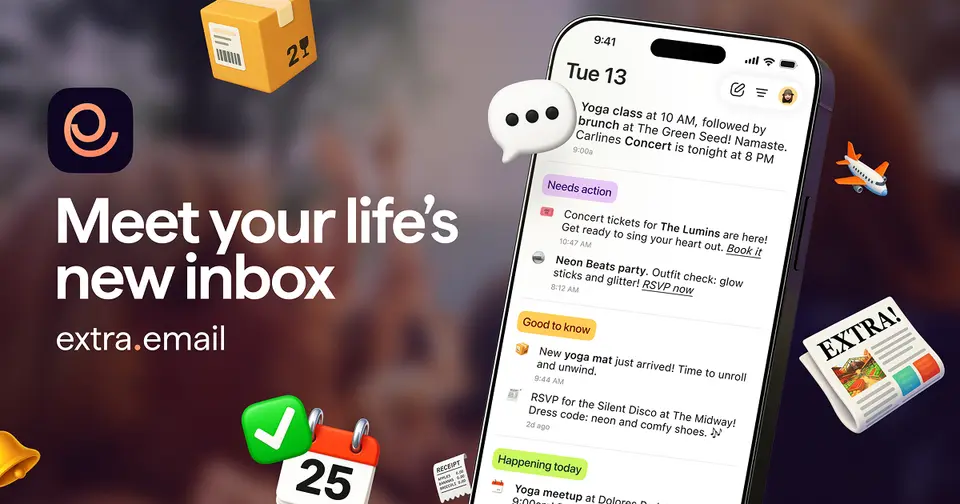
- A daily briefing that splits the day into Needs Action, Happening Today, Good to Know and More to Browse, with reply drafts and action items prepared before you open the inbox.
- Automatic categories
- Mail is sorted into groups such as News, Shop, Receipts, Events, Travel, Notifications, Personal and Packages, and you can create custom categories of your own.
- Bulk unsubscribe
- Shows who emails you most and how much of it you read, then unsubscribes using the sender's own unsubscribe method and adds a mailbox filter for that sender's future messages.
- Voice Mode
- Speak a reply and Extra drafts it in your tone of voice, which it learns from the emails you send. The draft can be reviewed and edited before it goes out.
- Extra Assist
- An assistant that answers questions from your inbox, such as finding a confirmation number or summarizing a month of ride spending, and helps draft replies.
- Natural-language search
- Search by topic or context, for example a flight confirmation or a restaurant recommendation from last month, without needing the exact keywords.
Extra pricing
As of Oct 9, 2026, Extra is free to use.
- Starts at
- Free
- Free plan
- Extra is free on iPhone, iPad, Mac and the web, and no paid plan is listed. The FAQ says paid features for power users may be introduced later.
- Free trial
- None listed
| Plan | Price | What you get |
|---|---|---|
| Free | $0 | The whole app at no charge: Today tab, automatic categories, bulk unsubscribe, Voice Mode, Extra Assist and multiple Gmail and Outlook accounts. |
Read from extra.email on Oct 9, 2026. Prices change, so confirm with Extra before you buy.
How people rate the Extra app
4.8
out of 5 for the iPhone and iPad app
- 5 stars88%
- 4 stars8%
- 3 stars2%
- 2 stars2%
- 1 star1%
384 ratings on the App Store in the United States, read Oct 9, 2026. It rates the app, not everything the product does. See the listing
Works with
Jobs at BuildForever
Any open roles at BuildForever are on its own careers page. We can’t read a count from there, so have a look.
Applications go to BuildForever, not to us.
Extra alternatives
- Extra vs Shortwave
Free plan · from $18/mo
- Extra vs Spark Mail
Free plan · from $8.25/mo
- Extra vs Edison Mail
Free plan · from $14.99/mo
- Extra vs Gmail
Free plan · from $7/mo
- Extra vs Superhuman Mail
From $25/mo





Common questions
Does Extra have an Android app?
No Android app was listed when its pages were read on Oct 9, 2026. Extra is listed for iOS, macOS and Web.
Does Extra have a Windows app?
No Windows app was listed when its pages were read on Oct 9, 2026. Extra is listed for iOS, macOS and Web.
Is Extra open source?
Extra is not described as open source on its own site, as read on Oct 9, 2026.
Sources for this page
The prices, plans, platforms and features above were read from these pages on Oct 9, 2026. What people say is linked where it appears.