School Assistant
Free school planner for iPhone, iPad, Mac and Apple Watch
School Assistant report card
Very good · out of 4.0 · graded Oct 9, 2026
Best for a free school planner on Apple devices
School Assistant is a school planner that's free, and we mean properly free: no subscription, no premium features, no ads, just a tip jar if you feel generous. It tracks assignments and tests, knows your class schedule even when it swaps between A and B weeks, and tells your Apple Watch what's next. It's Apple only, though, and there's no calendar view inside the app.
Who School Assistant is for
- Great if you're a student on Apple devices and don't want to pay for a planner
- Handy when your timetable alternates between A and B weeks
- A treat if you wear an Apple Watch, which shows the current class and how long is left
Who School Assistant is not for
- Skip it if you use Android or Windows, as it's Apple only and there's no web version
- Not for you if you want a calendar view in the app, because schoolwork shows in Apple Calendar instead
- Too light for anyone after a general planner, since it's built around classes and homework
Why School Assistant gets a 3.4
Five grades, each with its reason. The GPA is their average: an A is 4 points, an F is none.
- AValue for moneyIt costs nothing. The developer calls it 100% free, with no subscriptions, paywalls, premium features or ads. The only in-app purchases are tips from $0.99 to $4.99, and they unlock nothing extra.
- AFree plan and trialThe whole app is the free plan: every feature on iPhone, iPad, Mac, Apple Watch and Apple Vision Pro, iCloud sync included. There's nothing to upgrade to, so nothing is held back.
- BFeaturesAssignments and tests with due dates, subtasks and reminders, a class schedule that can rotate through up to ten weeks, and a page per class for the teacher, room and links. Solid for school. But there's no calendar view in the app. You see schoolwork in Apple Calendar instead.
- AEase of use4.8 from about 4,700 App Store ratings. Each class gets an icon and a colour that carry over to its homework, and on newer devices you can paste in text and have it turned into entries.
- CPlatforms and integrationsiPhone, iPad, Mac, Apple Watch and Apple Vision Pro, with iCloud sync, Siri, Shortcuts and Apple Calendar. All Apple, though. No Android, Windows or web version is listed.
What these grades rest on. Graded from this listing, whose facts were read from Sun Apps's own pages on 9 October 2026, and its App Store rating. Not based on using the product, and shorter than our full reviews. How we review and grade.
Make School Assistant? Put this grade on your site
Paste this where you want the badge. It links here and follows the grade if it changes. About badges
<a href="https://toolgpa.com/tools/school-assistant#review"><img src="https://toolgpa.com/badge/school-assistant.svg" alt="School Assistant: 3.4 GPA on ToolGPA" width="196" height="56"></a>What is School Assistant?
School Assistant is a school planner for Apple devices from Sun Apps, a one-person developer. Students track assignments and tests, keep a class schedule that can alternate between weeks, and store details for each class, with an Apple Watch app, widgets and iCloud sync. The developer describes it as 100% free, with no subscriptions, paywalls, premium features or ads. The only in-app purchases are optional tips.
School Assistant is free to use. See every plan
Good for
- Students on Apple devices who want a planner at no cost
- Class schedules that alternate between A and B weeks
- Checking assignments and the next class from an Apple Watch
Worth knowing
- Apple devices only: iPhone, iPad, Mac, Apple Watch and Apple Vision Pro. No Android, Windows or web version is listed.
- There is no calendar view inside the app. The developer chose to show schoolwork in Apple Calendar through Sync to Calendar.
- The Siri AI integration is limited to supported devices, and Smart Create depends on Apple Intelligence.
- Sun Apps is run by a single developer, according to its About page.
Key features
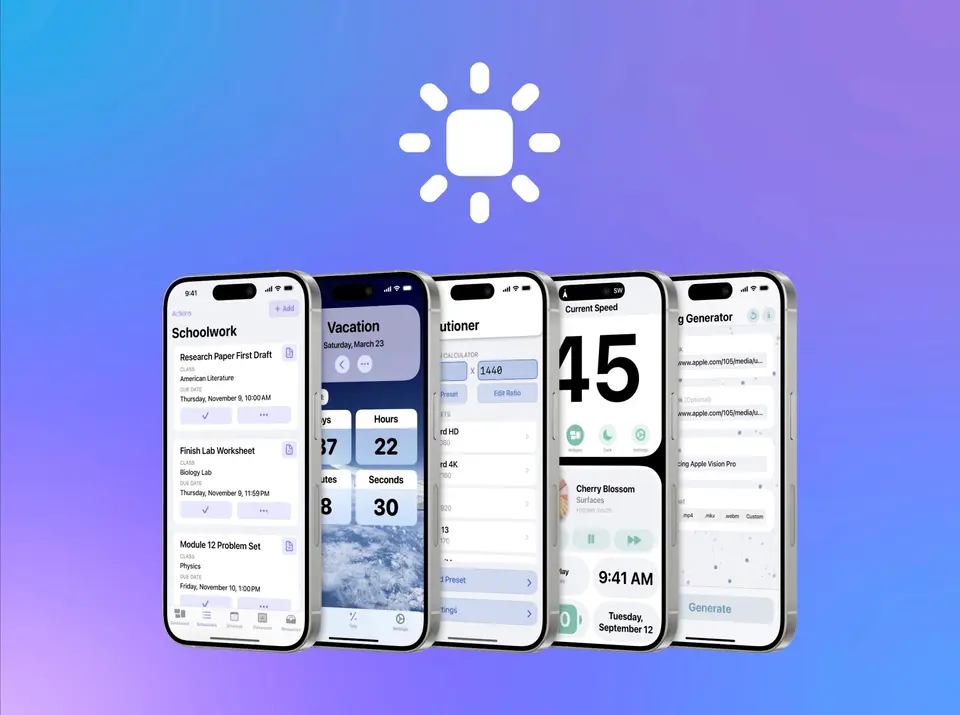
- Schoolwork
- Assignments and tests carry a class, due date, links, notes, subtasks and reminders, can be sorted several ways, and move to an archive when completed.
- Schedule
- Classes are listed for each day with teacher and room, or a link for online classes. The schedule can switch automatically between two weeks or manually between up to ten.
- Classes
- Each class has its own page for the teacher's name and email, a class code, links and notes, with an icon and a color that carry over to schoolwork.
- Apple Watch app and widgets
- The Watch app shows schoolwork, the schedule for any day, and the current and next class with time left. Home Screen widgets show assignment counts and the current and next class.
- Siri AI, Shortcuts and Smart Create
- Version 5 lets Siri AI on supported devices answer questions about schoolwork and create it, adds Shortcuts actions, and turns pasted text into entries with Apple Intelligence.
- iCloud sync and Sync to Calendar
- Data syncs automatically across devices over iCloud, and schoolwork can be shown in Apple Calendar through the Sync to Calendar feature.
School Assistant pricing
- Starts at
- Free
- Free plan
- The whole app is free: the listing says there are no subscriptions, paywalls, premium features or ads. A tip jar offers optional in-app tips from $0.99 to $4.99.
- Free trial
- None listed
| Plan | Price | What you get |
|---|---|---|
| Free | $0 | Every feature on iPhone, iPad, Mac, Apple Watch and Apple Vision Pro. Tips of $0.99 to $4.99 are optional and unlock nothing extra. |
Read from apps.apple.com on Oct 9, 2026. Prices change, so confirm with School Assistant before you buy.
How people rate the School Assistant app
4.8
out of 5 for the iPhone and iPad app
4,713 ratings on the App Store in the United States, read Oct 9, 2026. It rates the app, not everything the product does. See the listing
Works with
School Assistant alternatives
- School Assistant vs Power Planner
Free plan · from $4.99 one-time
- School Assistant vs MyStudyLife
Free plan · from $6.99/mo
- School Assistant vs Smart Timetable
Free plan · from $0.99
- School Assistant vs Shovel
Free trial · from $39/yr


Common questions
Is School Assistant free?
Yes. School Assistant is free to use. The whole app is free: the listing says there are no subscriptions, paywalls, premium features or ads. A tip jar offers optional in-app tips from $0.99 to $4.99.
How much does School Assistant cost?
School Assistant lists one plan. Free: $0. Prices were read from apps.apple.com on Oct 9, 2026.
What platforms does School Assistant work on?
School Assistant is available on iOS and macOS.
How is School Assistant rated?
School Assistant's iPhone and iPad app averages 4.8 out of 5 from 4,713 ratings on the App Store in the United States, as read on Oct 9, 2026. That is the store's rating of the app, not a score from us.
Does School Assistant have an Android app?
No Android app was listed when its pages were read on Oct 9, 2026. School Assistant is listed for iOS and macOS.
Does School Assistant have a Windows app?
No Windows app was listed when its pages were read on Oct 9, 2026. School Assistant is listed for iOS and macOS.
Is School Assistant open source?
School Assistant is not described as open source on its own site, as read on Oct 9, 2026.
What does School Assistant integrate with?
School Assistant's listing names Apple Calendar, iCloud, Siri and Shortcuts. A listing names up to eight integrations, so it may connect to more.
Who makes School Assistant?
School Assistant is made by Sun Apps, LLC.
What are the alternatives to School Assistant?
The closest alternatives to School Assistant in our directory are Power Planner, MyStudyLife, Smart Timetable, Saturn and Shovel. Each one has a side-by-side comparison with School Assistant.
Sources for this page
The prices, plans, platforms and features above were read from these pages on Oct 9, 2026. What people say is linked where it appears.