
WeekToDo
Free, open-source weekly planner that keeps tasks on your device
What is WeekToDo?
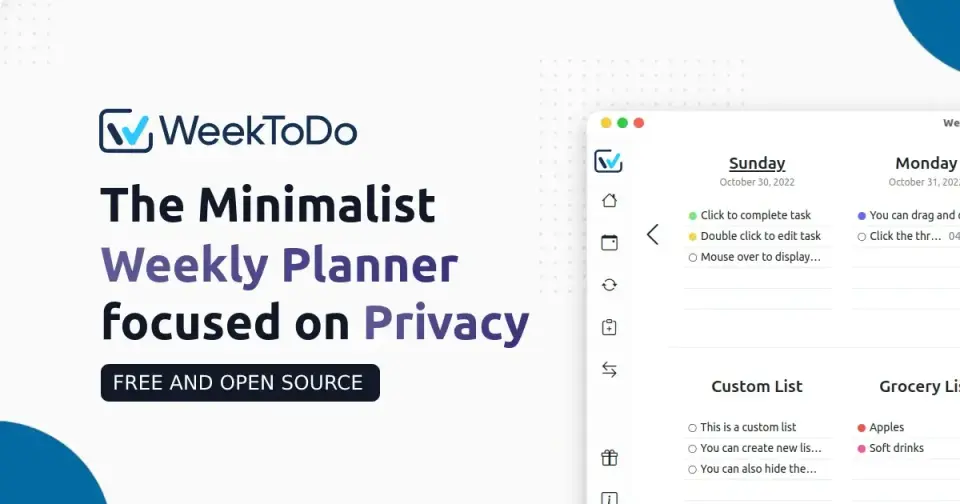
WeekToDo is a free, open-source weekly planner that puts a week calendar and to-do lists on one screen. Tasks sit under the day they are planned for and can carry colors, times, sub-tasks, reminders and repeat rules, with custom lists for anything not tied to a day. It runs as a desktop app on Windows, macOS and Linux or in a web browser, and saves all data locally on the device.
WeekToDo is free to use. See every plan
Good for
- People who want a simple week-at-a-glance task planner
- Privacy-minded users who want their tasks kept on their own device
- Linux, Windows and macOS users looking for a free desktop planner
Worth knowing
- There is no sync between devices, no cloud copy of the data and no mobile app. Sync and a mobile version are on the project's roadmap.
- The latest release on GitHub, version 2.2.0, is dated February 2024.
- The changelog for version 2.0.0 lists a telemetry system among its additions, while the privacy statement is dated December 2020.
- The download page says the app is not code-signed, so the first launch needs a workaround.
Key features
- Week calendar and task list in one
- The main screen shows the week as columns of days with each day's tasks under it, so planning and the to-do list share a single interface.
- Custom to-do lists
- Separate lists hold tasks that are not tied to a day, such as projects, and a setting controls how many list columns are shown.
- Sub-tasks and Markdown
- A task can be broken into sub-tasks, and its description supports Markdown, with links opening in the web browser.
- Recurring tasks and reminders
- Tasks can repeat, including on chosen weekdays, and a time and an alarm can be set on a task so it raises a notification.
- Drag and drop and task colors
- Tasks are moved between days and lists by dragging, and each one can be given a color from the task color picker.
- Local storage
- The privacy statement says all data is saved locally on the device and never sent to the project's server, and no personal data is collected.
WeekToDo pricing
- Starts at
- Free
- Free plan
- The whole app is free and open source under the GNU GPL 3. The download page asks for an optional pay-what-you-can donation, which can be declined.
- Free trial
- None listed
| Plan | Price | What you get |
|---|---|---|
| Free | $0 | Every feature on Windows, macOS, Linux and the web. Donations and sponsorships are optional and unlock nothing extra. |
Read from weektodo.me on Oct 5, 2026. Prices change, so confirm with WeekToDo before you buy.
WeekToDo alternatives
- WeekToDo vs Tweek
Free plan · from $4.17/mo
- WeekToDo vs Weekrise
Free plan · from $4/mo
- WeekToDo vs TeuxDeux
Free plan · from $3/mo
- WeekToDo vs Week Plan
Free plan · from $8.67/mo





Common questions
Is WeekToDo free?
Yes. WeekToDo is free to use. The whole app is free and open source under the GNU GPL 3. The download page asks for an optional pay-what-you-can donation, which can be declined.
How much does WeekToDo cost?
WeekToDo lists one plan. Free: $0. Prices were read from weektodo.me on Oct 5, 2026.
What platforms does WeekToDo work on?
WeekToDo is available on Web, Windows, macOS and Linux.
Does WeekToDo have an Android app?
No Android app was listed when its pages were read on Oct 5, 2026. WeekToDo is listed for Web, Windows, macOS and Linux.
Does WeekToDo have an iPhone app?
No iPhone app was listed when its pages were read on Oct 5, 2026. WeekToDo is listed for Web, Windows, macOS and Linux.
Is WeekToDo open source?
Yes. WeekToDo is open source, according to its own site.
Who makes WeekToDo?
WeekToDo is made by Manuel Ernesto Garcia.
What are the alternatives to WeekToDo?
The closest alternatives to WeekToDo in our directory are Tweek, Weekrise, TeuxDeux, Super Productivity and Week Plan. Each one has a side-by-side comparison with WeekToDo.
Sources for this page
The prices, plans, platforms and features above were read from these pages on Oct 5, 2026.