
Morgen
Calendar and daily planner with AI-suggested time blocking
What is Morgen?
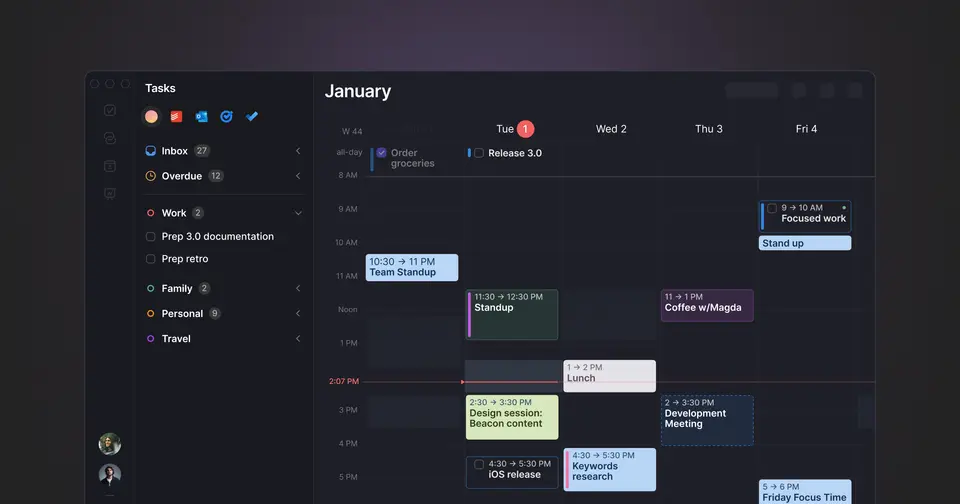
Morgen is a calendar and daily planner that brings several calendars and task tools into one app. Tasks from Notion, Todoist, ClickUp, Linear and other sources are time-blocked by dragging them into the calendar or by approving a plan proposed by its AI Planner. It also includes booking links, calendar automations and a REST API, and runs on desktop, web and mobile.
Morgen is a paid product with a free trial, starting at $15 per month, billed yearly. See every plan
Good for
- People managing calendars across Google, Outlook and Apple accounts
- Planning tasks from Notion, Todoist, ClickUp or Linear on a calendar
- Linux users who want a desktop calendar and planner
Worth knowing
- There is no free plan. When the 14-day trial ends, the account is inaccessible until you subscribe.
- Monthly billing is $30 per month for Pro, twice the yearly rate of $15 per month.
- Team plans require a minimum of 2 seats.
- The iOS and Android apps require an account that was first configured on desktop.
Key features
- AI Planner
- Proposes a time-blocked plan based on task priority, your capacity and how you like to work, and flags tasks at risk of being late. Plans are only scheduled once you approve them.
- Frames
- Blocks of time set aside for a type of task, each with its own filters. Together they template your ideal week and steer the AI Planner's suggestions.
- Tasks from other tools
- Drag tasks from Notion, Todoist, ClickUp, Linear, Obsidian, Google Tasks or Microsoft To Do into the calendar, or use the built-in task list.
- Unified calendars
- Combines Google, Outlook, Apple, Fastmail and other CalDAV calendars in one view, with calendar sets for switching between groups of them.
- Scheduling links and booking page
- Booking links let other people choose a meeting time, with your availability checked in real time.
- Calendar automations
- Syncs events between calendars to block time, and adds travel time and buffers around meetings automatically.
Morgen pricing
- Starts at
- $15 per month, billed yearly
- Free plan
- None
- Free trial
- 14-day free trial with full access, no credit card required. Refunds are available in the first 30 days.
| Plan | Price | What you get |
|---|---|---|
| Pro | $15per month, billed yearly | For individuals: AI Planner time blocking, unlimited calendar and task integrations, automations and booking links. $30 per month when billed monthly. |
| Team | $10per seat / month, billed yearly | For teams, with a minimum of 2 seats. $25 per seat / month when billed monthly. |
Read from morgen.so on Oct 4, 2026. Prices change, so confirm with Morgen before you buy.
Ways to pay less
- Annual discountSave 50% with yearly billing
Pro is $15 per month billed yearly instead of $30 billed monthly. Team is $10 per seat billed yearly instead of $25, which Morgen lists as a 60% saving.
Stated on morgen.so - Education25% off for students and educators
Students, academics and people working in education qualify for 25% off Morgen Pro. Start a free trial, then email support to request the discount.
Stated on morgen.so - Nonprofit25% off for non-profits
Non-profits qualify for 25% off Morgen Pro. Start a free trial, then email support to request the discount.
Stated on morgen.so - Other savings15% off for a year when switching
People moving to Morgen from Motion, Reclaim, Fantastical or Sunsama can request 15% off for one year.
Stated on morgen.so
Works with
Morgen alternatives
- Morgen vs Akiflow
Free trial · from $19/mo
- Morgen vs Sunsama
Free trial · from $17/mo
- Morgen vs Motion
Free trial · from $19/mo
- Morgen vs Reclaim.ai
Free plan · from $10/mo
- Morgen vs Fantastical
Free plan · from $4.75/mo





Featured in
Common questions
Is Morgen free?
No, Morgen is a paid product, but you can try it first. 14-day free trial with full access, no credit card required. Refunds are available in the first 30 days.
How much does Morgen cost?
Morgen lists 2 plans. Pro: $15 per month, billed yearly. Team: $10 per seat / month, billed yearly. Prices were read from morgen.so on Oct 4, 2026.
What platforms does Morgen work on?
Morgen is available on Web, macOS, Windows, Linux, iOS and Android.
Does Morgen offer any discounts?
Morgen publicly lists the following: Save 50% with yearly billing; 25% off for students and educators; 25% off for non-profits; 15% off for a year when switching.
Is Morgen open source?
Morgen is not described as open source on its own site, as read on Oct 4, 2026.
Does Morgen have an API?
Yes. Morgen offers a public API, according to its own site.
What does Morgen integrate with?
Morgen's listing names Google Calendar, Outlook Calendar, Apple Calendar, Fastmail, Notion, Todoist, ClickUp and Linear. A listing names up to eight integrations, so it may connect to more.
Does Morgen have a student discount?
25% off for students and educators. Students, academics and people working in education qualify for 25% off Morgen Pro. Start a free trial, then email support to request the discount.
Who makes Morgen?
Morgen is made by Morgen AG.
What are the alternatives to Morgen?
The closest alternatives to Morgen in our directory are Akiflow, Sunsama, Motion, Reclaim.ai and Fantastical. Each one has a side-by-side comparison with Morgen.
Sources for this page
The prices, plans, platforms and features above were read from these pages on Oct 4, 2026.