
Time Champ review (2026): is it worth $3.90 a month per user, billed yearly?
Employee monitoring and automatic timesheets with activity tracking
Black Friday: is there a Time Champ sale?
Time Champ report card
Fair · out of 4.0 · graded Nov 12, 2026
Best for attendance and activity tracking on a low seat price
Time Champ tracks attendance, apps and websites from $3.90 a user a month. A training charge, paid add-ons and the dearer tiers for screenshots and live video add to that figure.
Who Time Champ is for
- Fits if you want attendance and app tracking at the lowest seat price
- Works for field teams that need GPS check-ins
Who Time Champ is not for
- Watch out: a $4 per licence implementation charge, $62.50 minimum, is added on top
- Tight if you want screenshots, which start at Professional at $6.90
- Pricey if you add screen recording from $3 a user, or keystroke data and DLP, as they are separate
- Watch out: live video, alerts and phone support need Enterprise, and supported desktop systems aren't stated
Why Time Champ gets a 2.4
Five grades, each with its reason. The GPA is their average: an A is 4 points, an F is none.
- BValue for money$3.90 per user a month billed yearly, inside the cheaper quarter of time tracking, which ends at $4.50. A $4 per licence setup charge, $62.50 minimum, is added.
- CFree plan and trial7-day free trial with no card needed, and no free plan.
- CFeaturesAttendance, app and website tracking and projects, but screen recording, keystroke data and project management are add-ons.
- CEase of useNo store rating on record. Agents and productivity categories have to be set up.
- BPlatforms and integrationsWeb with 8 integrations and a GPS field app on record; the pages do not say which desktop or phone systems it supports.
What these grades rest on. Graded from this listing, whose facts were read from Time Champ's own pages on 12 November 2026. Not based on using the product, and shorter than our full reviews. How we review and grade.
Make Time Champ? Put this grade on your site
Paste this where you want the badge. It links here and follows the grade if it changes. About badges
<a href="https://toolgpa.com/tools/time-champ#review"><img src="https://toolgpa.com/badge/time-champ.svg" alt="Time Champ: 2.4 GPA on ToolGPA" width="196" height="56"></a>Where Time Champ stands among time tracking apps
Time Champ's GPA of 2.4 is higher than 25 of the 69 other time tracking apps we grade, and level with 16.
It stands best on value for money (B, above 47 of 69) and worst on features (C, above 0).
Its paid plans start at $3.90 a month for each person, against a middle price of $6.70 for the category: 7 of the 58 others that charge start lower.
On features, ease of use and platforms it scores 2.3 out of 4. 3 tools score higher and cost less.
Each grade against the category
Every bar is all 70 time tracking apps we grade, cut by the letter each got. Time Champ’s own letter is outlined.
- BValue for moneyAbove 47 of 69, level with 12
- CFree plan and trialAbove 10 of 69, level with 40
- CFeaturesAbove 0 of 69, level with 41
- CEase of useAbove 2 of 69, level with 47
- BPlatforms and integrationsAbove 18 of 69, level with 28
Price against what you get
Each dot is one of 64 time tracking apps. Further left costs less, and higher up scores better on features, ease of use and platforms. Point at a dot to see which tool it is.
Features, ease of use and platforms, averaged
What paid plans start at, a month (each step along is roughly double) →
- The best score at each price
- Has a free plan
- No free plan
Keep Time Champ, or make your own?
Keep it
The plain part of Time Champ you could make: time tracking and reports. What surrounds it you could not. The 3 things listed below take a company, not a weekend.
It costs $46.80 a year.
What you could make
- Time tracking and reports: an app builder makes these well.
What you could not
- Clocking in from a phone, checked against where and when.
- It is priced for each person, which means accounts and billing for a team.
- It plugs into other products, Jira, Slack and Asana among them.
What this rests on. Time Champ’s listing: what it does, where it runs, what it plugs into and what it costs. It is a judgement about the kind of software this is. We have not built a replacement for it, and making your own means looking after it too. How we decide, and every tool’s verdict.
What is Time Champ?
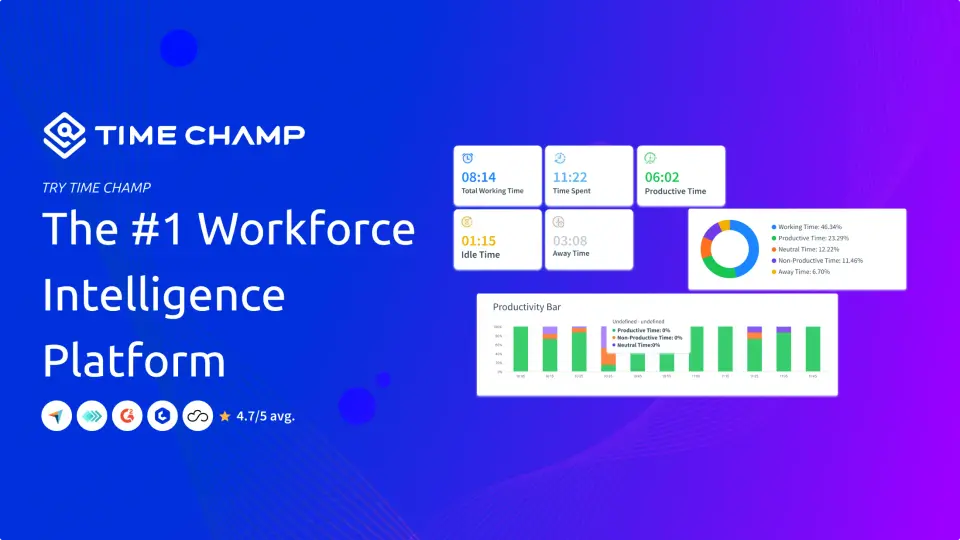
Time Champ is workforce software that logs work hours automatically and records app and website use, idle time and screenshots from a background agent on employee devices. It builds timesheets, attendance and productivity reports, and adds optional project management, GPS field tracking and data loss prevention as paid add-ons.
Worth knowing
- An implementation and training charge of $4 per user license, with a $62.50 minimum, is added on top of the plan price.
- Screen recording ($3 and up per user a month), project management, keystroke data and DLP are add-ons priced separately.
- Screenshots start at Professional; live video, real-time alerts and phone support need Enterprise.
- The pages read do not say which desktop operating systems or mobile platforms the agent and app support.
Key features
- Automatic time and attendance
- Logs hours as employees start work, with automatic login and logout, attendance and daily and monthly timesheet reports.
- App and website tracking
- Classifies applications and sites as productive, neutral or unproductive and reports idle time, with screenshots from the Professional plan.
- Project and task tracking
- A project management add-on provides Kanban boards, task assignment, timesheet submission and approval, and reports linked to tracked time.
- Field staff and GPS
- A field-tracking add-on adds live location, geofenced attendance, location history and expense management, using a mobile app.
- Data loss prevention
- A paid add-on blocks USB devices and sites, monitors file transfers and clipboard use, and sends alerts on policy violations.
- Integrations
- The vendor lists 78 integrations covering project tools, calendars, help desks and identity providers such as Jira, Slack and Azure Active Directory.
Time Champ pricing
As of Nov 12, 2026, Time Champ is a paid product with a free trial, starting at $3.90 per user / month, billed annually ($5.90 billed quarterly).
- Starts at
- $3.90 per user / month, billed annually ($5.90 billed quarterly)
- Free plan
- None
- Free trial
- 7-day free trial, no credit card required
| Plan | Price | What you get |
|---|---|---|
| Starter | $3.90per user / month, billed annually ($5.90 billed quarterly) | Automatic attendance, app and website tracking, productivity classifications, offline tracking, daily and monthly timesheet reports, 2 teams. |
| Professional | $6.90per user / month, billed annually ($10.90 billed quarterly) | Adds silent tracking, idle timeout, screenshots, a task timer, multiple shifts, intensity graphs, 1 week of detailed activity and 10 teams. |
| Enterprise | $13.90per user / month, billed annually ($22.90 billed quarterly) | Adds live video, real-time alerts and statuses, custom and suspicious-activity reports, Azure single sign-on, phone support and 50 teams. |
Read from timechamp.io on Nov 12, 2026. Prices change, so confirm with Time Champ before you buy.
Works with
Time Champ alternatives
- Time Champ vs Hubstaff
Free trial · from $4.99/mo
- Time Champ vs Time Doctor
Free trial · from $6.67/mo
- Time Champ vs ActivTrak
Free plan · from $10/mo
- Time Champ vs DeskTime
Free trial · from $6.42/mo
- Time Champ vs Teramind
Free trial




Common questions
Does Time Champ have an Android app?
No Android app was listed when its pages were read on Nov 12, 2026. Time Champ is listed for Web.
Does Time Champ have an iPhone app?
No iPhone app was listed when its pages were read on Nov 12, 2026. Time Champ is listed for Web.
Is Time Champ open source?
Time Champ is not described as open source on its own site, as read on Nov 12, 2026.
Sources for this page
The prices, plans, platforms and features above were read from these pages on Nov 12, 2026.