Clockk review (2026): is the free plan enough?
Automatic time tracking that groups your workday by project
Black Friday: is there a Clockk sale?
Clockk report card
Fair · out of 4.0 · graded Oct 10, 2026
Best for timesheets without a start and stop timer
Clockk notes what you work on through a desktop app and a browser extension, then the web app sorts it by project so you can lock it into a timesheet, with no timer to remember. There's no phone app, time can't be pinned to single tickets, the free plan shows today only, FreshBooks is the only outside tool connected so far, and budgets and team reports wait for Studio at $15 a user.
Who Clockk is for
- Fits if you bill several clients in one day and forget to start a timer
- Works for teams that want timesheets without screenshots
Who Clockk is not for
- Skip it if you track time away from your desk, because there's no mobile app and one is a long way off
- Not for you if time has to land on single tickets in a project tool, which Clockk won't do
- Tight if you stay on Express, as it only shows the current day and keeps limited data for three months
- Pricey if you need tags, project budgets, team reports or FreshBooks, as they start on Studio at $15 a user
- Watch out: FreshBooks is the only live integration, QuickBooks and Clio are announced only, and the trial length isn't stated
Why Clockk gets a 2.2
Five grades, each with its reason. The GPA is their average: an A is 4 points, an F is none.
- CValue for moneyInsight is $8 a user a month paid yearly, $12 monthly, which is mid-table for a time tracker. The bit agencies actually want, tags, project budgets, team reports and the FreshBooks link, waits on Studio at $15, and that is a long way above what this category charges.
- CFree plan and trialExpress is free and it's where you land if you don't upgrade after the trial, but it's drawn tight: the Activity view shows today only, and limited data is kept for three months. The trial itself needs no card.
- CFeaturesIt records the active window, the pages you visit, draft emails and calendar events, then groups them by project with some AI help, and locks the result into a timesheet. But time can't be pinned to a single ticket or task, which the FAQ confirms, and there's no timer for the times you'd want one.
- CEase of useNo store rating on record. You install a desktop app and a browser extension, then connect Gmail, Outlook or Exchange and your calendars, and you still assign each day's work to projects before it counts.
- BPlatforms and integrationsWeb, Mac, Windows and a browser extension, with an API and hooks into Gmail, Outlook and Google Calendar. No phone app, and the FAQ says one is a long way off. FreshBooks is the only invoicing tool connected so far.
What these grades rest on. Graded from this listing, whose facts were read from Clockk's own pages on 6 October 2026. Also tested with a demo account on 2026-06-10. How we review and grade.
Make Clockk? Put this grade on your site

Paste this where you want the badge. It links here and follows the grade if it changes. About badges
<a href="https://toolgpa.com/tools/clockk#review"><img src="https://toolgpa.com/badge/clockk.svg" alt="Clockk: 2.2 GPA on ToolGPA" width="196" height="56"></a>Where Clockk stands among time tracking apps
Clockk's GPA of 2.2 is higher than 22 of the 98 other time tracking apps we grade, and level with 18.
It stands best on platforms and integrations (B, above 26 of 98) and worst on features (C, above 0).
Its paid plans start at $8 a month for each person, against a middle price of $6.99 for the category: 44 of the 80 others that charge start lower.
On features, ease of use and platforms it scores 2.3 out of 4. 26 tools score higher and cost less.
Each grade against the category
Every bar is all 99 time tracking apps we grade, cut by the letter each got. Clockk’s own letter is outlined.
- CValue for moneyAbove 16 of 98, level with 50
- CFree plan and trialAbove 15 of 98, level with 58
- CFeaturesAbove 0 of 98, level with 64
- CEase of useAbove 3 of 98, level with 75
- BPlatforms and integrationsAbove 26 of 98, level with 45
Price against what you get
Each dot is one of 87 time tracking apps. Further left costs less, and higher up scores better on features, ease of use and platforms. Point at a dot to see which tool it is.
Features, ease of use and platforms, averaged
What paid plans start at, a month (each step along is roughly double) →
- The best score at each price
- Has a free plan
- No free plan
Keep Clockk, or make your own?
You could make this
A time tracker at its plainest is a start button, a stop button and a table of hours.
What Clockk does at its core is time tracking and reports, and that is the kind of thing an AI app builder makes well. You would give up 5 things, listed below, and little else. It costs $96 a year. An AI app builder starts at about $20 a month on our listings, and you only need it while you build.
What you could make
- Time tracking and reports: an app builder makes these well.
What you could not
- A real app for macOS and Windows. Something home-made would be a web page.
- It is priced for each person, which means accounts and billing for a team.
- It plugs into other products, FreshBooks, Google Calendar and Outlook Calendar among them, and has an API.
- AI features, unless you pay a model provider for each request yourself.
- What a company asks for before it lets staff use something: roles and permissions.
What this rests on. Clockk’s listing: what it does, where it runs, what it plugs into and what it costs. It is a judgement about the kind of software this is. We have not built a replacement for it, and making your own means looking after it too. How we decide, and every tool’s verdict.
What is Clockk?
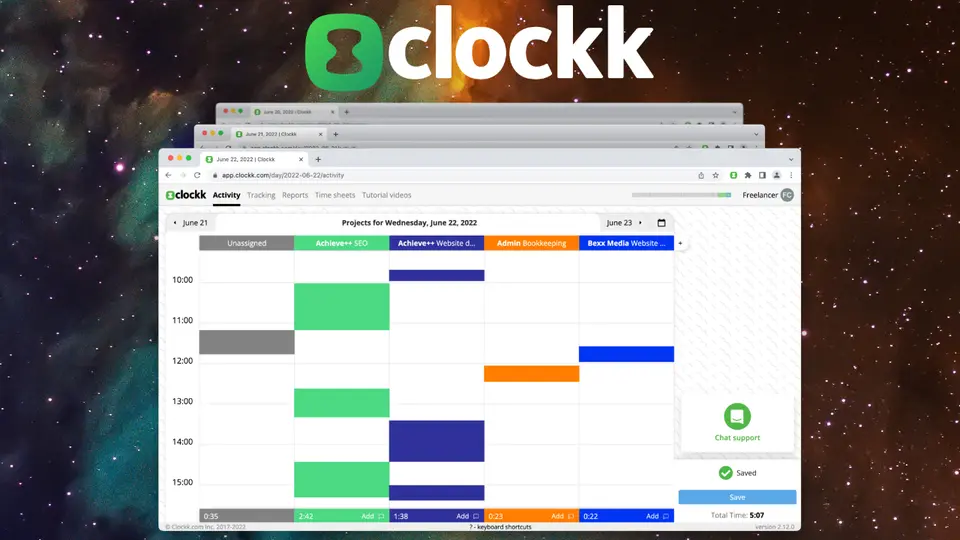
Clockk is an automatic time tracker for people who bill clients across several projects a day. A desktop app and a browser extension record the active window, the sites visited, draft emails and calendar events, and the web app groups that activity by project so it can be assigned and locked into a timesheet. There is no start and stop timer and no screenshots, and managers see only the timesheets a person submits.
Worth knowing
- There is no mobile app; the FAQ says one is planned but still a long way off.
- The free Express plan shows only the current day in the Activity view and keeps limited tracked data for three months.
- FreshBooks is the only third-party integration available today; QuickBooks and Clio are announced but not yet listed as live.
- Time cannot be attached to individual tickets or tasks in a project tool, a choice the vendor explains in its FAQ.
Key features
- Tracking without timers
- The Mac or Windows desktop app records the active window by app and document name, and a browser extension records each page's URL and title. Nothing has to be started or stopped.
- Activity view
- Each day is laid out project by project, showing the files, apps, web apps, calendar events and emails behind the time. Items are assigned to a project once or always.
- AI project grouping
- Clockk learns from past assignments and assigns matching work to the same project. On supported apps it reads the document or account name to tell projects apart.
- Email and calendar tracking
- The desktop app connects to Gmail, Outlook or Exchange, or an IMAP server to time draft emails, and imports Google and Outlook calendars or any public .ics feed.
- Timesheets, budgets and team reports
- Assigned time is locked in as a timesheet. Studio adds tags, project budgets, project-user permissions and team reports, including one listing who has not submitted.
- Private by design
- Clockk takes no screenshots and tracked activity is visible only to the person it belongs to. Employers see submitted timesheets, and tracking can be switched off at any time.
Clockk pricing
As of Oct 6, 2026, Clockk has a free plan, and paid plans start at $8 per user / month, billed annually.
- Starts at
- $8 per user / month, billed annually
- Free plan
- Express plan, where an account lands if the trial is not upgraded: the daily Timesheet Cheatsheet email, same-day access to the Activity view and three months of limited tracked data retention.
- Free trial
- Free trial of every paid plan, no credit card required; the pricing page does not state its length
| Plan | Price | What you get |
|---|---|---|
| Express | $0 | Daily Timesheet Cheatsheet email, same-day access to the Activity view and three months of limited tracked data retention. |
| Insight | $8per user / month, billed annually ($12 billed monthly) | Unlimited Activity view and data retention, AI project grouping, idle time detection and limited API access. |
| Studio | $15per user / month, billed annually ($18 billed monthly) | Adds tags, project-user permissions, project budgets, team timesheet reports and integrations such as FreshBooks. |
| Agency | $20per user / month, billed annually ($24 billed monthly) | Adds single sign-on with Microsoft Entra ID or Google, full API access, an admin assistant per seat (in beta) and an account manager. |
Read from clockk.com on Oct 6, 2026. Prices change, so confirm with Clockk before you buy.
Ways to pay less
- Annual discountUp to 33% less with annual billing
The pricing page lists Insight at $8 per user a month annually against $12 monthly (33% less), Studio at $15 against $18 and Agency at $20 against $24 (17% less each).
Stated on clockk.com
Works with
Jobs at Clockk.com
Any open roles at Clockk.com are on its own careers page. We can’t read a count from there, so have a look.
Applications go to Clockk.com, not to us.
Clockk alternatives
- Clockk vs Timely
Free trial · from $9/mo
- Clockk vs Memtime
Free trial · from $14/mo
- Clockk vs Rize
Free trial · from $9.99/mo
- Clockk vs Timing
Free trial · from $9/mo
- Clockk vs Toggl
Free plan · from $9/mo



Common questions
Does Clockk have an Android app?
No Android app was listed when its pages were read on Oct 6, 2026. Clockk is listed for Web, macOS and Windows.
Does Clockk have an iPhone app?
No iPhone app was listed when its pages were read on Oct 6, 2026. Clockk is listed for Web, macOS and Windows.
Is Clockk open source?
Clockk is not described as open source on its own site, as read on Oct 6, 2026.
Does Clockk have an API?
Yes. Clockk offers a public API, according to its own site.
Sources for this page
The prices, plans, platforms and features above were read from these pages on Oct 6, 2026.