Timelines review (2026): is the free plan enough?
Visual time tracking for iPhone, iPad and Apple Watch
Black Friday: is there a Timelines sale?
Timelines report card
Good · out of 4.0 · graded Oct 10, 2026
Best for seeing your day as colored blocks on a timeline
Timelines shows your day as colored blocks on a timeline you can pinch and scroll, from one afternoon out to months. It's a personal tracker from one developer in Prague, with timers on the Apple Watch. But it's Apple devices only with no native Mac app, the free version stops at 3 categories, sync and goals need PRO at $39.99 a year, and there are no team accounts or invoices.
Who Timelines is for
- Fits if you want to see where a day or a week went on a timeline
- Works for tracking your own time and habits from an iPhone or Apple Watch, not hours you bill
Who Timelines is not for
- Skip it if you use Android or Windows, as it only runs on Apple devices and Android is a waitlist
- Tight if you're staying free, because 3 categories don't cover much, and sync, goals and Apple Health import need PRO
- Not for you if you need team accounts or invoices, which it doesn't have
- Pricey if you pay monthly at $7.99, more than double the $39.99 year, or go Lifetime at $159.99, a price only the US App Store shows
- Watch out: there's no native Mac app yet; the press kit says it runs on Macs with Apple silicon
Why Timelines gets a 2.6
Five grades, each with its reason. The GPA is their average: an A is 4 points, an F is none.
- BValue for moneyPRO is $39.99 a year, which works out in the cheaper quarter for this category, and every paid feature is in it. Do take the year: monthly is $7.99, more than double over twelve months. Lifetime is $159.99 on the US App Store, four years of the yearly plan.
- CFree plan and trialThe free version has the interactive timeline, a pie chart, the events log, reminders and basic exporting, but it's capped at 3 categories. Work, sleep and exercise and you're full. There's a 7-day trial of the paid features.
- CFeaturesTimers from the app, a widget or your wrist, entries you can fix afterwards, one-tap pie charts, goals per category, Siri Shortcuts and import from Apple Health. It does the personal-tracking job fully, and that's a smaller job: no automatic tracking, no teams, no invoicing.
- AEase of use4.79 on the App Store from 1,556 ratings. You don't pick date ranges out of menus here: you swipe and pinch the timeline until it shows what you want.
- CPlatforms and integrationsApple only. iPhone, iPad, Apple Watch and Vision Pro, with Android down as a waitlist and no native Mac app, though the press kit says it runs on Macs with Apple silicon. Apple Health and Shortcuts are the only things it connects to.
What these grades rest on. Graded from this listing, whose facts were read from Timelines' own pages on 6 October 2026, and its App Store rating. Also tested with a demo account on 2026-05-14. How we review and grade.
Make Timelines? Put this grade on your site

Paste this where you want the badge. It links here and follows the grade if it changes. About badges
<a href="https://toolgpa.com/tools/timelines#review"><img src="https://toolgpa.com/badge/timelines.svg" alt="Timelines: 2.6 GPA on ToolGPA" width="196" height="56"></a>Where Timelines stands among time tracking apps
Timelines's GPA of 2.6 is higher than 66 of the 98 other time tracking apps we grade, and level with 15.
It stands best on ease of use (A, above 97 of 98) and worst on features (C, above 0).
Its paid plans start at $3.33 a month when paid by the year, against a middle price of $6.99 for the category: 6 of the 80 others that charge start lower.
On features, ease of use and platforms it scores 2.7 out of 4. 2 tools score higher and cost less.
Each grade against the category
Every bar is all 99 time tracking apps we grade, cut by the letter each got. Timelines’s own letter is outlined.
- BValue for moneyAbove 67 of 98, level with 18
- CFree plan and trialAbove 15 of 98, level with 58
- CFeaturesAbove 0 of 98, level with 64
- AEase of useAbove 97 of 98, level with 1
- CPlatforms and integrationsAbove 5 of 98, level with 20
Price against what you get
Each dot is one of 87 time tracking apps. Further left costs less, and higher up scores better on features, ease of use and platforms. Point at a dot to see which tool it is.
Features, ease of use and platforms, averaged
What paid plans start at, a month (each step along is roughly double) →
- The best score at each price
- Has a free plan
- No free plan
Keep Timelines, or make your own?
You could make this
A time tracker at its plainest is a start button, a stop button and a table of hours.
What Timelines does at its core is time tracking, goals and reports, and that is the kind of thing an AI app builder makes well. You would give up 2 things, listed below, and little else. It costs $39.99 a year. An AI app builder starts at about $20 a month on our listings, and you only need it while you build.
What you could make
- Time tracking, goals and reports: an app builder makes these well.
What you could not
- A real app for iOS. Something home-made would be a web page.
- Hooks into the device itself: an Apple Watch app, widgets, Siri and Shortcuts.
What this rests on. Timelines’s listing: what it does, where it runs, what it plugs into and what it costs. It is a judgement about the kind of software this is. We have not built a replacement for it, and making your own means looking after it too. How we decide, and every tool’s verdict.
What is Timelines?
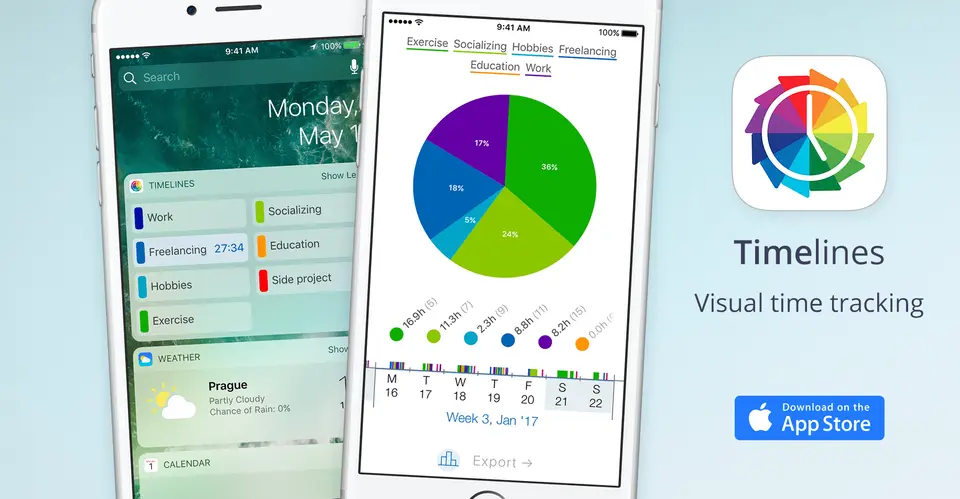
Timelines is a personal time tracker for Apple devices, built by an independent developer in Prague. Each project or area of life gets its own timeline, timers record what you are doing, and the result is drawn as colored blocks on a timeline that zooms from a single day out to months. A statistics mode, goals, widgets and an Apple Watch app sit around that view, and the free version is limited to three categories.
Worth knowing
- The free version tracks up to 3 categories; sync, goals, the bar chart, subcategories and Apple Health import need Timelines PRO.
- It runs only on Apple devices: iPhone, iPad, Apple Watch and Vision Pro. An Android version is offered only as a waitlist.
- There is no native Mac app; the press kit says the app can be used on Macs with Apple silicon and that a native one is planned.
- It is built as a personal tracker, and the vendor's pages describe no team accounts or invoicing.
Key features
- Interactive timeline
- Tracked events appear as colored markers on a timeline you pan and pinch, from hours up to weeks and months. Any set of timelines can be shown or hidden to focus on one area.
- Timers and editable entries
- Timers start and stop from the app, a widget or the watch. Events can be added afterwards, given a name and notes, and have their start and end times corrected.
- Statistics and exports
- One tap turns the visible interval into a pie chart with a time summary per category. PRO adds a bar chart of trends over time and detailed PDF and CSV exports.
- Goals
- Daily, weekly or monthly time targets can be set per category, such as 20 minutes of language practice a day, with progress tracking and periodic reports. Goals are part of PRO.
- Apple Watch app
- Timers are controlled from the wrist, with watch face complications, dictation for event names and the digital crown for correcting times. It works without a phone connection.
- Widgets, Shortcuts and Health import
- Home and Lock Screen widgets and a Live Activity show goals, charts and the running timer. Siri Shortcuts automate timers, and PRO imports workouts, sleep and meditation from Apple Health.
Timelines pricing
As of Oct 6, 2026, Timelines has a free plan, and paid plans start at $39.99 per year, or $7.99 per month.
- Starts at
- $39.99 per year, or $7.99 per month
- Free plan
- Up to 3 categories, events on the interactive timeline, a pie chart, the events log, reminders and basic exporting.
- Free trial
- 7-day free trial of all paid features
| Plan | Price | What you get |
|---|---|---|
| Free | $0 | Up to 3 categories with the interactive timeline, a pie chart, the events log, reminders and basic exporting. |
| Timelines PRO Monthly | $7.99per month | Sync between devices, unlimited categories, subcategories, the bar chart, goals, detailed exports and import from Apple Health. |
| Timelines PRO Yearly | $39.99per year | The same PRO features paid once a year. |
| Timelines PRO Lifetime | $159.99one-time, US App Store in-app purchase | Shown on the US App Store listing as a one-time purchase; the vendor's press kit mentions only the monthly and yearly options. |
Read from timelines.app on Oct 6, 2026. Prices change, so confirm with Timelines before you buy.
Ways to pay less
- Annual discountYearly PRO costs about 58% less than monthly
The press kit lists PRO at $7.99 a month or $39.99 a year. Twelve monthly payments come to $95.88, so paying yearly costs about 58% less.
Stated on timelines.app - Lifetime licenseTimelines PRO Lifetime at $159.99
The US App Store listing includes a Timelines PRO Lifetime in-app purchase at $159.99, a one-time alternative to the subscription.
Stated on apps.apple.com
How people rate the Timelines app
4.8
out of 5 for the iPhone and iPad app
- 5 stars89%
- 4 stars6%
- 3 stars2%
- 2 stars<1%
- 1 star2%
1,556 ratings on the App Store in the United States, read Oct 6, 2026. It rates the app, not everything the product does. See the listing
Works with
Timelines alternatives
- Timelines vs aTimeLogger
Free plan · from $5.99 one-time
- Timelines vs ATracker
Free plan · from $4.99 one-time
- Timelines vs Toggl
Free plan · from $9/mo
- Timelines vs Timing
Free trial · from $9/mo


Common questions
Does Timelines have an Android app?
No Android app was listed when its pages were read on Oct 6, 2026. Timelines is listed for iOS.
Does Timelines have a Windows app?
No Windows app was listed when its pages were read on Oct 6, 2026. Timelines is listed for iOS.
Is Timelines open source?
Timelines is not described as open source on its own site, as read on Oct 6, 2026.
Sources for this page
The prices, plans, platforms and features above were read from these pages on Oct 6, 2026. What people say is linked where it appears.