
Workstatus review (2026): is it worth $7 a month per user, billed yearly?
Time tracking, attendance and project margins for service firms
Black Friday: is there a Workstatus sale?
Workstatus report card
Fair · out of 4.0 · graded Nov 13, 2026
Best for tracking with screenshots for service firms
Workstatus tracks time, apps and screenshots from $7 a user a month on annual billing. Invoicing and budgets need the $13 plan, GPS and longer data retention cost extra, and it includes screenshots staff need to know about.
Who Workstatus is for
- Fits if you are a service firm that wants hours tied to project budgets
- Works for remote teams that want timesheets, shifts and leave in one tool
Who Workstatus is not for
- Pricey if you want invoicing and budgets, which start at $13 a user
- Tight if you need GPS, since Field Operations is $3 more a user
- Skip it if you need long history, because data is kept 90 days on Proof and 180 on Profit
- Watch out: session replay and longer retention are paid add-ons, and screenshots need to be disclosed to staff
Why Workstatus gets a 2.4
Five grades, each with its reason. The GPA is their average: an A is 4 points, an F is none.
- CValue for money$7 a user a month on annual billing, $9 monthly, which is just above the $6.99 middle. Budgets and invoicing need $13.
- CFree plan and trialA 14-day trial with no card. No free plan.
- CFeaturesTracking, timesheets, shifts, projects and boards. Gaps: GPS is a $3 add-on and data is kept 90 days on the $7 plan.
- CEase of useNo store rating on record. Projects, approval flows and rates need setting up.
- APlatforms and integrationsWeb, Windows, Mac, Linux, iOS and Android, with Jira, Asana, ClickUp, Trello, an API and webhooks.
What these grades rest on. Graded from this listing, whose facts were read from Workstatus's own pages on 13 November 2026. Not based on using the product, and shorter than our full reviews. How we review and grade.
Make Workstatus? Put this grade on your site

Paste this where you want the badge. It links here and follows the grade if it changes. About badges
<a href="https://toolgpa.com/tools/workstatus#review"><img src="https://toolgpa.com/badge/workstatus.svg" alt="Workstatus: 2.4 GPA on ToolGPA" width="196" height="56"></a>Where Workstatus stands among time tracking apps
Workstatus's GPA of 2.4 is higher than 41 of the 98 other time tracking apps we grade, and level with 24.
It stands best on platforms and integrations (A, above 72 of 98) and worst on features (C, above 0).
Its paid plans start at $7 a month for each person, against a middle price of $6.99 for the category: 41 of the 80 others that charge start lower.
On features, ease of use and platforms it scores 2.7 out of 4. 13 tools score higher and cost less.
Each grade against the category
Every bar is all 99 time tracking apps we grade, cut by the letter each got. Workstatus’s own letter is outlined.
- CValue for moneyAbove 16 of 98, level with 51
- CFree plan and trialAbove 15 of 98, level with 58
- CFeaturesAbove 0 of 98, level with 64
- CEase of useAbove 3 of 98, level with 75
- APlatforms and integrationsAbove 72 of 98, level with 26
Price against what you get
Each dot is one of 87 time tracking apps. Further left costs less, and higher up scores better on features, ease of use and platforms. Point at a dot to see which tool it is.
Features, ease of use and platforms, averaged
What paid plans start at, a month (each step along is roughly double) →
- The best score at each price
- Has a free plan
- No free plan
Keep Workstatus, or make your own?
Keep it
The plain part of Workstatus you could make: time tracking, time off, kanban boards, Gantt & timelines and reports. What surrounds it you could not. The 4 things listed below take a company, not a weekend.
It costs $84 a year.
What you could make
- Time tracking, time off, kanban boards, Gantt & timelines and reports: an app builder makes these well.
What you could not
- Clocking in from a phone, checked against where and when.
- A rota the whole staff sees on their phones, with swaps and alerts.
- Apps for macOS, Windows, Linux, iOS and Android that stay in step with each other.
- It is priced for each person, which means accounts and billing for a team.
What this rests on. Workstatus’s listing: what it does, where it runs, what it plugs into and what it costs. It is a judgement about the kind of software this is. We have not built a replacement for it, and making your own means looking after it too. How we decide, and every tool’s verdict.
What is Workstatus?
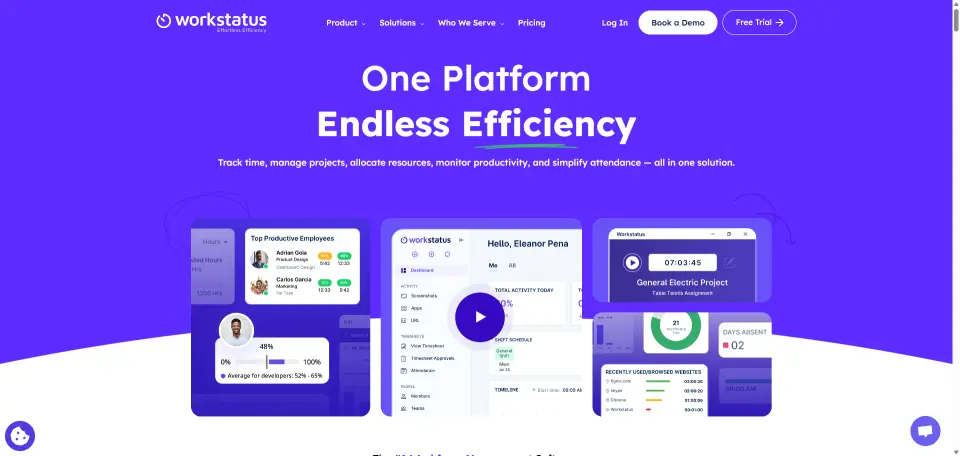
Workstatus tracks work time with app and URL monitoring, screenshots, timesheets and attendance, and adds project boards and budget tracking. The cheaper Proof plan covers time, activity and scheduling; the Profit plan adds margin tracking, invoicing and capacity planning. It is aimed at service businesses such as agencies and IT firms.
Worth knowing
- Live GPS and geofencing cost extra: the page lists a Field Operations add-on at $3 per user a month.
- Session replay and longer data retention are separate add-ons priced per user.
- Proof keeps 90 days of data and Profit 180 days unless the retention add-on is bought.
- It includes screenshots and activity monitoring, which teams may need to disclose to staff.
Key features
- Time and activity tracking
- Tracks time with app and URL monitoring, idle detection and configurable screenshots, with a blur option.
- Timesheets and approvals
- Timesheet grids with manager approval, approval workflows and payroll exports with payslips.
- Attendance and scheduling
- Shift scheduling, leave, PTO and overtime tracking. Geofencing and GPS tracking are a paid add-on.
- Projects and boards
- Kanban, Gantt and workload views, tasks and quick tasks, with up to 99 projects on either plan.
- Margin and budget tracking
- Profit adds budget-versus-actual by project and client, bill and cost rates, retainers and client invoicing.
- Integrations and API
- Native integrations with Jira, Asana, ClickUp and Trello plus an API and webhooks, rate-limited by plan.
Workstatus pricing
As of Nov 13, 2026, Workstatus is a paid product with a free trial, starting at $7 per user / month, billed annually ($9 billed monthly).
- Starts at
- $7 per user / month, billed annually ($9 billed monthly)
- Free plan
- None
- Free trial
- 14-day free trial, no credit card required
| Plan | Price | What you get |
|---|---|---|
| Proof | $7per user / month, billed annually ($9 billed monthly) | Time tracking with app and URL monitoring, screenshots, timesheets, shifts and leave, up to 99 projects and 90-day data retention. |
| Profit | $13per user / month, billed annually ($16 billed monthly) | Everything in Proof, plus budget tracking, client invoicing, utilization forecasting, a resource planner and 180-day data retention. |
| Enterprise | Custom | For 100 or more users; volume pricing sold through sales, with SSO and SCIM, MDM deployment, private cloud options and 2-year retention. |
Read from workstatus.io on Nov 13, 2026. Prices change, so confirm with Workstatus before you buy.
Ways to pay less
- Annual discountSave about 20% with annual billing
The pricing page lists annual billing at about 20% less than monthly: $7 against $9 on Proof and $13 against $16 on Profit.
Stated on workstatus.io
Works with
Workstatus alternatives
- Workstatus vs Hubstaff
Free trial · from $4.99/mo
- Workstatus vs Time Doctor
Free trial · from $6.67/mo
- Workstatus vs ActivTrak
Free plan · from $10/mo
- Workstatus vs Insightful
Free trial · from $8/mo
- Workstatus vs Teramind
Free trial





Common questions
Is Workstatus open source?
Workstatus is not described as open source on its own site, as read on Nov 13, 2026.
Sources for this page
The prices, plans, platforms and features above were read from these pages on Nov 13, 2026.