
Tim
Menu bar time tracker for Mac with reports and invoicing
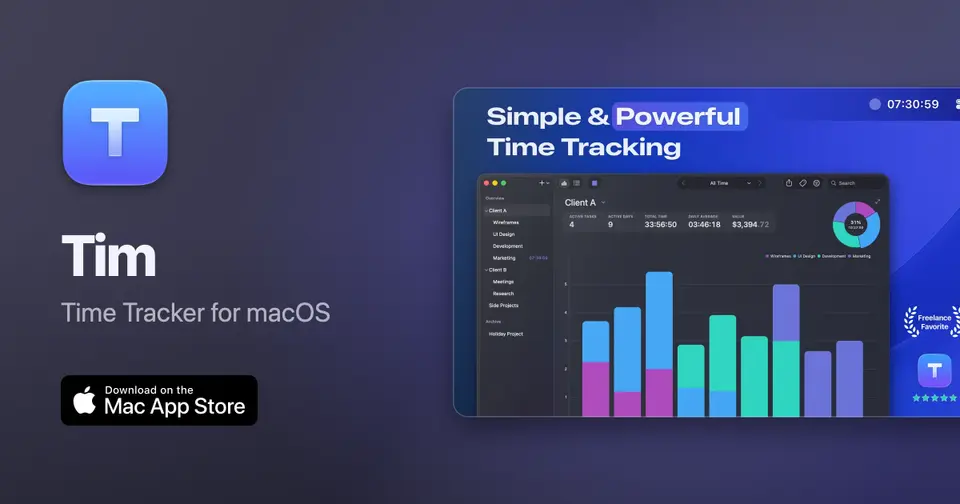
Tim report card
Very good · out of 4.0 · graded Oct 9, 2026
Best for a menu bar timer on one Mac
Tim is a small Mac time tracker that lives in the menu bar and runs from keyboard shortcuts. It keeps everything on your Mac with no account, and it'll turn your hours into a PDF invoice too. Pro is $24.99 once, which is hard to argue with. But it's Mac only, and your data stays on the one machine unless you move a backup across.
Who Tim is for
- Great if you want a timer in your Mac's menu bar that runs from keyboard shortcuts
- Good for freelancers who invoice clients from tracked hours and don't want a subscription
- Handy when you want time data kept on your own Mac with no account
Who Tim is not for
- Skip it if you use anything but a Mac, because that's the only place it runs
- Tight if you stay free, since 3 tasks and 6 tags won't cover many clients
- Not for you if you work on two Macs, as moving data means importing a backup, and that needs Pro
Why Tim gets a 3.0
Five grades, each with its reason. The GPA is their average: an A is 4 points, an F is none.
- AValue for moneyPro is $12.99 a year or $24.99 once on the US Mac App Store. Most time trackers ask more than that every few months. Skip the monthly option, though: $4.99 a month comes to $59.88 over a year.
- BFree plan and trialThe free version has most features, but it stops at 3 tasks and 6 tags. It also shows upgrade prompts and ads for the maker's other apps, and there are no automatic backups or data import.
- AFeaturesIt's a small tool for one person on one Mac, and it does that job fully. A menu bar timer with idle detection, tasks in groups or tags, charts of hours and revenue, and PDF invoices worked out from hourly rates, tax and payment terms. Exports go to CSV, JSON, PDF or iCal.
- BEase of useWe have no App Store rating on record, so a B is as high as we go. No account and no internet connection needed. The running time shows in the menu bar, and keyboard shortcuts control it.
- DPlatforms and integrationsMac only, and the current version needs macOS 15 or later. It does get on well with Mac automation: AppleScript, Shortcuts, Spotlight, Raycast and Hammerspoon. But that's one operating system.
What these grades rest on. Graded from this listing, whose facts were read from Tim's own pages on 6 October 2026. Not based on using the product, and shorter than our full reviews. How we review and grade.
Make Tim? Put this grade on your site

Paste this where you want the badge. It links here and follows the grade if it changes. About badges
<a href="https://toolgpa.com/tools/tim#review"><img src="https://toolgpa.com/badge/tim.svg" alt="Tim: 3.0 GPA on ToolGPA" width="196" height="56"></a>What is Tim?
Tim is a time tracker for macOS that keeps the running time in the menu bar and is controlled with keyboard shortcuts. Tasks are organized into groups or with tags, time records can be edited afterwards, and charts break hours, averages and revenue down by date range or tag. It also builds invoices from tracked time. All data stays on the Mac, with no account or internet connection needed.
Tim has a free plan. Paid plans start at $12.99 per year, or $24.99 one-time (Pro, US Mac App Store). See every plan
Good for
- Mac users who want a timer that lives in the menu bar
- Freelancers who invoice clients from their tracked hours
- People who want time data kept on their own Mac with no account
Worth knowing
- Tim is for Mac only, and the Mac App Store listing says the current version requires macOS 15 or later.
- The free version stops at 3 tasks and 6 tags and shows upgrade prompts.
- Data stays on the device it was recorded on; moving it to another Mac means importing a backup, which needs Pro.
- The website does not state the price of the direct-download Pro version; the listed prices are from the US Mac App Store.
Key features
- Menu bar timer
- The running time shows in the menu bar and the timer is controlled with keyboard shortcuts. Idle detection asks what to do with the time when you return.
- Tasks, groups and tags
- Tasks and their time records can be created and edited freely, grouped or tagged, and archived when they should stay on file but out of the main list and menu bar.
- Charts and filters
- Charts give a visual breakdown of hours, averages and revenue, and any view can be filtered by date range, by tag or by both.
- Invoicing
- Invoices are created from tracked time. Tim calculates totals from hourly rates, applies tax and payment terms, and exports a PDF to send to the client.
- Exports and backups
- Data exports to CSV, JSON, PDF or iCal, and a full export doubles as a backup. Pro adds automatic backups at a set interval and importing data on another Mac.
- Automation
- AppleScript, Shortcuts actions, Spotlight, deep links and x-callback-url can start and stop the timer and create tasks or records. A command-line export is possible through osascript.
Tim pricing
- Starts at
- $12.99 per year, or $24.99 one-time (Pro, US Mac App Store)
- Free plan
- Free version with most features, limited to 3 tasks and 6 tags. It has no automatic backups or data import and shows upgrade prompts and ads for the maker's other apps.
- Free trial
- None listed
| Plan | Price | What you get |
|---|---|---|
| Free | $0 | Most of Tim's features with up to 3 tasks and 6 tags, without automatic backups or data import. |
| Pro: Monthly | $4.99per month, US Mac App Store in-app purchase | Unlimited tasks and tags, automatic backups, importing and transferring data, and no ads or upgrade prompts. |
| Pro: Yearly | $12.99per year, US Mac App Store in-app purchase | The same Pro features paid once a year. |
| Pro: Lifetime | $24.99one-time, US Mac App Store in-app purchase | Pro as a single purchase. Pro is also sold as a direct download from the website, where the price appears at checkout. |
Read from apps.apple.com on Oct 6, 2026. Prices change, so confirm with Tim before you buy.
Ways to pay less
- Lifetime licensePro: Lifetime one-time purchase
The US Mac App Store lists Pro: Lifetime at $24.99, a one-time alternative to the monthly and yearly subscriptions.
Stated on apps.apple.com - Annual discountYearly Pro costs far less than monthly
The US Mac App Store lists Pro at $12.99 a year against $4.99 a month. Twelve monthly payments come to $59.88, so the yearly plan costs about 78% less.
Stated on apps.apple.com - EducationStudent discount through Student App Centre
Tim's help page says students can get a discount code from Student App Centre, which verifies student status. The amount is not stated.
Stated on tim.neat.software
Works with
- Apple Shortcuts
- AppleScript
- Raycast
- Hammerspoon
Tim alternatives
- Tim vs Timing
Free trial · from $9/mo
- Tim vs Timemator
Free trial · from $39 one-time
- Tim vs Daily
Free trial · from $39.99/yr
- Tim vs Tyme
Free trial · from $59.99/yr
- Tim vs Chronoid
Free trial · from $8/mo



Common questions
Is Tim free?
Tim has a free plan. Free version with most features, limited to 3 tasks and 6 tags. It has no automatic backups or data import and shows upgrade prompts and ads for the maker's other apps. Paid plans start at $12.99 per year, or $24.99 one-time (Pro, US Mac App Store).
How much does Tim cost?
Tim lists 4 plans. Free: $0. Pro: Monthly: $4.99 per month, US Mac App Store in-app purchase. Pro: Yearly: $12.99 per year, US Mac App Store in-app purchase. Pro: Lifetime: $24.99 one-time, US Mac App Store in-app purchase. Prices were read from apps.apple.com on Oct 6, 2026.
What platforms does Tim work on?
Tim is available on macOS.
Does Tim offer any discounts?
Tim publicly lists the following: Pro: Lifetime one-time purchase; Yearly Pro costs far less than monthly; Student discount through Student App Centre.
Does Tim have an Android app?
No Android app was listed when its pages were read on Oct 6, 2026. Tim is listed for macOS.
Does Tim have an iPhone app?
No iPhone app was listed when its pages were read on Oct 6, 2026. Tim is listed for macOS.
Is Tim open source?
Tim is not described as open source on its own site, as read on Oct 6, 2026.
Does Tim work offline?
Yes, according to its own site. What works without a connection differs by plan and platform, so check the vendor's page for the detail.
What does Tim integrate with?
Tim's listing names Apple Shortcuts, AppleScript, Raycast and Hammerspoon. A listing names up to eight integrations, so it may connect to more.
Does Tim have a student discount?
Student discount through Student App Centre. Tim's help page says students can get a discount code from Student App Centre, which verifies student status. The amount is not stated.
Who makes Tim?
Tim is made by Neat Software Co.
What are the alternatives to Tim?
The closest alternatives to Tim in our directory are Timing, Timemator, Daily, Tyme and Chronoid. Each one has a side-by-side comparison with Tim.
Sources for this page
The prices, plans, platforms and features above were read from these pages on Oct 6, 2026.