
TimeCamp review (2026): is the free plan enough?
Time tracking with attendance, billing and a free plan for any team
Black Friday: is there a TimeCamp sale?
TimeCamp report card
Very good · out of 4.0 · graded Oct 10, 2026
Best for free timesheets for a team of any size
TimeCamp gives timesheets free to unlimited users and projects. Paid plans start at $3.99 a user and add attendance, invoicing and budgets, but integrations are rationed: none on Free or Starter, one on Premium. Approvals, expenses, billing rates, screenshots and SSO wait for Ultimate at $9.99, and the AI Time Tracker is billed by usage on top, so teams that need those for less should look elsewhere.
Who TimeCamp is for
- Fits if you want free timesheets for a team of any size
- Works for companies that keep attendance, overtime and time off alongside time tracking
Who TimeCamp is not for
- Tight if you rely on integrations, because Free and Starter have none and Premium has one
- Pricey if you want the AI Time Tracker, as it's billed by token usage on top of your plan
- Skip it if you need timesheet approvals, expenses, billing rates, screenshots or SSO below Ultimate at $9.99 a user
- Not for you if you bill clients on the free plan, as invoicing and attendance start on Starter and budgets on Premium
- Watch out: self-hosted or private cloud setups are only for 50 or more users on annual Ultimate
Why TimeCamp gets a 3.2
Five grades, each with its reason. The GPA is their average: an A is 4 points, an F is none.
- BValue for moneyStarter is $3.99 a user a month billed annually, $5.49 month-to-month, and invoicing, attendance and time off are already in it. That sits in the cheaper quarter for time trackers. Ultimate is $9.99. The AI Time Tracker is extra, billed by token usage.
- AFree plan and trialFree forever with unlimited users and unlimited projects, plus timesheets and the web, desktop and mobile apps. A whole team can stay there. No integrations, invoicing or attendance, mind.
- BFeaturesLog time with a timer, by hand or on a weekly timesheet, or let the desktop app track by itself. Then attendance, time off and overtime, invoicing, budgets with alerts, 10-plus reports and, on Ultimate, approvals, expenses and screenshots. The job is covered.
- CEase of useNo store rating on record. There are three ways to log time, but this is a web app you furnish with projects first, and working out which of five plans holds the feature you need takes longer than the setup.
- APlatforms and integrationsWeb, Mac, Windows, Linux, iOS, Android and a browser extension, with Trello, Asana, ClickUp, Jira, GitHub, QuickBooks and Xero on the list. Integrations are rationed, though: none on Free or Starter, one on Premium, unlimited on Ultimate.
What these grades rest on. Graded from this listing, whose facts were read from TimeCamp's own pages on 5 October 2026. Also tested with a demo account on 2026-07-20. How we review and grade.
Make TimeCamp? Put this grade on your site
Paste this where you want the badge. It links here and follows the grade if it changes. About badges
<a href="https://toolgpa.com/tools/timecamp#review"><img src="https://toolgpa.com/badge/timecamp.svg" alt="TimeCamp: 3.2 GPA on ToolGPA" width="196" height="56"></a>Where TimeCamp stands among time tracking apps
TimeCamp's GPA of 3.2 is higher than 94 of the 98 other time tracking apps we grade, and level with 3.
It stands best on free plan and trial (A, above 91 of 98) and worst on ease of use (C, above 3).
Its paid plans start at $3.99 a month for each person, against a middle price of $6.99 for the category: 13 of the 80 others that charge start lower.
On features, ease of use and platforms it scores 3.0 out of 4. Nothing scores higher for less, though at least one tool matches that score at a lower price.
Each grade against the category
Every bar is all 99 time tracking apps we grade, cut by the letter each got. TimeCamp’s own letter is outlined.
- BValue for moneyAbove 67 of 98, level with 18
- AFree plan and trialAbove 91 of 98, level with 7
- BFeaturesAbove 65 of 98, level with 33
- CEase of useAbove 3 of 98, level with 75
- APlatforms and integrationsAbove 72 of 98, level with 26
Price against what you get
Each dot is one of 87 time tracking apps. Further left costs less, and higher up scores better on features, ease of use and platforms. Point at a dot to see which tool it is.
Features, ease of use and platforms, averaged
What paid plans start at, a month (each step along is roughly double) →
- The best score at each price
- Has a free plan
- No free plan
Keep TimeCamp, or make your own?
You could make this
A time tracker at its plainest is a start button, a stop button and a table of hours.
What TimeCamp does at its core is time tracking, reports and invoicing, and that is the kind of thing an AI app builder makes well. You would give up 5 things, listed below, and little else. It costs $47.88 a year. An AI app builder starts at about $20 a month on our listings, and you only need it while you build.
What you could make
- Time tracking, reports and invoicing: an app builder makes these well.
What you could not
- Apps for macOS, Windows, Linux, iOS and Android that stay in step with each other.
- It is priced for each person, which means accounts and billing for a team.
- It plugs into other products, Trello, Asana and ClickUp among them, and has an API.
- AI features, unless you pay a model provider for each request yourself.
- The depth: we grade its features B, which means it covers the whole job.
What this rests on. TimeCamp’s listing: what it does, where it runs, what it plugs into and what it costs. It is a judgement about the kind of software this is. We have not built a replacement for it, and making your own means looking after it too. How we decide, and every tool’s verdict.
What is TimeCamp?
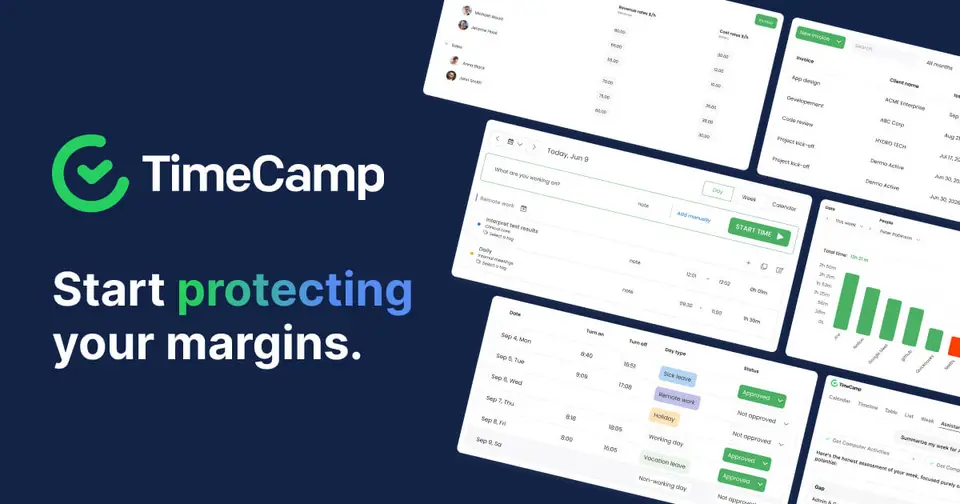
TimeCamp is time tracking software for teams that combines timesheets with automatic tracking of computer activity. Paid plans add attendance and time off, invoicing, budgets, productivity tracking of apps and websites, timesheet approvals and screenshots. The free plan has no user limit, and an AI Time Tracker that suggests time entries is billed separately by usage.
Worth knowing
- Integrations are not part of Free or Starter: Premium includes one and Ultimate removes the limit.
- The AI Time Tracker is billed by token usage on top of the plan price.
- Timesheet approvals, expenses, billing rates, screenshots and SSO login need the Ultimate plan.
- Self-hosted and private cloud setups are offered to customers with 50 or more users on annual Ultimate.
Key features
- Timesheets and automatic tracking
- Time is logged with a timer, manual entries or a weekly timesheet, and the desktop app can track computer activity automatically. Apps and websites tracking starts on Premium.
- AI Time Tracker
- A separate app for macOS and Windows that suggests time entries. It is billed by token usage on top of the plan, which TimeCamp estimates at about $6 per user a month.
- Attendance and time off
- From Starter, an attendance calendar records working days alongside time-off and overtime tracking, with reports for each.
- Billing and budgets
- Invoicing starts on Starter, and billable time and budgets with alerts on Premium. Billing rates, expenses, labor costs and fixed fee projects need Ultimate.
- Reports
- More than 10 time tracking reports with PDF export. Excel export starts on Starter, scheduled email reports on Premium and the pivot table report on Ultimate.
- Approvals and monitoring
- Ultimate adds timesheet approvals, screenshots, unusual activity detection, remote work detection and a history of changes to time entries.
TimeCamp pricing
As of Oct 5, 2026, TimeCamp has a free plan, and paid plans start at $3.99 per user / month, billed annually ($5.49 month-to-month).
- Starts at
- $3.99 per user / month, billed annually ($5.49 month-to-month)
- Free plan
- Free forever plan with unlimited users and projects: timesheets, the web, desktop and mobile apps and 2-factor authentication. Integrations, invoicing and attendance need a paid plan.
- Free trial
- 14-day free trial, no credit card required
| Plan | Price | What you get |
|---|---|---|
| Free | $0 | Unlimited users and projects with timesheets, the web, desktop and mobile apps and 2-factor authentication. |
| Starter | $3.99per user / month, billed annually ($5.49 month-to-month) | Adds invoicing, attendance and an attendance calendar, time off, overtime tracking, Excel report export and unlimited tasks. |
| Premium | $6.99per user / month, billed annually ($9.99 month-to-month) | Adds one integration, billable time, budgets and estimates, apps and websites tracking, a resource planner and scheduled email reports. |
| Ultimate | $9.99per user / month, billed annually ($13.99 month-to-month) | Adds unlimited integrations, timesheet approvals, billing rates, expenses, labor costs, screenshots, custom fields and SSO login. |
| Enterprise | Custom | Price on request. Adds self-hosted or private cloud deployment, custom integrations, an audit log, data warehouse access and an SLA. |
Read from timecamp.com on Oct 5, 2026. Prices change, so confirm with TimeCamp before you buy.
Ways to pay less
- Annual discountLower rate with annual billing
Annual billing costs roughly 27% to 30% less than month-to-month: Starter is $3.99 per user a month against $5.49, and Ultimate is $9.99 against $13.99.
Stated on timecamp.com - Nonprofit30% off for nonprofits
TimeCamp's pricing FAQ offers an additional 30% discount to non-profit organizations that email support with a copy of their 501(c)(3) paperwork.
Stated on timecamp.com - Education30% off for universities, schools and students
The same pricing FAQ extends the additional 30% discount to universities, students and schools, arranged by contacting TimeCamp support.
Stated on timecamp.com
Works with
Jobs at TimeCamp
Any open roles at TimeCamp are on its own careers page. We can’t read a count from there, so have a look.
Applications go to TimeCamp, not to us.
TimeCamp alternatives
- TimeCamp vs Clockify
Free plan · from $3.99/mo
- TimeCamp vs Toggl
Free plan · from $9/mo
- TimeCamp vs Hubstaff
Free trial · from $4.99/mo
- TimeCamp vs Time Doctor
Free trial · from $6.67/mo
- TimeCamp vs DeskTime
Free trial · from $6.42/mo



Common questions
Is TimeCamp open source?
TimeCamp is not described as open source on its own site, as read on Oct 5, 2026.
Can TimeCamp be self-hosted?
Yes. TimeCamp's own site says it can be run on a server of your own.
Does TimeCamp have an API?
Yes. TimeCamp offers a public API, according to its own site.
Sources for this page
The prices, plans, platforms and features above were read from these pages on Oct 5, 2026.