
Bubbles review (2026): is the free plan enough?
Screen and meeting replay for Mac, with an AI notetaker option
Black Friday: is there a Bubbles sale?
Bubbles report card
Fair · out of 4.0 · graded Nov 12, 2026
Best for a Mac screen replay with a meeting notetaker option
Bubbles is a Mac app that keeps a rolling two-hour replay of your screen and calls, plus an AI notetaker that joins Zoom, Meet and Teams. The free plan is capped at 5 recordings a week of 30 minutes, and one or two people pay $18 each on Pro.
Who Bubbles is for
- Fits if you're on a Mac and want to look back over the last two hours
- Works for small teams that want a notetaker and shareable replay clips
Who Bubbles is not for
- Tight if you stay free: 5 recordings a week, 30 minutes each, locked after 2 weeks
- Pricey if you're alone: $18 a month while the workspace has 1 or 2 members
- Watch out: on the free plan the Notetaker joins all meetings with 2 or more invitees, and everyone gets the recording
- Not for you if you don't use a Mac and want a no-bot mode, which needs macOS 13 or later
- Watch out: the homepage says no bots join calls, but the notetaker is a bot
Why Bubbles gets a 2.2
Five grades, each with its reason. The GPA is their average: an A is 4 points, an F is none.
- CValue for money$12 a member a month, billed yearly, but only for workspaces of 3 or more. One or two people pay $18 each, in the dearest quarter of the category.
- CFree plan and trialBasic is free with 5 meeting recordings a week of up to 30 minutes and unlimited screen recordings. Bubbles lock after 2 weeks, and the Notetaker joins every meeting.
- CFeaturesRolling replay, trim and share, notes from jotted fragments and a Notetaker for calendar meetings. The homepage says no bots join your calls, while the pricing page describes a bot.
- CEase of useNo store rating on record. You install the Mac app and connect a calendar, and two modes work differently.
- BPlatforms and integrationsMac app and web, with Zoom, Meet, Teams, Webex, Google Calendar, ChatGPT and Claude, and an API.
What these grades rest on. Graded from this listing, whose facts were read from Bubbles's own pages on 12 November 2026. Not based on using the product, and shorter than our full reviews. How we review and grade.
Make Bubbles? Put this grade on your site
Paste this where you want the badge. It links here and follows the grade if it changes. About badges
<a href="https://toolgpa.com/tools/bubbles#review"><img src="https://toolgpa.com/badge/bubbles.svg" alt="Bubbles: 2.2 GPA on ToolGPA" width="196" height="56"></a>Where Bubbles stands among AI meeting note takers
Bubbles's GPA of 2.2 is higher than 8 of the 68 other AI meeting note takers we grade, and level with 20.
It stands best on platforms and integrations (B, above 9 of 68) and worst on features (C, above 0).
Its paid plans start at $12 a month for each person, against a middle price of $11.99 for the category: 34 of the 62 others that charge start lower.
On features, ease of use and platforms it scores 2.3 out of 4. 25 tools score higher and cost less.
Each grade against the category
Every bar is all 69 AI meeting note takers we grade, cut by the letter each got. Bubbles’s own letter is outlined.
- CValue for moneyAbove 16 of 68, level with 43
- CFree plan and trialAbove 11 of 68, level with 46
- CFeaturesAbove 0 of 68, level with 26
- CEase of useAbove 0 of 68, level with 36
- BPlatforms and integrationsAbove 9 of 68, level with 37
Price against what you get
Each dot is one of 63 AI meeting note takers. Further left costs less, and higher up scores better on features, ease of use and platforms. Point at a dot to see which tool it is.
Features, ease of use and platforms, averaged
What paid plans start at, a month (each step along is roughly double) →
- The best score at each price
- Has a free plan
- No free plan
Keep Bubbles, or make your own?
Keep it
To replace Bubbles you would be making a bot that joins your calls and turns the talk into notes. That is not a weekend's work, with an AI app builder or without one.
That makes this kind of software worth paying for, not this one in particular: 40 of the 68 other AI meeting note takers grade higher. It costs $144 a year.
What you could not
- A bot that joins your calls and turns the talk into notes.
- An AI model, which you can rent by the request but not make.
- Speech turned into text you can trust.
- Recording the screen with its sound, and somewhere to keep the video.
- A real app for macOS. Something home-made would be a web page.
- It is priced for each person, which means accounts and billing for a team.
- It plugs into other products, Zoom, Google Meet and Microsoft Teams among them, and has an API.
What this rests on. Bubbles’s listing: what it does, where it runs, what it plugs into and what it costs. It is a judgement about the kind of software this is. We have not built a replacement for it, and making your own means looking after it too. How we decide, and every tool’s verdict.
What is Bubbles?
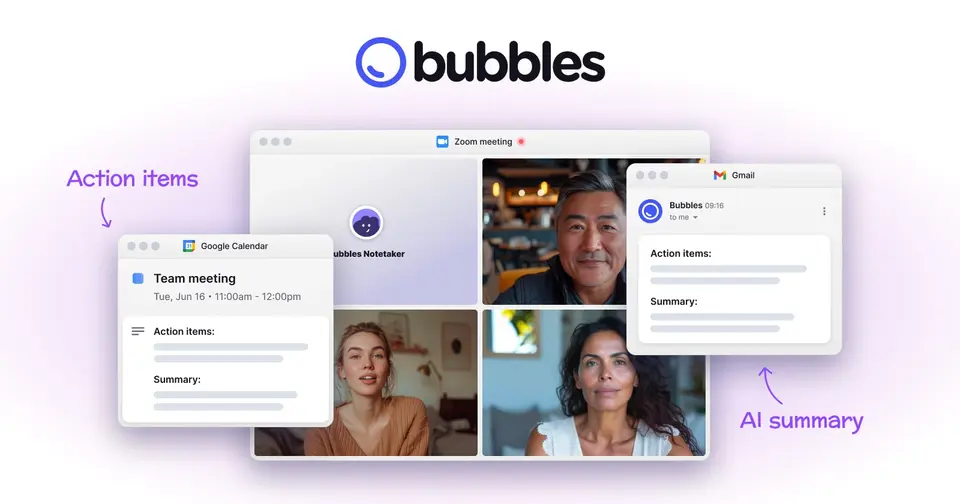
Bubbles is a Mac app that keeps a rolling two-hour replay of your screen and calls on your computer, so you can trim a moment and share it as a link. It also offers an AI Notetaker that joins calendar meetings on Zoom, Google Meet and Teams and sends back summaries and action items. The site presents both a no-bot desktop mode and a bot-based notetaker.
Worth knowing
- The homepage says no bots join your calls, while the Notetaker and pricing pages describe a bot that joins meetings; the two modes work differently.
- The download listed is for macOS 13 or later; the Notetaker is the route for other computers.
- On the free plan the Notetaker joins all meetings with 2 or more invitees and every invitee gets the recording.
- Pro pricing is $18 per member a month for 1 or 2 members and $12 at 3 or more.
Key features
- Two-hour rolling replay
- The Mac app keeps the last two hours of screen and audio, encrypted on your computer, and erases the oldest minute as new ones arrive.
- Notes from jotted fragments
- During a call you can type a few fragments; on save, AI turns the transcript and your fragments into a summary, action items and a full transcript.
- AI Notetaker for calendar meetings
- After you connect a calendar, the Notetaker joins meetings on Zoom, Google Meet and Teams and emails a summary and action items.
- Trim and share
- Scroll back through the replay, trim a moment and share a link. The site says only the trimmed part is uploaded.
- Chat with your meetings
- The site shows ChatGPT and Claude among the places where you can chat with your meeting content, and it publishes a Bubbles API.
- Controls on who gets recordings
- On Pro you choose which meetings the Notetaker joins and who receives recordings. On the free plan all invitees receive them.
Bubbles pricing
As of Nov 12, 2026, Bubbles has a free plan, and paid plans start at $12 per member / month, billed yearly ($15 billed monthly).
- Starts at
- $12 per member / month, billed yearly ($15 billed monthly)
- Free plan
- Basic: 5 meeting recordings a week, 30 minutes per recording, unlimited screen recordings, AI summaries and action items, 2 channels.
- Free trial
- 14-day free trial of Pro for every new workspace
| Plan | Price | What you get |
|---|---|---|
| Basic | Free | 5 meeting recordings a week of up to 30 minutes, unlimited screen recordings; Bubbles lock after 2 weeks and the Notetaker joins all meetings. |
| Pro Teams | $12per member / month, billed yearly ($15 billed monthly) | For workspaces of 3 or more: unlimited length and recordings, AI transcripts, choose which meetings the Notetaker joins, custom branding. |
| Pro Personal | $18per member / month, billed yearly ($22 billed monthly) | Same features as Pro Teams for workspaces of 1 or 2 members; switches to Pro Teams pricing when the workspace reaches 3. |
Read from usebubbles.com on Nov 12, 2026. Prices change, so confirm with Bubbles before you buy.
Ways to pay less
- Annual discountYearly billing lowers the member price
Pro Teams is $12 a member billed yearly against $15 billed monthly. Pro Personal is $18 against $22.
Stated on usebubbles.com
Works with
Bubbles alternatives
- Bubbles vs Fathom
Free plan · from $15/mo
- Bubbles vs tl;dv
Free plan · from $18/mo
- Bubbles vs Granola
Free plan · from $14/mo
- Bubbles vs Fireflies.ai
Free plan · from $10/mo
- Bubbles vs Otter.ai
Free plan · from $8.33/mo




Common questions
Does Bubbles have an Android app?
No Android app was listed when its pages were read on Nov 12, 2026. Bubbles is listed for macOS and Web.
Does Bubbles have an iPhone app?
No iPhone app was listed when its pages were read on Nov 12, 2026. Bubbles is listed for macOS and Web.
Is Bubbles open source?
Bubbles is not described as open source on its own site, as read on Nov 12, 2026.
Does Bubbles have an API?
Yes. Bubbles offers a public API, according to its own site.
Sources for this page
The prices, plans, platforms and features above were read from these pages on Nov 12, 2026.