
Shadow
Bot-free Mac meeting recorder that runs your own AI prompts
What is Shadow?
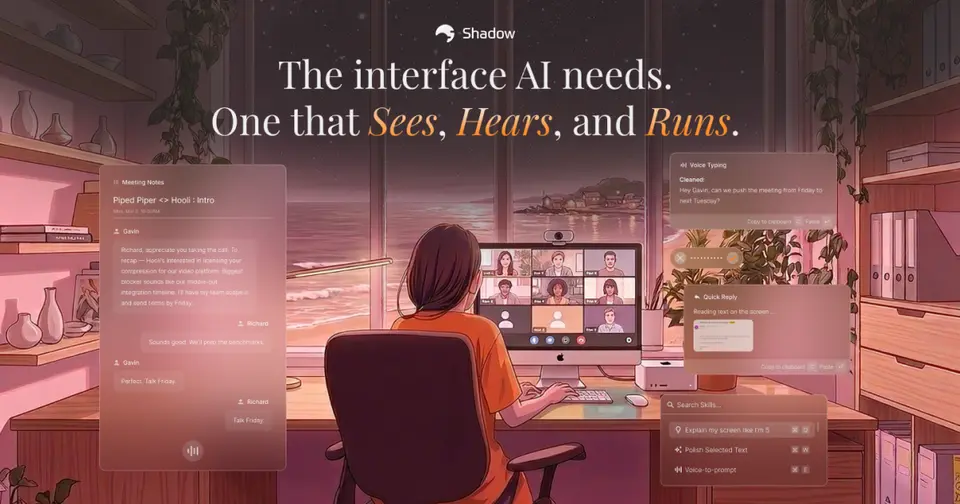
Shadow is a Mac app that records meetings in the background without sending a bot into the call, transcribes them on the device and takes screenshots of what is shown. Reusable prompts called Skills turn a meeting into notes, action items or a follow-up email, and Action Skills run from a keyboard shortcut in any app for jobs such as voice typing. Meetings are saved as Markdown files in a folder on the Mac.
Shadow has a free plan. Paid plans start at $8 per month, billed annually. See every plan
Good for
- Mac users who want meeting notes without a bot in the call
- People who want to write their own prompts for notes and follow-ups
- Keeping transcripts as Markdown files on their own disk
- Using one app for meeting notes and voice typing
Worth knowing
- Mac only: it requires Apple Silicon and macOS 14.2 or later. Windows and other devices are on a waitlist.
- Data is stored only on the one Mac. Sync across devices is on the roadmap but not available.
- The Free plan lists transcription, recording and screenshots; unlimited AI meeting notes, Skills and AI chat need Plus.
- Skills, Ask and automatic titles send transcripts or screen context to OpenAI, Google or Anthropic. Capture, transcription and storage stay on the Mac.
Key features
- Bot-free capture with Autopilot
- Shadow records the microphone and system audio from the Mac, so nothing joins the call. Autopilot detects supported meetings and starts and stops listening on its own.
- On-device transcription
- Transcription and speaker labeling run on the Mac, and raw audio is not sent to an outside provider. The vendor lists around 100 languages and says English works best.
- Smart Screenshots
- Shadow finds the meeting window and captures it as the visuals change, so questions asked afterwards can cover what was shown as well as what was said.
- Meeting Skills
- Each Skill is an editable prompt that produces notes, action items, a follow-up email or a BANT breakdown. A Skill can run automatically after a meeting and send its result to a webhook.
- Action Skills and voice typing
- A keyboard shortcut in any app runs a Skill on what you say, what is on screen or the text you selected, then pastes the result at the cursor.
- Local Markdown vault
- Transcripts and Skill outputs are saved as Markdown files, with media, in a vault folder you choose on the Mac. You can keep or discard meeting audio.
Shadow pricing
- Starts at
- $8 per month, billed annually
- Free plan
- Unlimited on-device transcription, audio recording and Smart Screenshots. AI meeting notes, Skills and AI chat are listed as unlimited only on Plus.
- Free trial
- 2 weeks of Plus included free with the download, no card required
| Plan | Price | What you get |
|---|---|---|
| Free | $0 | Unlimited transcription, unlimited audio recording and unlimited Smart Screenshots, described as free forever. |
| Plus | $8per month, billed annually; $12 billed monthly | Everything in Free, plus unlimited AI meeting notes, Meeting Skills, Action Skills and AI chat. |
Read from shadow.do on Oct 5, 2026. Prices change, so confirm with Shadow before you buy.
Ways to pay less
- Annual discountAnnual billing lowers Plus to $8 a month
The pricing page's billing toggle shows Plus at $8 a month on annual billing and $12 a month on monthly billing, about a third less.
Stated on shadow.do
Works with
Shadow alternatives
- Shadow vs Granola
Free plan · from $14/mo
- Shadow vs Jamie
Free plan · from €21/mo
- Shadow vs Quill Meetings
Free plan · from $6.99/mo
- Shadow vs Anarlog
Free plan · from $14/mo
- Shadow vs Meetily
Free plan · from $10/mo



Common questions
Is Shadow free?
Shadow has a free plan. Unlimited on-device transcription, audio recording and Smart Screenshots. AI meeting notes, Skills and AI chat are listed as unlimited only on Plus. Paid plans start at $8 per month, billed annually.
How much does Shadow cost?
Shadow lists 2 plans. Free: $0. Plus: $8 per month, billed annually; $12 billed monthly. Prices were read from shadow.do on Oct 5, 2026.
What platforms does Shadow work on?
Shadow is available on macOS.
Does Shadow offer any discounts?
Shadow publicly lists the following: Annual billing lowers Plus to $8 a month.
Does Shadow have an Android app?
No Android app was listed when its pages were read on Oct 5, 2026. Shadow is listed for macOS.
Does Shadow have an iPhone app?
No iPhone app was listed when its pages were read on Oct 5, 2026. Shadow is listed for macOS.
Is Shadow open source?
Shadow is not described as open source on its own site, as read on Oct 5, 2026.
What does Shadow integrate with?
Shadow's listing names Google Calendar, Zapier, n8n and Make. A listing names up to eight integrations, so it may connect to more.
Does Shadow have a free trial?
Yes. 2 weeks of Plus included free with the download, no card required.
Who makes Shadow?
Shadow is made by Taper Labs, Inc.
What are the alternatives to Shadow?
The closest alternatives to Shadow in our directory are Granola, Jamie, Quill Meetings, Anarlog and Meetily. Each one has a side-by-side comparison with Shadow.
Sources for this page
The prices, plans, platforms and features above were read from these pages on Oct 5, 2026.