Spellar AI review (2026): is it worth $15 a month, billed yearly?
Bot-free meeting notes with a choice of AI models
Black Friday: is there a Spellar AI sale?
Spellar AI report card
Good · out of 4.0 · graded Nov 2, 2026
Best for Apple users who want to pick the AI model
Spellar records on your Mac, iPhone or iPad, or in Chrome, with no bot in the call, and lets you pick GPT, Claude or Gemini models to write the notes, switched per meeting. There's no free plan, just 300 free minutes once, and Pro is $15 a month on the yearly plan or $20 monthly. No Windows or Android app is mentioned, the iPhone app needs iOS 18, and Teams starts at 5 seats with no published price.
Who Spellar AI is for
- Fits if you're on Mac, iPhone and iPad and want notes on all three under one plan
- Makes sense if you want to choose the AI model per meeting, or bring your own API key
Who Spellar AI is not for
- Skip it if you use Windows or Android, as no version for either is mentioned
- Not for you if you want a free plan, because after 300 free minutes it's $20 a month or $180 a year, and notes older than 7 days lock
- Pricey if you just want basic notes, at $15 a month on the yearly plan when rivals typically start near $10
- Watch out: the iPhone and iPad app needs iOS 18 or later, so older devices are out
- Tight if you're a small team: Teams starts at 5 seats and its price is given only on request
Why Spellar AI gets a 2.6
Five grades, each with its reason. The GPA is their average: an A is 4 points, an F is none.
- CValue for moneyPro is $15 a month on the yearly plan, or $20 if you pay monthly, which puts it at the dear end of this category and into its priciest tenth if you go month to month. That one plan covers unlimited recordings, summaries and chat, GPT, Claude and Gemini models, 30+ integrations and the API.
- CFree plan and trialThere's no free plan. New accounts get 300 free minutes of transcription and AI once, with no card needed, so it's a card-free trial. After that, transcription and AI stop and notes older than 7 days lock until you pay. The 14-day money-back guarantee is a refund, not a trial.
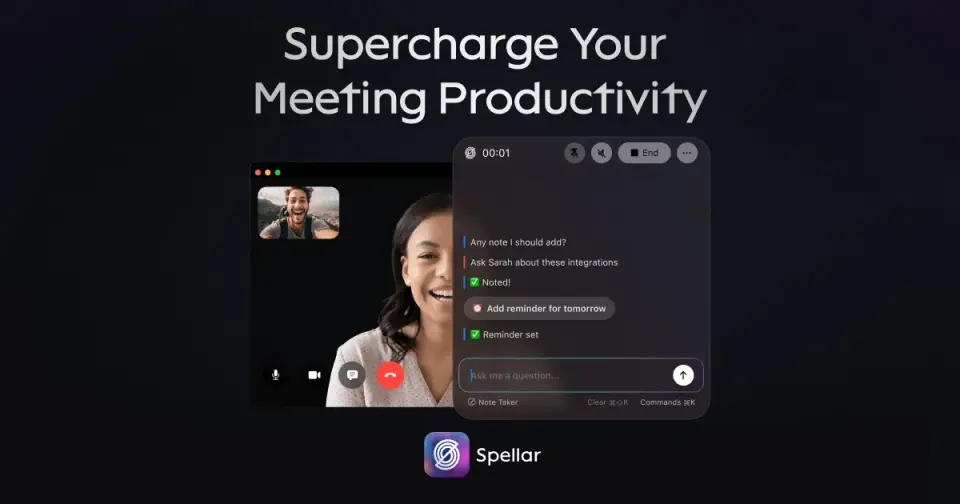
- AFeaturesIt covers the whole job, plus choices rivals do not list. No bot: it records from your own device or a Chrome extension, and reads speaker names from Zoom, Slack and Teams on a Mac. Transcription runs on the device or a server. GPT, Claude and Gemini are switchable, other models need your own key, and there is an API.
- CEase of useNo store rating on record, and the listing shows a product with a lot of knobs: which AI model per meeting, templates written as prompts, how long audio is kept, whether transcription goes to a server, and 30-odd integrations to wire up. That's setting to do before the notes come out your way.
- BPlatforms and integrationsMac, iPhone, iPad, the web and a Chrome extension, with two-way sync to Notion, Linear and Jira, 30+ integrations, webhooks, a public API and an MCP server. What keeps it off the top mark is that no Windows or Android version is mentioned, and the iPhone app needs iOS 18.
What these grades rest on. Graded from this listing, whose facts were read from Spellar's own pages on 2 November 2026. Not based on using the product, and shorter than our full reviews. How we review and grade.
Make Spellar AI? Put this grade on your site

Paste this where you want the badge. It links here and follows the grade if it changes. About badges
<a href="https://toolgpa.com/tools/spellar-ai#review"><img src="https://toolgpa.com/badge/spellar-ai.svg" alt="Spellar AI: 2.6 GPA on ToolGPA" width="196" height="56"></a>Where Spellar AI stands among AI meeting note takers
Spellar AI's GPA of 2.6 is higher than 60 of the 89 other AI meeting note takers we grade, and level with 11.
It stands best on features (A, above 82 of 89) and worst on ease of use (C, above 1).
Its paid plans start at $15 a month, against a middle price of $12 for the category: 46 of the 76 others that charge start lower.
On features, ease of use and platforms it scores 3.0 out of 4. 15 tools score higher and cost less.
Each grade against the category
Every bar is all 90 AI meeting note takers we grade, cut by the letter each got. Spellar AI’s own letter is outlined.
- CValue for moneyAbove 21 of 89, level with 57
- CFree plan and trialAbove 19 of 89, level with 59
- AFeaturesAbove 82 of 89, level with 7
- CEase of useAbove 1 of 89, level with 54
- BPlatforms and integrationsAbove 16 of 89, level with 50
Price against what you get
Each dot is one of 77 AI meeting note takers. Further left costs less, and higher up scores better on features, ease of use and platforms. Point at a dot to see which tool it is.
Features, ease of use and platforms, averaged
What paid plans start at, a month (each step along is roughly double) →
- The best score at each price
- Has a free plan
- No free plan
Keep Spellar AI, or make your own?
Keep it
To replace Spellar AI you would be making a bot that joins your calls and turns the talk into notes. That is not a weekend's work, with an AI app builder or without one.
It is one of the better ones too: its GPA of 2.6 is higher than 60 of the 89 other AI meeting note takers we grade. It costs $180 a year.
What you could make
- Templates: an app builder makes this well.
What you could not
- A bot that joins your calls and turns the talk into notes.
- Speech turned into text you can trust.
- An AI model, which you rent by the request and build your app around.
- Apps for macOS and iOS that stay in step with each other.
- It plugs into other products, Notion, Jira and Linear among them, and has an API.
- The depth: we grade its features A, which means it covers the whole job.
What this rests on. Spellar AI’s listing: what it does, where it runs, what it plugs into and what it costs. It is a judgement about the kind of software this is. We have not built a replacement for it, and making your own means looking after it too. How we decide, and every tool’s verdict.
What is Spellar AI?
Spellar AI records meetings locally on a Mac, iPhone or iPad, or in the browser with a Chrome extension, so no bot joins the call, and produces transcripts, summaries and action items. Its single Pro plan includes GPT, Claude and Gemini models that can be switched per meeting, along with custom summary templates, AI chat across meetings and more than 30 integrations. Server-side transcription is opt-in, and an on-device model is available.
Worth knowing
- There is no free plan: new accounts get 300 free minutes once, after which transcription and AI stop and notes older than 7 days lock until you subscribe.
- Apps are listed for Mac, iPhone, iPad, the web and Chrome only. No Windows or Android app is mentioned.
- Teams, with shared notes, centralized billing and seat management, starts at 5 seats and is priced on request.
- The iPhone and iPad app requires iOS 18 or later, according to its App Store listing.
Key features
- Local, bot-free recording
- Records the audio of your device on a Mac, iPhone or iPad, so nothing joins the call or notifies attendees. On a Mac it can read speaker names from Zoom, Slack and Teams calls. A Chrome extension records in the browser.
- Choice of AI model
- GPT, Claude and Gemini models are included in Pro and can be switched per meeting, per template or per question. Your own API key, Perplexity among them, can be added for other models.
- Opt-in server transcription
- Server-side AI transcription is off by default and enabled per meeting, or transcription can run on the device with a built-in model. The pricing page lists 45 languages.
- Configurable audio retention
- Audio is kept in an encrypted vault for a period you choose, from 1 hour up to always, or it can be set to device-only so that it does not leave your machine.
- Live Copilot, templates and AI chat
- A live copilot, shown in the Mac's notch, answers questions during a call. Summary templates are written as natural-language prompts, and an AI chat answers questions across meetings.
- Integrations, API and MCP
- Syncs with Notion, Linear and Jira in both directions and lists more than 30 integrations, including Slack. Webhooks, a public API and an MCP server are included.
Spellar AI pricing
As of Nov 2, 2026, Spellar AI is a paid product with a free trial, starting at $15 per month, billed annually ($180 per year).
- Starts at
- $15 per month, billed annually ($180 per year)
- Free plan
- None
- Free trial
- 300 free minutes of transcription and AI, no card needed, once per person; 14-day money-back guarantee on a first subscription
| Plan | Price | What you get |
|---|---|---|
| Spellar Pro | $15per month, billed annually ($180); $20 billed monthly | Unlimited recordings, transcripts, summaries and AI chat, every included AI model, Live Copilot, custom templates, 30+ integrations, and apps for Mac, iPhone, iPad and web. |
| Spellar Teams | Custom | From 5 seats: shared templates, folders, notes and AI chats, centralized billing and seat management, team integrations and your own S3-compatible audio storage. |
Read from spellar.ai on Nov 2, 2026. Prices change, so confirm with Spellar AI before you buy.
1 price change on recordWhat the app costs in other countries
Ways to pay less
- Annual discount25% off Pro with yearly billing
The pricing page marks yearly billing as 25% off: Pro is $180 a year, shown as $15 a month, instead of $20 a month, which adds up to $240 a year.
Stated on spellar.ai
Works with
Spellar AI alternatives
- Spellar AI vs Granola
Free plan · from $14/mo
- Spellar AI vs Jamie
Free plan · from €21/mo
- Spellar AI vs Shadow
Free plan · from $8/mo
- Spellar AI vs Otter.ai
Free plan · from $8.33/mo
- Spellar AI vs Fathom
Free plan · from $15/mo




Common questions
Does Spellar AI have an Android app?
No Android app was listed when its pages were read on Nov 2, 2026. Spellar AI is listed for Web, macOS and iOS.
Does Spellar AI have a Windows app?
No Windows app was listed when its pages were read on Nov 2, 2026. Spellar AI is listed for Web, macOS and iOS.
Is Spellar AI open source?
Spellar AI is not described as open source on its own site, as read on Nov 2, 2026.
Does Spellar AI have an API?
Yes. Spellar AI offers a public API, according to its own site.
Sources for this page
The prices, plans, platforms and features above were read from these pages on Nov 2, 2026.